
topshelf windows服务
一 开发:
1、新建控制台程序
2、nuget下载topshelf,根据不同的net版本选择下载版本,本人4.5下载3.3.1
3、main方法中增加
HostFactory.Run(x =>

            {

                x.Service<Rabbit>(s =>

                {

                    s.ConstructUsing(name => new Rabbit());//Rabbit是下面具体的业务类,实现具体业务

                    s.WhenStarted(ra => ra.Start());//Start() Rabbit类方法

                    s.WhenStopped(ra => ra.Stop());//Stop() Rabbit类方法

                });

                //x.RunAsLocalSystem();

                x.RunAsLocalSystem();

                x.SetDescription("订单完成升级为网店");  //服务管理器中服务选项卡中描述栏显示的内容

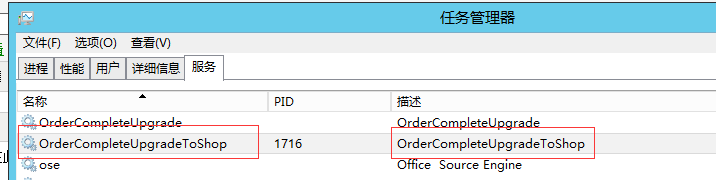
                x.SetDisplayName("OrderCompleteUpgradeToShop");//任务管理器中服务选项卡名称栏显示内容

                x.SetServiceName("OrderCompleteUpgradeToShop");//服务管理器中显示名称

                x.StartAutomatically();//自动启动,启动模式

            });
public class Rabbit

    {

        public void Start()

        {

            //实现

        }

        public void Stop()

        {

            //实现

        }

    }
二 安装服务:
安装

rabbitWinServer.exe install

启动

rabbitWinServer.exe start

停止

rabbitWinServer.exe stop

卸载

rabbitWinServer.exe uninstall
生成项目后可以在debug文件夹找到生成的文件,shift+鼠标右键弹出“在此处打开命令窗口”,运行上面的相应代码
Note:其中rabbitWinServer.exe为exe的名称
三 查看服务安装及运行结果:
完成
相关图示:

topshelf windows服务的更多相关文章
- Quartz和TopShelf Windows服务作业调度
上一次写了一遍关于Quartz作业调度的文章 Quartz.NET 作业调度使用 现在使用TopShelf和Quartz实现windows服务作业调度 TopShelf版本4.0 Quartz版本3. ...
- 使用topshelf包装redis为windows服务
Redis服务端目前用的是控制台程序运行,部署的时候能作为windows服务后台运行感觉更好.找到一篇文章Running Redis as a Windows Service,利用win ...
- topshelf包装redis为windows服务
topshelf包装redis为windows服务 Redis服务端目前用的是控制台程序运行,部署的时候能作为windows服务后台运行感觉更好.找到一篇文章Running Redis as a Wi ...
- 使用Topshelf创建Windows服务
概述 Topshelf是创建Windows服务的另一种方法,老外的一篇文章Create a .NET Windows Service in 5 steps with Topshelf通过5个步骤详细的 ...
- 使用Topshelf 开发windows服务
在业务系统中,我们为了调度一些自动执行的任务或从队列中消费一些消息,所以基本上都会涉及到后台服务的开发.如果用windows service开发,非常不爽的一件事就是:调试相对麻烦,而且你还需要了解 ...
- [Solution] Microsoft Windows 服务(2) 使用Topshelf创建Windows服务
除了通过.net提供的windows服务模板外,Topshelf是创建Windows服务的另一种方法. 官网教程:http://docs.topshelf-project.com/en/latest/ ...
- 使用Topshelf 5步创建Windows 服务 z
使用Topshelf创建Windows 服务简要的介绍了创建Windows服务的另一种方法,老外的一篇文章Create a .NET Windows Service in 5 steps with T ...
- 使用Topshelf创建Windows 服务
本文转载: http://www.cnblogs.com/aierong/archive/2012/05/28/2521409.html http://www.cnblogs.com/jys509/p ...
- Topshelf创建Windows服务
使用Topshelf创建Windows服务 概述 Topshelf是创建Windows服务的另一种方法,老外的一篇文章Create a .NET Windows Service in 5 steps ...
随机推荐
- AJAX发送json,SpringMVC 接收JSON,@RequestBody
需求:JQuery ajax前台,采用 POST请求 发送json,后台使用SpringMVC接收json并处理 前台: $.ajax({ url:"请求地址", type:&qu ...
- 5、用Numpy实现结构体
1.结构数组: 在C语言中我们可以通过struct关键字定义结构类型,结构中的字段占据连续的内存空间,每个结构体占用的内存大小都相同,因此可以很容易地定义结构数组.和C语言一样,在NumPy中也很容易 ...
- 小程序tabBar显示问题
我一直在纠结为什么小程序在有的页面显示,有的页面不显示 查了一下才知道,小程序tabBar只在tabBar中的list定义了页面的才会显示,其余页面不会显示 如下例:tabBar只在画红框的页面显示
- vcftools安装与使用
官网地址:https://vcftools.github.io/examples.html vcftools的软件下载:https://vcftools.github.io/examples.html ...
- 简单探究一下window下的wifi各种东西
保存地方在哪里 C:\ProgramData\Microsoft\Wlansvc\Profiles\Interfaces HKEY_LOCAL_MACHINE\SOFTWARE\Microsoft\W ...
- Q541 反转字符串 II
给定一个字符串和一个整数 k,你需要对从字符串开头算起的每个 2k 个字符的前k个字符进行反转.如果剩余少于 k 个字符,则将剩余的所有全部反转.如果有小于 2k 但大于或等于 k 个字符,则反转前 ...
- 宽度优先搜索(BFS)— 20180909 - 20180917
BFS几类题: 1.图的遍历:a.层级遍历 b.由点及面 c.拓扑排序 2.简单图最短路径: 简单图:1.无向图 2.边权重一致 图的时间复杂度: N个点,M条边,M最大是N^2,时间复杂度O(N+M ...
- TensorFlow-简单的卷积神经网络
先弄懂卷积神经网络的原理,推荐这两篇博客:http://blog.csdn.net/yunpiao123456/article/details/52437794 http://blog.csdn. ...
- TCP/IP协议分为哪四层,具体作用是什么。
TCP/IP通讯协议采用了4层的层级结构,每一层都呼叫它的下一层所提供的网络来完成自己的需求.这4层分别为: 应用层:应用程序间沟通的层,如简单电子邮件传输(SMTP).文件传输协议(FTP).网络远 ...
- nfs 问题总结
1. [root@backup read]# touch r01.txt touch: cannot touch `r01.txt': Stale file handle 使用共享目录创建文件 ...