
关于Spring Boot你不得不知道的事--Spring Boot的基本操作
1 Pom文件
1.1 spring-boot-starter-parent
表示当前pom文件从spring-boot-starter-parent继承下来,在spring-boot-starter-parent中提供了很多默认配置,可以简化我们的开发。
<parent>

    <groupId>org.springframework.boot</groupId>

    <artifactId>spring-boot-starter-parent</artifactId>

    <version>2.1.4.RELEASE</version>

    <relativePath/> <!-- lookup parent from repository -->

</parent>
- Java版本和编码方式
<properties>

    <project.reporting.outputEncoding>UTF-8</project.reporting.outputEncoding>

    <java.version>1.8</java.version>

    <resource.delimiter>@</resource.delimiter>

    <maven.compiler.source>${java.version}</maven.compiler.source>

    <project.build.sourceEncoding>UTF-8</project.build.sourceEncoding>

    <maven.compiler.target>${java.version}</maven.compiler.target>

</properties>
- 依赖管理spring-boot-dependencies
<properties>

    <activemq.version>5.15.9</activemq.version>

    <antlr2.version>2.7.7</antlr2.version>

    <appengine-sdk.version>1.9.73</appengine-sdk.version>

    <artemis.version>2.6.4</artemis.version>

    ...

</properties>
这样比如使用starter-web的时候就不需要指定版本号
<dependency>

    <groupId>org.springframework.boot</groupId>

    <artifactId>spring-boot-starter-web</artifactId>

    <version>2.1.4.RELEASE</version>

</dependency>
- 使用自己的parent项目
这时候将依赖管理的问题放到dependencyManagement中。
官网说明文档见:13.2.2 Using Spring Boot without the Parent POM
<dependencyManagement>

   <dependencies>

      <dependency>

         <groupId>org.springframework.boot</groupId>

         <artifactId>spring-boot-dependencies</artifactId>

         <version>2.1.4.RELEASE</version>

         <type>pom</type>

         <scope>import</scope>

      </dependency>

   </dependencies>

</dependencyManagement>
1.2 打包管理
使用mvn package打包的plugin。
<build>

   <plugins>

      <plugin>

         <groupId>org.springframework.boot</groupId>

         <artifactId>spring-boot-maven-plugin</artifactId>

      </plugin>

   </plugins>

</build>
1.3 Starters
官网见:13.5 Starters
Starters are a set of convenient dependency descriptors that you can include in your application. You get a one-stop shop for all the Spring and related technologies that you need without having to hunt through sample code and copy-paste loads of dependency descriptors. For example, if you want to get started using Spring and JPA for database access, include the spring-boot-starter-data-jpa dependency in your project.
- 官方starter命名
spring-boot-starter-*
- 自定义starter命名
thirdpartyproject-spring-boot-starter
- spring-boot-web-starter
查看其diagram,可以排除某个依赖
<dependency>

   <groupId>org.springframework.boot</groupId>

   <artifactId>spring-boot-starter-web</artifactId>

   <exclusions>

      <exclusion>

         <groupId>org.springframework.boot</groupId>

         <artifactId>spring-boot-starter-tomcat</artifactId>

      </exclusion>

   </exclusions>

</dependency>
2 XXXApplication
2.1 @SpringBootApplication
官网见:18. Using the @SpringBootApplication Annotation
等同于@EnableAutoConfiguration,@ComponentScan和@Configuration
2.2 SpringApplication.run
官网见:23. SpringApplication
3 配置文件
3.1 初步感受
server.port=9090
3.2 yml文件
application.yml
3.3 给属性注入值
- 实体类Person和IDCard
public class Person {

    private String name;

    private int age;

    private Date birthday;

    private String[] hobbies;

    private IDCard idCard;

    ...

}
public class IDCard {

    private int id;

    private String number;

}
- yml注入写法
person:

	name: Jack

	age: 17

	birthday: 1997/06/01

	hobbies: [code,sing,share]

	idCard:

		id: 1

		number: 111
- Person类增加注解
@Component

@ConfigurationProperties(prefix="person")
- 测试
@Autowired

private Person person;
如果Person类上报错,在Pom文件中加入如下依赖
<dependency>

    <groupId>org.springframework.boot</groupId>

    <artifactId>spring-boot-configuration-processor</artifactId>

</dependency>
4 处理动静态资源
4.1 动态资源
官网见:90.2 Reload Templates without Restarting the Container
- templates
resources目录下有一个templates文件夹,可以将动态资源放到其中
- 引入thymeleaf
<!--thymeleaf的jar包-->

<dependency>

    <groupId>org.springframework.boot</groupId>

    <artifactId>spring-boot-starter-thymeleaf</artifactId>

</dependency>
- templates下新建test.html文件
<html xmlns:th="http://www.thymeleaf.org">

<head>

</head>

<body>

    <span style="color:red; font-size:30pt" th:text="${str}"></span>

</body>
- controller中return test
@Controller

@RequestMapping("/gupao")

public class GupaoController {

    @RequestMapping("/hello")

    public String hello(Model model){

        String str="hello spring boot";

        //想要动态的显示在网页当中

        model.addAttribute("str",str);

        //接下来的页面是能够动态显示传过来的数据

        return "test";

    }

}
4.2 静态资源
- static文件夹
在resources目录下有一个static文件夹,可以将静态资源放到其中,浏览器可以直接访问。
- 静态资源其他存放文件夹
"classpath:/META-INF/resources/"

"classpath:/resources/"

"classpath:/static/"

"classpath:/public/"
- WebMvcAutoConfiguration源码分析
WebMvcAutoConfiguration--->WebMvcAutoConfigurationAdapter.addResourceHandlers(xxx)--->
this.resourceProperties.getStaticLocations()
return this.staticLocations;
private String[] staticLocations = CLASSPATH_RESOURCE_LOCATIONS;
private static final String[] CLASSPATH_RESOURCE_LOCATIONS = {

      "classpath:/META-INF/resources/", "classpath:/resources/",

      "classpath:/static/", "classpath:/public/" };
- 自定义静态资源文件夹
观察
@ConfigurationProperties(prefix = "spring.resources", ignoreUnknownFields = false)

public class ResourceProperties {
配置application.properties
spring.resources.static-locations=classpath:/gupao/
5 整合MyBatis
5.1 需求
通过Spring Boot Web项目api接口的方式,整合MyBatis实现crud的操作。
5.2 创建Spring Boot Web项目
重温一下web项目创建的过程。
5.3 引入项目中需要的starter依赖
<dependency>

   <groupId>mysql</groupId>

   <artifactId>mysql-connector-java</artifactId>

</dependency>

<dependency>

   <groupId>org.mybatis.spring.boot</groupId>

   <artifactId>mybatis-spring-boot-starter</artifactId>

   <version>1.3.1</version>

</dependency>

<dependency>

   <groupId>org.springframework.boot</groupId>

   <artifactId>spring-boot-starter-thymeleaf</artifactId>

</dependency>
5.4 创建数据库表
db_gupao_springboot--->t_user
5.5 创建domain/User对象
public class User {

    private int id;

    private String username;

    private String password;

    private String number;

    ...

}
5.6 开发dao层
@Repository

@Mapper

public interface UserMapper {

    User find(String username);

    List<User> list();

    int insert(User user);

    int delete(int id);

    int update(User user);

}
5.7 开发service层
@Service

public class UserService {

    @Autowired

    public UserMapper userMapper;

    public User findByUsername(String username){

        return userMapper.find(username);

    }

    public List<User> listUser(){

        return userMapper.list();

    }

    public int insertUser(User user){

        return userMapper.insert(user);

    }

    public int updateUser(User user){

        return userMapper.update(user);

    }

    public int delete(int id){

        return userMapper.delete(id);

    }

}
5.8 开发controller层
@RestController

@RequestMapping(value="/user",method = {RequestMethod.GET,RequestMethod.POST})

public class UserController {

    @Autowired

    private UserService userService;

    @RequestMapping("/listone")

    @ResponseBody

    public User listOne(String username){

        return userService.findByUsername(username);

    }

    @RequestMapping("/listall")

    @ResponseBody

    public List<User> listAll(){

        return userService.listUser();

    }

    @RequestMapping(value="/add",method= RequestMethod.POST)

    @ResponseBody

    public String add(User user){

        int result=userService.insertUser(user);

        if(result>=1) {

            return "添加成功";

        }else{

            return "添加失败";

        }

    }

    @RequestMapping(value="/update",method= RequestMethod.POST)

    @ResponseBody

    public String update(User user){

        int result=userService.updateUser(user);

        if(result>=1) {

            return "修改成功";

        }else{

            return "修改失败";

        }

    }

    @RequestMapping(value="/delete",method= RequestMethod.GET)

    @ResponseBody

    public String delete(int id){

        int result=userService.delete(id);

        if(result>=1) {

            return "删除成功";

        }else{

            return "删除失败";

        }

    }

}
5.9 resources目录下创建mapper文件夹---UserMapper.xml
<?xml version = "1.0" encoding = "UTF-8"?>

<!DOCTYPE mapper PUBLIC

        "-//mybatis.org//DTD com.example.Mapper 3.0//EN"

        "http://mybatis.org/dtd/mybatis-3-mapper.dtd">

<mapper namespace="com.csdn.springbootmybatis.dao.UserMapper">

    <resultMap id="result" type="com.gupao.springbootmybatis.domain.User">

        <result property="username" column="username"/>

        <result property="password" column="password"/>

        <result property="number" column="number"/>

    </resultMap>

    <select id="find" resultMap="result">

      SELECT * FROM t_user where username=#{username}

    </select>

    <select id="list" resultMap="result">

      SELECT * FROM t_user

   </select>

    <insert id="insert" parameterType="com.gupao.springbootmybatis.domain.User"

            keyProperty="id" useGeneratedKeys="true">

      INSERT INTO t_user

      (

      id,username,password,number

      )

      VALUES (

      #{id},

      #{username, jdbcType=VARCHAR},

      #{password, jdbcType=VARCHAR},

      #{number}

      )

   </insert>

    <delete id="delete" parameterType="int">

      delete from t_user where id=#{id}

   </delete>

    <update id="update" parameterType="com.gupao.springbootmybatis.domain.User">

   update t_user set user.username=#{username},user.password=#{password},user.number=#{number} where user.id=#{id}

   </update>

</mapper>
5.10 application.properties文件配置
#数据源

spring:

  datasource:

    url: jdbc:mysql://127.0.0.1:3306/boot?useUnicode=true&characterEncoding=UTF-8&serverTimezone=UTC

    username: root

    password: 123456

    driver-class-name: com.mysql.cj.jdbc.Driver

#mybatis托管mapper文件

mybatis:

  mapper-locations: classpath:mapper/*.xml
5.11 启动项目测试
- 查询
http://localhost:8888/user/listone?username=Jack
- 全部查询
http://localhost:8888/user/listall
- 增加
http://localhost:8888/user/add?id=3&username=AAA&password=111111&number=300
- 更新
http://localhost:8888/user/update?id=3&username=BBB
- 删除
http://localhost:8888/user/delete?id=3
6 项目打包
- jar包
mvn -Dmaven.test.skip -U clean install
java -jar xxx.jar
- war包
<groupId>com.csdn</groupId>

<artifactId>springboot-demo2</artifactId>

<version>0.0.1-SNAPSHOT</version>

<packaging>war</packaging>
7 Spring Boot in less than 10 minutes
https://www.youtube.com/watch?v=lhkwLtDIMHI&feature=youtu.be
BUILD ANYTHING WITH SPRING BOOT

Spring Boot is the starting point for building all Spring-based applications. Spring Boot is designed to get you up and running as quickly as possible, with minimal upfront configuration of Spring.
| - | Get started in seconds using Spring Initializr |
| - | Build anything: REST API, WebSocket, web, streaming, tasks, and more |
| - | Simplified security |
| - | Rich support for SQL and NoSQL |
| - | Embedded runtime support: Tomcat, Jetty, and Undertow |
| - | Developer productivity tools such as LiveReload and Auto Restart |
| - | Curated dependencies that just work |
| - | Production-ready features such as tracing, metrics, and health status |
| - | Works in your favorite IDE: Spring Tool Suite, IntelliJ IDEA, and NetBeans |
7.1 IDEA创建工程
group:com.example
artifact:bootiful
dependencies:Reactive Web,Reactive MongoDB,Lombok,Actuator,Security
7.2 DATA DRIVE
Spring Data integrates seamlessly with SQL and NoSQL persistence stores. Spring Data supports reactive data access,too!
@Component

class DataWriter implements ApplicationRunner {

    private final CustomerRepository customerRepository;

    DataWriter(CustomerRepository customerRepository) {

        this.customerRepository = customerRepository;

    }

    @Override

    public void run(ApplicationArguments args) throws Exception {

        Flux.just("Jack", "Rechal", "Richard", "Jobs")

                .flatMap(name -> customerRepository.save(new Customer(null, name)))

                .subscribe(System.out::println);

    }

}

interface CustomerRepository extends ReactiveMongoRepository<Customer, String> {

}

@Document

@NoArgsConstructor

@Data

class Customer {

    private String id,name;

    public Customer(String id, String name) {

        this.id = id;

        this.name = name;

    }

}
7.3 REST
On the web,nobody knows you're a reactive microservice.
@SpringBootApplication

public class BootifulApplication {

    @Bean

    RouterFunction<ServerResponse> routes(CustomerRepository cr){

        return RouterFunctions.route(GET("/customers"),serverRequest -> ok().body(cr.findAll(),Customer.class));

    }

    public static void main(String[] args) {

        SpringApplication.run(BootifulApplication.class, args);

    }

}
7.4 OBSERVABILITY
How's your app's health?Who better to articulate that then the application itself?
Spring Boot featurese strong opinions,loosely held.
It's easy to change any of them with properties or pluggable implementations
management.endpoint.health.show-details=always

management.endpoints.web.exposure.exclude=*
@Bean

HealthIndicator healthIndicator(){

return () -> Health.status("I <3 Production").build();

}
访问:curl http://localhost:8080/actuator/health | jq
7.5 SECURITY
Effortlessly plugin authentication and authorization in a traditional or reactive application with Spring Security
@Bean

MapReactiveUserDetailsService users(){

    return new MapReactiveUserDetailsService(User.withDefaultPasswordEncoder().username("user").password("pw").roles("USER").build());

}
访问:curl -vu user:pw http://localhost:8080/customers | jq
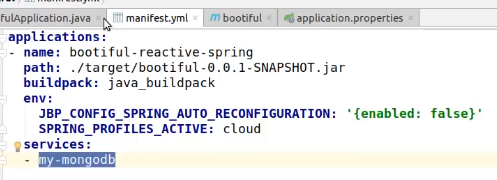
7.6 TO PRODUCTION
Let's provision a MongoDB instance,configure our application's route and MongoDB binding,and then push our application to production with Cloud Foundry.
命令切换到bootiful根目录下
cf services
定位到my-mongodb文件夹
- 复制对应文件,修改和观察



大家可以扫描下方二维码关注下我的微信公众号,公众号内没有福利,只会定期生产技术性文章!

关于Spring Boot你不得不知道的事--Spring Boot的基本操作的更多相关文章
- Spring中你可能不知道的事(一)
Spring作为Java的王牌开源项目,相信大家都用过,但是可能大家仅仅用到了Spring最常用的功能,Spring实在是庞大了,很多功能可能一辈子都不会用到,今天我就罗列下Spring中你可能不知道 ...
- Spring中你可能不知道的事(二)
在上一节中,我介绍了Spring中极为重要的BeanPostProcessor BeanFactoryPostProcessor Import ImportSelector,还介绍了一些其他的零碎知识 ...
- 关于Spring Boot你不得不知道的事
1 Spring Boot官网[2.1.5 CURRENT GA] 1.1 Pivotal Wiki Pivotal Software, Inc. is a software and services ...
- Java你可能不知道的事(3)HashMap
概述 HashMap对于做Java的小伙伴来说太熟悉了.估计你们每天都在使用它.它为什么叫做HashMap?它的内部是怎么实现的呢?为什么我们使用的时候很多情况都是用String作为它的key呢?带着 ...
- java你可能不知道的事(2)--堆和栈
在java语言的学习和使用当中你可能已经了解或者知道堆和栈,但是你可能没有完全的理解它们.今天我们就一起来学习堆.栈的特点以及它们的区别.认识了这个之后,你可能对java有更深的理解. Java堆内存 ...
- ES6 你可能不知道的事 – 基础篇
序 ES6,或许应该叫 ES2015(2015 年 6 月正式发布),对于大多数前端同学都不陌生. 首先这篇文章不是工具书,不会去过多谈概念,而是想聊聊关于每个特性 你可能不知道的事,希望能为各位同学 ...
- overflow:hidden 你所不知道的事
overflow:hidden 你所不知道的事 overflow:hidden这个CSS样式是大家常用到的CSS样式,但是大多数人对这个样式的理解仅仅局限于隐藏溢出,而对于清除浮动这个含义不是很了解. ...
- java你可能不知道的事(2)--堆和栈<转>
在java语言的学习和使用当中你可能已经了解或者知道堆和栈,但是你可能没有完全的理解它们.今天我们就一起来学习堆.栈的特点以及它们的区别.认识了这个之后,你可能对java有更深的理解. Java堆内存 ...
- 【Java基础】关于枚举类你可能不知道的事
目录 谈谈枚举 1. 枚举类的定义 2. 枚举类的底层实现 3. 枚举类的序列化实现 4. 用枚举实现单列 5. 枚举实例的创建过程是线程安全的 谈谈枚举 如果一个类的对象个数是有限的而且是不变的,我 ...
随机推荐
- SpringCloud中Feign的适配器的实现方案
前言 最近在做微服务的项目,各个系统之间需要进行调用,然后用一个适配器来实现服务之间的feign调用,使用适配器进行统一管理. 实现方案 首先我们需要将服务的名称进行单独的配置,可以方便的进行切换和扩 ...
- Elasticsearch 6.x版本全文检索学习之数据建模
1.什么是数据建模. 答:数据建模,英文为Data Modeling,为创建数据模型的过程.数据模型Data Mdel,对现实世界进行抽象描述的一种工具和方法,通过抽象的实体及实体之间联系的形式去描述 ...
- 04-JVM垃圾收集器详解
1.垃圾收集器的种类 垃圾收集算法是内存回收的方法论,垃圾收集器是内存回收的具体实现工具.目前没有万能的垃圾收集器,需要根据具体的应用场景选择合适的垃圾收集器. 1.1Serial收集器(-XX:+U ...
- Cobalt Strike系列教程第一章:简介与安装
Cobalt Strike是一款超级好用的渗透测试工具,拥有多种协议主机上线方式,集成了提权,凭据导出,端口转发,socket代理,office攻击,文件捆绑,钓鱼等多种功能.同时,Cobalt St ...
- SQLi-LABS Page-1(Basic Challenges) Less11-Less22
Less-11 GET - Blind - Time based - double quotes http://10.10.202.112/sqli/Less-11/ 尝试登录: username:a ...
- 来个ADG switch over
怕以后忘了,做个试验记录一下,这个switch比较常规1]主--备库先查一遍,如下的话就可以开始了两者当前序列一致角色状态如下--主库SQL> archive log list;数据库日志模式 ...
- python配置yaml
我们在做自动化的过程中无论是接口自动化还是UI自动化都会存在很多数据,我们对于自动化中如何存放这些数据也是很重要一点,如果写在代码里的话,每次更换数据就有点繁琐,我们可以通过一个文件存放这些数据,然后 ...
- 快速破解Goland
两种激活方式永久激活:推荐优先使用,永久有效有效期激活:如果你实在激活不了又着急使用,这是备选激活方案,简单快捷 一.永久激活 1.下载新版破解补丁 点击链接 https://pan.baidu.co ...
- 进一步使用 模板缓冲(stencil)
最近做课题的时候需要计算一个 view(就是一次渲染得到的帧) 下的重叠像素个数(两个物体或更多的物体重叠). 最开始我的想法是渲染一个物体输出一张纹理,这样对比物体之间的纹理就知道重叠了.但是这样当 ...
- Python Django,事务,transaction.atomic,事务保存点
from django.shortcuts import renderfrom django.http import HttpResponsefrom django.views.generic imp ...