
配置hibernate访问mysql
在之前搭建spring mvc项目这篇的基础上继续集成,引入hibernate支持
一、添加jar包引用
修改pom.xml文件,加入:
<dependency>

    <groupId>org.springframework</groupId>

    <artifactId>spring-orm</artifactId>

    <version>${spring.version}</version>

</dependency>

<dependency>

    <groupId>org.springframework</groupId>

    <artifactId>spring-jdbc</artifactId>

    <version>${spring.version}</version>

</dependency>

<!-- hibernate -->

<dependency>

    <groupId>org.hibernate</groupId>

    <artifactId>hibernate-core</artifactId>

    <version>4.2.21.Final</version>

</dependency>

<!-- jdbc driver -->

<dependency>

    <groupId>mysql</groupId>

    <artifactId>mysql-connector-java</artifactId>

    <version>5.1.38</version>

    <scope>runtime</scope>

</dependency>
二、添加配置文件
1、在"src/main/resources"代码文件夹中新建文件"demo.properties",内容为:
#mysql database setting

jdbc.type=mysql

jdbc.driver=com.mysql.jdbc.Driver

jdbc.url=jdbc:mysql://localhost:3306/springmvc?useUnicode=true&characterEncoding=utf-8

jdbc.username=root

jdbc.password=123456

#hibernate settings

hibernate.show_sql=true
2、在"src/main/resources"代码文件夹中新建文件"spring-context-hibernate.xml",内容为:
<?xml version="1.0" encoding="UTF-8"?>

<beans xmlns="http://www.springframework.org/schema/beans"

    xmlns:util="http://www.springframework.org/schema/util"

    xmlns:aop="http://www.springframework.org/schema/aop"

    xmlns:tx="http://www.springframework.org/schema/tx"

    xmlns:context="http://www.springframework.org/schema/context"

    xmlns:xsi="http://www.w3.org/2001/XMLSchema-instance"

    xsi:schemaLocation="http://www.springframework.org/schema/beans

    http://www.springframework.org/schema/beans/spring-beans-3.2.xsd

    http://www.springframework.org/schema/util

    http://www.springframework.org/schema/util/spring-util-3.2.xsd

    http://www.springframework.org/schema/aop

    http://www.springframework.org/schema/aop/spring-aop-3.2.xsd

    http://www.springframework.org/schema/context

    http://www.springframework.org/schema/context/spring-context-3.2.xsd

    http://www.springframework.org/schema/tx

    http://www.springframework.org/schema/tx/spring-tx-3.2.xsd ">

    <description>Hibernate Configuration</description>

    <!-- 使用Annotation自动注册Bean -->

    <context:component-scan base-package="org.xs.demo1" use-default-filters="false">

        <!-- 在父上下文中注册Repository -->

        <context:include-filter type="annotation" expression="org.springframework.stereotype.Repository" />

    </context:component-scan>

    <!-- 加载配置属性文件 -->

    <context:property-placeholder ignore-unresolvable="true" location="classpath*:/demo.properties" />

    <!-- 配置数据源 -->

    <bean id="dataSource" class="org.springframework.jdbc.datasource.DriverManagerDataSource">

        <property name="driverClassName" value="${jdbc.driver}"></property>

        <property name="url" value="${jdbc.url}"></property>

        <property name="username" value="${jdbc.username}"></property>

        <property name="password" value="${jdbc.password}"></property>

    </bean>

    <!-- 配置SessionFactory -->

    <bean id="sessionFactory" class="org.springframework.orm.hibernate4.LocalSessionFactoryBean">

        <property name="dataSource" ref="dataSource" />

        <property name="hibernateProperties">

            <props>

                <prop key="hibernate.dialect">org.hibernate.dialect.MySQLDialect</prop>

                <prop key="hibernate.hbm2ddl.auto">none</prop>

                <prop key="hibernate.show_sql">${hibernate.show_sql}</prop>

                <prop key="hibernate.format_sql">true</prop>

            </props>

        </property>

        <!-- 动态映射字段 -->

        <property name="namingStrategy">

            <bean class="org.hibernate.cfg.ImprovedNamingStrategy" />

        </property>

        <!-- 注解扫描的包 -->

        <property name="packagesToScan" value="org.xs.demo1" />

    </bean>

</beans>
动态映射字段ImprovedNamingStrategy配置以后,Entity实体类里的属性就不需要一个个加@Column注解了,只要命名和表里的一致
三、添加hibernate session过滤器
修改web.xml文件,加入:
<!-- hibernate session过滤器 -->

<filter>

    <filter-name>openSessionInViewFilter</filter-name>

    <filter-class>org.springframework.orm.hibernate4.support.OpenSessionInViewFilter</filter-class>

</filter>

<filter-mapping>

    <filter-name>openSessionInViewFilter</filter-name>

    <url-pattern>/*</url-pattern>

</filter-mapping>
默认情况下server中的方法调用完成后,session就会关闭,等到显示层调用的时候会报错,OpenSessionInViewFilter的效果就是把session的关闭延迟到显示层
四、运行测试
1、建数据库表
CREATE TABLE `test` (

  `id` int(11) NOT NULL AUTO_INCREMENT,

  `name` varchar(255) DEFAULT NULL,

  PRIMARY KEY (`id`)

);

INSERT INTO `test` VALUES ('1', '233');

INSERT INTO `test` VALUES ('2', '666');
2、增加Entity类
package org.xs.demo1;

import javax.persistence.Entity;

import javax.persistence.Id;

import javax.persistence.Table;

@Entity

@Table(name="test")

public class testInfo {

    @Id

    private String id;

    private String name;

    public String getId() {

        return id;

    }

    public void setId(String id) {

        this.id = id;

    }

    public String getName() {

        return name;

    }

    public void setName(String name) {

        this.name = name;

    }

}
在"src/main/java"代码文件夹的"org.xs.demo1"的包下新建"testInfo.java"类
3、增加Repository类
package org.xs.demo1;

import java.util.List;

import org.hibernate.Query;

import org.hibernate.SessionFactory;

import org.springframework.beans.factory.annotation.Autowired;

import org.springframework.stereotype.Repository;

@Repository

public class testDao {

    @Autowired

    private SessionFactory sessionFactory;

    @SuppressWarnings("unchecked")

    public List<testInfo> getList() {

        String hql = "from testInfo";

        Query query = sessionFactory.getCurrentSession().createQuery(hql);

        return query.list();

    }

}
在"src/main/java"代码文件夹的"org.xs.demo1"的包下新建"testDao.java"类
4、添加Controller方法
@Autowired

private testDao testDao;

@RequestMapping("mysql")

public String mysql(HttpServletRequest request) {

    List<testInfo> list = testDao.getList();

    request.setAttribute("testList", list);

    request.setAttribute("say", "Hello Mysql!");

    return "index3";

}
在HelloController.java中增加"testDao"属性和"mysql"方法
5、增加jsp页面
<%@ page language="java" contentType="text/html; charset=UTF-8" pageEncoding="UTF-8"%>

<!DOCTYPE html PUBLIC "-//W3C//DTD HTML 4.01 Transitional//EN"

    "http://www.w3.org/TR/html4/loose.dtd">

<html>

    <head>

        <meta http-equiv="Content-Type" content="text/html;charset=utf-8" />

        <title>Insert title here</title>

    </head>

    <body>

        <p>${say}</p>

        <table border="1" width="100px">

            <tr>

                <th>列1</th>

                <th>列2</th>

            </tr>

            <tr>

                <td>${testList[0].id}</td>

                <td>${testList[0].name}</td>

            </tr>

            <tr>

                <td>${testList[1].id}</td>

                <td>${testList[1].name}</td>

            </tr>

        </table>

    </body>

</html>
在WEB-INF的views文件夹中新建"index3.jsp"页面
6、运行测试
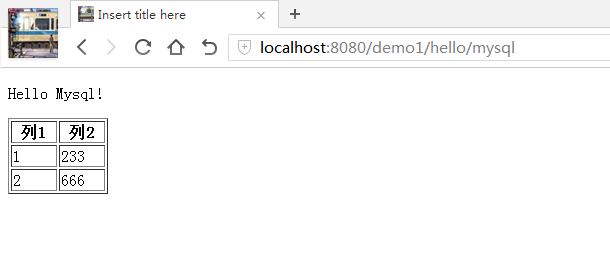
实例代码地址:https://github.com/ctxsdhy/cnblogs-example
配置hibernate访问mysql的更多相关文章
- PHP16 PHP访问MySQL
学习要点 PHP访问MySQL配置 PHP访问MySQL函数介绍 足球赛程信息管理 PHP访问MySQL配置 PHP.ini配置文件确认以下配置已经打开 extension=php_mysql.dll ...
- 在Eclipse中使用JDBC访问MySQL数据库的配置方法
在Eclipse中使用JDBC访问MySQL数据库的配置方法 分类: DATABASE 数据结构与算法2009-10-10 16:37 5313人阅读 评论(10) 收藏 举报 jdbcmysql数据 ...
- MyBatis学习(一)、MyBatis简介与配置MyBatis+Spring+MySql
一.MyBatis简介与配置MyBatis+Spring+MySql 1.1MyBatis简介 MyBatis 是一个可以自定义SQL.存储过程和高级映射的持久层框架.MyBatis 摒除了大部分的J ...
- Maven+Spring+Hibernate+Shiro+Mysql简单的demo框架(二)
然后是项目下的文件:完整的项目请看 上一篇 Maven+Spring+Hibernate+Shiro+Mysql简单的demo框架(一) 项目下的springmvc-servlet.xml配置文件: ...
- MyBatis学习 之 一、MyBatis简介与配置MyBatis+Spring+MySql
目录(?)[-] 一MyBatis简介与配置MyBatisSpringMySql MyBatis简介 MyBatisSpringMySql简单配置 搭建Spring环境 建立MySql数据库 搭建My ...
- Spring boot通过JPA访问MySQL数据库
本文展示如何通过JPA访问MySQL数据库. JPA全称Java Persistence API,即Java持久化API,它为Java开发人员提供了一种对象/关系映射工具来管理Java应用中的关系数据 ...
- SpringBoot 整合 hibernate 连接 Mysql 数据库
前一篇搭建了一个简易的 SpringBoot Web 项目,最重要的一步连接数据库执行增删改查命令! 经过了一天的摸爬滚打,终于成功返回数据! 因为原来项目使用的 SpringMVC + Hibern ...
- 【译】Spring 4 + Hibernate 4 + Mysql + Maven集成例子(注解 + XML)
前言 译文链接:http://websystique.com/spring/spring4-hibernate4-mysql-maven-integration-example-using-annot ...
- java文件来演示如何访问MySQL数据库
java文件来演示如何访问MySQL数据库. 注:在命令行或用一个SQL的前端软件创建Database. 先创建数据库: CREATE DATABASE SCUTCS; 接着,创建表: CREATE ...
随机推荐
- linux+jenkins+python+svn 自动化测试集成之路
本文背景: 背景1---个人基础: 本机win7上安装pycharm,使用python搭建API自动化测试框架,本地运行Pass.本机上搭建jenkins,创建测试任务,定时构建Pass. 背景2-- ...
- SpingBoot:整合Elasticsearch7.2.0
Spring boot 2.1.X整合Elasticsearch最新版的一处问题 新版本的Spring boot 2的spring-boot-starter-data-elasticsearch中支持 ...
- C笔记_动态库和静态库
1. 静态库 创建 工程属性配置中设置为lib静态库,编辑.h文件和.c文件,生成即可. 使用 方法一: 添加工程的头文件目录:工程---属性---配置属性---c/c++---常规---附加包含目录 ...
- 分布式任务调度框架 Azkaban —— Flow 2.0 的使用
一.Flow 2.0 简介 1.1 Flow 2.0 的产生 Azkaban 目前同时支持 Flow 1.0 和 Flow2.0 ,但是官方文档上更推荐使用 Flow 2.0,因为 Flow 1.0 ...
- 用jquery uploadify上传插件上传文件
public void ProcessRequest(HttpContext context) { string esOIDs = System.Web.HttpContext.Current.Req ...
- DOM的高级操作-一种JS控制元素的视觉假象
1.运动中的边界处理(让其在一个指定区域内运动) 当元素的offsetLeft值超出一定距离或达到一个我们想要设置的边界值时,停止计时器. var timer; timer = setInterval ...
- Codeforces Round #465 &935C. Fifa and Fafa计算几何
传送门 题意:在平面中,有一个圆,有一个点,问能在这个圆中围出最大的圆的圆心坐标和半径.要求这个最大圆不包含这个点. 思路:比较基础的计算几何,要分三种情况,第一种就是这个点在圆外的情况.第二种是点在 ...
- LuoGu-P2863牛的舞会The Cow Prom[tarjan 缩点模板]
传送门:https://www.luogu.org/problemnew/show/P2863 思路:tarjan模板题,之前会的tarjan,一直想学缩点到底是什么操作,发现就是把同组的放在一个数组 ...
- BZOJ-3343教主的魔法+分块(大块排序二分)
传送门:https://www.luogu.org/problemnew/show/P2801 参考:http://hzwer.com/2784.html 感觉思路无比清晰:) ps:我在洛谷A的, ...
- codeforces 876 F. High Cry(思维)
题目链接:http://codeforces.com/contest/876/problem/F 题解:一道简单的思维题,知道最多一共有n*(n+1)/2种组合,不用直接找答案直接用总的组合数减去不符 ...