
Android---闪频页和倒计时
android闪频的实现非常简单,使用Handler对象的postDelayed()方法就可以实现。在这个方法里传递一个Runnable对象和一个延迟的时间。该方法实现了一个延迟执行的效果,延迟的时间由第2个参数指定,单位是毫秒。第一个参数是Runnable对象,里面包含了延迟后需要执行的操作。我在这里给他加了个简单的放大效果。下面贴上代码:
package com.msn.zn.splashdemo;

import android.app.Activity;
import android.content.Intent;
import android.os.Bundle;
import android.os.Handler;
import android.view.Window;
import android.view.WindowManager;
import android.view.animation.Animation;
import android.view.animation.AnimationUtils;
import android.widget.ImageView;

public class SplashActivity extends Activity {
    private ImageView iv_logo;

    @Override
    protected void onCreate(Bundle savedInstanceState) {
        super.onCreate(savedInstanceState);
        //取消标题
        this.requestWindowFeature(Window.FEATURE_NO_TITLE);
        //取消状态栏
        this.getWindow().setFlags(WindowManager.LayoutParams.FLAG_FULLSCREEN,
                WindowManager.LayoutParams.FLAG_FULLSCREEN);
        setContentView(R.layout.activity_splash);
        iv_logo= (ImageView) findViewById(R.id.logo);

        //加载xml文件中的动画
        Animation anim= AnimationUtils.loadAnimation(this,R.anim.splash);
        iv_logo.startAnimation(anim);

        Handler handler=new Handler();
        handler.postDelayed(new Runnable() {
            @Override
            public void run() {
                Intent intent=new Intent(SplashActivity.this,MainActivity.class);
                startActivity(intent);
                finish();
            }
        },3000);
    }
}
布局xml:
<?xml version="1.0" encoding="utf-8"?>
<RelativeLayout xmlns:android="http://schemas.android.com/apk/res/android"
    xmlns:tools="http://schemas.android.com/tools"
    android:layout_width="match_parent"
    android:layout_height="match_parent"
    tools:context="com.msn.zn.splashdemo.SplashActivity">
<ImageView
    android:id="@+id/logo"
    android:layout_width="match_parent"
    android:layout_height="match_parent"
    android:scaleType="fitXY"
    android:src="@mipmap/splasht2"/>
</RelativeLayout>

动画xml:
<?xml version="1.0" encoding="utf-8"?>
<set xmlns:android="http://schemas.android.com/apk/res/android"
    android:duration="1500"
    android:fillAfter="true">
    <scale
        android:fromXScale="1.0"
        android:fromYScale="1.0"
        android:pivotX="50%"
        android:pivotY="50%"
        android:toXScale="1.1"
        android:toYScale="1.1"/>
    <alpha
        android:fromAlpha="1.0"
        android:toAlpha="0.8"/>
<!--
duration="1500"设置动画的持续时间为1.5s
fillAfter="true"设置动画结束后保持当前的位置(即不返回动画开始前的位置)
这些也可以在代码中实现
animation.setDuration(1500);
animation.setFillAfter(true);
-->
</set>
倒计时效果图:

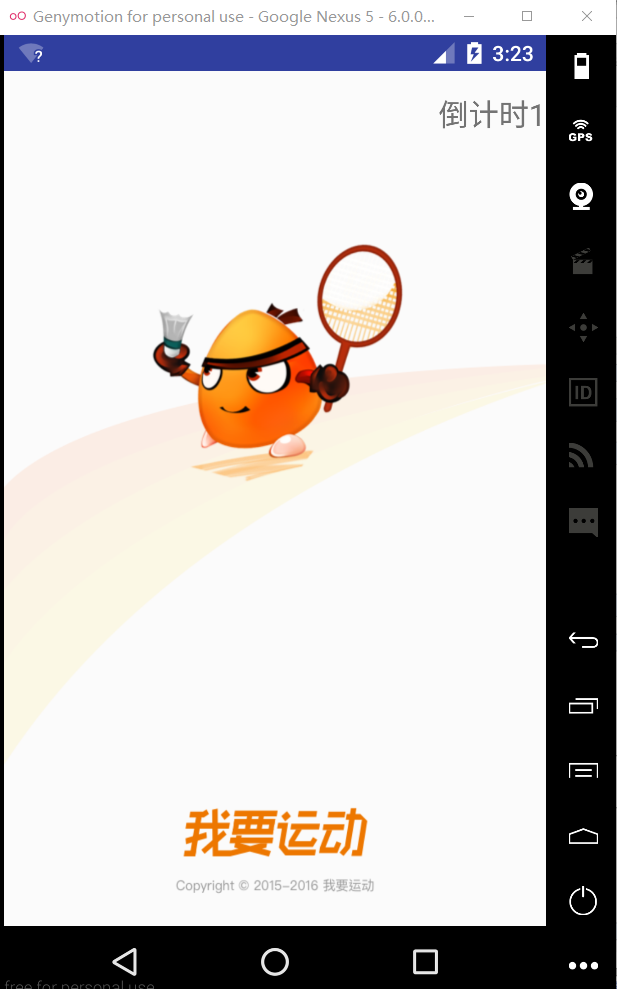
我是用了个android封装好了的一个倒计时类CountDownTimer,其实是将后台线程的创建和Handler队列封装成为了一个方便的类调用。下面附上代码:
package com.msn.zn.splashdemo;
import android.app.Activity;
import android.content.Intent;
import android.os.Bundle;
import android.os.CountDownTimer;
import android.os.Handler;
import android.widget.TextView;
public class SplashTimeActivity extends Activity {
    private TextView tv_time;
    private MyCountDownTimer mc;
    @Override
    protected void onCreate(Bundle savedInstanceState) {
        super.onCreate(savedInstanceState);
        setContentView(R.layout.activity_splash_time);
        tv_time= (TextView) findViewById(R.id.tv_time);
        mc=new MyCountDownTimer(5000,1000);
        mc.start();//启动倒计时
        handler.postDelayed(new Runnable() {
            @Override
            public void run() {
                Intent intent=new Intent(SplashTimeActivity.this,MainActivity.class);
                startActivity(intent);
            }
        },5000);
    }
    private Handler handler=new Handler();
    /**
     * 定义一个倒计时的内部类
     */
    class MyCountDownTimer extends CountDownTimer {
        /**
         *
         * @param millisInFuture 从开始调用start()到倒计时完成并onfinish()方法被调用的毫秒数
         * @param countDownInterval 接收onTick(long)回调的间隔时间
         */
        public MyCountDownTimer(long millisInFuture, long countDownInterval) {
            super(millisInFuture, countDownInterval);
        }
        @Override
        public void onTick(long l) {
            tv_time.setText("倒计时"+l/1000);
        }
        @Override
        public void onFinish() {
            tv_time.setText("正在跳转");
        }
    }
}

xml:
<?xml version="1.0" encoding="utf-8"?>
<RelativeLayout xmlns:android="http://schemas.android.com/apk/res/android"
    xmlns:tools="http://schemas.android.com/tools"
    android:layout_width="match_parent"
    android:layout_height="match_parent"
    android:background="@mipmap/splasht2"
    tools:context="com.msn.zn.splashdemo.SplashTimeActivity">
    <TextView
        android:id="@+id/tv_time"
        android:layout_width="wrap_content"
        android:layout_height="wrap_content"
        android:layout_marginTop="15dp"
        android:textSize="20sp"
        android:text="闪一下"
        android:layout_alignParentRight="true"
        android:layout_alignParentEnd="true" />

</RelativeLayout>
Android---闪频页和倒计时的更多相关文章
- Android 引导页公共方法LeaderPager
SimpAndroidFarme是近期脑子突然发热想做的android快速开发的框架,目标是模块化 常用的控件,方便新手学习和使用.也欢迎老鸟来一起充实项目:项目地址 引导页是我们开发app很常用的功 ...
- Android—实现自定义相机倒计时拍照
这篇博客为大家介绍Android自定义相机,并且实现倒计时拍照功能 首先自定义拍照会用到SurfaceView控件显示照片的预览区域,以下是布局文件: 两个TextView是用来显示提示信息和倒计时的 ...
- Android自定义View之倒计时Countdown实现
先看一下效果: 在点击OK键之后,开始倒计时. 实现步骤 1.新建Android工程"CountdownView" 2.自定义Drawable 自定义View并没有直接的用户交互, ...
- Android引导页设计
大家在安装好一个应用后,第一次打开时往往会出现一个使用引导页,形式一般为三.四张图片,随着我们的滑动进行切换,在最后一页会有一个进入应用的按钮,我们通过点击这个按钮可以进入应用,其实这其中没有太多的复 ...
- [转]Android实现计时与倒计时(限时抢购)的几种方法
在购物网站的促销活动中一般都有倒计时限制购物时间或者折扣的时间,这些都是如何实现的呢? 在一个安卓客户端项目中恰好遇到了类似的问题,一开始使用的是Timer与 TimerTask, 虽然此方法通用,但 ...
- Android基础之CountDownTimer 倒计时类
app常用的60s倒计时计时功能: private static final int TIME_LIMIT = 60; private void initView() { // 相关控件 mResen ...
- android引导页的实现 及跳转到主页面
第一个activity package com.qualitypicture.activity; import java.util.ArrayList; import java.util.List; ...
- Xamarin.Android 引导页
http://blog.csdn.net/qq1326702940/article/details/78665588 https://www.cnblogs.com/catcher1994/p/555 ...
- android 特卖列表倒计时卡顿问题
在Android的开发中,我们经常遇见倒计时的操作,通常使用Timer和Handler共同操作来完成.当然也可以使用Android系统控件CountDownTimer,这里我们封装成一个控件,也方便大 ...
随机推荐
- 中国B2B行业将进入后平台时代
中国的B2B正在进入后平台时代,我们用三个特征来诠释这个词:1.电商平台构建流程闭环服务,从电商平台向综合服务商转变:2.新流量批发策略的落地代表B2B找到了新入口:3.第三方服务的价值变现与第二波创 ...
- python 获取脚本所在目录
平时写python经常会想获得脚本所在的目录,例如有个文件跟脚本文件放在一个相对的目录位置,那就可以通过脚本文件的目录找到对应的文件,即使以后脚本文件移到其他地方,脚本也基本不需要改动(相对于写死目录 ...
- VScode调试Python
第一步,确保装上了PYTHON扩展 然后打开文件夹(这个东西必须打开文件夹才能进行调试,不能打开一个文件就调试) 打开文件夹后,那里显示没有配置,这时需要你按下F5 弹出选择环境,点击Python 它 ...
- google closure--继承模块一:goog.inherits()
最近在项目是使用了google closure框架,深入研究了一下源码,先从最简单的继承系统吧. 废话不多说,closure继承模块主要有2个API: goog.inherits(childCtor, ...
- 接口或者http请求测试工具--chrome plug
Postman : With Postman, you can construct simple as well as complex requests quickly, save them for ...
- Android实战技巧:ViewStub的应用
在开发应用程序的时候,经常会遇到这样的情况,会在运行时动态根据条件来决定显示哪个View或某个布局.那么最通常的想法就是把可能用到的View都写在上面,先把它们的可见性都设为View.GONE,然后在 ...
- ASP.NET MVC3的学习
ASP.NET MVC第一次课(2013-12-25晚学完) 1.ASP.NET MVC 的特点 分离任务 可扩展 强大的URL重写(路由)机制 ...
- C#中可直接调用WIN32的API函数--USER32.DLL
Win32的API函数可以直接在C#中直接调用,在做WinForm时还是很有帮助的.有时候直接调用Win32的API,可以很高效的实现想要的效果. using System; using System ...
- MySql的max_connections和max pool的设置
这几天工作当中,在使用mysql数据库的时候,碰到了too many connections的问题和timeout expired的问题,经过尝试,稍作总结,希望能够帮到需要的朋友; 在测试当中发现, ...
- 10大白帽黑客专用的 Linux 操作系统
原文出处: Irshad Pathoor 译文出处:Linux中国 欢迎分享原创到伯乐头条 今天让我们来介绍十个黑客专用的操作系统,它们被白帽黑客用作渗透测试的工具.这里我把 Kali Lin ...