
Spring boot使用Aspose.Slides操作ppt转PDF、转图片
最近要将ppt转为PDF和图片,Apache poi ,jacob都试了下
Apache poi 转图片乱码,处理了,还会存在部分乱码
jacob对系统依赖比较大,必须是windows还得安装MS Office,如果同时安装了WPS,还会调用WPS处理,还出现异常
因此换成了Aspose.Slides,这个是商用的,带有水印
本文使用的是去除水印的 aspose.slides-19.3.jar( 获取资源 提取码:zhb8)
去除水印的方法 查看
1.创建spring boot项目

2.准备
(1)导入Aspose.Slides的jar包
(2)将license.xml,放到src/main/resources下

(3)修改pom.xml
<dependency>

    <groupId>aspose.slides</groupId>

    <artifactId>slides</artifactId>

    <version>19.3</version>

    <scope>system</scope>

    <systemPath>${basedir}/lib/aspose.slides-19.3.jar</systemPath>

</dependency>
3.转PDF
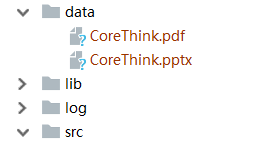
目标文件data/CoreThink.pptx
pdf保存data/CoreThink.pdf
package com.slides.ppt.controller;

import com.aspose.slides.License;

import com.aspose.slides.Presentation;

import com.aspose.slides.SaveFormat;

import org.springframework.web.bind.annotation.*;

import java.io.File;

import java.io.FileInputStream;

import java.io.FileOutputStream;

import java.io.InputStream;

@RestController

@RequestMapping("/api")

public class TestOperation {

    private static InputStream license;

    /**

     * 获取license

     *

     * @return

     */

    public static boolean getLicense() {

        boolean result = false;

        license = TestOperation.class.getClassLoader().getResourceAsStream("license.xml");

        if (license != null) {

            License aposeLic = new License();

            aposeLic.setLicense(license);

            result = true;

        }

        return result;

    }

    /**

     * 转PDF

     *

     * @return

     */

    @PostMapping("/convertPDF")

    public String convertPDF() {

        // 验证License

        if (!getLicense()) {

            return "验证License失败";

        }

        try {

            FileInputStream fileInput = new FileInputStream("data/CoreThink.pptx");

            Presentation pres = new Presentation(fileInput);

            FileOutputStream out = new FileOutputStream(new File("data/CoreThink.pdf"));

            pres.save(out, SaveFormat.Pdf);

            out.close();

        } catch (Exception e) {

            return e.getMessage();

        }

        return "转换成功";

    }

}
4.转图片
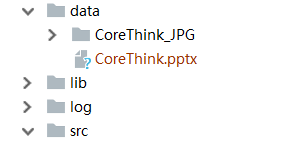
目标文件data/CoreThink.pptx
图片保存路径为 文件名_JPG即CoreThink_JPG
package com.slides.ppt.controller;

import com.aspose.slides.ISlide;

import com.aspose.slides.License;

import com.aspose.slides.Presentation;

import org.springframework.web.bind.annotation.*;

import javax.imageio.ImageIO;

import java.awt.image.BufferedImage;

import java.io.File;

import java.io.FileInputStream;

import java.io.InputStream;

@RestController

@RequestMapping("/api")

public class TestOperation {

    private static InputStream license;

    /**

     * 获取license

     *

     * @return

     */

    public static boolean getLicense() {

        boolean result = false;

        license = TestOperation.class.getClassLoader().getResourceAsStream("license.xml");

        if (license != null) {

            License aposeLic = new License();

            aposeLic.setLicense(license);

            result = true;

        }

        return result;

    }

    /**

     * 转Image

     *

     * @return

     */

    @PostMapping("/convertImage")

    public String convertImage() {

        // 验证License

        if (!getLicense()) {

            return "验证License失败";

        }

        String fileName = "data/CoreThink.pptx";

        File file = new File(fileName);

        if (!file.exists()) {

            return "转换文件不存在";

        }

        String filePath = file.getParent()+File.separator;

        String dest = filePath + getFileNameNoEx(file.getName())+"_JPG";

        File destPath = new File(dest);

        if (!destPath.exists()) {

            destPath.mkdir();

        }

        try {

            FileInputStream fileInput = new FileInputStream(fileName);

            Presentation pres = new Presentation(fileInput);

            int i;

            for (i = 0; i < pres.getSlides().size(); i++) {

                ISlide slide = pres.getSlides().get_Item(i);

                int height = (int)(pres.getSlideSize().getSize().getHeight()-150);

                int width = (int)(pres.getSlideSize().getSize().getWidth()-150);

                BufferedImage image = slide.getThumbnail(new java.awt.Dimension(width, height));

                //每一页输出一张图片

                File outImage = new File(dest+File.separator + (i+1) + ".JPG");

                ImageIO.write(image, "JPG", outImage);

            }

        } catch (Exception e) {

            return e.getMessage();

        }

        return "转换成功";

    }

    /**

     * 获取文件名,去除扩展名的

     *

     * @param filename

     * @return

     */

    private String getFileNameNoEx(String filename) {

        if ((filename != null) && (filename.length() > 0)) {

            int dot = filename.lastIndexOf('.');

            if ((dot > -1) && (dot < (filename.length()))) {

                return filename.substring(0, dot);

            }

        }

        return filename;

    }

}
说明:
如果没有验证License,输出的会带水印的,因此要保证 license.xml 能读取成功,并做验证
注意:
资源文件只允许学习使用,不得用于商业用途,请购买授权正版 aspose官网
Spring boot使用Aspose.Slides操作ppt转PDF、转图片的更多相关文章
- Spring Boot(二):数据库操作
本文主要讲解如何通过spring boot来访问数据库,本文会演示三种方式来访问数据库,第一种是JdbcTemplate,第二种是JPA,第三种是Mybatis.之前已经提到过,本系列会以一个博客系统 ...
- Aspose.Words操作word生成PDF文档
Aspose.Words操作word生成PDF文档 using Aspose.Words; using System; using System.Collections.Generic; using ...
- spring boot编程思想(核心篇) pdf 下载 it教程
资料简介:本书是<Spring Boot 编程思想>的核心篇,开篇总览Spring Boot核心特性,接着讨论自动装配(Auto-Configuration)与SpringApplicat ...
- Spring Boot实战之数据库操作
上篇文章中已经通过一个简单的HelloWorld程序讲解了Spring boot的基本原理和使用.本文主要讲解如何通过spring boot来访问数据库,本文会演示三种方式来访问数据库,第一种是Jdb ...
- spring boot ----> jpa连接和操作mysql数据库
环境: centos6.8,jdk1.8.0_172,maven3.5.4,vim,spring boot 1.5.13,mysql-5.7.23 1.引入jpa起步依赖和mysql驱动jar包 &l ...
- spring boot通过Jedis来操作redis
idea中新建spring boot项目,引入jedis依赖 <!-- https://mvnrepository.com/artifact/redis.clients/jedis --> ...
- 使用spring boot中的JPA操作数据库
前言 Spring boot中的JPA 使用的同学都会感觉到他的强大,简直就是神器一般,通俗的说,根本不需要你写sql,这就帮你节省了很多时间,那么下面我们来一起来体验下这款神器吧. 一.在pom中添 ...
- Spring Boot 使用 Dom4j XStream 操作 Xml
Xml 现在仍然占据着比较重要的地位,比如微信接口中使用了 Xml 进行消息的定义.本章重点讨论 Xml 的新建.编辑.查找.转化,可以这么理解,本章是使用了 dom4j.xstream 也是在开发者 ...
- 阿里云服务器 配置 tomcat 发布spring boot项目 的具体操作 【使用公网ip】
1.前言 spring boot 转成war包 后用tomcat发布的具体操作在我另一篇随笔有详细记载,不论是window系统还是Linux系统,tomcat的发布配置都是一样的,所以这里不具体讲这个 ...
随机推荐
- 192-0070 Final project proposal
Final project proposal192-00701 – Summary of your project.It is based on an existing game which is c ...
- PC端自适应布局
截止目前,国内绝大多数内容为主的网站(知乎,果壳,V2EX,网易新闻等)均使用内容区定宽布局,大多数电商网站(网易考拉,京东,聚美优品)也使用了内容区定宽的布局,也有些网站使用了自适应布局: 天猫 内 ...
- createTextRange 创建文本对象
document.body.createTextRange 主要是用来对一些文本对象进行操作.比如你有一大段文字,都在同一个P标签内,但是你只希望通过JS改变其中的一小部分,这时就可以用createT ...
- python变量选中后高亮显示
file>settings>editor>color scheme>general>code>identifier under caret>backgroun ...
- Wiki with Herbal Medicine
Problem H. Wiki with Herbal MedicineInput file: standard input Time limit: 1 secondOutput file: stan ...
- Collecting metrics with the PostgreSQL and TimescaleDB output plugin for Telegraf
转自:https://docs.timescale.com/v1.3/tutorials/telegraf-output-plugin 文章演示了如何使用pg output 插件 以及Telegraf ...
- 原生 ajax 请求
ajax 即 Asynchronous Javascript And XML,AJAX 不是一门的新的语言,而是对现有持术的综合利用.本质是在 HTTP 协议的基础上以异步的方式与服务器进行通信. 异 ...
- 奶牛抗议 DP 树状数组
奶牛抗议 DP 树状数组 USACO的题太猛了 容易想到\(DP\),设\(f[i]\)表示为在第\(i\)位时方案数,转移方程: \[ f[i]=\sum f[j]\;(j< i,sum[i] ...
- hbase 由于zookeeper问题导致连接失败问题
问题现象: 使用hbase shell 连接报如下问题: 2019-10-09 10:37:18,855 ERROR [main] zookeeper.RecoverableZooKeeper: Zo ...
- 拉格朗日插值法(c++)
已给sin0.32=0.314567,sin0.34=0.333487,sin0.36=0.352274,计算sin0.3367的值 #include <iostream> #includ ...