
Report List Controls
Report风格的ListCtrl的扩展,原文链接地址:http://www.codeproject.com/Articles/5560/Another-Report-List-Control
1.列排序
BOOL IsSortable() const; // Is sort allowed?

BOOL SetSortable(BOOL bSet); // Allow/disallow sorting

BOOL IsSortAscending() const;

int GetSortedColumn() const;

// Sort a specified column.

void SortItems(int nColumn, BOOL bAscending);
A message WM_ITEM_SORTED is sent to the parent window after a sorting is completed, the column index is passed as wParam and sorting method is passed as lParam (0=descending, 1=ascending).
2.列中排序
单列中,按照每一部分排列,如separator一部分进行排列。
1)不用字符串进行排列:
m_wndList.SetSortSeparator(NULL); // Disable sort-separator

// Sort the first column in ascending order

m_wndList.SortItems(0, TRUE);
2)按照separator字符串进行排列:
// m_wndList.SetSortSeparator(NULL); // Disable sort-separator

// m_wndList.SortItems(0, TRUE); // Sort the first column in ascending order

// Use string "Separator" as the sort-separator

m_wndList.SetSortSeparator(_T("Separator"));

// Sort the first column in ascending order

m_wndList.SortItems(0, TRUE);
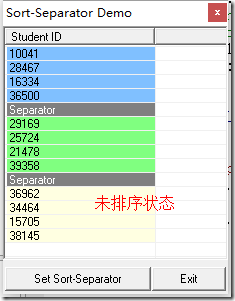
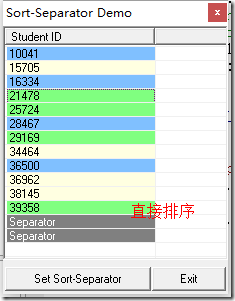
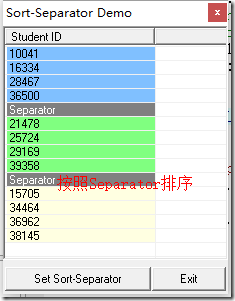
2)其他相关函数:
void SetSortSeparator(LPCTSTR lpSortSeparator);

LPCTSTR GetSortSeparator() const;
3.子项可编辑
BOOL IsEditable() const; // Is Item text editable?

void SetEditable(BOOL bSet = TRUE); // Allow item text editting

// Display the editbox, previous edit are committed

BOOL StartEdit(int nItem, int nSubItem);

BOOL EndEdit(BOOL bCommit = TRUE); // Commit/cancel text edit, hide the editbox

CEdit* GetEditControl();
4.自定义框选
void SetCheckboxeStyle(int nStyle = RC_CHKBOX_NORMAL); // Set checkbox styles.

int GetCheckboxStyle() const;
----------------------------nStyle-------------------------------------------------------------
RC_CHKBOX_NONE-- No checkbox displayedRC_CHKBOX_NORMAL-- Normal style, multiple check marks allowedRC_CHKBOX_SINGLE-- Single check only. Checkboxes are mutually exclusive, just like using radio buttons.RC_CHKBOX_DISABLED-- Disabled, cannot be checked/unchecked by user input.
// Example:

// Make the checkbox read-only

m_wndList.SetCheckboxeStyle(RC_CHKBOX_DISABLED);
5.列图标、子项颜色、子项图标
// Column header images

BOOL SetHeaderImage(int nColumn, int nImageIndex, BOOL bLeftSide = TRUE);

int GetHeaderImage(int nColumn) const;

CImageList* SetHeaderImageList(UINT nBitmapID, COLORREF crMask = RGB(255, 0, 255));

CImageList* SetHeaderImageList(CImageList* pImageList);
// Sub-item images

BOOL SetItemImage(int nItem, int nSubItem, int nImageIndex);

int GetItemImage(int nItem, int nSubItem) const;

CImageList* SetImageList(UINT nBitmapID, COLORREF crMask = RGB(255, 0, 255));

CImageList* SetImageList(CImageList* pImageList);

CImageList* GetImageList() const;
// Sub-item Text & Background Color

void SetItemTextColor(int nItem = -1, int nSubItem = -1,

  COLORREF color = COLOR_INVALID, BOOL bRedraw = TRUE);

COLORREF GetItemTextColor(int nItem, int nSubItem) const;

void SetItemBkColor(int nItem = -1, int nSubItem = -1,

  COLORREF color = COLOR_INVALID, BOOL bRedraw = TRUE);

COLORREF GetItemBkColor(int nItem, int nSubItem) const;
// Example: Set image and color for grid - 1st row 3rd column

m_wndList.SetImageList(IDB_BITMAP1); // Using bitmap resource "IDB_BITMAP1"

m_wndList.SetItemImage(0, 2, 0); // Set the 1st row 3rd column with image index 0

// Set grid colors

m_wndList.SetItemTextColor(0, 2, RGB(255, 0, 0), TRUE); // Grid text color: red

m_wndList.SetItemBkColor(0, 2, RGB(0, 255, 0), TRUE); // Grid bkground color: green
6.方便操作
1)操作属性
RC_ITEM_ALL - All items regardless of states

RC_ITEM_SELECTED - Selected items

RC_ITEM_UNSELECTED - Unselected items

RC_ITEM_CHECKED - Checked items

RC_ITEM_UNCHECKED - Unchecked items

RC_ITEM_FOCUSED - Focused item

RC_ITEM_UNFOCUSED - Unfocused items
2)相关函数
int GetFirstItem(DWORD dwStates = RC_ITEM_ALL, int nStartAfter = -1) const;

int GetLastItem(DWORD dwStates = RC_ITEM_ALL, int nStartBefore = -1) const;

int GetItemCount(DWORD dwStates = RC_ITEM_ALL) const;

DWORD GetItemStates(int nItem) const;

BOOL ExamItemStates(int nItem, DWORD dwStates) const;

BOOL SetItemStates(int nItem, DWORD dwNewStates);

int SetAllItemStates(DWORD dwOldStates, DWORD dwNewStates);

void InvertItems(int nType); // RC_INVERT_SELECTION or RC_INVERT_CHECKMARK
3)example
// Example:

// Select all items which were unselected and unchecked

m_wndList.SetAllItemStates(RC_ITEM_UNSELECTED | RC_ITEM_UNCHECKED, RC_ITEM_SELECTED);

// How many items are not checked?

int n = m_wndList.GetItemCount(RC_ITEM_UNCHECKED);

//Unselect and check all items regardless of their previous states

m_wndList.SetAllItemStates(RC_ITEM_ALL, RC_ITEM_UNSELECTED | RC_ITEM_CHECKED);

// Delete all items which were selected and checked

m_wndList.DeleteAllItems(RC_ITEM_SELECTED | RC_ITEM_CHECKED);
7.方便定位
int MoveUp(int nItem, int nCount = 1); // Move an item upwards by "nCount" positions.

// Move an item downwards by "nCount" positions.

int MoveDown(int nItem, int nCount = 1);

int MoveToTop(int nItem); // Move an item up to the top.

int MoveToBottom(int nItem); // Move an item down to the bottom.

int MoveTo(int nItem, int nNewPosition); // Move an item to a particular position

BOOL SwapItems(int nItem1, int nItem2); // Swap two items including all attributes.
8.内容项操作
BOOL SetItemText(int nItem, int nSubItem, INT val);

BOOL SetItemText(int nItem, int nSubItem, UINT val);

BOOL SetItemText(int nItem, int nSubItem, LONG val);

BOOL SetItemText(int nItem, int nSubItem, ULONG val);

BOOL SetItemText(int nItem, int nSubItem, TCHAR val);

BOOL SetItemText(int nItem, int nSubItem, DOUBLE val, int nPrecision = -1);

BOOL SetItemText(int nItem, int nSubItem,

   const COleDateTime& dateTime,

   DWORD dwFlags = 0);
9.自适应
void CMyView::OnSize(UINT nType, int cx, int cy)

{

    CFormView::OnSize(nType, cx, cy);

    // TODO: Add your message handler code here

    m_wndList.ResizeToFitParent(); // Add this line!

}
10.例子
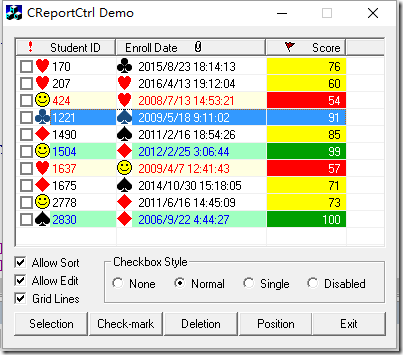
m_wndList.SetColumnHeader(_T("Student ID, 100; Enroll Date, 150; Score, 80, 2"));

    for (int i = 0; i < 10; i++)

    {

        const int IDX = m_wndList.InsertItem(0, _T(""));

        m_wndList.SetItemText(IDX, 0, rand() % 3000);

        m_wndList.SetItemText(IDX, 1, GenRandDate());

        m_wndList.SetItemText(IDX, 2, (rand() % 51) + 50);

        for (int j = 0; j < 2; j++)

            m_wndList.SetItemImage(IDX, j, rand() % 5); // subitem images

    }

    m_wndList.SetImageList(IDB_BITMAP1);

    m_wndList.SetHeaderImageList(IDB_BITMAP2);

    m_wndList.SetHeaderImage(0, 0);

    m_wndList.SetHeaderImage(1, 2, FALSE);

    m_wndList.SetHeaderImage(2, 1);

    m_wndList.SetGridLines(TRUE); // SHow grid lines

    m_wndList.SetCheckboxeStyle(RC_CHKBOX_NORMAL); // Enable checkboxes

    m_wndList.SetEditable(TRUE); // Allow sub-text edit

    m_wndList.SortItems(0, TRUE); // sort the 1st column, ascending

    m_bSortable = m_wndList.IsSortable();

    UpdateData(FALSE);

    GetDlgItem(IDC_ALLOWSORT)->EnableWindow(m_wndList.HasColumnHeader());

    // now play some colorful stuff

    // Set the 3rd column background color to yellow, text color to blue

    m_wndList.SetItemTextColor(-1, 2, RGB(0, 0, 0));

    m_wndList.SetItemBkColor(-1, 2, RGB(255, 255, 0));

    for (int n = 0; n < m_wndList.GetItemCount(); n++)

    {

        const int SCORE = _ttoi(m_wndList.GetItemText(n, 2)); // student score

        if (SCORE < 60)

        {

            m_wndList.SetItemBkColor(n, -1, ::GetSysColor(COLOR_INFOBK));

            m_wndList.SetItemTextColor(n, -1, RGB(255, 0, 0));

            m_wndList.SetItemBkColor(n, 2, RGB(255, 0, 0));

            m_wndList.SetItemTextColor(n, 2, RGB(255, 255, 255));

        }

        else if (SCORE > 90)

        {

            m_wndList.SetItemBkColor(n, -1, RGB(160, 255, 192));

            m_wndList.SetItemTextColor(n, -1, RGB(0, 0, 255));

            m_wndList.SetItemTextColor(n, 2, RGB(255, 255, 255));

            m_wndList.SetItemBkColor(n, 2, RGB(0, 160, 0));

        }

    }
代码链接地址:http://download.csdn.net/detail/wuyuan2011woaini/9592993
Report List Controls的更多相关文章
- Percona Toolkit 使用
安装 percona-toolkit perl Makefile.PL make make test make install 默认安装到 /usr/local/bin 目录下 可能需要 DBI-1. ...
- WPF Combox实现下拉多选,可选中多个值
自定义多选MultiCombox,可以实现下拉列表多选 using System; using System.Collections.Generic; using System.Collections ...
- Session for SSRS Report of Microsoft Dynamics AX
Session for SSRS Report of Microsoft Dynamics AX 版权声明:本文为博主原创文章,未经博主允许不得转载. Contract •A data contrac ...
- Report processing of Microsoft Dynamic AX
Report processing of Microsoft Dynamic AX 版权声明:本文为博主原创文章,未经博主允许不得转载. The implementation of a general ...
- SQL Server 2008 R2 升级到 Service Pack 3后Report Builder启动不了
一同事将测试服务器从SQL Server 2008 R2 SP2升级到了SQL Server 2008 R2 SP3后发现Report Service的报表编辑时启动不了Report Builder, ...
- Crystal Report在.net中的两种显示方式
Crystal Report在.net中的两种显示方式 编写人:CC阿爸 2014-7-29 近来在完成深圳一公司的项目,对方对各方面要求相当严格,一不满意就拒绝签收,为了对修正水晶报表显示及导出的一 ...
- [转] Asp.net Report Viewer 简单实例
原文链接:http://www.aspsnippets.com/Green/Articles/ASPNet-Report-Viewer-control-Tutorial-with-example.as ...
- USB HID Report Descriptor 报告描述符详解
Report descriptors are composed of pieces of information. Each piece of information is called an Ite ...
- DevExpress ASP.NET Core Controls 2019发展蓝图(No.4)
本文主要为大家介绍DevExpress ASP.NET Core Controls 2019年的官方发展蓝图,更多精彩内容欢迎持续收藏关注哦~ [DevExpress ASP.NET Controls ...
随机推荐
- Java魔法堂:自定义和解析注解
一.前言 注解(Annotation)作为元数据的载体,为程序代码本身提供额外的信息,使用过MyBatis等ORM框架的朋友对 @Insert 的注解应该不陌生了,这是MyBatis自定义的注解,显然 ...
- Scrum 项目4.0--软件工程
1.准备看板. 2.任务认领,并把认领人标注在看板上的任务标签上. 林宇粲:处理数据的存储:目前先进行数据库表的分析和创建. 蔡舜:对复利计算,单利计算,代码进行编写. 王昕明:编写一些用户登录,操作 ...
- jQuery的 delegate问题
习惯了bind,用惯了live,就不习惯delegate了呀有木有... 支持为动态生成的标签元素绑定事件也许就live和delegate了吧,不过新版本已经不支持live了,只有delegate d ...
- C#类的一些概念
一.概念 1.类的作用是来模拟现实对象的,一个现实对象可以从两个地方进行描述:特征和行为. 2.类不是你凭空想象的,它只是描述现实对象具体的特征和行为的. 3我们写类只需要写我们所需要的. 4.类是提 ...
- 在android设备上调试ionic应用
方法1: ionic run android -l -c 将会在console中输出日志信息 方法2: (1).使用usb连接android设备,并打开android设备的调试功能 (2).在chro ...
- YII页面跳转
$criteria = new CDbCriteria; $criteria->select = array('ziduan"); $res = Model::model()-> ...
- stl空间配置器线程安全问题补充
摘要 在上一篇博客<STL空间配置器那点事>简单介绍了空间配置器的基本实现 两级空间配置器处理,一级相关细节问题,同时简单描述了STL各组件之间的关系以及设计到的设计模式等. 在最后,又关 ...
- 一些js小题(一)
一些js小题,掌握这些对于一些常见的面试.笔试题应该很有帮助: var a=10; function aa(){ alert(a); } function bb(){ aa(); } bb();//1 ...
- 说反话(c++实现)
描述:给定一句英语,要求你编写程序,将句中所有单词的顺序颠倒输出. 输入:测试输入包含一个测试用例,在一行内给出总长度不超过80的字符串.字符串由若干单词和若干空格组成,其中单词是由英文字母(大小写有 ...
- 使用SWFUpload无刷新上传图片
使用SWFUpload组件无刷新上传图片 在做项目时,需要用到一个图片的无刷新上传,之前听说过SWFUpload,于是想要通过SWFUpload来进行图片的无刷新上传,由于我的项目属于是ASP.NET ...