
AspectJ AOP学习基础
一、切入点表达式
1、execution:匹配方法的执行
格式:execution(修饰符 返回值类型 包.类.方法(参数) throw 异常)
1.1修饰符,表示方法的修饰符,一般省略。
1.2返回类型 String表示返回String;void表示没有返回值;*表示返回任意类型,包括无返回值。
1.3包
hjp.spring.service 表示指定的包
hjp.spring.*.service 表示spring下子模块包含service的包
hjp.spring.service.. 表示service目录及其子目录
综合:hjp.spring.*.service..
1.4类 UserService表示指定的类;*Service表示以Service结尾;Test*表示以Test开头;*表示任意类名。
1.5方法(与类相似)
addUser表示指定方法;add*表示以add开头;*Do表示以Do结尾;*表示任意。
1.6参数 ()表示没有参数;(int)表示一个int类型参数;(int,int)表示两个int类型参数(如果是java.lang包下的可以省略,其他类型必须写完全限定类名);(..)表示
任意,包括无参。
1.7throws 异常,一般省略。
综合:execution(* hjp.spring.*.service..*.*(..))
2、within:匹配包或子包中的方法,如:within(hjp.spring.service..*)
3、this:匹配实现接口的代理对象中的方法,如:this(hjp.spring.dao.UserDao)
4、target:匹配实现接口的目标对象中的方法,如:target(hjp.spring.daoImpl.UserDao)
5、args:匹配参数格式符合标准的方法,如args(int,int)
6、bean:匹配指定的bean,如:bean("userServiceId")
二、AspectJ规定的通知类型
1、before:前置通知(应用:各种校验),在方法执行前执行,如果通知抛出异常,阻止方法运行。
2、afterReturning:后置通知(应用:常规数据处理),方法正常返回后执行,如果方法中抛出异常,通知无法执行;在方法执行后执行,所以才可以获得方法的返回值。
3、around:环绕通知(应用:可以做任何事),方法执行前后分别执行,可以阻止方法的执行。
4、afterThrowing:抛出异常通知(应用:包装异常信息),方法抛出异常后执行,如果方法没有抛出异常,无法执行。
5、after:最终通知(应用:清理现场),方法执行完毕后执行,无论方法是否有异常出现。
环绕通知类似代码块:
try{

//前置通知(before)

//手动执行目标方法

//后置通知(after),可获得返回值

}catch{

//抛出异常通知(afterThrowing),可获得具体异常信息

}finally{

//最终(finally)

}
环绕通知类似代码块
三、基于XML配置的代码示例
1、代码结构:
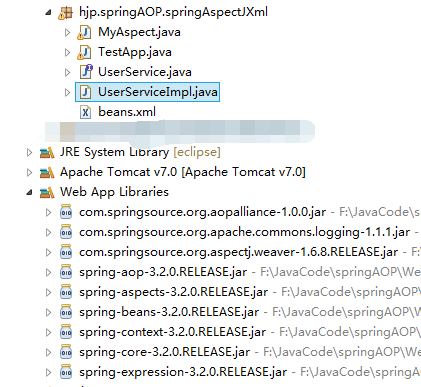
2、aspectj aop不是针对接口的,所有有没有接口不影响AOP实现,下面是UserService接口和UserServiceImpl实现类(目标类)代码
package hjp.springAOP.springAspectJXml;

public interface UserService {

    void addUser();

    void updateUser();

}
UserService
package hjp.springAOP.springAspectJXml;

public class UserServiceImpl implements UserService {

    @Override

    public void addUser() {

        // TODO Auto-generated method stub

        System.out.println("aspectj xml add user");

    }

    @Override

    public void updateUser() {

        // TODO Auto-generated method stub

        //int i=9/0;

        System.out.println("aspectj xml update user");

    }

}
UserServiceImpl
3、切面类MyAspect代码
package hjp.springAOP.springAspectJXml;

import org.aspectj.lang.JoinPoint;

import org.aspectj.lang.ProceedingJoinPoint;

public class MyAspect {

    public void myBefore(JoinPoint joinPoint) {

        System.out.println("前置通知:" + joinPoint.getSignature().getName());

    }

    public void myAfterReturning(JoinPoint joinPoint, Object ret) {

        System.out.println("后置通知:方法名," + joinPoint.getSignature().getName() + ";返回值," + ret);

    }

    public Object myAround(ProceedingJoinPoint proceedingJoinPoint) throws Throwable {

        System.out.println("环绕通知前");

        // 手动执行目标方法

        Object object = proceedingJoinPoint.proceed();

        System.out.println("环绕通知后");

        return object;

    }

    public void myAfterThrowing(JoinPoint joinPoint, Throwable e) {

        System.out.println("目标类方法" + joinPoint.getSignature().getName() + "抛出异常:" + e.getMessage());

    }

    public void myAfter(JoinPoint joinPoint) {

        System.out.println("最终执行通知:方法:" + joinPoint.getSignature().getName());

    }

}
MyAspect
4、beans.xml配置文件,记得添加aop命名空间和引用地址
<?xml version="1.0" encoding="UTF-8"?>

<beans xmlns="http://www.springframework.org/schema/beans"

    xmlns:xsi="http://www.w3.org/2001/XMLSchema-instance" xmlns:aop="http://www.springframework.org/schema/aop"

    xsi:schemaLocation="http://www.springframework.org/schema/beans

                              http://www.springframework.org/schema/beans/spring-beans.xsd

                              http://www.springframework.org/schema/aop

                              http://www.springframework.org/schema/aop/spring-aop.xsd">

    <!-- 1、创建目标类 -->

    <bean id="userServiceId" class="hjp.springAOP.springAspectJXml.UserServiceImpl"></bean>

    <!-- 2、创建切面类 (通知) -->

    <bean id="myAspectId" class="hjp.springAOP.springAspectJXml.MyAspect"></bean>

    <!-- aop编程

         如果强制使用CGLIB,则设置aop:config 属性proxy-target-class="true"

     -->

    <aop:config>

        <!-- aspectj 编程

             ref指向切面类 -->

        <aop:aspect ref="myAspectId">

            <!-- 声明切入点,确定目标类上哪些方法需被增强 -->

            <aop:pointcut expression="execution(* hjp.springAOP.springAspectJXml.*.*(..))" id="myPointCut" />

            <!-- 声明通知方式 -->

            <!-- 1、前置通知

                 method切面类中具体方法名

                 pointcut-ref指向切入点(使用pointcut,也可以在通知里配置自己的切入点表达式)

            <aop:before method="myBefore" pointcut-ref="myPointCut"/>

             -->

             <!-- 2、后置通知,可获取到返回值

                   returning用于设置通知的第二个参数名称,类型为Object(注意:此处参数名称要与切面类后置通知方法第二个参数名称一致)

             <aop:after-returning method="myAfterReturning" pointcut-ref="myPointCut" returning="ret"/>

              -->

              <!-- 3、环绕通知

              <aop:around method="myAround" pointcut-ref="myPointCut"/>

               -->

               <!-- 4、抛出异常通知(测试此通知时,将目标类中updateUser方法中int i=9/0;代码注释去掉)

                       目标方法在抛出异常时执行,如果没有则不执行

                       throwing设置抛出异常通知的第二个参数,参数名称和此处设置的e一致,类型Throwable

                <aop:after-throwing method="myAfterThrowing" pointcut-ref="myPointCut" throwing="e"/>

                -->

                <!-- 5、最终通知,即任何情况下都会执行 -->

                <aop:after method="myAfter" pointcut-ref="myPointCut"/>

        </aop:aspect>

    </aop:config>

</beans>
beans.xml
5、测试类
package hjp.springAOP.springAspectJXml;

import org.junit.Test;

import org.springframework.context.ApplicationContext;

import org.springframework.context.support.ClassPathXmlApplicationContext;

public class TestApp {

    @Test

    public void demo1() {

        String xmlPath="hjp/springAOP/springAspectJXml/beans.xml";

        ApplicationContext applicationContext=new ClassPathXmlApplicationContext(xmlPath);

        UserService userService = (UserService)applicationContext.getBean("userServiceId");

        userService.addUser();

        userService.updateUser();

    }

}
测试类
四、基于注解的代码示例
1、代码结构和上面差不多
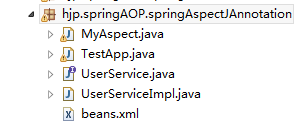
2、目标类的接口代码不变,目标类加注解后代码:
package hjp.springAOP.springAspectJAnnotation;

import org.springframework.stereotype.Service;

@Service("userServiceId")//<bean id="userServiceId" class="hjp.springAOP.springAspectJAnnotation.UserServiceImpl"></bean>

public class UserServiceImpl implements UserService {

    @Override

    public void addUser() {

        // TODO Auto-generated method stub

        System.out.println("aspectj xml add user");

    }

    @Override

    public void updateUser() {

        // TODO Auto-generated method stub

        //int i=9/0;

        System.out.println("aspectj xml update user");

    }

}
目标类
3、切面类加注解后代码(注意:代码里面使用了引用公共切入点表达式的方法):
package hjp.springAOP.springAspectJAnnotation;

import org.aspectj.lang.JoinPoint;

import org.aspectj.lang.ProceedingJoinPoint;

import org.aspectj.lang.annotation.After;

import org.aspectj.lang.annotation.AfterReturning;

import org.aspectj.lang.annotation.AfterThrowing;

import org.aspectj.lang.annotation.Around;

import org.aspectj.lang.annotation.Aspect;

import org.aspectj.lang.annotation.Before;

import org.aspectj.lang.annotation.Pointcut;

import org.springframework.stereotype.Component;

@Component//<bean id="myAspectId" class="hjp.springAOP.springAspectJAnnotation.MyAspect"></bean>

@Aspect//<aop:aspect ref="myAspectId">

public class MyAspect {

    //@Before("execution(* hjp.springAOP.springAspectJAnnotation.*.*(..))")//<aop:before method="myBefore" pointcut="myPointCut"/>

    public void myBefore(JoinPoint joinPoint) {

        System.out.println("前置通知:" + joinPoint.getSignature().getName());

    }

    //@AfterReturning(value="execution(* hjp.springAOP.springAspectJAnnotation.*.*(..))",returning="ret")

    public void myAfterReturning(JoinPoint joinPoint, Object ret) {

        System.out.println("后置通知:方法名," + joinPoint.getSignature().getName() + ";返回值," + ret);

    }

    //编写共有的切入点表达式

    @Pointcut("execution(* hjp.springAOP.springAspectJAnnotation.*.*(..))")

    private void myPointCut(){}

    //@Around("myPointCut()")//注意加括号

    public Object myAround(ProceedingJoinPoint proceedingJoinPoint) throws Throwable {

        System.out.println("环绕通知前");

        // 手动执行目标方法

        Object object = proceedingJoinPoint.proceed();

        System.out.println("环绕通知后");

        return object;

    }

    //@AfterThrowing(value="myPointCut()",throwing="e")

    public void myAfterThrowing(JoinPoint joinPoint, Throwable e) {

        System.out.println("目标类方法" + joinPoint.getSignature().getName() + "抛出异常:" + e.getMessage());

    }

    @After("myPointCut()")

    public void myAfter(JoinPoint joinPoint) {

        System.out.println("最终执行通知:方法:" + joinPoint.getSignature().getName());

    }

}
切面类
4、beans.xml配置文件,注意新加context和AOP命名空间及引用地址
<?xml version="1.0" encoding="UTF-8"?>

<beans xmlns="http://www.springframework.org/schema/beans"

    xmlns:xsi="http://www.w3.org/2001/XMLSchema-instance" xmlns:aop="http://www.springframework.org/schema/aop"

    xmlns:context="http://www.springframework.org/schema/context"

    xsi:schemaLocation="http://www.springframework.org/schema/beans

                              http://www.springframework.org/schema/beans/spring-beans.xsd

                              http://www.springframework.org/schema/aop

                              http://www.springframework.org/schema/aop/spring-aop.xsd

                              http://www.springframework.org/schema/context

                              http://www.springframework.org/schema/context/spring-context.xsd">

    <!-- spring注解扫描 -->

    <context:component-scan base-package="hjp.springAOP.springAspectJAnnotation"></context:component-scan>

    <!-- 使AOP注解生效 -->

    <aop:aspectj-autoproxy></aop:aspectj-autoproxy>

</beans>
5、测试类
package hjp.springAOP.springAspectJAnnotation;

import org.junit.Test;

import org.springframework.context.ApplicationContext;

import org.springframework.context.support.ClassPathXmlApplicationContext;

public class TestApp {

    @Test

    public void demo1() {

        String xmlPath="hjp/springAOP/springAspectJAnnotation/beans.xml";

        ApplicationContext applicationContext=new ClassPathXmlApplicationContext(xmlPath);

        UserService userService = (UserService)applicationContext.getBean("userServiceId");

        userService.addUser();

        userService.updateUser();

    }

}
测试类
3、
AspectJ AOP学习基础的更多相关文章
- Spring AOP 学习例子
http://outofmemory.cn/code-snippet/3762/Spring-AOP-learn-example 工作忙,时间紧,不过事情再多,学习是必须的.记得以前的部门老大 ...
- AOP技术基础
1.引言 2.AOP技术基础 3.Java平台AOP技术研究 4..Net平台AOP技术研究 2.1 AOP技术起源 AOP技术的诞生并不算晚,早在1990年开始,来自Xerox Palo Alto ...
- AOP技术基础(转)
1.引言 2.AOP技术基础 3.Java平台AOP技术研究 4..Net平台AOP技术研究 2.1 AOP技术起源 AOP技术的诞生并不算晚,早在1990年开始,来自Xerox Palo Alto ...
- springBoot AOP学习(一)
AOP学习(一) 1.简介 AOp:面向切面编程,相对于OOP面向对象编程. Spring的AOP的存在目的是为了解耦.AOP可以让一切类共享相同的行为.在OOP中只能通过继承类或者实现接口,使代码的 ...
- Spring AOP学习笔记
Spring提供了一站式解决方案: 1) Spring Core spring的核心功能: IOC容器, 解决对象创建及依赖关系 2) Spring Web ...
- spring 学习(三):aop 学习
spring 学习(三):aop 学习 aop 概念 1 aop:面向切面(方面)编程,扩展功能不修改源代码实现 2 AOP采取横向抽取机制,取代了传统纵向继承体系重复性代码 3 aop底层使用动态代 ...
- Spring入门IOC和AOP学习笔记
Spring入门IOC和AOP学习笔记 概述 Spring框架的核心有两个: Spring容器作为超级大工厂,负责管理.创建所有的Java对象,这些Java对象被称为Bean. Spring容器管理容 ...
- Spring IOC 和Aspectj AOP
1.Aspectj AOP 是一套独立的AOP 解决方案,不仅限于java应用,不依赖其他方案,属于编译时增强,有自己单独的编译器.Spring AOP 是基于Spring 容器的的AOP解决方式,属 ...
- 现代3D图形编程学习-基础简介(2) (译)
本书系列 现代3D图形编程学习 基础简介(2) 图形和渲染 接下去的内容对渲染的过程进行粗略介绍.遇到的部分内容不是很明白也没有关系,在接下去的章节中,会被具体阐述. 你在电脑屏幕上看到的任何东西,包 ...
随机推荐
- sqlSQL2008如何创建定时作业(代理服务)(转)
SQL2008如何创建定时作业?此方法也适应于Sql Server2005数据库,有兴趣的可以来看下! 1.打开[SQL Server Management Studio],在[对象资源管理器]列表中 ...
- 课程1——数据类型和变量
声明:本系列随笔主要用于记录c语言的常备知识点,不能保证所有知识正确性,欢迎大家阅读.学习.批评.指正!!你们的鼓励是我前进的动力.严禁用于私人目的.转载请注明出处:http://www.cnblog ...
- [CareerCup] 9.2 Robot Moving 机器人移动
9.2 Imagine a robot sitting on the upper left corner of an X by Y grid. The robot can only move in t ...
- [CareerCup] 10.2 Data Structures for Large Social Network 大型社交网站的数据结构
10.2 How would you design the data structures for a very large social network like Facebook or Linke ...
- Openwrt flash 空间不足的临时解决方法
最近有网友在安装软件的时候发现flash空间不够用了: 一个临时的解决方案是在RAM里面使用这个程序.因为 1.路由器改机后的RAM有64MB,flash一般有16MB,RAM空间比较大./tmp是挂 ...
- [C语言]一个很实用的服务端和客户端进行TCP通信的实例
本文给出一个很实用的服务端和客户端进行TCP通信的小例子.具体实现上非常简单,只是平时编写类似程序,具体步骤经常忘记,还要总是查,暂且将其记下来,方便以后参考. (1)客户端程序,编写一个文件clie ...
- Visual Studio调试
一:C# CODING 技巧 1:TODO 然后 CTRL + W + T,打开任务列表,选中 Comments,就会显示所有待做的任务 2:打开所在的文件夹 右键单击任何一个文件选项卡, 选择&qu ...
- Grunt-cli的执行过程以及Grunt加载原理
通过本篇你可以了解到: 1 grunt-cli的执行原理 2 nodeJS中模块的加载过程 Grunt-cli原理 grunt-cli其实也是Node模块,它可以帮助我们在控制台中直接运行grunt命 ...
- SqlDependency数据库同步+signalr 推送消息
sqlDependency提供了这样一种能力:当被监测的数据库中的数据发生变化时,SqlDependency会自动触发OnChange事件来通知应用程序,从而达到让系统自动更新数据(或缓存)的目的. ...
- zabbix 乱码的问题
文章转自:http://www.ttlsa.com/zabbix/zabbix-chinese-garbled-ttlsa/ 在使用zabbix的时候发现图片下方的中文都是一个个小方格 这是zabbi ...