
SpringCloud学习(二):微服务入门实战项目搭建
一、开始使用Spring Cloud实战微服务
1、SpringCloud是什么?
云计算的解决方案?不是
SpringCloud是一个在SpringBoot的基础上构建的一个快速构建分布式系统的工具集(全家桶)。
SpringCloud拥有SpringBoot的特点。
2、关于SpringCloud的版本?
大部分spring软件的版本是以:主版本.次版本.增量版本.里程碑版本的形式命名。
Spring Cloud Angel SR6???
Angel是SpringCloud的一个大版本,Service Release6版本,标识一个bug修复的版本。
3、SpringCloud的特点?
1)、约定优于配置
2)、开箱即用、快速启动
3)、适用于各种环境(PC Server、云环境、Subtopic、容器Docker)
4)、轻量级的组件(如服务发现中整合的Eureka)
5)、组件支持很丰富、功能很齐全(如提供配置中心、注册中心、智能路由…)
6)、选型中立(服务发现中使用Eureka、Zookeeper、Consul等都可以)
二、需要的技术储备
1、java(scala、Groovy…均可)
2、构建工具
1)、Maven
2)、Gradle
将maven项目转换成gradle项目:(在pom文件的上一级目录执行如下命令,使用cmd操作)
gradle init --type pom
3)、SpringBoot:http://cnblogs.com/mmzs/category/1192166.html
三、使用的软件版本
1、原则:使用最新的版本进行讲解
2、JDK 1.8
3、Maven 3.3.9
4、IDE(Spring Tool Suite 3.8.2、IDEA、Eclipse)
5、Spring Boot
6、SpringCloud Camden SR1
建议:大家学习时,尽量使用相同的版本进行选择,避免采坑
SpringCloud学习(二):开始使用Spring Cloud实战微服务
四、创建工程
1、创建调用关系的微服务
创建存在调用关系的微服务,调用关系如下
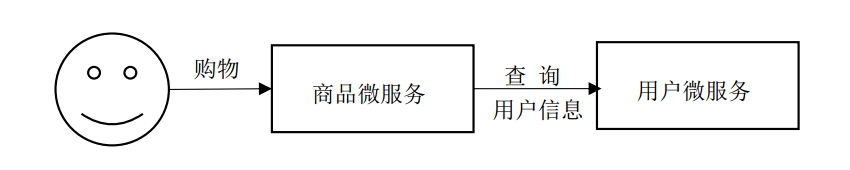
服务消费者:服务的调用方,调用别的微服务的微服务(即:依赖其他服务的服务)
服务提供者:服务的被调用方,提供API的微服务(即:为其他服务提供服务的服务)
2、编写一个服务提供者
填写信息:
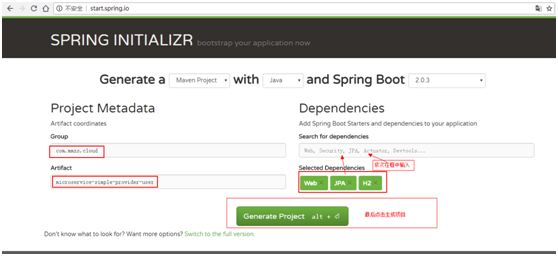
(1)、将生成的maven工程导入eclipse
然后一次创建如下选中的类和配置文件。
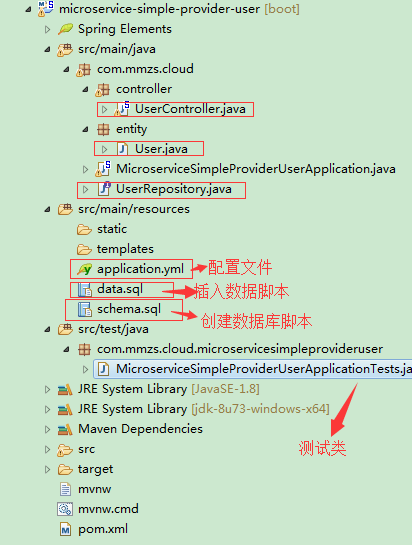
(2)、data.sql和schema.sql
insert into user(id,username, name, age, balance) values(1,'liubei', '刘备', 20, 100.00);

insert into user(id,username, name, age, balance) values(2,'guanyu', '关羽', 20, 100.00);

insert into user(id,username, name, age, balance) values(3,'zhangfei', '张飞', 20, 100.00);

insert into user(id,username, name, age, balance) values(4,'machao', '马超', 20, 100.00);
data.sql
drop table user if exists;

create table user(

    id bigint generated by default as identity,

    username varchar(40),

    name varchar(20),

    age int(3),

    balance decimal(10,2),

    primary key(id)

);
schema.sql
(3)、配置文件application.yml
 server:

   # 服务器端口号

   port: 6900

 spring:

   jpa:

     # 是否生成ddl语句

     generate-ddl: false

     # 是否打印sql语句

     show-sql: true

     hibernate:

       # 自动生成ddl,由于指定了具体的ddl,此处设置为none

       ddl-auto: none

   datasource:

     # 使用H2数据库

     platform: h2

     # 指定生成数据库的schema文件位置

     schema: classpath:schema.sql

     # 指定插入数据库语句的脚本位置

     data: classpath:data.sql

 # 配置日志打印信息

 logging:

   level:

     root: INFO

     org.hibernate: INFO

     org.hibernate.type.descriptor.sql.BasicBinder: TRACE

     org.hibernate.type.descriptor.sql.BasicExtractor: TRACE

     com.itmuch: DEBUG
schema.sql
(4)、创建UserController
 package com.mmzs.cloud.controller;

 import javax.annotation.Resource;

 import javax.websocket.server.PathParam;

 import org.springframework.beans.factory.annotation.Autowired;

 import org.springframework.web.bind.annotation.GetMapping;

 import org.springframework.web.bind.annotation.PathVariable;

 import org.springframework.web.bind.annotation.RequestMapping;

 import org.springframework.web.bind.annotation.RestController;

 import com.mmzs.cloud.UserRepository;

 import com.mmzs.cloud.entity.User;

 /**

  * @author: mmzsit

  * @date:   2018年8月17日

  * @Description:

  * 博客地址:https://www.cnblogs.com/mmzs/p/9282412.html

  * @version V1.0

 */

 @RestController

 public class UserController {

     @Resource

     private UserRepository userRepository;

     //第一种方式

     @GetMapping("/user/{id}")

     //第二种方式

     //@RequestMapping(value="/xxx",method=org.springframework.web.bind.annotation.RequestMethod.GET)

     //第一种和第二种方式其实是等效的

     public User findById(@PathVariable Long id){

         return this.userRepository.getOne(id);

     }

 }
UserController
(5)、创建UserRepository
 package com.mmzs.cloud;

 import org.springframework.data.jpa.repository.JpaRepository;

 import org.springframework.stereotype.Repository;

 import com.mmzs.cloud.entity.User;

 /**

  * @author: mmzsit

  * @date:   2018年8月17日

  * @Description:

  * 博客地址:https://www.cnblogs.com/mmzs/p/9282412.html

  * @version V1.0

 */

 @Repository

 public interface UserRepository extends JpaRepository<User, Long>{

     /**

      * @Description:

      * @param:  @param id

      * @param:  @return

      * @return: User

      * @throws

     */

 //    User findOne(Long id);

 }
UserRepository
(6)、创建实体类User
 package com.mmzs.cloud.entity;

 import java.math.BigDecimal;

 import javax.persistence.Column;

 import javax.persistence.Entity;

 import javax.persistence.GeneratedValue;

 import javax.persistence.GenerationType;

 import javax.persistence.Id;

 import com.fasterxml.jackson.annotation.JsonIgnoreProperties;

 /**

  * @author: mmzsit

  * @date:   2018年8月17日

  * @Description:

  * 博客地址:https://www.cnblogs.com/mmzs/p/9282412.html

  * @version V1.0

 */

 @Entity

 @JsonIgnoreProperties(value = { "hibernateLazyInitializer", "handler" })

 public class User {

     @SuppressWarnings("unused")

     private static final long serialVersionUID = 1L;

     @Id

     @GeneratedValue(strategy=GenerationType.AUTO)

     private Long id;

     @Column

     private String username;

     @Column

     private String name;

     @Column

     private Short age;

     @Column

     private BigDecimal balance;

     public Long getId() {

         return id;

     }

     public String getUsername() {

         return username;

     }

     public String getName() {

         return name;

     }

     public Short getAge() {

         return age;

     }

     public BigDecimal getBalance() {

         return balance;

     }

     public void setId(Long id) {

         this.id = id;

     }

     public void setUsername(String username) {

         this.username = username;

     }

     public void setName(String name) {

         this.name = name;

     }

     public void setAge(Short age) {

         this.age = age;

     }

     public void setBalance(BigDecimal balance) {

         this.balance = balance;

     }

 }
User
注:此处采用的是jpa,使用的是h2数据库,如果访问时出现实体类转化json格式错误,则需要在实体类前面加上如下这句注释:
@JsonIgnoreProperties(value = { "hibernateLazyInitializer", "handler" })
错误提示:disable SerializationFeature.FAIL_ON_EMPTY_BEANS
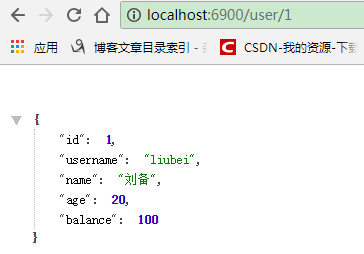
(7)、执行MicroserviceSimpleProviderUserApplication类,然后进行访问测试
3、编写一个服务消费者
填写信息:
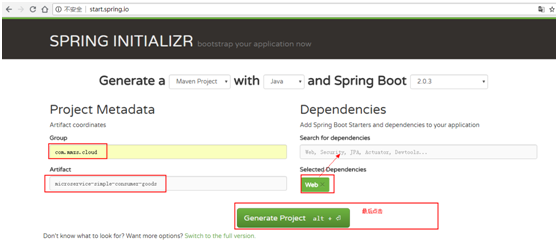
(1)、将生成的maven工程导入eclipse
然后一次创建如下选中的类和配置文件。
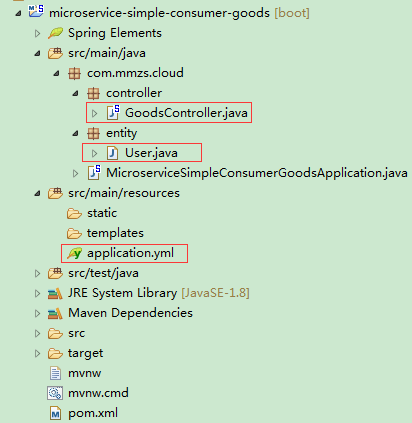
(2)、配置文件application.yml
server:

  port: 6901
(3)、创建GoodsController
 package com.mmzs.cloud.controller;

 import org.springframework.beans.factory.annotation.Autowired;

 import org.springframework.beans.factory.annotation.Value;

 import org.springframework.web.bind.annotation.GetMapping;

 import org.springframework.web.bind.annotation.PathVariable;

 import org.springframework.web.bind.annotation.RestController;

 import org.springframework.web.client.RestTemplate;

 import com.mmzs.cloud.entity.User;

 /**

  * @author: mmzsit

  * @date: 2018年8月17日

  * @Description: 博客地址:https://www.cnblogs.com/mmzs/p/9282412.html

  * @version V1.0

  */

 @RestController

 public class GoodsController {

     @Autowired

     private RestTemplate restTemplate;

     @GetMapping("/goods/{id}")

     public User findById(@PathVariable Long id) {

         //采用了硬编码注册user服务

         return this.restTemplate.getForObject("http://localhost:6900/user/" + id, User.class);

     }

 }
GoodsController
(4)、创建实体类User
 package com.mmzs.cloud.entity;

 import java.io.Serializable;

 import java.math.BigDecimal;

 /**

  * @author: mmzsit

  * @date:   2018年8月17日

  * @Description:

  * 博客地址:https://www.cnblogs.com/mmzs/p/9282412.html

  * @version V1.0

 */

 public class User implements Serializable{

     private static final long serialVersionUID = -7125209803403015533L;

     private Long id;

     private String username;

     private String name;

     private Short age;

     private BigDecimal balance;

     public Long getId() {

         return id;

     }

     public void setId(Long id) {

         this.id = id;

     }

     public String getUsername() {

         return username;

     }

     public void setUsername(String username) {

         this.username = username;

     }

     public String getName() {

         return name;

     }

     public void setName(String name) {

         this.name = name;

     }

     public Short getAge() {

         return age;

     }

     public void setAge(Short age) {

         this.age = age;

     }

     public BigDecimal getBalance() {

         return balance;

     }

     public void setBalance(BigDecimal balance) {

         this.balance = balance;

     }

 }
User
(5)、在MicroserviceSimpleConsumerGoodsApplication类中注入Bean
其中11-16行表示注入的Bean
 package com.mmzs.cloud;

 import org.springframework.boot.SpringApplication;

 import org.springframework.boot.autoconfigure.SpringBootApplication;

 import org.springframework.context.annotation.Bean;

 import org.springframework.web.client.RestTemplate;

 @SpringBootApplication

 public class MicroserviceSimpleConsumerGoodsApplication {

     @Bean

     public RestTemplate restTemplate() {

         return new RestTemplate();

     }

     //12、13、14、行相当于16行

     //private RestTemplate restTemplate = new RestTemplate();

     public static void main(String[] args) {

         SpringApplication.run(MicroserviceSimpleConsumerGoodsApplication.class, args);

     }

 }
MicroserviceSimpleConsumerGoodsApplication
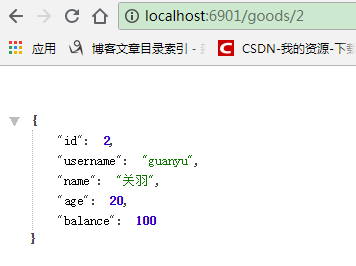
(5)、执行MicroserviceSimpleConsumerGoodsApplication类,然后进行访问测试
SHAPE \* MERGEFORMAT
4、小小优化一下
主要优化的点是在GoodsController类中的硬编码部分。简单优化如下:
@RestController

public class GoodsController {

    @Autowired

    private RestTemplate restTemplate;

    //优化部分

    @Value("${user.userServicePath}")

    private String userServicePath;

    //优化后此处的硬编码字符串,修改为变量获取

    @GetMapping("/goods/{id}")

    public User findById(@PathVariable Long id) {

        //采用了硬编码注册user服务

        return this.restTemplate.getForObject(this.userServicePath + id, User.class);

    }

}
这样子的话,userServicePath的具体值需要通过配置文件application.yml来配置,故application.yml文件修改为:
server:

  port: 6901

# 优化部分

user:

  userServicePath: http://localhost:6900/user/
注: 其实这样子的优化也不是很好,因为当微服务过多时,层层调用,需要修改的部分也会越来越多,不便于维护和修改。具体措施,详见下回分解。
五、代码下载
如果需要积分的话,其实大家没必要消耗积分进行下载,按照文章内容一步一步来,绝对是可以完美测试成功的,动手过程,让影响更加深刻,不是吗?
SpringCloud学习(二):微服务入门实战项目搭建的更多相关文章
- springcloud与docker微服务架构实战--笔记
看了<微服务那些事>之后,Spring boot和Spring Cloud的关系理清楚了,Spring cloud各个模块的作用也了解了. 但是,Spring cloud 与Docker的 ...
- 《Spring Cloud微服务 入门 实战与进阶》
很少在周末发文,还是由于昨晚刚收到实体书,还是耐不住性子马上发文了. 一年前,耗时半年多的时间,写出了我的第一本书<Spring Cloud微服务-全栈技术与案例解析>. 时至今日,一年的 ...
- 庐山真面目之十二微服务架构基于Docker搭建Consul集群、Ocelot网关集群和IdentityServer版本实现
庐山真面目之十二微服务架构基于Docker搭建Consul集群.Ocelot网关集群和IdentityServer版本实现 一.简介 在第七篇文章<庐山真面目之七微服务架构Consul ...
- SpringCloud与Docker微服务架构实战笔记
一 微服务架构概述 1. 单体应用架构存在的问题 结合:https://www.cnblogs.com/jialanshun/p/10637454.html一起看,在该篇博客中搜索“单块架构的优缺点 ...
- SpringCloud学习系列-微服务
最近和尚硅谷周阳老师学习了Spring Cloud感觉有必要在这里做下笔记和总结. 软件系统架构演变 单一应用架构当网站流量很小时,只需一个应用,将所有功能都部署在一起,以减少部署节点和成本.此时,用 ...
- Spring Cloud微服务安全实战_4-5_搭建OAuth2资源服务器
上一篇搭建了一个OAuth2认证服务器,可以生成token,这篇来改造下之前的订单微服务,使其能够认这个token令牌. 本篇针对订单服务要做三件事: 1,要让他知道自己是资源服务器,他知道这件事后, ...
- SpringCloud 学习(二) :服务注册与发现Eureka
Spring Cloud应用中可以支持多种的服务治理框架,比如Eureka.Consul.Zookeeper等,现在我们用的是consul,本文以SpringCloud Dalston.SR5版本介绍 ...
- Spring cloud微服务安全实战-4-6搭建OAuth2资源服务器
认证服务器已经搭建好了. 可以通过认证服务器拿到令牌 下面改造订单服务,让它可以用这个令牌. 争对订单服务要做三个事, 1.让订单服务知道它自己是Oauth协议里面的资源服务器.,它知道这个事后,它才 ...
- Spring cloud微服务安全实战-4-5搭建OAuth2认证服务器
现在可以访问我们的认证服务器,应用我们已经配置好了. 下面配置让用户可以访问我的认证服务器.再来重写一个方法. EndpointConfigure端点的配置. authenticationManage ...
随机推荐
- .net 发布程序时出现“类型ASP.global_asax同时存在于...”错误的解决办法
web程序发布后,通过浏览器访问程序显示如下的错误信息: 编译器错误消息: CS0433: 类型“ASP.global_asax”同时存在于“c:\WINDOWS\Microsoft.NET\Fram ...
- hadoop伪分布式搭建
安装好jdk 减压hadoop压缩包 cd /home/hadoop/hadoop-2.7.3/etc/hadoop vi hadoop-env.sh 文件末尾处添加 jdk环境变量 export J ...
- php 跨数据库调取数据
我的这个是thinkphp,我就在 Application -> Common -> Conf -> config.php 文件里面配置数据库的地方,加入了下面这段代码 //'数据库 ...
- Ajax级联选择框
Ajax级联选择框 级联选择框常用与比较负责的网页开发,例如实现的商品添加页面中,需要选择商品的分类,而分类信息又有层次,例如大分类和小分类就是两层级联,在用户选择商品所属大类时,所属小类的内容需要根 ...
- python语法_模块_loggin_hashlib_conifgparser
loggin模块 日志模块,级别从上往下依次增强,debug 和 info 默认不输出信息,只有后三种级别有输出信息 loggin.debug('') loggin.info('') loggin.w ...
- 微信小程序用户信息解密失败导致的内存泄漏问题。
微信小程序获取用户解密的Session_key 然后对 encryptedData进行解密 偶尔报错 时间长了之后会报内存溢出: java.lang.OutOfMemoryError: GC over ...
- 琐事集 vol 2
vol 2-0 宝宝,你是不是该看书咯? 她正瘫在沙发上看剧 我刚提起看书,她惊恐地看了看我 然后眼白一翻,彻底地瘫平了 宝宝? “宝宝睡着了.” 你下周就要考护师了!很难得,她认真地睁开眼,信誓旦旦 ...
- LeetCode题解39.Combination Sum
39. Combination Sum Given a set of candidate numbers (C) (without duplicates) and a target number (T ...
- 记录一次JavaWeb开发的乱码解决
POST提交的中文,测试能正确接收到,而且在控制台打印出中文 但是存到数据库乱码 查看了数据库,设置的是utf-8,最后发现应该在数据库连接的地方设置: jdbc:mysql://localhost: ...
- [Swift]LeetCode795. 区间子数组个数 | Number of Subarrays with Bounded Maximum
We are given an array A of positive integers, and two positive integers L and R (L <= R). Return ...