
Spring学习笔记3——使用注解的方式完成注入对象中的效果
第一步:修改applicationContext.xml
添加<context:annotation-config/>表示告诉Spring要用注解的方式进行配置
 <?xml version="1.0" encoding="UTF-8"?>

 <beans xmlns="http://www.springframework.org/schema/beans"

     xmlns:xsi="http://www.w3.org/2001/XMLSchema-instance"

     xmlns:aop="http://www.springframework.org/schema/aop"

     xmlns:tx="http://www.springframework.org/schema/tx"

     xmlns:context="http://www.springframework.org/schema/context"

     xsi:schemaLocation="

    http://www.springframework.org/schema/beans

    http://www.springframework.org/schema/beans/spring-beans-3.0.xsd

    http://www.springframework.org/schema/aop

    http://www.springframework.org/schema/aop/spring-aop-3.0.xsd

    http://www.springframework.org/schema/tx

    http://www.springframework.org/schema/tx/spring-tx-3.0.xsd

    http://www.springframework.org/schema/context

    http://www.springframework.org/schema/context/spring-context-3.0.xsd">

   <context:annotation-config/>

     <bean name="category" class="com.spring.cate.Category">

         <property name="name" value="category 3333" />

     </bean>

     <bean name="product" class="com.spring.cate.Product">

         <property name="name" value="product 3333" />

     </bean>

 </beans>
第二步:在Product.java的category属性前加上@Autowired注解
 package com.spring.cate;

 import org.springframework.beans.factory.annotation.Autowired;

 public class Product {

     private int id;

     private String name;

     @Autowired

     private Category category;

     public int getId() {

         return id;

     }

     public void setId(int id) {

         this.id = id;

     }

     public String getName() {

         return name;

     }

     public void setName(String name) {

         this.name = name;

     }

     public Category getCategory() {

         return category;

     }

     public void setCategory(Category category) {

         this.category = category;

     }

 }
第三步:测试
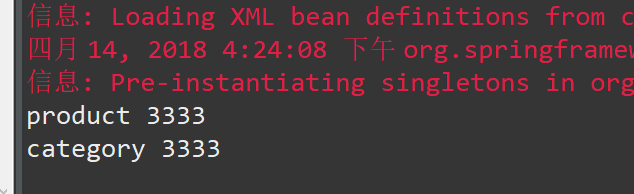
 package com.spring.test;

 import org.springframework.context.ApplicationContext;

 import org.springframework.context.support.ClassPathXmlApplicationContext;

 import com.spring.cate.Product;

 public class TestSpring {

     public static void main(String[] args) {

         // TODO Auto-generated method stub

         ApplicationContext context = new ClassPathXmlApplicationContext(new String[] { "applicationContext.xml" });

         Product p = (Product) context.getBean("product");

         System.out.println(p.getName());

         System.out.println(p.getCategory().getName());

     }

 }
第四步:除了前面的在属性前加@Autowired这种方式外,也可以在setCategory方法前加上@Autowired,这样来达到相同的效果
第五步:除了@Autowired之外,@Resource也是常用的手段
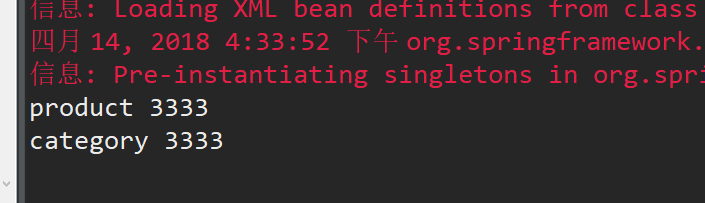
 package com.spring.cate;

 import javax.annotation.Resource;

 //@Component("product")

 public class Product {

     private int id;

     // private String name = "product1";

     private String name;

     @Resource(name = "category")

     private Category category;

     public int getId() {

         return id;

     }

     public void setId(int id) {

         this.id = id;

     }

     public String getName() {

         return name;

     }

     public void setName(String name) {

         this.name = name;

     }

     public Category getCategory() {

         return category;

     }

     public void setCategory(Category category) {

         this.category = category;

     }

 }
第六步:对Bean的注解
上述例子是对注入对象行为的注解,那么bean对象本身,比如Category,Product可不可以移出applicationContext.xml配置文件,也通过注解进行呢?
接下来就讲解如何对Bean进行注解配置
第七步:修改applicationContext.xml
修改applicationContext.xml,什么都去掉,只新增: <context:component-scan base-package="com.spring.cate"/>
其作用是告诉Spring,bean都放在com.spring.cate这个包下
第八步:@Component
为Product类加上@Component注解,即表明此类是bean
为Category 类加上@Component注解,即表明此类是bean
另外,因为配置从applicationContext.xml中移出来了,所以属性初始化放在属性声明上进行了。
Product.java
 package com.spring.cate;

 import org.springframework.beans.factory.annotation.Autowired;

 import org.springframework.stereotype.Component;

 @Component("product")

 public class Product {

     private int id;

     private String name = "product1";

     @Autowired

     private Category category;

     public int getId() {

         return id;

     }

     public void setId(int id) {

         this.id = id;

     }

     public String getName() {

         return name;

     }

     public void setName(String name) {

         this.name = name;

     }

     public Category getCategory() {

         return category;

     }

     public void setCategory(Category category) {

         this.category = category;

     }

 }
Category.java
 package com.spring.cate;

 import org.springframework.stereotype.Component;

 @Component("category")

 public class Category {

     private int id;

     private String name = "category1";

     public int getId() {

         return id;

     }

     public void setId(int id) {

         this.id = id;

     }

     public String getName() {

         return name;

     }

     public void setName(String name) {

         this.name = name;

     }

 }
结果:
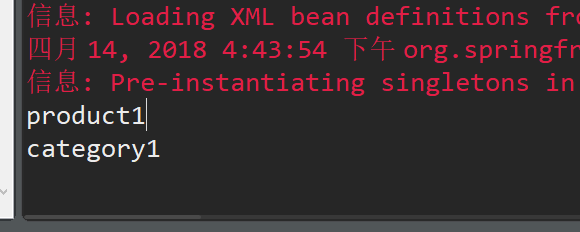
Spring学习笔记3——使用注解的方式完成注入对象中的效果的更多相关文章
- Spring 学习笔记(四)—— XML配置依赖注入
依赖注入(DI)与控制反转(IoC)是同一个概念,都是为了处理对象间的依赖关系. 通过DI/IoC容器,相互依赖的对象由容器负责创建和装配,而不是在代码中完成. Spring支持通过setter方法和 ...
- spring学习笔记 星球日one - xml方式配置bean
ide: idea lib包的导入:http://webcache.googleusercontent.com/search?q=cache:http://zyjustin9.iteye.com/bl ...
- spring学习笔记三:Component注解(把POJO类实例化到spring的IOC容器中)
Component注解:把普通的POJO 类实例化到spring的IOC容器中,就是定义成<bean id="" class=""> 项目目录树: ...
- Java框架spring 学习笔记(九):Spring的bean管理(@Required、@Component、@Autowired、@Resource注解)
注解:代码里面特殊的标记,使用注解可以完成相关功能 注解写法:@注解名称(属性名.属性值) @Required 用在set方法上,一旦用了这个注解,那么容器在初始化bean的时候必须要进行set,也就 ...
- 不错的Spring学习笔记(转)
Spring学习笔记(1)----简单的实例 --------------------------------- 首先需要准备Spring包,可从官方网站上下载. 下载解压后,必须的两个包是s ...
- 【Spring学习笔记-MVC-3.1】SpringMVC返回Json数据-方式1-扩展
<Spring学习笔记-MVC>系列文章,讲解返回json数据的文章共有3篇,分别为: [Spring学习笔记-MVC-3]SpringMVC返回Json数据-方式1:http://www ...
- 【Spring学习笔记-MVC-4】SpringMVC返回Json数据-方式2
<Spring学习笔记-MVC>系列文章,讲解返回json数据的文章共有3篇,分别为: [Spring学习笔记-MVC-3]SpringMVC返回Json数据-方式1:http://www ...
- 【Spring学习笔记-MVC-3】SpringMVC返回Json数据-方式1
<Spring学习笔记-MVC>系列文章,讲解返回json数据的文章共有3篇,分别为: [Spring学习笔记-MVC-3]SpringMVC返回Json数据-方式1:http://www ...
- Spring学习笔记之依赖的注解(2)
Spring学习笔记之依赖的注解(2) 1.0 注解,不能单独存在,是Java中的一种类型 1.1 写注解 1.2 注解反射 2.0 spring的注解 spring的 @Controller@Com ...
随机推荐
- C++ 异常小记
catch必定使用拷贝构造函数 如下代码编译不通过,因为拷贝构造被标记delete #include <stdexcept> #include <cstdlib> #inclu ...
- navicate连接不上阿里云mysql
一 用xshell连接进入服务器: 二 使用命令连接mysql mysql -uroot -p 三 更新权限 GRANT ALL PRIVILEGES ON *.* TO 'root'@'%' IDE ...
- CentOS 7 PHP-redis扩展安装,浏览器不显示数据及redis无法储存数据常见问题解决办法
首先使用php -m 可以查看到自己安装了那些扩展. 1.使用wget下载redis压缩包 wget https://github.com/phpredis/phpredis/archive/deve ...
- Nginx负载均衡(架构之路)
[前言] 在大型网站中,负载均衡是有想当必要的.尤其是在同一时间访问量比较大的大型网站,例如网上商城,新闻等CMS系统,为了减轻单个服务器的处理压力,我们引进了负载均衡这一个概念,将一个服务器的压力分 ...
- 【52ABP实战教程】0.3-- 从github推送代码回vsts实现双向同步
需求 在之前的文章中"[DevOps]如何用VSTS持续集成到Github仓库" 我们有讲述如何将vsts中的代码编译推送到github中,这一篇我们来完善,如果有人给你开源项目推 ...
- PL/SQL Developer 导入导出操作
一.PL/SQL Developer数据导入 Tools->Import Tables
- Android TabLayout 在宽屏幕上tab不能平均分配的问题解决
当TabLayout 在宽屏幕的设备上,如平板横屏的时候,tab的宽度超过一定值后,就不在平均分配宽度,而是居中显示.此时设置 app:tabMode="fixed"或者 top_ ...
- 基于 MySQL 的数据库实践(准备工作)
背景 本学期在北京大学选修了<数据库概论>的实验班课程,由于 SQL 语法并不是特别理论的内容,因此课上暂时也没有特别展开.出于探索数据库领域的兴趣,使用国内普遍使用的数据库软件 MySQ ...
- 使用requirejs来管理angularJS依赖示例
有关requirejs是什么在这里不做解释,只用纯代码实战让你感受requirejs依赖管理的强大. 一.首先要先下载require.js,然后整一个入口文件main.js包括了对其他js的引用. / ...
- iOS之AFSecurityPolicy
AFSecurityPolicy是AFNetworking中负责对https请求进行证书验证的模块,本文主要是要搞清楚它是如何工作的. 在介绍AFSecurityPolicy之前,我们先来了解一下ht ...