
QtGui.QGridLayout
The most universal layout class is the grid layout. This layout divides the space into rows and columns. To create a grid layout, we use the QtGui.QGridLayout class.
#!/usr/bin/python

# -*- coding: utf-8 -*-

import sys

from PyQt4 import QtGui

"""

ZetCode PyQt4 tutorial

In this example, we create a skeleton

of a calculator using a QtGui.QGridLayout.

author: Jan Bodnar

website: zetcode.com

last edited: July 2014

"""

class Example(QtGui.QWidget):

    def __init__(self):

        super(Example, self).__init__()

        self.initUI()

    def initUI(self):

        grid = QtGui.QGridLayout()

        self.setLayout(grid)

        names = ['Cls', 'Bck', '', 'Close',

                 '7', '8', '9', '/',

                '4', '5', '6', '*',

                 '1', '2', '3', '-',

                '0', '.', '=', '+']

        positions = [(i,j) for i in range(5) for j in range(4)]

        for position, name in zip(positions, names):

            if name == '':

                continue

            button = QtGui.QPushButton(name)

            grid.addWidget(button, *position)

        self.move(300, 150)

        self.setWindowTitle('Calculator')

        self.show()

def main():

    app = QtGui.QApplication(sys.argv)

    ex = Example()

    sys.exit(app.exec_())

if __name__ == '__main__':

    main()
In our example, we create a grid of buttons. To fill one gap, we add one QtGui.QLabel widget.
grid = QtGui.QGridLayout()

self.setLayout(grid)
The instance of a QtGui.QGridLayout is created and set to be the layout for the application window.
names = ['Cls', 'Bck', '', 'Close',

            '7', '8', '9', '/',

        '4', '5', '6', '*',

            '1', '2', '3', '-',

        '0', '.', '=', '+']
These are the labels used later for buttons.
positions = [(i,j) for i in range(5) for j in range(4)]
We create a list of positions in the grid.
for position, name in zip(positions, names):

    if name == '':

        continue

    button = QtGui.QPushButton(name)

    grid.addWidget(button, *position)
Buttons are created and added to the layout with the addWidget() method.
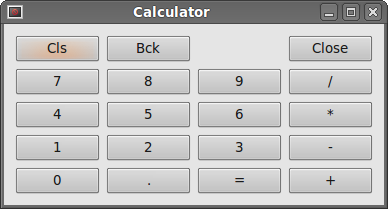 Figure: Calculator skeleton
QtGui.QGridLayout的更多相关文章
- PySide中QtGui.QFrame的用法
最近一位同事的出现让我重新正视PySide中designer这个工具的强大之处,通过QtGui.QObject.setGeometry(QtCore.QRect())这个最简单直接的方法可以完成很多复 ...
- pyqt布局管理器QGridLayout简单示例
# _*_ coding:utf-8 _*_ import sys from PyQt4 import QtGui class Example(QtGui.QWidget): def __init__ ...
- Python应用03 使用PyQT制作视频播放器
作者:Vamei 出处:http://www.cnblogs.com/vamei 严禁任何形式转载. 最近研究了Python的两个GUI包,Tkinter和PyQT.这两个GUI包的底层分别是Tcl/ ...
- PyQt4入门学习笔记(三)
# PyQt4入门学习笔记(三) PyQt4内的布局 布局方式是我们控制我们的GUI页面内各个控件的排放位置的.我们可以通过两种基本方式来控制: 1.绝对位置 2.layout类 绝对位置 这种方式要 ...
- Pyqt 获取打包二进制文件中的资源
记得有一次打开一个单独exe程序,点击btn中的一个帮助说明按钮,在同级目录下就多出一个help.chm 文件并自动打开. 那这个exe肯定是把help.chm 打包到exe中,当我触发“帮助”按钮的 ...
- linux下使用多线程编写的聊天室
自从开始学linux网络编程后就想写个聊天室,一开始原本打算用多进程的方式来写,可是发觉进程间的通信有点麻烦,而且开销也大,后来想用多线程能不能实现呢,于是便去看了一下linux里线程的用法,实际上只 ...
- python GUI输入窗口
为了解决 sublime text 下 python 的 raw_input() 函数无法起效,便萌生了个用 GUI 窗口来获取输入的想法,一开始想用 Tkinter,后来想了下还是用 PyQt 吧, ...
- Pyqt 窗体间传值
窗体间传值网上有好多方法,比如新建文件,先将子类窗体的数据传到文件中,父窗体读取文件. Signal&Slot机制进行传值 等等 在这里,我们就举个采用apply方法:Signal& ...
- Pyqt QSystemTrayIcon 实现托盘效果
pyqt的托盘效果很好实现,在Pyqt的demo中有个例子 路径:PyQt4\examples\desktop\systray.py 今天我就仿这个Tray效果做效果 一. 创建UI trayicon ...
随机推荐
- luogu P1809 过河问题_NOI导刊2011提高(01)
题目描述 有一个大晴天,Oliver与同学们一共N人出游,他们走到一条河的东岸边,想要过河到西岸.而东岸边有一条小船. 船太小了,一次只能乘坐两人.每个人都有一个渡河时间T,船划到对岸的时间等于船上渡 ...
- loj117 有源汇有上下界最小流
link 题意&题解 code: #include<bits/stdc++.h> #define rep(i,x,y) for (int i=(x);i<=(y);i++) ...
- 【洛谷】P1631: 序列合并
P1631 序列合并 题目描述 有两个长度都是N的序列A和B,在A和B中各取一个数相加可以得到N2个和,求这N2个和中最小的N个. 输入输出格式 输入格式: 第一行一个正整数N: 第二行N个整数Ai ...
- [转]Android Studio开发入门-引用jar及so文件
注意: 1.jar包在app的libs目录 2.so文件放在src/main”目录中名为“jniLibs”的目录 一.引用jar文件 1.将jar文件复制.粘贴到app的libs目录中: ...
- Swift 笔记1
// Playground - noun: a place where people can play import Cocoa var str = "Hello, playground&q ...
- JVM堆设置及调优
1.JVM堆设置 -Xmx3550m 设置JVM最大堆内存 为3550M. -Xms3550m 设置JVM初始堆内存 为3550M.此值可以设置与-Xmx相同,以避免每次垃圾回收完成后JVM重新分配内 ...
- Android PopupWindow做的分享界面
package com.tq.mbaexam.view; import java.util.ArrayList; import java.util.LinkedHashMap; import java ...
- java通过jacob来读取word转换为htm格式
转自:http://blog.csdn.net/chinapi_hzh/article/details/5798689 因为微软没有公开word源代码,所以直接用java流来读取word的后果是读出来 ...
- 加载大量的xml数据 使用压缩方法解决(当然较小时也可以压缩)
如果你的应该程序必须在运行期间加载一个外部大且冗长的XML文件时,这个方案可能是有用的,通过将XML保存为二进制,你可以压缩数据得到一个较小的文件,当然,你可以得到的压缩的数量取决于数据的复杂性,但它 ...
- Ext 的Ajax 请求,添加mask 等待效果
{ text: "删除", iconCls: "btn-del", scope: this, handler: function() { var f = thi ...