
python开发_os.path
在python中,os.path模块在处理路径的时候非常有用
下面是我做的demo
运行效果:
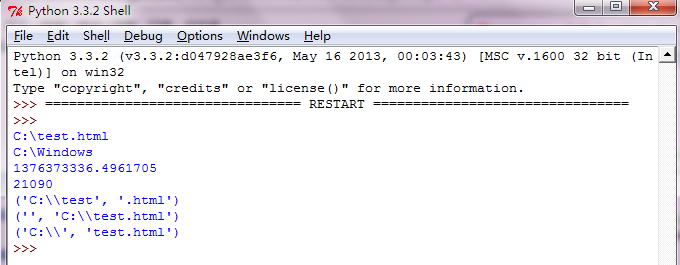
=========================================
代码部分:
=========================================
 #python os

 import os

 def abspath(path):

     '''Return a normalized absolutized version of the pathname path'''

     return os.path.abspath(path)

 def dirname(path):

     '''Return the directory name of pathname path'''

     return os.path.dirname(path)

 def getatime(path):

     '''Return the time of last access of path'''

     return os.path.getatime(path)

 def gettime(path):

     '''Return the time of last modification of path'''

     return os.path.gettime(path)

 def getsize(path):

     '''Return the size, in bytes, of path. Raise OSError if the file does not exist or is inaccessible.'''

     return os.path.getsize(path)

 def is_file(path):

     '''Return True if path is an existing regular file.

     This follows symbolic links, so both islink() and isfile()

     can be true for the same path.'''

     return os.path.isfile(path)

 def is_dir(path):

     '''Return True if path is an existing directory. This follows symbolic links,

     so both islink() and isdir() can be true for the same path.'''

     return os.path.isdir(path)

 def is_link(path):

     '''Return True if path refers to a directory entry that

     is a symbolic link. Always False if symbolic links are not supported.'''

     return os.path.islink(path)

 def splitext(path):

     '''

     Split the pathname path into a pair (root, ext) such that

     root + ext == path, and ext is empty or begins with a period

     and contains at most one period. Leading periods on the basename

     are ignored; splitext('.cshrc') returns ('.cshrc', '').

     '''

     return os.path.splitext(path)

 def splitunc(path):

     '''

     Split the pathname path into a pair (unc, rest) so that unc is

     the UNC mount point (such as r'\\host\mount'), if present,

     and rest the rest of the path (such as r'\path\file.ext').

     For paths containing drive letters, unc will always be the

     empty string.

     '''

     return os.path.splitunc(path)

 def split(path):

     '''Split the pathname path into a pair, (head, tail) where tail is the last

     pathname component and head is everything leading up to that'''

     return os.path.split(path)

 def main():

     path_file = 'C:\\test.html'

     path_dir = 'C:\\Windows\\Branding'

     print(abspath(path_file))

     print(dirname(path_dir))

     print(getatime(path_file))

     print(getsize(path_file))

     print(splitext(path_file))

     print(splitunc(path_file))

     print(split(path_file))

 if __name__ == '__main__':

     main()
python开发_os.path的更多相关文章
- 【Machine Learning】Python开发工具:Anaconda+Sublime
Python开发工具:Anaconda+Sublime 作者:白宁超 2016年12月23日21:24:51 摘要:随着机器学习和深度学习的热潮,各种图书层出不穷.然而多数是基础理论知识介绍,缺乏实现 ...
- ubuntu上用eclipse搭建java、python开发环境
上一篇文章讲到如何在windwos上用eclipse搭建java.python开发环境,这一讲将关注如何在ubuntu上实现搭建,本人使用虚拟机安装的ubuntu系统,系统版本为:14.04 lts ...
- windows 下用eclipse搭建java、python开发环境
本人只针对小白!本文只针对小白!本文只针对小白! 最近闲来无事,加上之前虽没有做过eclipse上java.python的开发工作,但一直想尝试一下.于是边查找资料边试验,花了一天时间在自己的机器上用 ...
- kali linux Python开发环境初始化
kali linux Python 黑客编程1 开发环境初始化 为什么要选择Python? Python作为目前Linux系统下最流行的编程语言之一,对于安全工作者的作用可以和C++相提并论.Pyth ...
- Sublime搭建Python开发环境
print ('hello world!') 1. 下载python,并设置path系统环境变量:当在命令行中输入python,出现如下界面,显示安装成功. 2. 安装最新的sublime,使用注册机 ...
- SublimeText3下的Python开发环境配置
最近重装了机器,需要重新安装Python的开发环境,中间遇到了几个问题,特些记录一下,以防下次备忘. 从Python的网站下载安装Python,这个非常简单,没有什么值得说的,大家可以参考廖雪峰的这个 ...
- Python开发【第六篇】:模块
模块,用一砣代码实现了某个功能的代码集合. 类似于函数式编程和面向过程编程,函数式编程则完成一个功能,其他代码用来调用即可,提供了代码的重用性和代码间的耦合.而对于一个复杂的功能来,可能需要多个函数才 ...
- Python开发【第二篇】:初识Python
Python开发[第二篇]:初识Python Python简介 Python前世今生 python的创始人为吉多·范罗苏姆(Guido van Rossum).1989年的圣诞节期间,吉多·范罗苏 ...
- 翻译:打造基于Sublime Text 3的全能python开发环境
原文地址:https://realpython.com/blog/python/setting-up-sublime-text-3-for-full-stack-python-development/ ...
随机推荐
- javascript经典小游戏代码集合
http://www.jb51.net/Special/349.htm
- uboot之---make smdk2410_config命令详细解析
先进入顶层Makefile.有很多相对不同板子的配置,如: gec2440_config:unconfig @$(MKCONFIG) $(@:_config=) arm arm920t gec2440 ...
- Linux mint 18.1 / Ubuntu 16.04 安装steam
这里以Limit Mint 18.1为例: 安装steam: sudo dpkg -i steam.deb 运行后会有如下错误: 直接运行如下命令修复, 并自动启动steam: LD_PRELOAD= ...
- ubuntu新机安装工具
ubuntu新机安装工具:1,sudo apt-get install ssh vim2, 设置root密码,以备不时之需: 执行:sudo passwd root 然后输入当前三次密码,第一次是当前 ...
- sar命令使用【转】
sar(System Activity Reporter系统活动情况报告)是目前 Linux 上最为全面的系统性能分析工具之一,可以从多方面对系统的活动进行报告,包括:文件的读写情况.系统调用的使用情 ...
- 安装 Xamarin for Visual Studio
总得来说,Xamarin 有“联网自动安装”和“手动安装”两种方式. 说明:本文涉及得资源链接都是官网的,同时,在 我的网盘 也有相关备份. 现在,我就以 Windows 为例来大概说明……(-=-我 ...
- shell脚本执行方式
# BY THE WAY, 其实这块内容算是比较简单的,但是都比较常记得它最基本的两种方式,另外两种却忘记了 1. 利用sh或bash命令执行 sh test.sh bash test.sh 2. 在 ...
- 做php网站后台开发,在Linux系统上进行更好吗?【转载】
1. PHP是开源软件,它在bsd/linux/win下都有很好的正式版及孪生版.并非开发php就必须要在linux下进行.主机服务商们习惯性的把asp与php分为两个主机系列几进行销售.由于asp只 ...
- C/C++——C语言常用库函数
本文转载自:https://blog.csdn.net/qq_36955347/article/details/71511900 一.数学函数 调用数学函数时,要求在源文件中包下以下命令行: #inc ...
- 观察者模式和java委托
观察者模式与java委托 所谓观察者模式,指的某个状态信息的改变,会影响其他一系列的操作,这时就可以将这些操作抽象化,同时创建一个类统一的管理和执行这些操作.把这些抽象出来的操作称为观察者类,而管理这 ...