
spring mvc mongoDb
http://www.cnblogs.com/dennisit/p/3372568.html
系统环境:
操作系统: windows xp
数 据 库: mongodb2.0.6
驱 动 包: Spring3.1.2 + mongodb2.7.3 + spring-data-mongodb1.0.1
说明: 对于xp系统用户,在执行mongod.exe安装mongodb时 出现,无法定位程序输入点 InterlockedCompareExchange64 于动态链接库KERNEL32.dll上,这是因为最新的开发分支已经不再支持xp.也就是说你的mongodb安装包不支持xp系统.V2.0.6是最新也是最后一个新版本支持xp.所以笔者使用数据库为2.0.6
项目结构: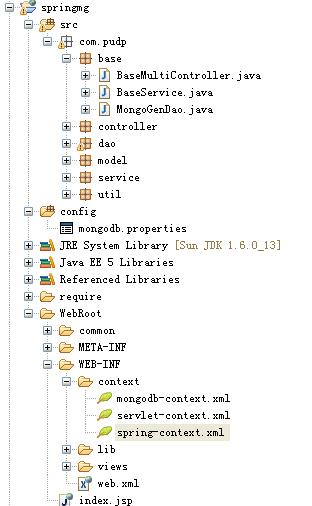
配置说明:
Web.xml文件配置spring相关与springmvc相关.

<?xml version="1.0" encoding="UTF-8"?>

<web-app version="2.5"

    xmlns="http://java.sun.com/xml/ns/javaee"

    xmlns:xsi="http://www.w3.org/2001/XMLSchema-instance"

    xsi:schemaLocation="http://java.sun.com/xml/ns/javaee

    http://java.sun.com/xml/ns/javaee/web-app_2_5.xsd">

      <!-- spring配置 -->

    <context-param>

        <param-name>contextConfigLocation</param-name>

        <param-value>/WEB-INF/context/spring-context.xml</param-value>

    </context-param>

    <listener>

        <listener-class>org.springframework.web.context.ContextLoaderListener</listener-class>

    </listener>

    <!-- spring MVC配置 -->

    <servlet>

        <servlet-name>springmvc</servlet-name>

        <servlet-class>org.springframework.web.servlet.DispatcherServlet</servlet-class>

        <init-param>

            <param-name>contextConfigLocation</param-name>

            <param-value>/WEB-INF/context/servlet-context.xml</param-value>  <!--指定XML文件位置-->

        </init-param>

        <load-on-startup>4</load-on-startup>

    </servlet>

    <servlet-mapping>

        <servlet-name>springmvc</servlet-name>

        <url-pattern>/</url-pattern>

    </servlet-mapping>

  <welcome-file-list>

    <welcome-file>index.jsp</welcome-file>

  </welcome-file-list>

</web-app>
Springmvc的配置文件servlet-context.xml
<?xml version="1.0" encoding="UTF-8"?>

<beans xmlns="http://www.springframework.org/schema/beans"

    xmlns:xsi="http://www.w3.org/2001/XMLSchema-instance"

    xmlns:util="http://www.springframework.org/schema/util"

    xmlns:p="http://www.springframework.org/schema/p"

    xmlns:aop="http://www.springframework.org/schema/aop"

    xmlns:tx="http://www.springframework.org/schema/tx"

    xmlns:mvc="http://www.springframework.org/schema/mvc"

    xmlns:context="http://www.springframework.org/schema/context"

    xsi:schemaLocation="

    http://www.springframework.org/schema/beans http://www.springframework.org/schema/beans/spring-beans-3.1.xsd

    http://www.springframework.org/schema/util http://www.springframework.org/schema/util/spring-util-3.1.xsd

    http://www.springframework.org/schema/tx http://www.springframework.org/schema/tx/spring-tx-3.1.xsd

    http://www.springframework.org/schema/aop http://www.springframework.org/schema/aop/spring-aop-3.1.xsd

    http://www.springframework.org/schema/mvc http://www.springframework.org/schema/mvc/spring-mvc-3.1.xsd

    http://www.springframework.org/schema/context

    http://www.springframework.org/schema/context/spring-context-3.1.xsd">

    <!-- DispatcherServlet Context: defines this servlet's request-processing infrastructure -->

    <!-- Enables the Spring MVC @Controller programming model -->

    <mvc:annotation-driven />

    <context:component-scan base-package="com.pudp" />

    <!-- 配置基于Session的处理,将提交上来的locale参数进行处理 -->

    <bean id="localeResolver" class="org.springframework.web.servlet.i18n.SessionLocaleResolver">

        <!-- 该属性可以不用配置 -->

        <property name="defaultLocale" value="ja"></property>

    </bean>

    <!-- Resolves views selected for rendering by @Controllers to .jsp resources in the /WEB-INF/views directory -->

    <bean class="org.springframework.web.servlet.view.InternalResourceViewResolver">

        <property name="prefix" value="/WEB-INF/views/" />

        <property name="suffix" value=".jsp" />

    </bean>

</beans>
spring配置文件Spring-context.xml
<?xml version="1.0" encoding="UTF-8"?>

<beans xmlns="http://www.springframework.org/schema/beans"

    xmlns:xsi="http://www.w3.org/2001/XMLSchema-instance"

    xmlns:util="http://www.springframework.org/schema/util"

    xmlns:p="http://www.springframework.org/schema/p"

    xmlns:aop="http://www.springframework.org/schema/aop"

    xmlns:tx="http://www.springframework.org/schema/tx"

    xmlns:context="http://www.springframework.org/schema/context"

    xsi:schemaLocation="

    http://www.springframework.org/schema/beans http://www.springframework.org/schema/beans/spring-beans-3.1.xsd

    http://www.springframework.org/schema/util http://www.springframework.org/schema/util/spring-util-3.1.xsd

    http://www.springframework.org/schema/tx http://www.springframework.org/schema/tx/spring-tx-3.1.xsd

    http://www.springframework.org/schema/aop http://www.springframework.org/schema/aop/spring-aop-3.1.xsd

    http://www.springframework.org/schema/context

    http://www.springframework.org/schema/context/spring-context-3.1.xsd">

   <context:annotation-config />

   <context:component-scan base-package="com.pudp" />

   <!-- 导入mongodb的配置文件 -->

   <import resource="mongodb-context.xml"/>

</beans>
mongodb的配置文件mongodb-context.xml
<?xml version="1.0" encoding="UTF-8"?>

<beans xmlns="http://www.springframework.org/schema/beans"

    xmlns:xsi="http://www.w3.org/2001/XMLSchema-instance"

    xmlns:context="http://www.springframework.org/schema/context"

    xmlns:mongo="http://www.springframework.org/schema/data/mongo"

    xsi:schemaLocation="http://www.springframework.org/schema/context

          http://www.springframework.org/schema/context/spring-context-3.0.xsd

          http://www.springframework.org/schema/data/mongo

          http://www.springframework.org/schema/data/mongo/spring-mongo-1.0.xsd

          http://www.springframework.org/schema/beans

          http://www.springframework.org/schema/beans/spring-beans-3.0.xsd">

    <!-- 加载mongodb的属性配置文件 -->

    <context:property-placeholder location="classpath:mongodb.properties" />

    <!-- 定义mongo对象,对应的是mongodb官方jar包中的Mongo,replica-set设置集群副本的ip地址和端口 -->

    <mongo:mongo id="mongo" replica-set="${mongo.hostport}">

        <!-- 一些连接属性的设置 -->

        <mongo:options

             connections-per-host="${mongo.connectionsPerHost}"

             threads-allowed-to-block-for-connection-multiplier="${mongo.threadsAllowedToBlockForConnectionMultiplier}"

             connect-timeout="${mongo.connectTimeout}"

             max-wait-time="${mongo.maxWaitTime}"

             auto-connect-retry="${mongo.autoConnectRetry}"

             socket-keep-alive="${mongo.socketKeepAlive}"

             socket-timeout="${mongo.socketTimeout}"

             slave-ok="${mongo.slaveOk}"

             write-number="1"

             write-timeout="0"

             write-fsync="true"/>

    </mongo:mongo>

    <mongo:db-factory dbname="database" mongo-ref="mongo" />

    <bean id="mongoTemplate" class="org.springframework.data.mongodb.core.MongoTemplate">

        <constructor-arg ref="mongo" />

        <constructor-arg name="databaseName" value="db_mongo" />

    </bean>

</beans>
mongodb的属性配置文件mongodb.properties
mongo.hostport=127.0.0.1:27017

mongo.connectionsPerHost=8

mongo.threadsAllowedToBlockForConnectionMultiplier=4

#连接超时时间

mongo.connectTimeout=1000

#等待时间

mongo.maxWaitTime=1500

mongo.autoConnectRetry=true

mongo.socketKeepAlive=true

#Socket超时时间

mongo.socketTimeout=1500

mongo.slaveOk=true
编写Controller、Service、Dao相关.这里我们测试以下Spring-data-mong中对Collection的实现机制. 我们创建不同的实体类型Member、Article
然后编写对应的Service、Dao实现.这里我们侧重点持久层实现
持久层的操作实现
ArticleDao
package com.pudp.dao;

import org.springframework.stereotype.Repository;

import com.pudp.base.MongoGenDao;

import com.pudp.model.Article;

/**

 * description:

 *

 * @author <a href='mailto:dennisit@163.com'> Cn.苏若年 (En.dennisit)</a> Copy Right since 2013-10-16

 *

 * com.pudp.dao.ArticleDao.java

 *

 */

@Repository

public class ArticleDao extends MongoGenDao<Article>{

    /**

     * 实现钩子方法,返回反射的类型

     * @author <a href='mailto:dennisit@163.com'>Cn.苏若年(En.dennisit)</a> Copy Right since 2013-10-13

     *

     * @return

     */

    @Override

    protected Class<Article> getEntityClass() {

        return Article.class;

    }

}
MemberDao
package com.pudp.dao;

import org.springframework.stereotype.Repository;

import com.pudp.base.MongoGenDao;

import com.pudp.model.Member;

/**

 * description:

 *

 * @author <a href='mailto:dennisit@163.com'> Cn.苏若年 (En.dennisit)</a> Copy Right since 2013-10-13

 *

 * com.pudp.dao.MemberDao.java

 *

 */

@Repository

public class MemberDao extends MongoGenDao<Member>{

    /**

     * 实现钩子方法,返回反射的类型

     * @author <a href='mailto:dennisit@163.com'>Cn.苏若年(En.dennisit)</a> Copy Right since 2013-10-13

     *

     * @return

     */

    @Override

    protected Class<Member> getEntityClass() {

        return Member.class;

    }

}
MongoGenDao中我们实现了对库中添加数据
package com.pudp.base;

import org.springframework.beans.factory.annotation.Autowired;

import org.springframework.data.mongodb.core.MongoTemplate;

/**

 * description:

 *

 * @author <a href='mailto:dennisit@163.com'> Cn.苏若年 (En.dennisit)</a> Copy Right since 2013-10-13

 *

 * com.pudp.base.MongoGenDao.java

 *

 */

public abstract class MongoGenDao<T> {

    @Autowired

    protected MongoTemplate mongoTemplate;

    /**

     * 保存一个对象

     *

     * @author <a href='mailto:dennisit@163.com'>Cn.苏若年(En.dennisit)</a> Copy Right since 2013-10-13 下午03:37:28

     *

     * @param t

     * @return

     */

    public void save(T t){

        this.mongoTemplate.save(t);

    }

    /**

     * 为属性自动注入bean服务

     *

     * @author <a href='mailto:dennisit@163.com'>Cn.pudp(En.dennisit)</a> Copy Right since 2013-10-13 下午03:21:23

     *

     * @param mongoTemplate

     */

    public void setMongoTemplate(MongoTemplate mongoTemplate) {

        this.mongoTemplate = mongoTemplate;

    }

}
这里需要说明的是MongoTemplate对库的管理。
MongoTemplate对库Collection的管理
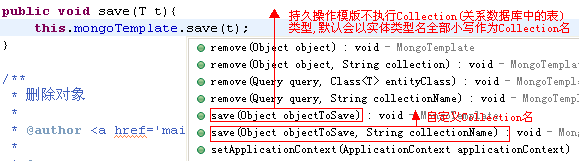
我们使用MongoTemplate操作持久层.这里如果我们没有指定CollectionName的话,会依实体类型的类名作为库中的集合名,当我们执行数据入库操作之后,从数据库中查看到如下信息.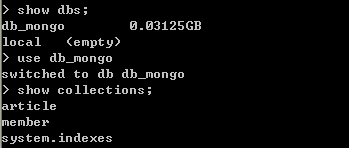
当然,如果我们想自己定义数据库的Collection名的化,可以在持久层Dao中指定. 关于Mongodb的可以Mongodb相关的内容. 后续将介绍SpringMVC+ Mongodb 的CRUD + 分页实现.
转载请注明出处:[http://www.cnblogs.com/dennisit/p/3372568.html]
spring mvc mongoDb的更多相关文章
- mongoDB数据库和Spring MVC的整合
之前一直用到的项目是Spring MVC+maven+mysql的,最近有些数据需要用到mongoDB数据库,现在做一些总结. 第一步:加载jar.maven配置 <!-- mongodb开始 ...
- spring MVC 整合mongodb
Spring Mongodb 目录 1 SPRING整合MONGODB 1 1.1 环境准备 1 1.2 包依赖 1 1.3 配置 2 2 案列 5 2.1 SPRING MVC整合MONGODB代码 ...
- Spring Data MongoDB example with Spring MVC 3.2
Spring Data MongoDB example with Spring MVC 3.2 Here is another example web application built with S ...
- Spring MVC中使用Mongodb总结
近期项目做了次架构调整,原来是使用MySQL+GeoHash来存储LBS数据(地理位置信息),现在使用NOSQL数据库MongoDB来存储LBS数据(地理位置信息).由于项目是基于spring MVC ...
- Spring MVC + Spring MongoDB + Querydsl 通过maven整合实例
效果图 一共3个页面:注册页,欢迎页,用户列表页 很简单的例子,主要是为了把流程走通,没有各种验证. 注册页: 欢迎页: 用户列表页: 源码地址 https://github.com/lemonbar ...
- Spring MVC通过Pageable对象和PageableDefault注解获取分页信息(MongoDB通过Pageable来操作分页)
说明:Pageable同时也能用于操作MongoDB的分页. PageableSpring Data库中定义的一个接口,该接口是所有分页相关信息的一个抽象,通过该接口,我们可以得到和分页相关所有信息( ...
- intellij idea 12 搭建maven web项目 freemarker + spring mvc
配置spring mvc ,写这篇文章的时候spring已经出了4.0 这里还是用稳定的3.2.7.RELEASE,先把spring和freemarker配置好 1.spring mvc配置 在web ...
- spring mvc中的@propertysource
在spring mvc中,在配置文件中的东西,可以在java代码中通过注解进行读取了: @PropertySource 在spring 3.1中开始引入 比如有配置文件 config.propert ...
- Spring MVC文件上传出现错误:Required MultipartFile parameter 'file' is not present
1.配置文件上传的解析器 首先需要在spring mvc的配置文件中(注意是spring mvc的配置文件而不是spring的配置文件:applicationContext.xml)配置: sprin ...
随机推荐
- Java/JSP获得客户端网卡MAC地址的三种方法解析
java/jsp获得客户端(IE)网卡MAC地址的方法大概有三种. 1.通过命令方式,在客户端执行Ipconfig 等等.(java/jsp) 2.通过ActiveX的方法.(jsp) 3.通过向13 ...
- 【k8s】基础概念 + 工作原理
工作原理: 原理图 工作原理描述: 1>用户通过kubectl或者API server的REST API接口,提交需要运行的docker容器(创建pod请求): 2>api server将 ...
- MQ:Introducing Advanced Messaging
原文地址:http://www.yourenterprisearchitect.com/2011/11/introducing-advanced-messaging.html. Introducing ...
- StringBuffer与StringBuilder差别
从JDK源代码能够看出,StringBuffer和StringBuilder都是继承自AbstractStringBuilder,事实上这两个类的功能实现都是在AbstractStringBuilde ...
- Exchange2003/2010共存模式环境迁移
一.我司的exchange2010架构设计基于中心的模式进行.而且基于exchange2010sp3进行. 基于dag三台架构设计进行,截止到5月14日,北京局基于2台dag进行,大连局基于excha ...
- jQuery Ajax方式上传文件实现暂停或取消上传
未上传时要实现取消,很简单... 但如果用户点击了上传,并加载了进度信息... 2017-05-04再次改进.在上传过程中用户可以按 Esc 来取消上传(取消当前上传,或者是全部上传)... 也可以在 ...
- 用layer-list实现图片旋转叠加、错位叠加、阴影、按钮指示灯
先来看看一个简单的文件: <?xml version="1.0" encoding="utf-8"?> <layer-list xmlns:a ...
- 《Excel效率手册:早做完,不加班》
<Excel效率手册:早做完,不加班> 基本信息 作者: 陈锡卢 杨明辉 出版社:清华大学出版社 ISBN:9787302350743 上架时间:2014-5-8 出版日期:2014 ...
- Orchard模块开发全接触8:改造后台
后台默认提供了 Content 的管理,但是,所有的内容类型揉杂在一起,而我们需要更深度的定制一些功能,比如,我们只想管理订单,又比如,我们需要对注册用户进行管理.本篇的内容包括: 1:自定义 adm ...
- BZOJ3328: PYXFIB
题目:http://www.lydsy.com/JudgeOnline/problem.php?id=3328 题解:关键在于只处理i%k的项,那么我们就需要用一个式子来表达这个东西. p%k==1. ...