
web-Amazon
一 准备实验数据
1.1.下载数据
wget http://snap.stanford.edu/data/amazon/all.txt.gz
1.2.数据分析
1.2.1.数据格式
product/productId: B00006HAXW

product/title: Rock Rhythm & Doo Wop: Greatest Early Rock

product/price: unknown

review/userId: A1RSDE90N6RSZF

review/profileName: Joseph M. Kotow

review/helpfulness: /

review/score: 5.0

review/time:

review/summary: Pittsburgh - Home of the OLDIES

review/text: I have all of the doo wop DVD's and this one is as good or better than the

1st ones. Remember once these performers are gone, we'll never get to see them again.

Rhino did an excellent job and if you like or love doo wop and Rock n Roll you'll LOVE

this DVD !!
而,
- product/productId: asin, e.g. amazon.com/dp/B00006HAXW #亚马逊标准识别号码(英语:Amazon Standard Identification Number),简称ASIN(productId),是一个由十个字符(字母或数字)组成的唯一识别号码。由亚马逊及其伙伴分配,并用于亚马逊上的产品标识。
- product/title: title of the product
- product/price: price of the product
- review/userId: id of the user, e.g. A1RSDE90N6RSZF
- review/profileName: name of the user
- review/helpfulness: fraction of users who found the review helpful
- review/score: rating of the product
- review/time: time of the review (unix time)
- review/summary: review summary
- review/text: text of the review
1.2.2.数据格式转换
首先,我们需要把原始数据格式转换成dictionary
import pandas as pd

import numpy as np

import datetime

import gzip

import json

from  sklearn.decomposition import PCA

from myria import *

import simplejson

def parse(filename):

    f = gzip.open(filename, 'r')

    entry = {}

    for l in f:

        l = l.strip()

        colonPos = l.find(':')

        if colonPos == -1:

            yield entry

            entry = {}

            continue

        eName = l[:colonPos]

        rest = l[colonPos+2:]

        entry[eName] = rest

    yield entry

f = gzip.open('somefile.gz', 'w')

#review_data = parse('kcore_5.json.gz')

for e in parse("kcore_5.json.gz"):

        f.write(str(e))

f.close()
py文件执行时报错: string indices must be intergers
分析原因:
在.py文件中写的data={"a":"123","b":"456"},data类型为dict
而在.py文件中通过data= arcpy.GetParameter(0) 获取在GP中传过来的参数{"a":"123","b":"456"},data类型为字符串!!!
所以在后续的.py中用到的data['a']就会报如上错误!!!
解决方案:
data= arcpy.GetParameter(0)
data=json.loads(data) //将字符串转成json格式
或
data=eval(data) #本程序中我们采用eval()的方式,将字符串转成dict格式
二.数据预处理
思路:
#import libraries
# Helper functions
# Prepare the review data for training and testing the algorithms
# Preprocess product data for Content-based Recommender System
# Upload the data to the MySQL Database on an Amazon Web Services ( AWS) EC2 instance
2.1创建DataFrame
f parse(path):

  f = gzip.open(path, 'r')

  for l in f:

    yield eval(l)

review_data = parse('/kcore_5.json.gz')

productID = []

userID = []

score = []

reviewTime = []

rowCount = 0

while True:

    try:

        entry = next(review_data)

        productID.append(entry['asin'])

        userID.append(entry['reviewerID'])

        score.append(entry['overall'])

        reviewTime.append(entry['reviewTime'])

        rowCount += 1

        if rowCount % 1000000 == 0:

            print 'Already read %s observations' % rowCount

    except StopIteration, e:

        print 'Read %s observations in total' % rowCount

        entry_list = pd.DataFrame({'productID': productID,

                                   'userID': userID,

                                   'score': score,

                                   'reviewTime': reviewTime})

        filename = 'review_data.csv'

        entry_list.to_csv(filename, index=False)

        print 'Save the data in the file %s' % filename

        break

entry_list = pd.read_csv('review_data.csv')
2.2数据过滤
def filterReviewsByField(reviews, field, minNumReviews):

    reviewsCountByField = reviews.groupby(field).size()

    fieldIDWithNumReviewsPlus = reviewsCountByField[reviewsCountByField >= minNumReviews].index

    #print 'The number of qualified %s: ' % field, fieldIDWithNumReviewsPlus.shape[0]

    if len(fieldIDWithNumReviewsPlus) == 0:

        print 'The filtered reviews have become empty'

        return None

    else:

        return reviews[reviews[field].isin(fieldIDWithNumReviewsPlus)]

def checkField(reviews, field, minNumReviews):

    return np.mean(reviews.groupby(field).size() >= minNumReviews) == 1

def filterReviews(reviews, minItemNumReviews, minUserNumReviews):

    filteredReviews = filterReviewsByField(reviews, 'productID', minItemNumReviews)

    if filteredReviews is None:

        return None

    if checkField(filteredReviews, 'userID', minUserNumReviews):

        return filteredReviews

    filteredReviews = filterReviewsByField(filteredReviews, 'userID', minUserNumReviews)

    if filteredReviews is None:

        return None

    if checkField(filteredReviews, 'productID', minItemNumReviews):

        return filteredReviews

    else:

        return filterReviews(filteredReviews, minItemNumReviews, minUserNumReviews)

def filteredReviewsInfo(reviews, minItemNumReviews, minUserNumReviews):

    t1 = datetime.datetime.now()

    filteredReviews = filterReviews(reviews, minItemNumReviews, minUserNumReviews)

    print 'Mininum num of reviews in each item: ', minItemNumReviews

    print 'Mininum num of reviews in each user: ', minUserNumReviews

    print 'Dimension of filteredReviews: ', filteredReviews.shape if filteredReviews is not None else '(0, 4)'

    print 'Num of unique Users: ', filteredReviews['userID'].unique().shape[0]

    print 'Num of unique Product: ', filteredReviews['productID'].unique().shape[0]

    t2 = datetime.datetime.now()

    print 'Time elapsed: ', t2 - t1

    return filteredReviews

allReviewData = filteredReviewsInfo(entry_list, 100, 10)

smallReviewData = filteredReviewsInfo(allReviewData, 150, 15)
理论知识
1. Combining predictions for accurate recommender systems
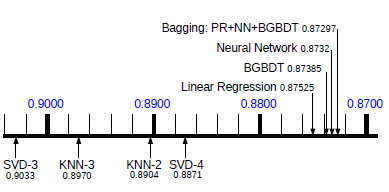
So, for practical applications we recommend to use a neural network in combination with bagging due to the fast prediction speed.
Collaborative ltering(协同过滤,筛选相似的推荐):电子商务推荐系统的主要算法,利用某兴趣相投、拥有共同经验之群体的喜好来推荐用户感兴趣的信息
web-Amazon的更多相关文章
- Amazon AWS EC2开启Web服务器配置
在Amazon AWS EC2申请了一年的免费使用权,安装了CentOS + Mono + Jexus环境做一个Web Server使用. 在上述系统安装好之后,把TCP 80端口开启(iptable ...
- Summary of Amazon Marketplace Web Service
Overview Here I want to summarize Amazon marketplace web service (MWS or AMWS) that can be used for ...
- Getting Started with Amazon EC2 (1 year free AWS VPS web hosting)
from: http://blog.coolaj86.com/articles/getting-started-with-amazon-ec2-1-year-free-aws-vps-web-host ...
- 注册 Amazon Web Services(AWS) 账号,助园一臂之力
感谢大家去年的大力支持,今年园子继续和 Amazon Web Services(AWS) 合作,只要您通过 博客园专属链接 注册一个账号(建议使用手机4G网络注册),亚马逊就会给园子收入,期待您的支持 ...
- AWS(0) - Amazon Web Services
Computer EC2 – Virtual Servers in the Cloud EC2 Container Service – Run and Manage Docker Containers ...
- Amazon Web Services (目录)
一.官方声明 AWS云全球服务基础设施区域列表 AWS产品定价国外区 AWS产品定价中国区 (注意!需要登陆账户才能查看) AWS产品费用预算 AWS区域和终端节点 二.计算 Amazon学习:如何启 ...
- Amazon Web Services
- 亚马逊记AWS(Amazon Web Services)自由EC2应用
很长时间,我听到AWS能够应用,但是需要结合信用卡,最近申请了. 说是免费的,我还是扣6.28,后来我上网查了.认为是通过进行验证.像服务期满将返回. 关键是不要让我进入全抵扣信用卡支付passwor ...
- 网络爬虫: 从allitebooks.com抓取书籍信息并从amazon.com抓取价格(3): 抓取amazon.com价格
通过上一篇随笔的处理,我们已经拿到了书的书名和ISBN码.(网络爬虫: 从allitebooks.com抓取书籍信息并从amazon.com抓取价格(2): 抓取allitebooks.com书籍信息 ...
- 网络爬虫: 从allitebooks.com抓取书籍信息并从amazon.com抓取价格(1): 基础知识Beautiful Soup
开始学习网络数据挖掘方面的知识,首先从Beautiful Soup入手(Beautiful Soup是一个Python库,功能是从HTML和XML中解析数据),打算以三篇博文纪录学习Beautiful ...
随机推荐
- DRF的权限和频率
DRF的权限 权限组件源码 权限和频率以及版本认证都是在initial方法里初始化的 我们的权限类一定要有has_permission方法~否则就会抛出异常~~这也是框架给我提供的钩子~~ 在rest ...
- minSdk(API 26) > deviceSdk(API 19)解决方式
运行项目时出现“minSdk(API 26) > deviceSdk(API 19)”的提示,因为我用的是手机是sdk(API19)的,而项目要求是最低版本是minSdk(API 26),在我的 ...
- OpenGL ES 2 for Android - A Quick Start Guide
英文原版,语法很简单,带书签,带实例,很好的书,从头到尾讲述OpenGL强烈推荐!~~~ 扫码时备注或说明中留下邮箱 付款后如未回复请至https://shop135452397.taobao.com ...
- reportviewer需要的3个引用
安装ReportViewer后其中会出现以下DLL. Microsoft.ReportViewer.ProcessingObjectModel.dll Micr ...
- vue 父子组件相互传参
转自https://blog.csdn.net/u011175079/article/details/79161029 子组件: <template> <div> <di ...
- 25 【python入门指南】如何编写测试代码
python如何编写测试代码 python内置了unittest,使得写应用层的单元测试变得超乎寻常的简单. 1,执行单个测试函数 #!/bin/python import unittest clas ...
- JAVA EXAM3 复习提纲
[Practice11_Zipcode_ArrayList] Zipcode class: //3 variables: zipcode, city, county, and compare by c ...
- Wechat微信公众平台开发
一.微信概述 1.历史背景 1)2011年1月21日,腾讯推出微信应用程序.(张小龙) 2)2012年8月20日,腾讯推出微信公众平台功能,同年11月开放第三方接口 3)2013年11月注册用户量突破 ...
- python+selenium环境安装
目前 selenium 版本已经升级到 3.7了,网上的大部分教程是基于 2.x写的,所 以在学习前先要弄清楚版本号,这点非常重要.本系列依然以 selenium2 为基础, 目前 selenium3 ...
- Android camera2 回调imagereader 从Image拿到YUV数据转化成RGB,生成bitmap并保存
ImageUtil.java import android.graphics.ImageFormat; import android.media.Image; import android.os.Bu ...