
javascript 45种缓动效果BY司徒正美
javascript 45种缓动效果
| 参数 | 类型 | 说明 |
|---|---|---|
| el | element | 必需,为页面元素 |
| begin | number | 必需,开始的位置 |
| change | number | 必需,要移动的距离 |
| duration | number | 可选,缓动效果持续时间,默认是500ms。建议取300~1000ms。 |
| field | string | 必需,要发生变化的样式属性。请在top,left,bottom,right,width与height中选择。 |
| ftp | number | 可选,每秒进行多少帧动画,默认50帧,保证流畅播放。一些参考资料,日本动画1秒36帧,中国卡通24帧,赛车游戏60帧。 |
| ease | function | 必需,缓动公式,参数为0~1之间的数。可参考我下面给出的45条公式。 |
| onStart | function | 可选,在开始时执行。 |
| onEnd | function | 可选,在结束时执行。 |
效果图:
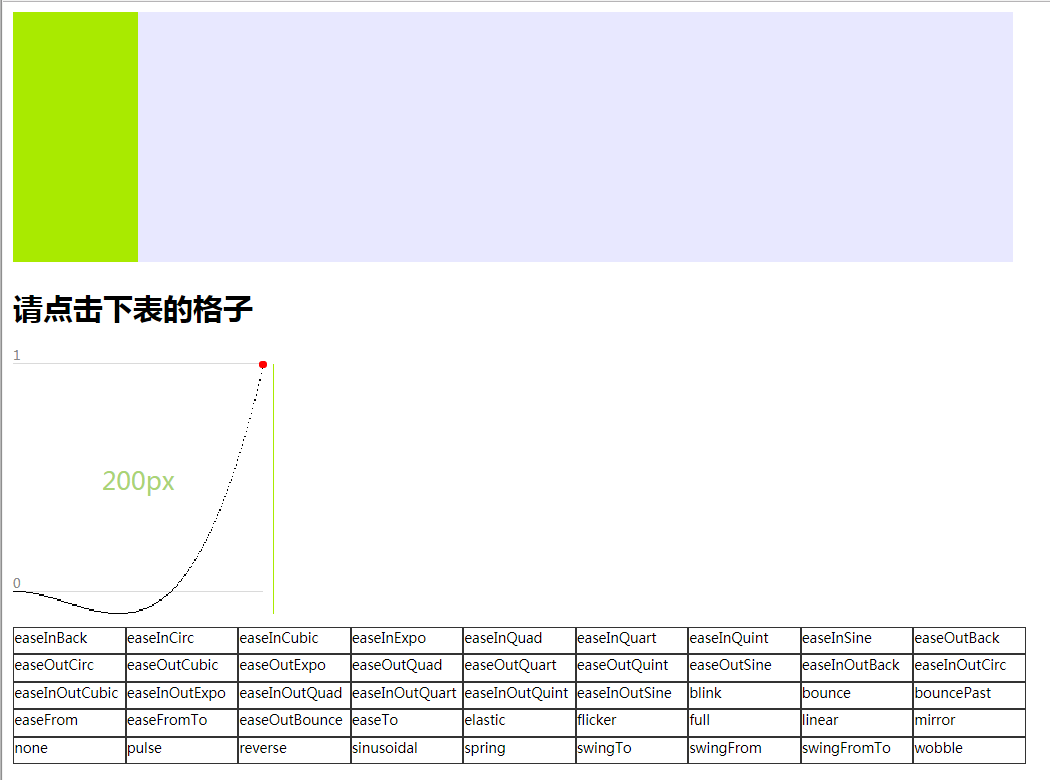
prototype流派的缓动公式,只需一个参数(增至45种)
<!DOCTYPE html>
<html> <head>
<meta charset="UTF-8">
<meta http-equiv="X-UA-Compatible" content="IE=8">
<title>JavaScript 45种缓动效果</title>
<style type="text/css">
.taxiway {
width: 800px;
height: 100px;
background: #E8E8FF;
} .move {
width: 100px;
height: 100px;
background: #a9ea00;
} #panel {
float: left;
width: 810px
} #panel div {
float: left;
width: 88px;
border: 1px solid #;
height: 20px;
font-size: 11px;
} div.transition {
margin-top: 30px;
width: 200px;
height: 200px;
position: relative;
margin-bottom: 10px;
} div.transition div {
position: absolute;
height: 1px;
width: 1px;
background: #;
} div.transition span {
display: block;
position: absolute;
border-bottom: 1px solid #dadada;
font-size: 10px;
color: #;
width: 200px;
left: 0px;
} div.transition div#indicator {
position: absolute;
background-color: #a9ea00;
height: 200px;
top: 0px;
left: 0px;
} div.transition div#marker {
background-color: #f00;
height: 6px;
width: 6px;
border-radius: 3px;
-webkit-border-radius: 3px;
-moz-border-radius: 3px;
left: 0px;
margin-bottom: -3px;
margin-left: -3px;
} div.transition div#label {
background: transparent;
color: #ABD474;
font-size: 20px;
height: 20px;
width: 200px;
text-align: center;
top: 80px;
left: 0px;
z-index: -;
}
</style>
<script type="text/javascript">
var getCoords = function(el) {
var box = el.getBoundingClientRect(),
doc = el.ownerDocument,
body = doc.body,
html = doc.documentElement,
clientTop = html.clientTop || body.clientTop || ,
clientLeft = html.clientLeft || body.clientLeft || ,
top = box.top + (self.pageYOffset || html.scrollTop || body.scrollTop) - clientTop,
left = box.left + (self.pageXOffset || html.scrollLeft || body.scrollLeft) - clientLeft
return {
'top': top,
'left': left
};
};
var getStyle = function(el, style) {
if(!+"\v1") {
style = style.replace(/\-(\w)/g, function(all, letter) {
return letter.toUpperCase();
});
var value = el.currentStyle[style];
(value == "auto") && (value = "0px");
return value;
} else {
return document.defaultView.getComputedStyle(el, null).getPropertyValue(style)
}
}
var tween = {
easeInQuad: function(pos) {
return Math.pow(pos, );
},
easeOutQuad: function(pos) {
return -(Math.pow((pos - ), ) - );
},
easeInOutQuad: function(pos) {
if((pos /= 0.5) < ) return 0.5 * Math.pow(pos, );
return -0.5 * ((pos -= ) * pos - );
},
easeInCubic: function(pos) {
return Math.pow(pos, );
},
easeOutCubic: function(pos) {
return(Math.pow((pos - ), ) + );
},
easeInOutCubic: function(pos) {
if((pos /= 0.5) < ) return 0.5 * Math.pow(pos, );
return 0.5 * (Math.pow((pos - ), ) + );
},
easeInQuart: function(pos) {
return Math.pow(pos, );
},
easeOutQuart: function(pos) {
return -(Math.pow((pos - ), ) - )
},
easeInOutQuart: function(pos) {
if((pos /= 0.5) < ) return 0.5 * Math.pow(pos, );
return -0.5 * ((pos -= ) * Math.pow(pos, ) - );
},
easeInQuint: function(pos) {
return Math.pow(pos, );
},
easeOutQuint: function(pos) {
return(Math.pow((pos - ), ) + );
},
easeInOutQuint: function(pos) {
if((pos /= 0.5) < ) return 0.5 * Math.pow(pos, );
return 0.5 * (Math.pow((pos - ), ) + );
},
easeInSine: function(pos) {
return -Math.cos(pos * (Math.PI / )) + ;
},
easeOutSine: function(pos) {
return Math.sin(pos * (Math.PI / ));
},
easeInOutSine: function(pos) {
return(-. * (Math.cos(Math.PI * pos) - ));
},
easeInExpo: function(pos) {
return(pos == ) ? : Math.pow(, * (pos - ));
},
easeOutExpo: function(pos) {
return(pos == ) ? : -Math.pow(, - * pos) + ;
},
easeInOutExpo: function(pos) {
if(pos == ) return ;
if(pos == ) return ;
if((pos /= 0.5) < ) return 0.5 * Math.pow(, * (pos - ));
return 0.5 * (-Math.pow(, - * --pos) + );
},
easeInCirc: function(pos) {
return -(Math.sqrt( - (pos * pos)) - );
},
easeOutCirc: function(pos) {
return Math.sqrt( - Math.pow((pos - ), ))
},
easeInOutCirc: function(pos) {
if((pos /= 0.5) < ) return -0.5 * (Math.sqrt( - pos * pos) - );
return 0.5 * (Math.sqrt( - (pos -= ) * pos) + );
},
easeOutBounce: function(pos) {
if((pos) < ( / 2.75)) {
return(7.5625 * pos * pos);
} else if(pos < ( / 2.75)) {
return(7.5625 * (pos -= (1.5 / 2.75)) * pos + .);
} else if(pos < (2.5 / 2.75)) {
return(7.5625 * (pos -= (2.25 / 2.75)) * pos + .);
} else {
return(7.5625 * (pos -= (2.625 / 2.75)) * pos + .);
}
},
easeInBack: function(pos) {
var s = 1.70158;
return(pos) * pos * ((s + ) * pos - s);
},
easeOutBack: function(pos) {
var s = 1.70158;
return(pos = pos - ) * pos * ((s + ) * pos + s) + ;
},
easeInOutBack: function(pos) {
var s = 1.70158;
if((pos /= 0.5) < ) return 0.5 * (pos * pos * (((s *= (1.525)) + ) * pos - s));
return 0.5 * ((pos -= ) * pos * (((s *= (1.525)) + ) * pos + s) + );
},
elastic: function(pos) {
return - * Math.pow(, - * pos) * Math.sin((pos * - ) * ( * Math.PI) / ) + ;
},
swingFromTo: function(pos) {
var s = 1.70158;
return((pos /= 0.5) < ) ? 0.5 * (pos * pos * (((s *= (1.525)) + ) * pos - s)) :
0.5 * ((pos -= ) * pos * (((s *= (1.525)) + ) * pos + s) + );
},
swingFrom: function(pos) {
var s = 1.70158;
return pos * pos * ((s + ) * pos - s);
},
swingTo: function(pos) {
var s = 1.70158;
return(pos -= ) * pos * ((s + ) * pos + s) + ;
},
bounce: function(pos) {
if(pos < ( / 2.75)) {
return(7.5625 * pos * pos);
} else if(pos < ( / 2.75)) {
return(7.5625 * (pos -= (1.5 / 2.75)) * pos + .);
} else if(pos < (2.5 / 2.75)) {
return(7.5625 * (pos -= (2.25 / 2.75)) * pos + .);
} else {
return(7.5625 * (pos -= (2.625 / 2.75)) * pos + .);
}
},
bouncePast: function(pos) {
if(pos < ( / 2.75)) {
return(7.5625 * pos * pos);
} else if(pos < ( / 2.75)) {
return - (7.5625 * (pos -= (1.5 / 2.75)) * pos + .);
} else if(pos < (2.5 / 2.75)) {
return - (7.5625 * (pos -= (2.25 / 2.75)) * pos + .);
} else {
return - (7.5625 * (pos -= (2.625 / 2.75)) * pos + .);
}
},
easeFromTo: function(pos) {
if((pos /= 0.5) < ) return 0.5 * Math.pow(pos, );
return -0.5 * ((pos -= ) * Math.pow(pos, ) - );
},
easeFrom: function(pos) {
return Math.pow(pos, );
},
easeTo: function(pos) {
return Math.pow(pos, 0.25);
},
linear: function(pos) {
return pos
},
sinusoidal: function(pos) {
return(-Math.cos(pos * Math.PI) / ) + 0.5;
},
reverse: function(pos) {
return - pos;
},
mirror: function(pos, transition) {
transition = transition || tween.sinusoidal;
if(pos < 0.5)
return transition(pos * );
else
return transition( - (pos - 0.5) * );
},
flicker: function(pos) {
var pos = pos + (Math.random() - 0.5) / ;
return tween.sinusoidal(pos < ? : pos > ? : pos);
},
wobble: function(pos) {
return(-Math.cos(pos * Math.PI * ( * pos)) / ) + 0.5;
},
pulse: function(pos, pulses) {
return(-Math.cos((pos * ((pulses || ) - .) * ) * Math.PI) / ) + .;
},
blink: function(pos, blinks) {
return Math.round(pos * (blinks || )) % ;
},
spring: function(pos) {
return - (Math.cos(pos * 4.5 * Math.PI) * Math.exp(-pos * ));
},
none: function(pos) {
return
},
full: function(pos) {
return
}
}
var _ = function(id) {
return document.getElementById(id);
}
var transition = function(el) {
el.style.position = "absolute";
var options = arguments[] || {},
begin = options.begin, //开始位置
change = options.change, //变化量
duration = options.duration || , //缓动效果持续时间
field = options.field, //必须指定,基本上对top,left,width,height这个属性进行设置
ftp = options.ftp || ,
onEnd = options.onEnd || function() {},
ease = options.ease, //要使用的缓动公式
end = begin + change, //结束位置
startTime = new Date().getTime(); //开始执行的时间
(function() {
setTimeout(function() {
var newTime = new Date().getTime(), //当前帧开始的时间
timestamp = newTime - startTime, //逝去时间
delta = ease(timestamp / duration);
el.style[field] = Math.ceil(begin + delta * change) + "px"
if(duration <= timestamp) {
el.style[field] = end + "px";
onEnd();
} else {
setTimeout(arguments.callee, / ftp);
}
}, / ftp)
})()
}
if(typeof Array.prototype['max'] == 'undefined') {
Array.prototype.map = function(fn, thisObj) {
var scope = thisObj || window;
var a = [];
for(var i = , j = this.length; i < j; ++i) {
a.push(fn.call(scope, this[i], i, this));
}
return a;
};
Array.prototype.max = function() {
return Math.max.apply({}, this)
}
Array.prototype.min = function() {
return Math.min.apply({}, this)
}
}
var range = function(start, end) {
var _range = []
for(var i = start, l = end - start; i < l; i++) {
_range.push(i)
}
return _range
}
var draw = function(ease) {
var demo = _("transition");
demo.innerHTML = ""; //还原!
//***********绘制控制台********************
var values = range(, ).map(function(v) {
return tween[ease](v / ) * ;
}),
max = Math.max(, values.max()),
min = Math.min(, values.min());
if(min == max) {
min = ;
max = ;
}
var factor = / (max - min),
grid = '<span style="bottom:' + Math.round(( - min) * factor) + 'px">0</span>' +
'<span style="bottom:' + Math.round(( - min) * factor) + 'px">1</span>',
graph = range(, ).map(function(v) {
return '<div style="left:' + v + 'px;bottom:' + Math.round((values[v] - min) * factor) + 'px;height:1px"></div>';
}).join('') + '<div id="indicator" style="display:none">' +
'</div><div id="marker" style="display:none"></div><div id="label"></div>';
demo.innerHTML = grid + graph;
var indicator = _("indicator"),
marker = _("marker"),
label = _("label"),
demoTransition = function(pos) {
var value = tween[ease](pos);
indicator.style.display = "block";
marker.style.display = "block";
marker.style.left = Math.round(pos * ) + 'px';
marker.style.bottom = Math.round((value * - min) * factor) + 'px';
label.innerHTML = Math.round(pos * ) + 'px';
return value;
}
transition(indicator, {
field: "left",
begin: parseFloat(getCoords(demo).left),
change: ,
ease: demoTransition
})
}
window.onload = function() {
var panelHTML = function() {
var builder = [];
var _temp = 'Back Circ Cubic Expo Quad Quart Quint Sine'.split(' ');
var ease = _temp.map(function(v) {
return 'easeIn' + v;
});
ease = ease.concat(_temp.map(function(v) {
return 'easeOut' + v;
}));
ease = ease.concat(_temp.map(function(v) {
return 'easeInOut' + v;
}));
ease = ease.concat('blink bounce bouncePast easeFrom easeFromTo easeOutBounce easeTo elastic'.split(' '));
ease = ease.concat('flicker full linear mirror none pulse reverse sinusoidal spring swingTo swingFrom swingFromTo wobble'.split(' '))
for(var i = , l = ease.length; i < l; i++) {
builder.push("<div onclick='draw(this.innerHTML)'>");
builder.push(ease[i]);
builder.push("</div>");
}
return builder.join('');
}
var panel = document.createElement("div");
panel.id = "panel"
panel.innerHTML = panelHTML();
_("transition").parentNode.insertBefore(panel, _("transition").nextSibling);
}
</script>
</head> <body>
<div class="taxiway">
<div class="move" onclick="transition(this,{field:'left',begin:parseFloat(getCoords(this).left),change:700,ease:tween.bouncePast})"></div>
</div>
<div class="taxiway">
<div class="move" onclick="transition(this,{field:'width',begin:parseFloat(getStyle(this,'width')),change:300,ease:tween.spring})"></div>
</div>
<span class="clear"></span>
<h2>请点击下表的格子</h2>
<div id="transition" class="transition">
</div>
</body> </html>
javascript 45种缓动效果BY司徒正美的更多相关文章
- javascript的缓动效果
这部分对原先的缓动函数进行抽象化,并结合缓动公式进行强化.成品的效果非常惊人逆天.走过路过不要错过. 好了,打诨到此为止.普通的加速减速是难以让人满意的,为了实现弹簧等让人眼花缭乱的效果必须动用缓动公 ...
- 《JavaScript 实战》:Tween 算法及缓动效果
Flash 做动画时会用到 Tween 类,利用它可以做很多动画效果,例如缓动.弹簧等等.我这里要教大家的是怎么利用 Flash 的 Tween 类的算法,来做js的Tween算法,并利用它做一些简单 ...
- 过渡与动画 - 缓动效果&基于贝塞尔曲线的调速函数
难题 给过渡和动画加上缓动效果是一种常见的手法(比如具有回弹效果的过渡过程)是一种流行的表现手法,可以让界面显得更加生动和真实:在现实世界中,物体A点到B点往往也是不完全匀速的 以纯技术的角度来看,回 ...
- animation js控制 缓动效果
<!DOCTYPE html><html><head><meta charset="utf-8" /><title>缓动 ...
- WPF中ListBox滚动时的缓动效果
原文:WPF中ListBox滚动时的缓动效果 上周工作中遇到的问题: 常规的ListBox在滚动时总是一格格的移动,感觉上很生硬. 所以想要实现类似Flash中的那种缓动的效果,使ListBox滚动时 ...
- [ActionScript 3.0] AS3 用于拖动对象时跟随鼠标的缓动效果
package com.fylibs.components.effects { import flash.display.DisplayObject; import flash.events.Even ...
- Adobe Edge Animate –弹性的方块-使用tweenmax缓动效果
Adobe Edge Animate –弹性的方块-使用tweenmax缓动效果 版权声明: 本文版权属于 北京联友天下科技发展有限公司. 转载的时候请注明版权和原文地址. 此前有Edge爱好者提出一 ...
- [ javascript ] 司徒正美的fadeOut-fadeIn效果!
首先感谢司徒正美的文章! 在司徒大神的博客看到一个简单的渐入渐出的效果.全然採用js实现. 例如以下: <!doctype html> <html dir="ltr&quo ...
- 软件项目技术点(1)——Tween算法及缓动效果
AxeSlide软件项目梳理 canvas绘图系列知识点整理 Tween算法及缓动效果 软件里在切换步序时需要有过渡动画效果,从当前位置的画面缓动到目标位置的画面.动画效果可重新查看文章系列第一篇 ...
随机推荐
- code forces 436 D. Make a Permutation!
D. Make a Permutation! time limit per test 2 seconds memory limit per test 256 megabytes input stand ...
- Python函数篇:dict函数和列表生成式
1.dict函数语法:dict()dict(**kwarg) dict(mapping, **kwarg) dict(iterable, **kwarg) 第一种:dict()构造一个空字典 h=di ...
- 0_Simple__cudaOpenMP
在OpenMP的多线程程序中,各线程分别调用CUDA进行计算.OpenMP的简单示例. ▶ 源代码: #include <omp.h> #include <stdio.h> # ...
- pycharm安装激活
我的版本是pycharm-professional-2016.3.3 总体的安装步骤基本没什么,就是一直下一步,下一步就行了. 重要的最后的注册,找了一堆版本,最后用的server,注册成功. 注册码 ...
- iOS 中的 Delayed Transition
Android 的动画体系中,存在一类由 TransitionManager. beginDelayedTransition 管理的动画.这个方法,很特殊.执行此方法后,其后续的 UI 变化,不会立即 ...
- Luogu P2183 巧克力
题目描述 佳佳邀请了M个同学到家里玩.为了招待客人,她需要将巧克力分给她的好朋友们.她有N(1<=N<=5000)块巧克力,但是大小各不一样,第i块巧克力大小为为1*Xi(1<=i& ...
- nohup和&后台运行,查看占用端口进程
1.nohup 用途:不挂断地运行命令. 语法:nohup Command [ Arg - ] [ & ] 无论是否将 nohup 命令的输出重定向到终端,输出都将附加到当前目录的 nohup ...
- idea for Mac 代码提示设置
1 打开idea. 2 command+, 打开设置 ,移除Cyclic Expand Word 的快捷键 3 设置basic的快捷键为 option+/ 4,自动提示大小写敏感关闭 apply ...
- vmware fusion 10/pro 10序列号
p.p1 { margin: 0.0px 0.0px 0.0px 0.0px; font: 12.0px "Helvetica Neue"; color: #454545 } sp ...
- better-scroll 实现tab栏目滑动当前高亮始终在可视区
https://ustbhuangyi.github.io/better-scroll/doc/zh-hans/#better-scroll better-scroll文档地址 如图 ,是我们要实现的 ...