
vue2.0项目中使用Ueditor富文本编辑器示例
最近在vue项目中需要使用富文本编辑器,于是将Ueditor集成进来,作为公共组件。
在线预览:https://suweiteng.github.io/vue2-management-platform/#/editor
项目地址:https://github.com/suweiteng/vue2-management-platform 记得在右上角点个赞哦~
1.放入静态资源并配置
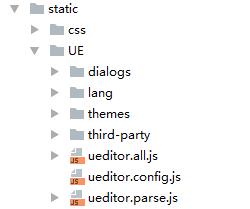
首先把官网下载的Ueditor资源,放入静态资源src/static中。
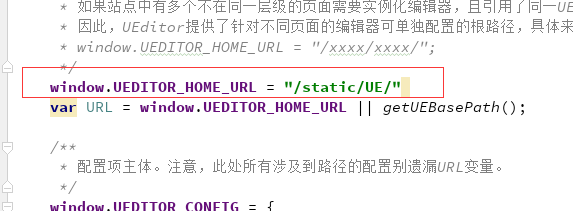
修改ueditor.config.js中的window.UEDITOR_HOME_URL配置,如下图:
2.引入
在main.js中引入
import '../static/UE/ueditor.config.js'

import '../static/UE/ueditor.all.min.js'

import '../static/UE/lang/zh-cn/zh-cn.js'

import '../static/UE/ueditor.parse.min.js'
3.开发公共组件
开发公共组件,可设置填充内容defaultMsg,配置信息config(宽度和高度等),并提供获取内容的方法。
<template>

  <div>

    <script id="editor" type="text/plain"></script>

  </div>

</template>

<script>

  export default {

    name: 'UE',

    data () {

      return {

        editor: null

      }

    },

    props: {

      defaultMsg: {

        type: String

      },

      config: {

        type: Object

      }

    },

    mounted() {

      const _this = this;

      this.editor = UE.getEditor('editor', this.config); // 初始化UE

      this.editor.addListener("ready", function () {

        _this.editor.setContent(_this.defaultMsg); // 确保UE加载完成后,放入内容。

      });

    },

    methods: {

      getUEContent() { // 获取内容方法

        return this.editor.getContent()

      }

    },

    destroyed() {

      this.editor.destroy();

    }

  }

</script>
4.使用
当我们需要使用富文本编辑器时,直接调用公共组件即可
<template>

  <div class="components-container">

    <div class="info">UE编辑器示例<br>需要使用编辑器时,调用UE公共组件即可。可设置填充内容defaultMsg,配置信息config(宽度和高度等),可调用组件中获取内容的方法。</div>

    <button @click="getUEContent()">获取内容</button>

    <div class="editor-container">

      <UE :defaultMsg=defaultMsg :config=config ref="ue"></UE>

    </div>

  </div>

</template>

<style>

  .info{

    border-radius: 10px;

    line-height: 20px;

    padding: 10px;

    margin: 10px;

    background-color: #ffffff;

  }

</style>

<script>

  import UE from '../../components/ue/ue.vue';

  export default {

    components: {UE},

    data() {

      return {

        defaultMsg: '这里是UE测试',

        config: {

          initialFrameWidth: null,

          initialFrameHeight: 350

        }

      }

    },

    methods: {

      getUEContent() {

        let content = this.$refs.ue.getUEContent();

        this.$notify({

          title: '获取成功,可在控制台查看!',

          message: content,

          type: 'success'

        });

        console.log(content)

      }

    }

  };

</script>
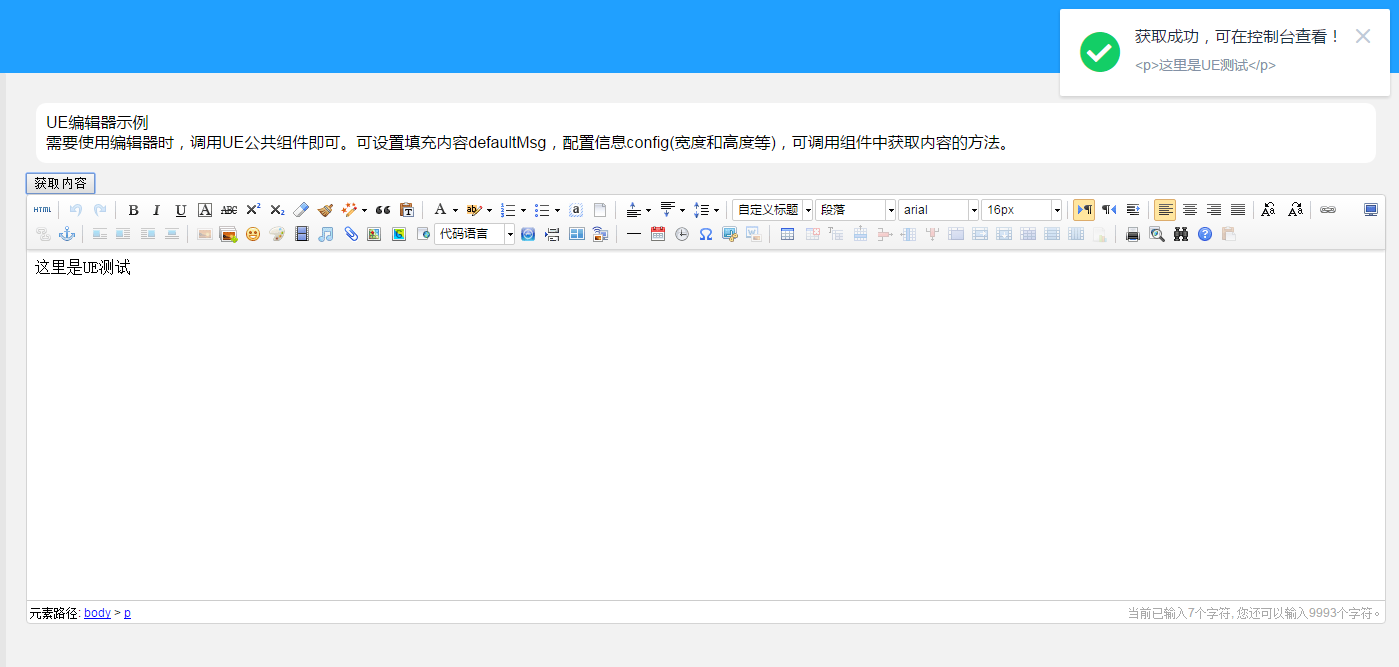
效果如下:
5.报错
ESlint报错
eslint报错的参考请评论4L 5L
严格模式报错
部分人使用时出现以下报错:
Uncaught TypeError: 'caller', 'callee', and 'arguments' properties

 may not be accessed on strict mode functions or the arguments objects

for calls to them...
这个问题是因为项目中的使用的babel默认添加了use strict造成,可参考 https://segmentfault.com/q/1010000007415253
我采用的是链接中答案的第三种方式:添加了babel-plugin-transform-remove-strict-mode,并在.babelrc里添加下列代码
{

  "plugins": ["transform-remove-strict-mode"]

}
然后就没问题了。
vue2.0项目中使用Ueditor富文本编辑器示例的更多相关文章
- vue2.0项目中使用Ueditor富文本编辑器应用中出现的问题
1.如何设置config中的内容 readonly:true,//只读模式wordCount:false,//是否开启字数统计enableAutoSave: false,//自动保存功能 重点:ena ...
- WEB项目中使用UEditor(富文本编辑器)
Ueditor富文本编辑器是在很多项目里经常用到的框架,是百度开发团队开发的一款很好用的富文本编辑器 下面就是我在一个系统里用到的,有了富文本编辑器,管理员使用起来不是很方便? 所以本博客介绍这个富文 ...
- ASP.NET MVC5 中百度ueditor富文本编辑器的使用
随着网站信息发布内容越来越多,越来越重视美观,富文本编辑就是不可缺少的了,众多编辑器比较后我选了百度的ueditor富文本编辑器. 百度ueditor富文本编辑器分为两种一种是完全版的ueditor, ...
- ASP.NET MVC 中使用 UEditor 富文本编辑器
在上篇<使用ASP.NET MVC+Entity Framework快速搭建博客系统>中,已经基本上可以实现博客分类和博客文章的CURD.但是,文章编辑界面实在是…… 好吧,咱得搞专业点. ...
- 在网站中使用UEditor富文本编辑器
UEditor是由百度WEB前端研发部开发的所见即所得的开源富文本编辑器,具有轻量.可定制.用户体验优秀等特点. 官网链接 进入到下载页面,选择相应的版本下载 这里我们使用ASP.NET开发,所以选择 ...
- 在java项目中加入百度富文本编辑器
富文本编辑器在项目中很常见,他可以将文本,图片等信息存入数据库,在编辑一些图文混排的信息的时候很有用,比如商城项目的商品详情页,包含很多带有样式的文字和图片. 此前一直使用的百度的富文本编辑器uedi ...
- 在 Vue 项目中引入 tinymce 富文本编辑器
项目中原本使用的富文本编辑器是 wangEditor,这是一个很轻量.简洁编辑器 但是公司的业务升级,想要一个功能更全面的编辑器,我找了好久,目前常见的编辑器有这些: UEditor:百度前端的开源项 ...
- Vue 中使用UEditor富文本编辑器-亲测可用-vue-ueditor-wrap
其中UEditor中也存在不少错误,再引用过程中. 但是UEditor相对还是比较好用的一个富文本编辑器. vue-ueditor-wrap说明 Vue + UEditor + v-model 双向绑 ...
- django项目中使用KindEditor富文本编辑器。
先从官网下载插件,放在static文件下 前端引入 <script type="text/javascript" src="/static/back/kindedi ...
随机推荐
- springBoot系列教程03:redis的集成及使用
1.为了高可用,先安装redis集群 参考我的另一篇文章 http://www.cnblogs.com/xiaochangwei/p/7993065.html 2.POM中引入redis <de ...
- spring boot 遇到 supported setting property http://xml.org/sax/properties/lexical-handler
解决链接:http://apache-fop.1065347.n5.nabble.com/org-xml-sax-SAXNotSupportedException-thrown-by-FOP-td11 ...
- HTML5新特性:元素的classList属性与应用
在html5新增的classList之前, 操作元素的class用的是className这个属性,而如果要向jquery封装的hasClass, removeClass, addClass, togg ...
- js生成word中图片处理
首先功能是要求前台导出word,但是前后台是分离的,图片存在后台,所以就存在跨域问题. 导出文字都是没有问题的(jquery.wordexport.js),但是导出图片就存在问题了: 图片是以链接形式 ...
- iOS学习——UIAlertController详解
在开发中,弹出提示框是必不可少的.这两天项目中统一对已经被iOS API废弃的UIAlertView和UIActionSheet进行替换,我们知道,UIAlertView和UIActionSheet都 ...
- HDFS中namenode启动失败
1.环境配置: -1.core-site.xml文件 <configuration> <property> <name>fs.defaultFS</name& ...
- 固定sql语句传参批量查询数据库脚本
#!/usr/bin/env python # encoding: utf-8 import pandas as pd import psycopg2 conn_dv = psycopg2.conne ...
- 设备树的interrupt
http://www.cnblogs.com/targethero/p/5080499.html https://www.cnblogs.com/xiaojiang1025/p/6131381.htm ...
- golang 在 windows 下编译出 linux 二进制可执行文件的软件套装合集 [go 1.7.3环境]
golang 很好用,不过要把工具链弄完整. 要不你会发现怎么不能编译跨平台的呀? 怎么写代码没提示啊? ... 这一整套弄下来并不容易. 所以精心准备了一套工具方便大家使用. 软件列表如图. 安装顺 ...
- hihocoder-1079题解(线段树+离散化)
一.题目链接 http://hihocoder.com/problemset/problem/1079 二.题意 给定一个长度为L的区间,给你n个子区间,没一个区间涂成一种颜色,问最后这个区间内有几种 ...