
springBoot系列教程03:redis的集成及使用
1.为了高可用,先安装redis集群 参考我的另一篇文章 http://www.cnblogs.com/xiaochangwei/p/7993065.html
2.POM中引入redis
        <dependency>

            <groupId>org.springframework.boot</groupId>

            <artifactId>spring-boot-starter-redis</artifactId>

            <version>1.4.7.RELEASE</version>

        </dependency>
3.增加redis配置(使用集群方式)
#redis pool config

#spring.redis.hostName=192.168.0.32

#spring.redis.port=6379

#spring.redis.password=

#spring.redis.database=13

#spring.redis.pool.maxActive=8

#spring.redis.pool.maxWait=-1

#spring.redis.pool.maxIdle=8

#spring.redis.pool.minIdle=0

#spring.redis.timeout=0

#spring.redis.expire.time=20

#redis cluster config

spring.redis.cluster.nodes=192.168.0.45:7001,192.168.0.45:7002,192.168.0.45:7003,192.168.0.45:7004,192.168.0.45:7005,192.168.0.45:7006

#spring.redis.cluster.nodes=192.168.0.81:7001,192.168.0.81:7002,192.168.0.81:7003,192.168.0.81:7004,192.168.0.81:7005,192.168.0.81:7006

spring.redis.cluster.timeout=2000

spring.redis.cluster.max-redirects=1

spring.redis.expire.time=20
4.配置redis集群链接并设置缓存(部分配置及内容会在后续文章中讲解到)
package com.xiao.config;

import org.springframework.beans.factory.annotation.Value;

import org.springframework.cache.CacheManager;

import org.springframework.cache.annotation.EnableCaching;

import org.springframework.cloud.context.config.annotation.RefreshScope;

import org.springframework.context.annotation.Bean;

import org.springframework.context.annotation.Configuration;

import org.springframework.core.env.MapPropertySource;

import org.springframework.data.redis.cache.RedisCacheManager;

import org.springframework.data.redis.connection.RedisClusterConfiguration;

import org.springframework.data.redis.connection.jedis.JedisClusterConnection;

import org.springframework.data.redis.connection.jedis.JedisConnectionFactory;

import org.springframework.data.redis.core.RedisTemplate;

import org.springframework.data.redis.serializer.GenericJackson2JsonRedisSerializer;

import org.springframework.data.redis.serializer.StringRedisSerializer;

import java.util.HashMap;

import java.util.Map;

//链接redis集群的时候

@Configuration

@EnableCaching

@RefreshScope

public class RedisClusterConfig {

    @Value("${spring.redis.cluster.nodes}")

    private String clusterNodes;

    @Value("${spring.redis.cluster.max-redirects}")

    private int redirects;

    @Value("${spring.redis.expire.time}")

    private int redisExpireTime;

    @Bean

    @RefreshScope

    public RedisClusterConfiguration redisClusterConfiguration() {

        Map<String, Object> source = new HashMap<>();

        source.put("spring.redis.cluster.nodes", clusterNodes);

        source.put("spring.redis.cluster.max-redirects", redirects);

        return new RedisClusterConfiguration(new MapPropertySource("RedisClusterConfiguration", source));

    }

    @Bean

    public JedisConnectionFactory jedisConnectionFactory() {

        return new JedisConnectionFactory(redisClusterConfiguration());

    }

    @Bean

    public JedisClusterConnection jedisClusterConnection() {

        return (JedisClusterConnection) jedisConnectionFactory().getConnection();

    }

    @Bean

    public RedisTemplate<String, String> redisTemplate() {

        RedisTemplate<String, String> redisTemplate = new RedisTemplate<String, String>();

        redisTemplate.setConnectionFactory(jedisConnectionFactory());

        redisTemplate.setKeySerializer(new StringRedisSerializer());

        redisTemplate.setDefaultSerializer(new GenericJackson2JsonRedisSerializer());

        return redisTemplate;

    }

    @Bean

    public CacheManager cacheManager(RedisTemplate<String, String> redisTemplate) {

        RedisCacheManager cacheManager = new RedisCacheManager(redisTemplate);

        cacheManager.setDefaultExpiration(redisExpireTime);

        return cacheManager;

    }

}
5.通过下列代码进行测试
@Autowired

    StringRedisTemplate stringRedisTemplate;

    @RequestMapping(value = "/redis/setget")

    public Result redisSetGet(@RequestParam(value = "key", required = true) String key) {

        stringRedisTemplate.opsForValue().set(key, UUID.randomUUID().toString());

        stringRedisTemplate.expire(key, 10, TimeUnit.MINUTES);

        return new Result("从redis中获取到的值为:" + stringRedisTemplate.opsForValue().get(key));

    }
结果如下:
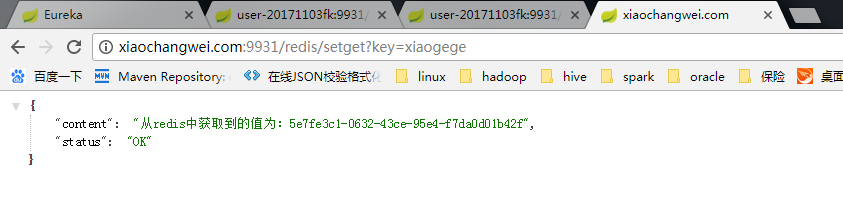
通过redis的可视化工具 查看如下
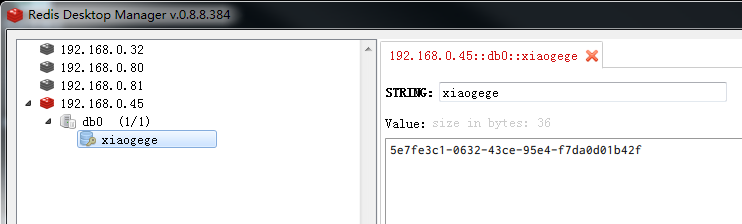
redis一般而言用string就可以了,对象可以通过JSON转换后再存储
springBoot系列教程03:redis的集成及使用的更多相关文章
- SpringBoot系列之Spring Data Jpa集成教程
SpringBoot系列之Spring Data Jpa集成教程 Spring Data Jpa是属于Spring Data的一个子项目,Spring data项目是一款集成了很多数据操作的项目,其下 ...
- springBoot系列教程07:异常捕获
发生异常是很正常的事,异常种类也是千奇百怪,发生异常并不可怕,只要正确的处理,并正确的返回错误信息并无大碍,如果不进行捕获或者处理,分分钟服务器宕机是很正常的事 所以处理异常时,最基本的要求就是发生异 ...
- Java工程师之SpringBoot系列教程前言&目录
前言 与时俱进是每一个程序员都应该有的意识,当一个Java程序员在当代步遍布的时候,你就行该想到我能多学点什么.可观的是后端的框架是稳定的,它们能够维持更久的时间在应用中,而不用担心技术的更新换代.但 ...
- SpringBoot系列教程起步
本篇学习目标 Spring Boot是什么? 构建Spring Boot应用程序 三分钟开发SpringBoot应用程序 本章源码下载 Spring Boot是什么? spring Boot是由Piv ...
- SpringBoot系列教程web篇之过滤器Filter使用指南
web三大组件之一Filter,可以说是很多小伙伴学习java web时最早接触的知识点了,然而学得早不代表就用得多.基本上,如果不是让你从0到1写一个web应用(或者说即便从0到1写一个web应用) ...
- SpringBoot系列教程web篇之自定义异常处理HandlerExceptionResolver
关于Web应用的全局异常处理,上一篇介绍了ControllerAdvice结合@ExceptionHandler的方式来实现web应用的全局异常管理: 本篇博文则带来另外一种并不常见的使用方式,通过实 ...
- SpringBoot系列教程web篇之全局异常处理
当我们的后端应用出现异常时,通常会将异常状况包装之后再返回给调用方或者前端,在实际的项目中,不可能对每一个地方都做好异常处理,再优雅的代码也可能抛出异常,那么在 Spring 项目中,可以怎样优雅的处 ...
- SpringBoot系列教程web篇之404、500异常页面配置
接着前面几篇web处理请求的博文,本文将说明,当出现异常的场景下,如404请求url不存在,,403无权,500服务器异常时,我们可以如何处理 原文友链: SpringBoot系列教程web篇之404 ...
- SpringBoot系列教程web篇之重定向
原文地址: SpringBoot系列教程web篇之重定向 前面介绍了spring web篇数据返回的几种常用姿势,当我们在相应一个http请求时,除了直接返回数据之外,还有另一种常见的case -&g ...
随机推荐
- HDU 1014 Uniform Generator 欧几里得
题目链接:http://acm.hdu.edu.cn/showproblem.php?pid=1014 解题思路: 1. 把题目意思读懂后,明白会输入两个数,然后根据题中的公式产生一系列伪随机数,看这 ...
- 51Nod--1085背包问题
1085 背包问题 基准时间限制:1 秒 空间限制:131072 KB 分值: 0 难度:基础题 收藏 关注 在N件物品取出若干件放在容量为W的背包里,每件物品的体积为W1,W2--Wn(Wi为整 ...
- ViewPager使用记录3——循环展示
ViewPager是v4支持库中的一个控件,相信几乎所有接触Android开发的人都对它不陌生.之所以还要在这里翻旧账,是因为我在最近的项目中有多个需求用到了它,觉得自己对它的认识不够深刻.我计划从最 ...
- ConcurrentHashMap\HashMap put操作时key为什么要rehash
参考java并发编程的艺术一书中,对ConcurrentHashMap的讲解 ConcurrentHashMap使用的是分段锁Segment来保证不同的Segment区域互相不干扰,不存在锁竞争关系, ...
- Koltin——最详细的可见性修饰符详解
在Kotlin中,不管是类,对象,接口,构造函数,函数,属性及其设置器都具有可见性修饰符.Kotlin中的可见性修饰符共四种.即public.protected.private.internal.在不 ...
- 从durable谈起,我是如何用搜索引擎抓住技术的关键字学习新姿势打开敏捷开发的大门
---又名我讨厌伸手党 我又把个人博客的子标题改为了 你可以在书和搜索引擎找到90%的问题的答案,为什么要问别人?剩下的10%或许没有答案,为什么要问别人? 这是由于最近在网上看到各种伸手,对于我这种 ...
- BEGINNING SHAREPOINT® 2013 DEVELOPMENT 第8章节--配送SP2013Apps
BEGINNING SHAREPOINT® 2013 DEVELOPMENT 第8章节--配送SP2013Apps 本章节你将学到: 通过SP商店配送Apps: 在商店授予证书并管理A ...
- PushMeBaby 使用
github 下载地址 https://github.com/stefanhafeneger/PushMeBaby 1.执行假设报错,那么导入CoreServices.framawork 替换这句 # ...
- 重要经验五:block作为属性的注意事项
现代ios应用的开发.不使用GCD和block,效率会减少非常多,在今年3月份之前,我在block的学习和使用方面,精力和经验都明显不足,在SF有个牛逼同事.不仅自己积累了一套库,并且对这个库持续进行 ...
- M03 利用Accord 进行机器学习的第一个小例子
01 安装 Visual studio 2017. 不具备安装这个的话,也可安装,Microsoft Visual Studio Express (or equivalent) 02 创建 C# 的 ...