
Flutter Widgets 之 BottomNavigationBar 和 BottomNavigationBarItem
注意:无特殊说明,Flutter版本及Dart版本如下:
- Flutter版本: 1.12.13+hotfix.5
- Dart版本: 2.7.0
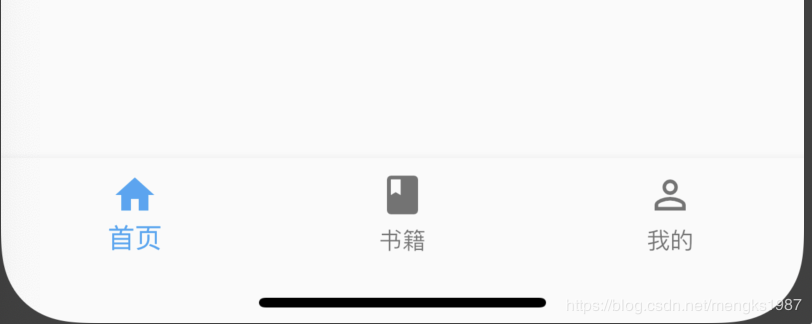
BottomNavigationBar 和 BottomNavigationBarItem配合Scaffold控件使用可以实现底部导航效果,类似于微信底部的导航效果,下面是一个简单的底部导航案例:
Scaffold(
      bottomNavigationBar: BottomNavigationBar(
        items: <BottomNavigationBarItem>[
          BottomNavigationBarItem(title: Text('首页'),icon: Icon(Icons.home)),
          BottomNavigationBarItem(title: Text('书籍'),icon: Icon(Icons.book)),
          BottomNavigationBarItem(title: Text('我的'),icon: Icon(Icons.perm_identity)),
        ],
      ),
    );
效果:
点击其他2个item时没有反应,添加切换效果:
int _currentIndex = 0;
BottomNavigationBar(
    onTap: (int index) {
        setState(() {
            _currentIndex = index;
        });
    },
    currentIndex: _currentIndex,
...currentIndex代表当前显示导航的索引,当前切换时调用onTap,在onTap回调中调用setState方法改变_currentIndex的值达到切换的效果。
效果如下:

BottomNavigationBar有2种显示模式,其中一种是fixed效果,前面的展示就是fixed效果,这也是默认值,另一种是shifting效果,
BottomNavigationBar(
    type:BottomNavigationBarType.shifting,
    selectedItemColor: Theme.of(context).primaryColor,
    unselectedItemColor: Colors.black,
    ...
}设置shifting时需要设置selectedItemColor和 unselectedItemColor,效果如下:

我们还可以设置其背景颜色(backgroundColor)、图标大小(iconSize)、选中和未选中图标、字体的颜色,大小等。
如果导航的图标是自己设计的图标,这时仅仅通过BottomNavigationBar是无法实现我们想要的效果的,比如微信的导航的效果,虽然选中和未选中也是颜色的区别,但图标不是Icons自带的图标,想要实现切换2个图标需要BottomNavigationBarItem控件的支持,其中的icon和activeIcon分别代表未选中和选中。
通过切换导航而改变页面是App中最常用的方式,开始构建页面的切换:
int _currentIndex = 0;

Widget _currBody = HomePage();

_onTap(int index) {
    switch (index) {
      case 0:
        _currBody = HomePage();;
        break;
      case 1:
        _currBody = BookPage();
        break;
      case 2:
        _currBody = MyPage();
        break;
    }
    setState(() {
      _currentIndex = index;
    });
  }

Scaffold(
      body: _currBody,
      bottomNavigationBar: BottomNavigationBar(
        onTap: _onTap,
        type: BottomNavigationBarType.shifting,
        selectedItemColor: Theme.of(context).primaryColor,
        unselectedItemColor: Colors.black,
        currentIndex: _currentIndex,
        items: <BottomNavigationBarItem>[
          BottomNavigationBarItem(title: Text('首页'), icon: Icon(Icons.home)),
          BottomNavigationBarItem(title: Text('书籍'), icon: Icon(Icons.book)),
          BottomNavigationBarItem(
              title: Text('我的'), icon: Icon(Icons.perm_identity)),
        ],
      ),
    );
Scaffold控件的body表示导航上面,AppBar下面的页面,HomePage,BookPage,MyPage对应3个导航的页面,背景分别是红、蓝、黄色,效果如下:

推荐几款Github上带动画效果的底部导航
更多相关阅读:
- Flutter系列文章总览
- Flutter Widgets 之 Expanded和Flexible
- Flutter Widgets 之 AnimatedList
- Flutter Widgets 之 SliverAppBar
如果这篇文章有帮助到您,希望您来个“赞”并关注我的公众号,非常谢谢。

Flutter Widgets 之 BottomNavigationBar 和 BottomNavigationBarItem的更多相关文章
- 【Flutter Widgets大全】电子书开源
[Flutter Widgets大全]是老孟耗费大量精力整理的,总共有330多个组件的详细用法,开源到Github上,希望可以帮助到大家,开源不易,点个赞可不可以. [Flutter Widgets ...
- Flutter Widgets 之 InkWell 和 Ink
注意:无特殊说明,Flutter版本及Dart版本如下: Flutter版本: 1.12.13+hotfix.5 Dart版本: 2.7.0 InkWell InkWell组件在用户点击时出现&quo ...
- Flutter Widgets 之 FutureBuilder
注意:无特殊说明,Flutter版本及Dart版本如下: Flutter版本: 1.12.13+hotfix.5 Dart版本: 2.7.0 展示异步任务状态 当有一个Future(异步)任务需要展示 ...
- Flutter Widgets 之 ListWheelScrollView
注意:无特殊说明,Flutter版本及Dart版本如下: Flutter版本: 1.12.13+hotfix.5 Dart版本: 2.7.0 基础用法 在展示大量数据的时候我们第一会想到使用ListV ...
- Flutter Widgets 之 RichText
注意:无特殊说明,Flutter版本及Dart版本如下: Flutter版本: 1.12.13+hotfix.5 Dart版本: 2.7.0 基础用法 应用程序离不开文字的展示,因此文字的排版非常重要 ...
- Flutter Widgets 之 SnackBar
注意:无特殊说明,Flutter版本及Dart版本如下: Flutter版本: 1.12.13+hotfix.5 Dart版本: 2.7.0 基础用法 应用程序有时候需要弹出消息提示用户,比如'网络连 ...
- Flutter Widgets 对话框-Dialog
注意:无特殊说明,Flutter版本及Dart版本如下: Flutter版本: 1.12.13+hotfix.5 Dart版本: 2.7.0 当应用程序进行重要操作时经常需要用户进行2次确认,以避免用 ...
- Flutter Widgets
Flutter Widgets Flutter 组件 Syncfusion Flutter Widgets 所有组件均支持即装即用的 Android,iOS和 Web not free https:/ ...
- Flutter Widgets (Container/Row/Column/Image)
俗话说知己知彼百战百胜,如果对Flutter 里面的各种Widgets不了解,那你就别想将它们组合成你想要的效果.从今天开始.会把一个一个的widget 撸一遍..知道它大概的用法.效果.当你想做某个 ...
随机推荐
- 利用docker安装gitlab
安装docker 安装 virtualbox 下载 dockertoolbox并安装 官网的服务器一直连不上, 幸亏还有这个 https://get.daocloud.io/toolbox/ 比 ht ...
- rabbitmq安装(linux)遇到 很多坑
1.下载erlang官网地址 http://www.erlang.org/download 挑选合适的版本 然后 建议20.3运行命令 wget http://erlang.org/download/ ...
- Codeforces Round #316 (Div. 2) D计算在一棵子树内某高度的节点
题:https://codeforces.com/contest/570/problem/D 题意:给定一个以11为根的n个节点的树,每个点上有一个字母(a~z),每个点的深度定义为该节点到11号节点 ...
- c语言中getchar的用法
/************************************************************************* > File Name: getchar2. ...
- Linkage Disequilibrium|D‘|r2
I.10 Other Measures of Linkage Disequilibrium 因为D的取值强烈地依赖于人为制定的等位基因频率(PA及PB),所以它不利于LD程度的比较.标准化的不平衡系数 ...
- python-jenkins 操作
Python-Jenkins Doc:http://python-jenkins.readthedocs.io/en/latest/index.html 实例代码: import jenkins je ...
- Springboot中RestTemplate -- 用更优雅的方式发HTTP请求
RestTemplate是Spring提供的用于访问Rest服务的客户端,RestTemplate提供了多种便捷访问远程Http服务的方法,能够大大提高客户端的编写效率. 我之前的HTTP开发是用ap ...
- v-cloak使用
v-cloak:保持和元素实例的关联,直到结束编译后自动消失. v-cloak指令和CSS 规则一起用的时候,能够解决差值表达式闪烁的问题(即:可以隐藏未编译的标签直到实例准备完毕). 就拿上一段代码 ...
- VMware vSphere ESXi 和 vCenter Server 5.1 文档地址
VMware vSphere ESXi 和 vCenter Server 5.1 文档地址 https://pubs.vmware.com/vsphere-51/index.jsp?top ...
- script和scriptreplay_超骚气的实时监控你的服务器
今天看到一个超级叼的linux命令,可以完整记录屏幕上的命令与输出结果. 有人问这有什么叼的,不就是保存历史操作记录吗?我看看日志也能看出来. 不不不,我要说的“完整记录”包括第几秒执行什么命令,就像 ...