
四、分离T4引擎
在前几篇文章中,我使用大量的篇幅来介绍T4在VisualStudio中如何使用。虽然在一定程度上可以提高我们的工作效率,但并没有实质上的改变。不过从另一方面来说,我们确实了解到了T4的强大。如何让这个强大的工具为我们所用呢?本章将讲解如何在自己的程序中使用T4。在原来的解决方案中新建一个窗体项目T4Generator。T4引擎被封装在了:
Microsoft.VisualStudio.TextTemplating.10.0.dll
Microsoft.VisualStudio.TextTemplating.Interfaces.10.0.dll
这两个dll文件中,具体位置在C:\Windows\Microsoft.NET\assembly\GAC_MSIL这个路径下找到和Microsoft.VisualStudio.TextTemplating相关的文件夹即可。这里需要注意的文件末尾的10.0是版本号。可以根据自己的VS版本选择相应的版本号,当然哪一个版本都无所谓。
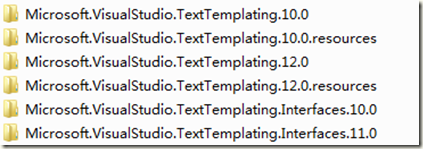
我这里有10.0和12.0两个版本,为了协调我使用了10.0的版本。因为12.0版本对应的Interfaces文件版本号是11.0看着觉得变扭。将上述两个文件添加引用到自己的项目中。
TT模板的执行需要一个宿主环境,Microsoft.VisualStudio.TextTemplating.10.0.dll提供了模板运行的环境也即引擎。TT模板和宿主环境之间怎样进行衔接?比如传递参数,这就需要一个下上文环境。Microsoft.VisualStudio.TextTemplating.Interfaces.10.0.dll接口则定义了上下文环境。我们需要做的就是实现该接口。用F12跟踪源码可见该接口定义如下:
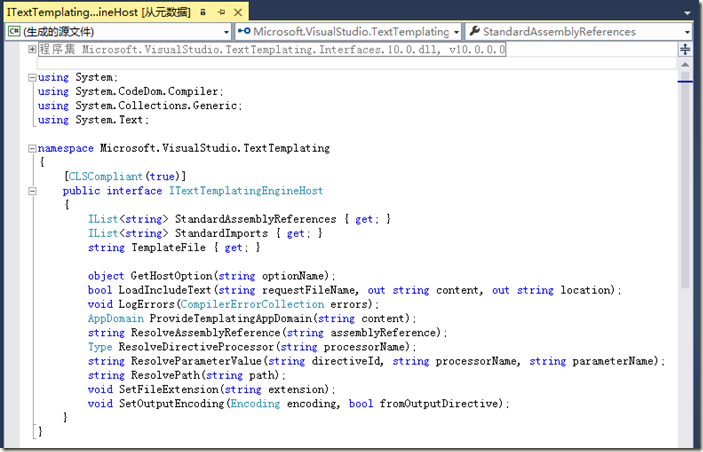
内容挺多,但是没任何注解,这也是VS类库的最让人心碎的地方。怎么实现该接口?如果不知道具体方法的含义估计要实现该接口近乎是沮丧的。好在MSDN上资料比较齐全,在MSDN中查看该接口时提供了一个自定义模板宿主的案例。这里说明下:我理解的宿主就是指引擎本身,这个接口我理解成上下文环境。如果仅仅通过字面意思理解,可能和我说的不一样,这仅仅是理解不同,实质不冲突,我也是为了方便讲解。
MSDN案例地址:https://msdn.microsoft.com/en-us/library/bb126579.aspx
依据MSDN的案例,基本已经了解该接口实现的细节了。故此可以依葫芦画瓢打造自己的上下文环境了。在实现该接口之前还需要了解有关参数传递的方式。因为是自定义程序,提取表结构和响应用户操作全是由程序完成,模板如何接受程序传递的参数?

如图所示,主程序可以直接通过参数传递方式传递给宿主,在模版中可以获取宿主上下文对象,从而间接拿到主程序传递的参数。
这里继续使用上一次的需求做一个实体生成器。首先打开主窗体,界面布局如下:
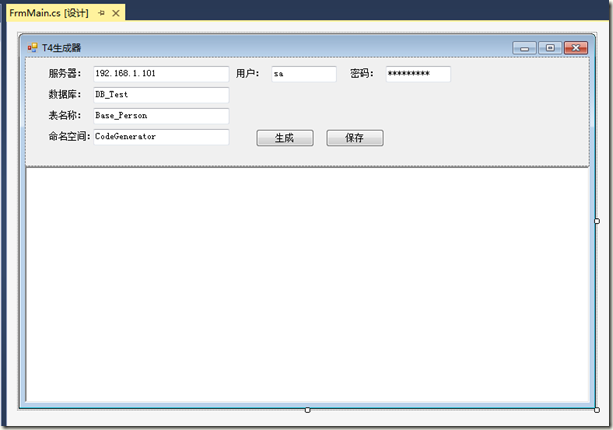
然后需要创建两个类文件用于封装需要传递给模板的数据。代码如下:
using System;

using System.Collections.Generic;

using System.Linq;

using System.Text;

namespace T4Generator

{

    /// <summary>

    /// 表结构信息

    /// </summary>

    [Serializable]

    public class SchemaInfo

    {

        /// <summary>

        /// 列描述信息

        /// </summary>

        public string ColumnDesc { get; set; }

        /// <summary>

        /// 列数据类型

        /// </summary>

        public string ColumnType { get; set; }

        /// <summary>

        /// 列名称

        /// </summary>

        public string ColumnName { get; set; }

    }

}
该类用于描述表结构信息用的。在上一篇的讲解中表结构使用DataSet封装,由于DataSet需要涉及到的命名空间比较多,在模板里操作不是很方便,这里就直接改用自定义类来封装数据了。
using System;

using System.Collections.Generic;

using System.Linq;

using System.Text;

namespace T4Generator

{

    /// <summary>

    /// 参数对象

    /// </summary>

    [Serializable]

    public class HostParam

    {

        /// <summary>

        /// 数据表名称

        /// </summary>

        public string TableName { get; set; }

        /// <summary>

        /// 命名空间

        /// </summary>

        public string NameSpace { get; set; }

        /// <summary>

        /// 数据表列集合

        /// </summary>

        public List<SchemaInfo> ColumnList { get; set; }

    }

}
此类用于封装一些额外数据,以便在模版中调用。需要注意的这两个作为封装数据的类一定要声明可序列化,否则执行时会出错。只要涉及在宿主环境或模板中使用的类都必须可序列化。
接下来最重要的工作就是实现接口,具体代码如下:
using System;

using System.Collections.Generic;

using System.Linq;

using System.Text;

using System.IO;

using System.CodeDom.Compiler;

using Microsoft.VisualStudio.TextTemplating;

namespace T4Generator

{

    /// <summary>

    /// 模版宿主

    /// </summary>

    [Serializable]

    public class TemplateHost : ITextTemplatingEngineHost

    {

        #region 字段

         private CompilerErrorCollection _ErrorCollection;

        private Encoding _fileEncodingValue = Encoding.UTF8;

        private string _fileExtensionValue = ".cs";

        private string _namespace = "T4Generator";

        internal string _templateFileValue;

        #endregion

        #region 属性

        /// <summary>

        /// 编译错误对象集合

        /// </summary>

        public CompilerErrorCollection ErrorCollection

        {

            get { return this._ErrorCollection; }

        }

        /// <summary>

        /// 文件编码方式

        /// </summary>

        public Encoding FileEncoding

        {

            get { return this._fileEncodingValue; }

        }

        /// <summary>

        /// 文件扩展名

        /// </summary>

        public string FileExtension

        {

            get { return this._fileExtensionValue; }

        }

        /// <summary>

        /// 宿主所在命名空间

        /// </summary>

        public string NameSpace

        {

            get { return this._namespace; }

            set { this._namespace = value; }

        }

        /// <summary>

        /// 模版需调用的其他程序集引用

        /// </summary>

        public IList<string> StandardAssemblyReferences

        {

            get

            {

                return new string[] {

            typeof(Uri).Assembly.Location,

            typeof(HostParam).Assembly.Location,

            typeof(SchemaInfo).Assembly.Location,

            typeof(TemplateHost).Assembly.Location

        };

            }

        }

        /// <summary>

        /// 模版调用标准程序集引用

        /// </summary>

        public IList<string> StandardImports

        {

            get

            {

                return new string[] {

            "System",

            "System.Text",

            "System.Collections.Generic",

            "T4Generator"

        };

            }

        }

        /// <summary>

        /// 模版文件

        /// </summary>

        public string TemplateFile

        {

            get { return this._templateFileValue; }

            set { this._templateFileValue = value; }

        }

        /// <summary>

        /// 自定义参数对象用于向模板传参

        /// </summary>

        public HostParam Param { get; set; }

        #endregion

        #region 方法

        public object GetHostOption(string optionName)

        {

            string str;

            return (((str = optionName) != null) && (str == "CacheAssemblies"));

        }

        public bool LoadIncludeText(string requestFileName, out string content, out string location)

        {

            content = string.Empty;

            location = string.Empty;

            if (File.Exists(requestFileName))

            {

                content = File.ReadAllText(requestFileName);

                return true;

            }

            return false;

        }

        public void LogErrors(CompilerErrorCollection errors)

        {

            this._ErrorCollection = errors;

        }

        public AppDomain ProvideTemplatingAppDomain(string content)

        {

            return AppDomain.CreateDomain("Generation App Domain");

        }

        public string ResolveAssemblyReference(string assemblyReference)

        {

            if (File.Exists(assemblyReference))

            {

                return assemblyReference;

            }

            string path = Path.Combine(Path.GetDirectoryName(this.TemplateFile), assemblyReference);

            if (File.Exists(path))

            {

                return path;

            }

            return "";

        }

        public Type ResolveDirectiveProcessor(string processorName)

        {

            string.Compare(processorName, "XYZ", StringComparison.OrdinalIgnoreCase);

            throw new Exception("没有找到指令处理器");

        }

        public string ResolveParameterValue(string directiveId, string processorName, string parameterName)

        {

            if (directiveId == null)

            {

                throw new ArgumentNullException("the directiveId cannot be null");

            }

            if (processorName == null)

            {

                throw new ArgumentNullException("the processorName cannot be null");

            }

            if (parameterName == null)

            {

                throw new ArgumentNullException("the parameterName cannot be null");

            }

            return string.Empty;

        }

        public string ResolvePath(string fileName)

        {

            if (fileName == null)

            {

                throw new ArgumentNullException("the file name cannot be null");

            }

            if (!File.Exists(fileName))

            {

                string path = Path.Combine(Path.GetDirectoryName(this.TemplateFile), fileName);

                if (File.Exists(path))

                {

                    return path;

                }

            }

            return fileName;

        }

        public void SetFileExtension(string extension)

        {

            this._fileExtensionValue = extension;

        }

        public void SetOutputEncoding(Encoding encoding, bool fromOutputDirective)

        {

            this._fileEncodingValue = encoding;

        }

        #endregion

    }

}
该接口实现基本可以参照MSDN给的方案即可,如果在模板中需要调用程序中定义的类,那么需要把该类位于程序集的位置注入到宿主环境
public IList<string> StandardAssemblyReferences

{

    get

    {

        return new string[] {

            typeof(Uri).Assembly.Location,

            typeof(HostParam).Assembly.Location,

            typeof(SchemaInfo).Assembly.Location,

            typeof(TemplateHost).Assembly.Location

        };

    }

}
该属性的实现就是把程序中自定义的3个类:HostParam、SchemaInfo、TemplateHost本身所在程序集位置注入到宿主环境中。
public IList<string> StandardImports

{

    get

    {

        return new string[] {

            "System",

            "System.Text",

            "System.Collections.Generic",

            "T4Generator"

        };

    }

}
这里就是把模板需要用的命名空间注入到宿主环境中。依据前面所述,模板中是可以拿到这个上下文对象的,故此我们把需要传递的参数也可以一并定义在该类中。
public HostParam Param { get; set; }
所以这里定义了一个属性用于接受程序传递的参数。
接下来只要在生成按钮的事件下调用即可,代码如下:
//定义引擎对象

private Engine engine; //Microsoft.VisualStudio.TextTemplating命名空间下

public FrmMain()

{

    InitializeComponent();

    this.engine = new Engine();

}

private void btnGenerate_Click(object sender, EventArgs e)

{

    string connString = string.Format("Data Source={0};Database={1};uid={2};pwd={3}", txtServer.Text, txtDB.Text, txtUser.Text, txtPwd.Text);

    //创建参数对象

    HostParam param = new HostParam();

    param.TableName = this.txtTableName.Text;

    param.NameSpace = this.txtNameSpace.Text;

    param.ColumnList = DBHelper.GetSchema(connString, param.TableName);

    //模板文件

    string templateFile = "Entity.txt";

    string content = File.ReadAllText(templateFile);

    //创建宿主

    TemplateHost host = new TemplateHost

    {

        TemplateFile = templateFile,

        Param = param

    };

    //生成代码

    this.txtCode.Text = engine.ProcessTemplate(content, host);

}
最后需要说明就是,在自定义程序中模板文件只要是文本文件即可,这里直接用了Entity.txt来作为模板文件。文件内容如下:
<#@ template language="c#" HostSpecific="True" #>

<#@ output extension= ".cs" #>

<#

    //获取宿主对象

    TemplateHost host = Host as TemplateHost;

#>

using System;

using System.Collections.Generic;

using System.Linq;

using System.Text;

namespace <#=host.Param.NameSpace  #>

{

    public class <#= host.Param.TableName #>Entity

    {

<#

foreach(SchemaInfo info in host.Param.ColumnList)

{

 #>

        /// <summary>

        /// <#= info.ColumnDesc #>

        /// </summary>

        public <#= info.ColumnType #> <#= info.ColumnName #> { get; set; }

<# } #>

    }

}
相比之前的TT模板简化了很多。当然功能是一样的。
<#@ template language="c#" HostSpecific="True" #>首先使用了@ template 指令指明模板宿主已变更。
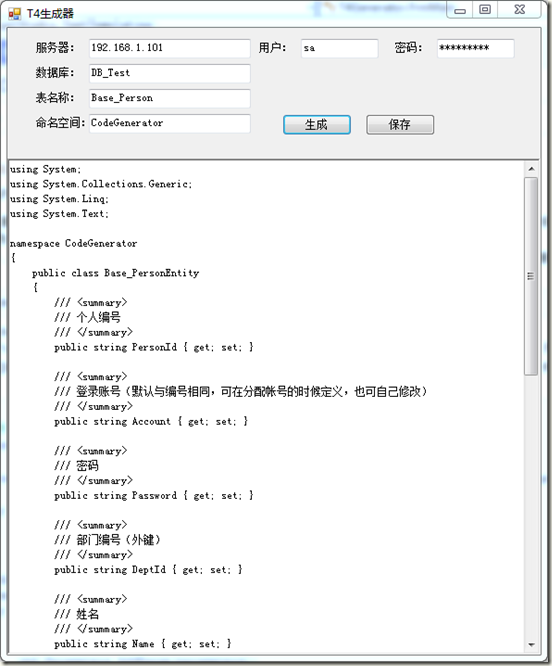
其次可以直接使用Host这个内置的对象获取宿主上下文环境。使用此对象即可获取到程序传递过来的参数。依据预先准备好的参数即可动态生成实体类,具体程序实现细节请参照源码。实现效果如下:
四、分离T4引擎的更多相关文章
- 【关于微软的上一代模板引擎 T4引擎】
导语:国内有名的动软代码生成器用的就是T4引擎......可以自己下载下来用用,批量生成固定模式的代码文件,十分有用........... 示例代码:示例代码__你必须懂的T4模板:浅入深出.rar ...
- 使用Photon引擎进行unity网络游戏开发(四)——Photon引擎实现网络游戏逻辑
使用Photon引擎进行unity网络游戏开发(四)--Photon引擎实现网络游戏逻辑 Photon PUN Unity 网络游戏开发 网络游戏逻辑处理与MasterClient 网络游戏逻辑处理: ...
- 一、初识T4引擎
对于代码生成器我们并不陌生,在日常编码中这也是用的比较多的工具之一.一般代码生成器主要功能是生成公共或基础代码来减少编码人员的工作量,而一款优秀的代码生成器除了生产代码以外,同时兼具生成项目架构和基础 ...
- Spring Boot (四)模板引擎Thymeleaf集成
一.Thymeleaf介绍 Thymeleaf是一种Java XML / XHTML / HTML5模板引擎,可以在Web和非Web环境中使用.它更适合在基于MVC的Web应用程序的视图层提供XHTM ...
- mysql中四种存储引擎的区别和选择
前言 数据库存储引擎是数据库底层软件组织,数据库管理系统(DBMS)使用数据引擎进行创建.查询.更新和删除数据.不同的存储引擎提供不同的存储机制.索引技巧.锁定水平等功能,使用不同的存储引擎,还可以 ...
- 关系型数据库(四),引擎MyISAM和InnoDB
目录 1.MyISAM和InnoDB关于锁方面的区别是什么 2.MYSQL的两个常用存储引擎 3.MyISAM应用场景 4.InnoDB适合场景 四.引擎MyISAM和InnoDB 1.MyISAM和 ...
- 【MySQL】MySQL(四)存储引擎、索引、锁、集群
MySQL存储引擎 MySQL体系结构 体系结构的概念 任何一套系统当中,每个部件都能起到一定的作用! MySQL的体系结构 体系结构详解 客户端连接 支持接口:支持的客户端连接,例如C.Java.P ...
- MySQL学习笔记(四):存储引擎的选择
一:几种常用存储引擎汇总表 二:如何选择 一句话:除非需要InnoDB 不具备的特性,并且没有其他办法替代,否则都应该优先考虑InnoDB:或者,不需要InnoDB的特性,并且其他的引擎更加合适当前情 ...
- hadoop与spark的处理技巧(四)推荐引擎处理技巧
经常一起购买的商品 scala> var file=sc.textFile("/user/ghj/togeterBought") file: org.apache.spark ...
随机推荐
- Struts2再爆远程代码执行漏洞
Struts又爆远程代码执行漏洞!在这次的漏洞中,攻击者可以通过操纵参数远程执行恶意代码.Struts 2.3.15.1之前的版本,参数action的值redirect以及redirectAction ...
- 查错 CH Round #57 - Story of the OI Class
题目:http://ch.ezoj.tk/contest/CH%20Round%20%2357%20-%20Story%20of%20the%20OI%20Class/查错 题解:刚开始看见立马以为是 ...
- POJ-3468-A Simple Problem with Integers(区间更新,求和)-splay或线段树
区间更新求和 主要用来练习splay树区间更新问题 //splay树的题解 // File Name: 3468-splay.cpp // Author: Zlbing // Created Time ...
- 【枚举】Vijos P1012 清帝之惑之雍正
题目链接: https://vijos.org/p/1012 题目大意: 给n个坐标(n<=100 000),求直线距离最短是多少.数据较大用long long 或 double 题目思路: [ ...
- haffman树c实现
#include<stdio.h>#include<stdlib.h>#include<string.h>#define N 100#define M 2*N-1t ...
- python BDD&TDD
教程一:行为驱动开发(BDD) 基于Python的行为驱动开发实战: http://python.jobbole.com/81303/ 基于Python的行为驱动开发实战 英语原文地址: http:/ ...
- myeclipse 闪退解决方法
今天提交一个svn文件发生卡死,然后关闭myeclipse后发生,打开myeclipse出险闪退,摸索半天,发现: 只要修改下工作空间的名称,然后打开myeclipse重新导入即可,只是之前的配置都没 ...
- angularJS 过滤器 表单验证
过滤器1.filter的作用就是接收一个输入,通过某个规则进行处理,然后返回处理后的结果,主要用于数据的格式化.2.内置过滤器(1)Currency(货币)将一个数值格式化为货币格式,默认为$(2)D ...
- Python读写文件模式
1.r 打开只读文件,该文件必须存在. 2.r+ 打开可读写的文件,该文件必须存在. 3.w 打开只写文件,若文件存在则文件长度清为0,即该文件内容会消失.若文件不存在则建立该文件. 4.w+ 打开可 ...
- 2nd day
<?php //求数组的平均值 $a3 = array( array(11,12, 13), array(21,22,23, 24, 25), array(31,32,33, 35), arra ...