
eclipse+axis2+webservice开发实例
myeclipse10安装axis2插件
第一步:下载axis2-1.6的插件压缩包,axis2-eclipse-codegen-plugin-1.6.2.zip 和 axis2-eclipse-service-plugin-1.6.2.zip(现在最新版本是1.6.2);
第二步:解压下载的两个压缩包,并且将解压后的文件夹放到myeclipse8.6的dropins目录下;
第三步:在dropins目录下添加axis2.link文件,内容是
path=myeclipse的安装目录\\dropins(例如:我的文件内容为:path=E:\\Genuitec\\MyEclipse-8.6\\dropins);
第四步:重启myeclipse,在新建工程时,选择new-->other,然后在弹出窗口中输入axis2,如果出现axis向导,则代表安装成功.
1.参考文献:
1.利用Java编写简单的WebService实例 http://nopainnogain.iteye.com/blog/791525
2.Axis2与Eclipse整合开发Web Service http://tech.ddvip.com/2009-05/1242968642120461.html
3.http://blog.csdn.net/lightao220/article/details/3489015
4.http://clq9761.iteye.com/blog/976029
5.使用Eclipse+Axis2+Tomcat构建Web Services应用(实例讲解篇)
2.实例1(主要看到[2])
2.1.系统功能:
2.2.开发前准备:
- 安装Eclipse-jee;
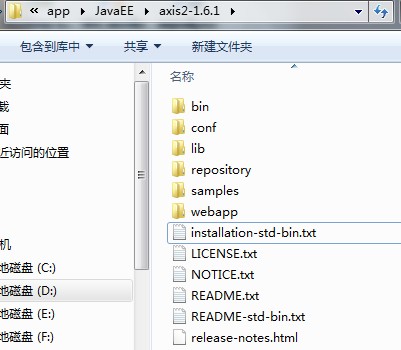
- 下载最新版本的Axis2,网址http://axis.apache.org/axis2/java/core/download.cgi ,选择Standard Binary Distribution的zip包,解压缩得到的目录名axis2-1.4.1,目录内的文件结构如下:
2.3.开发前配置:
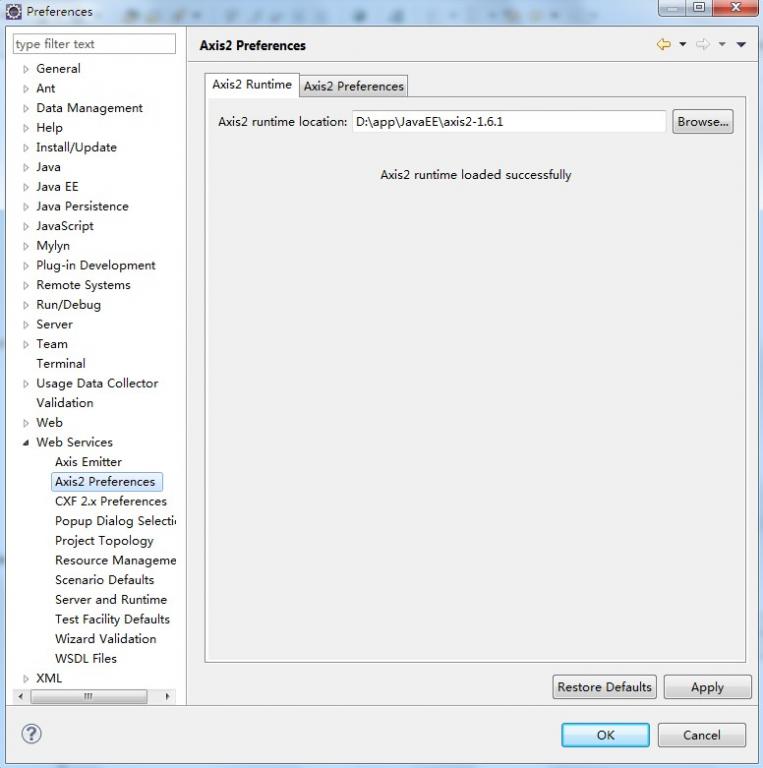
在Eclipse的菜单栏中,Window --> Preferences --> Web Service --> Axis2 Perferences,在Axis2 runtime location中选择Axis2解压缩包的位置,设置好后,点"OK"即行。(如图)
2.4.开发Web Service:
(1)新建一个Java Project,命名为"WebServiceTest1"
(2)新建一个class,命名为"CalculateService",完整代码如下:
- package edu.sjtu.webservice;
- /**
- * 计算器运算
- * @author rongxinhua
- */
- public class CalculateService {
- //加法
- public float plus(float x, float y) {
- return x + y;
- }
- //减法
- public float minus(float x, float y) {
- return x - y;
- }
- //乘法
- public float multiply(float x, float y) {
- return x * y;
- }
- //除法
- public float divide(float x, float y) {
- if(y!=0)
- {
- return x / y;
- }
- else
- return -1;
- }
- }
(3)在"WebServiceTest1"项目上new --> other,找到"Web Services"下面的"Web Service";
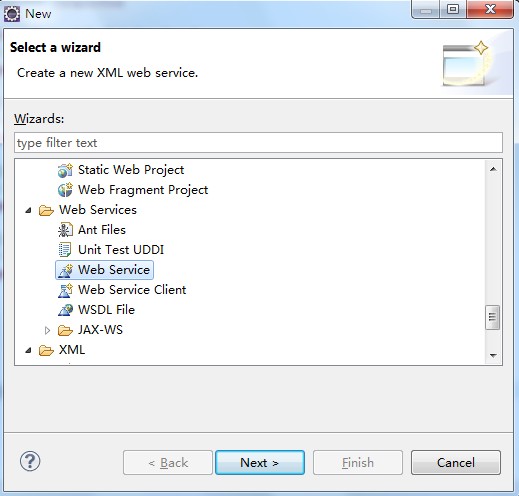
(4)下一步(next),在出现的Web Services对象框,在Service implementation中点击"Browse",进入Browse Classes对象框,查找到我们刚才写的写的CalculateService类。(如下图)。点击"ok",则回到Web Service话框。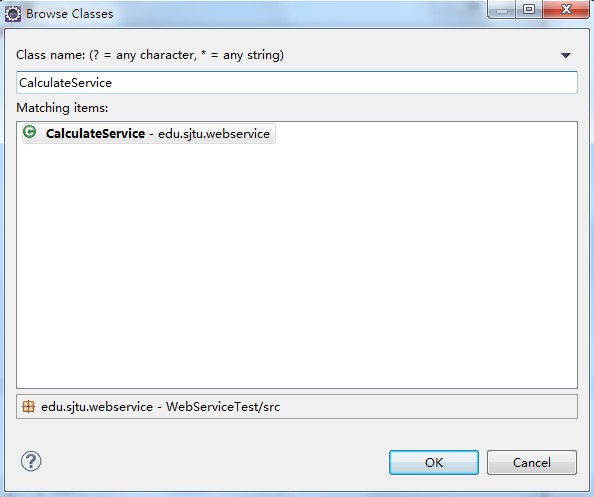
(5)在Web Service对话框中,将Web Service type中的滑块,调到"start service“的位置,将Client type中的滑块调到"Test client"的位置。
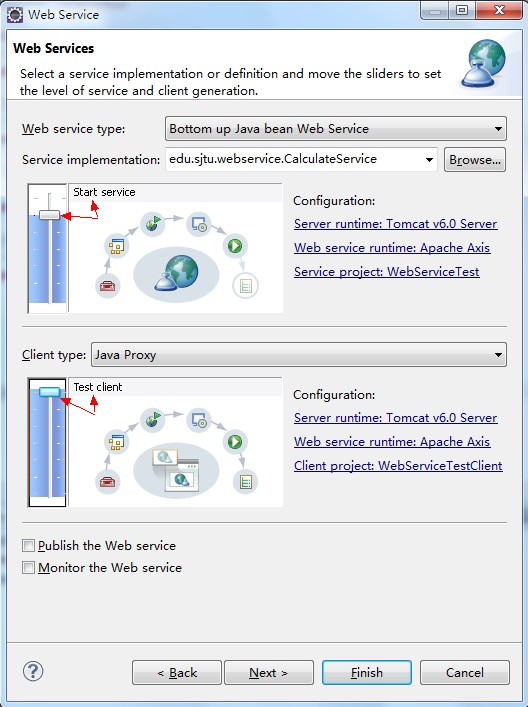
(6)在Web Service type滑块图的右边有个"Configuration",点击它下面的选项,进入Service Deployment Configuration对象框,在这里选择相应的Server(我这里用Tomcat6.0)和Web Service runtime(选择Apache Axis2),如下图:
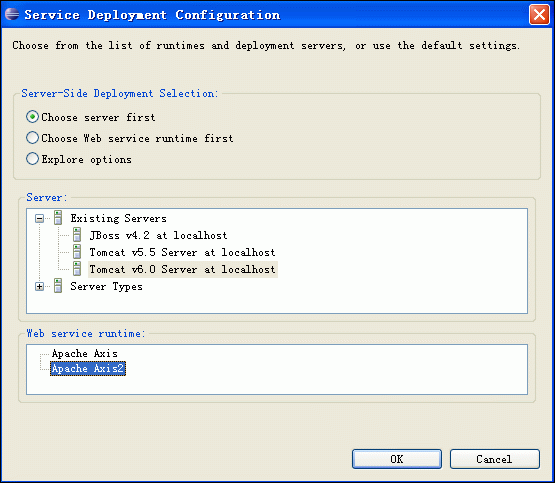
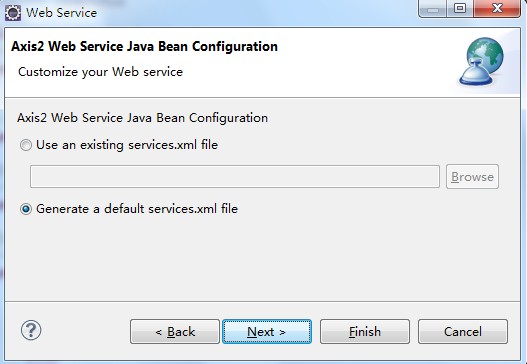
(7)点OK后,则返回到Web Service对话框,同理,Client type中的滑块右边也有"Configuration",也要进行相应的置,步骤同上。完成后,Next --> next即行。进入到Axis2 Web Service Java Bean Configuration,我们选择Generate a default services.xml,如下图所示:
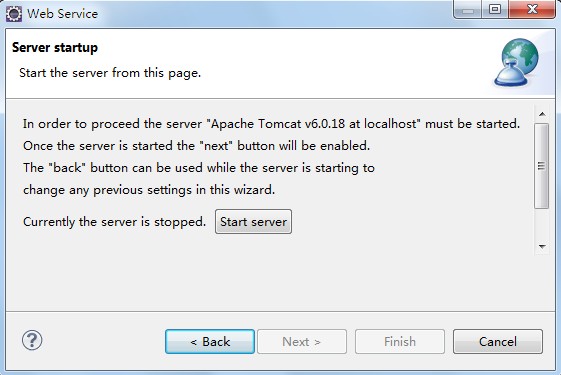
(8)到了Server startup对话框,有个按键"start server"(如下图),点击它,则可启动Tomcat服务器了。
(9)等启完后,点击"next -- > next",一切默认即行,最后,点击完成。最后,出现如下界面:(Web Service Explorer),我们在这里便可测试我们的Web服务。(使用浏览器打开的话使用如下地址:http://127.0.0.1:19189/wse/wsexplorer/wsexplorer.jsp?org.eclipse.wst.ws.explorer=3)。如下图所示:
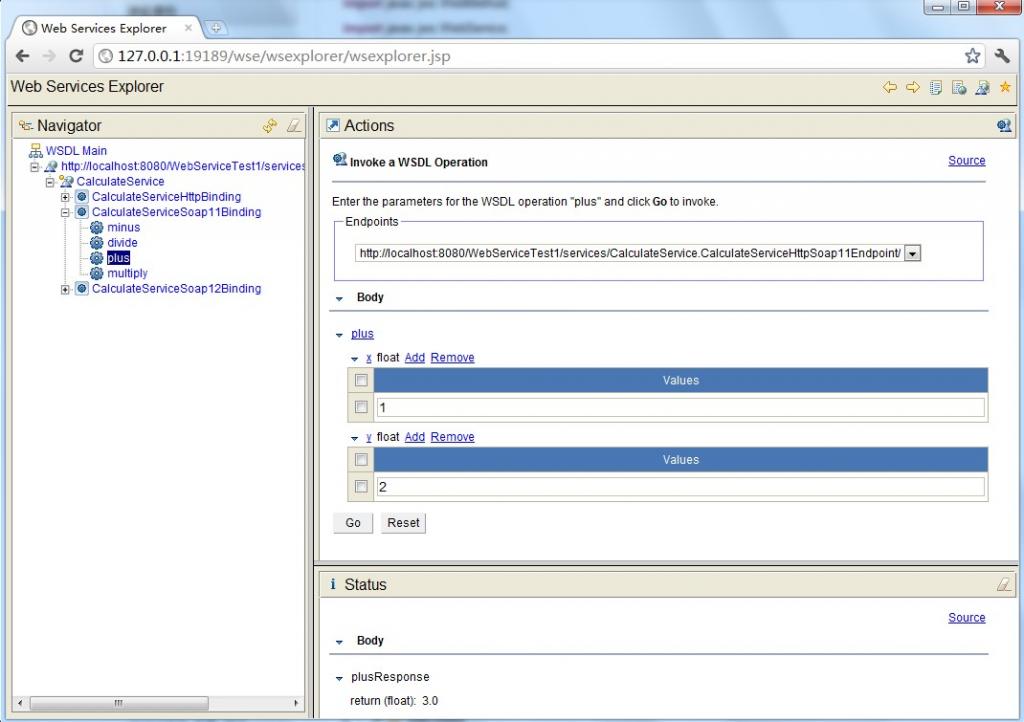
注:在浏览器中打开Web Service Explorer(有时候在eclipse中关闭了webservice explorer,可以用这种方法打开)
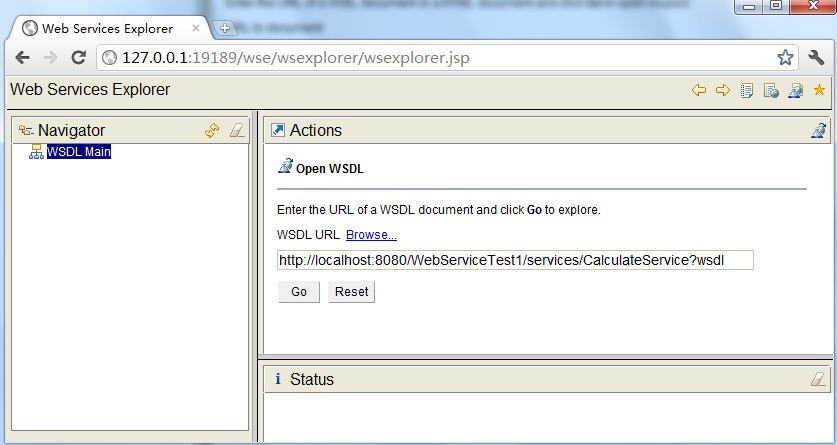
首先登录地址:http://127.0.0.1:19189/wse/wsexplorer/wsexplorer.jsp。然后在网页右上角选择Web Service Exoplorer标签。然后输入WSDL地址:http://localhost:8080/WebServiceTest1/services/CalculateService?wsdl 。这个wsdl地址就是我们刚才发布服务的那个wsdl。点击go,如下图所示:
然后就可以看到如下界面了:
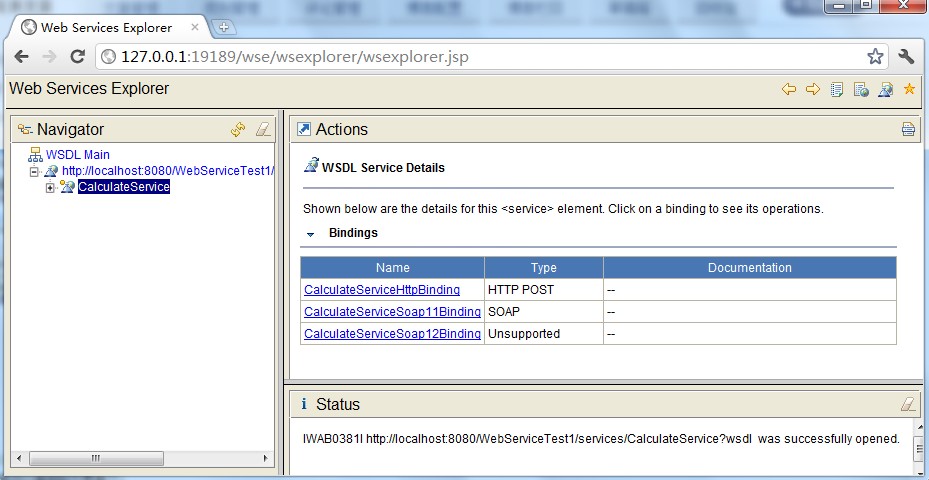
(10)测试比较简单,例如,我们选择一个"plus"的Operation(必须是CalculateServiceSoap11Binding),出现下图,在x的输入框中输入1,在y的输入框中输入2,点击"go",便会在status栏中显示结果3.0。其他方法的测试也类似。结果如上图所示。
2.5.CalculateService客户端调用程序
- package edu.sjtu.webservice.test;
- import javax.xml.namespace.QName;
- import org.apache.axis2.AxisFault;
- import org.apache.axis2.addressing.EndpointReference;
- import org.apache.axis2.client.Options;
- import org.apache.axis2.rpc.client.RPCServiceClient;
- public class CalculateServiceTest {
- /**
- * @param args
- * @throws AxisFault
- */
- public static void main(String[] args) throws AxisFault {
- // TODO Auto-generated method stub
- // 使用RPC方式调用WebService
- RPCServiceClient serviceClient = new RPCServiceClient();
- Options options = serviceClient.getOptions();
- // 指定调用WebService的URL
- EndpointReference targetEPR = new EndpointReference(
- "http://localhost:8080/WebServiceTest1/services/CalculateService");
- options.setTo(targetEPR);
- // 指定要调用的计算机器中的方法及WSDL文件的命名空间:edu.sjtu.webservice。
- QName opAddEntry = new QName("http://webservice.sjtu.edu","plus");//加法
- QName opAddEntryminus = new QName("http://webservice.sjtu.edu","minus");//减法
- QName opAddEntrymultiply = new QName("http://webservice.sjtu.edu","multiply");//乘法
- QName opAddEntrydivide = new QName("http://webservice.sjtu.edu","divide");//除法
- // 指定plus方法的参数值为两个,分别是加数和被加数
- Object[] opAddEntryArgs = new Object[] { 1,2 };
- // 指定plus方法返回值的数据类型的Class对象
- Class[] classes = new Class[] { float.class };
- // 调用plus方法并输出该方法的返回值
- System.out.println(serviceClient.invokeBlocking(opAddEntry,opAddEntryArgs, classes)[0]);
- System.out.println(serviceClient.invokeBlocking(opAddEntryminus,opAddEntryArgs, classes)[0]);
- System.out.println(serviceClient.invokeBlocking(opAddEntrymultiply,opAddEntryArgs, classes)[0]);
- System.out.println(serviceClient.invokeBlocking(opAddEntrydivide,opAddEntryArgs, classes)[0]);
- }
- }
运行结果:
- 3.0
- -1.0
- 2.0
- 0.5
3.实例2.HelloService
(1)首先定义服务方法,代码如下所示:
- package edu.sjtu.webservice;
- public class HelloService {
- public String sayHelloNew() {
- return "hello";
- }
- public String sayHelloToPersonNew(String name) {
- if (name == null) {
- name = "nobody";
- }
- return "hello," + name;
- }
- public void updateData(String data) {
- System.out.println(data + " 已更新。");
- }
- }
(2)参考实例1将这个方法发布为服务。
(3)编写客户端代码调用WebService(主要参考[5])
本文例子与其他例子最大的不同就在这里,其他例子一般需要根据刚才的服务wsdl生成客户端stub,然后通过stub来调用服务,这种方式显得比较单一,客户端必须需要stub存根才能够访问服务,很不方面。本例子的客户端不采用stub方式,而是一种实现通用的调用方式,不需要任何客户端存根即可访问服务。只需要指定对于的web servce地址、操作名、参数和函数返回类型即可。代码如下所示:
HelloServiceTest2.java
- package edu.sjtu.webservice.test;
- import javax.xml.namespace.QName;
- import org.apache.axis2.AxisFault;
- import org.apache.axis2.addressing.EndpointReference;
- import org.apache.axis2.client.Options;
- import org.apache.axis2.rpc.client.RPCServiceClient;
- public class HelloServiceTest2 {
- private RPCServiceClient serviceClient;
- private Options options;
- private EndpointReference targetEPR;
- public HelloServiceTest2(String endpoint) throws AxisFault {
- serviceClient = new RPCServiceClient();
- options = serviceClient.getOptions();
- targetEPR = new EndpointReference(endpoint);
- options.setTo(targetEPR);
- }
- public Object[] invokeOp(String targetNamespace, String opName,
- Object[] opArgs, Class<?>[] opReturnType) throws AxisFault,
- ClassNotFoundException {
- // 设定操作的名称
- QName opQName = new QName(targetNamespace, opName);
- // 设定返回值
- // Class<?>[] opReturn = new Class[] { opReturnType };
- // 操作需要传入的参数已经在参数中给定,这里直接传入方法中调用
- return serviceClient.invokeBlocking(opQName, opArgs, opReturnType);
- }
- /**
- * @param args
- * @throws AxisFault
- * @throws ClassNotFoundException
- */
- public static void main(String[] args) throws AxisFault,
- ClassNotFoundException {
- // TODO Auto-generated method stub
- final String endPointReference = "http://localhost:8080/WebServiceTest1/services/HelloService";
- final String targetNamespace = "http://webservice.sjtu.edu";
- HelloServiceTest2 client = new HelloServiceTest2(endPointReference);
- String opName = "sayHelloToPersonNew";
- Object[] opArgs = new Object[] { "My Friends" };
- Class<?>[] opReturnType = new Class[] { String[].class };
- Object[] response = client.invokeOp(targetNamespace, opName, opArgs,
- opReturnType);
- System.out.println(((String[]) response[0])[0]);
- }
- }
运行该程序,点击Run As->Java application,可以看到控制台端口的输出是:Hello, My Friends,表明客户端调用成功。该例子最大的不同和优势表现在客户端的调用方式,或者说是发起服务调用的方式,虽然比起客户端stub存根的方式,代码稍多,但是这种方式统一,不需要生产stub存根代码,解决了客户端有很多类的问题。如果读者对这些代码进一步封装,我想调用方式很简单,只需要传递相关参数,这更好地说明了服务调用的优势。而且这种方式更加简单明了,一看便知具体含义。而不需要弄得stub类的一些机制。
(4)改写客户端调用服务的代码
(3)中提到的客户端应用代码写的略微有些繁杂,下面将上面的客户端调用service程序进行改写,简洁了许多。代码如下:
HelloServiceTest.java
- import javax.xml.namespace.QName;
- import org.apache.axis2.AxisFault;
- import org.apache.axis2.addressing.EndpointReference;
- import org.apache.axis2.client.Options;
- import org.apache.axis2.rpc.client.RPCServiceClient;
- public class HelloServiceTest {
- public static void main(String args[]) throws AxisFault {
- // 使用RPC方式调用WebService
- RPCServiceClient serviceClient = new RPCServiceClient();
- Options options = serviceClient.getOptions();
- // 指定调用WebService的URL
- EndpointReference targetEPR = new EndpointReference("http://localhost:8080/WebServiceTest1/services/HelloService");
- options.setTo(targetEPR);
- // 指定要调用的sayHelloToPerson方法及WSDL文件的命名空间
- QName opAddEntry = new QName("http://webservice.sjtu.edu","sayHelloToPersonNew");
- // 指定sayHelloToPerson方法的参数值
- Object[] opAddEntryArgs = new Object[] { "xuwei" };
- // 指定sayHelloToPerson方法返回值的数据类型的Class对象
- Class[] classes = new Class[] { String.class };
- // 调用sayHelloToPerson方法并输出该方法的返回值
- System.out.println(serviceClient.invokeBlocking(opAddEntry,opAddEntryArgs, classes)[0]);
- }
- }
eclipse+axis2+webservice开发实例的更多相关文章
- eclipse+webservice开发实例
1.參考文献: 1.利用Java编写简单的WebService实例 http://nopainnogain.iteye.com/blog/791525 2.Axis2与Eclipse整合开发Web ...
- 转:Eclipse+webservice开发实例
原文地址:http://blog.csdn.net/xw13106209/article/details/7049614 1.参考文献: 1.利用Java编写简单的WebService实例 http ...
- WebService开发实例(Axis2实现,无需安装,快速实现)
曾经做过的项目里涉及Android客户端向服务器发送请求,服务器访问数据库获得数据并返回给Android客户端.当时Android客户端与服务器的通信已经实现,我只负责客户端布局和数据呈现的部分,近日 ...
- axis2 webService开发指南(1)
参考文件:blog.csdn.net/IBM_hoojo http://hoojo.cnblogs.com/ 1 WebService简介 WebService让一个程序可以透明的调用互联网的程序,不 ...
- axis2 webService开发指南(3)
复杂对象类型的WebService 这次我们编写复杂点的WebService方法,返回的数据是我们定义属性带getter.setter方法JavaBean,一维数组.二维数组等 1.服务源代码 新建一 ...
- axis2 webService开发指南(2)
1 Axis2的简单WebService示例 1.1 新建一个web工程,创建一个类Greeting,用于当作webservice服务 代码如下: package amyservices; impo ...
- 基于JAX-WS的webService开发实例
最近因为工作原因接触到webService,所以记录下开发中碰到的问题,方便自己以后复习,顺便发扬一下开源精神.刚刚接触webServie如果有什么错误欢迎大家指正. 本地环境:myEclipse10 ...
- axis2开发实例(二)建立独自的新工程
第一部分 环境搭建 1. 环境搭建 (1) 下载Axis2服务包:axis2-1.6.2-bin.zip,axis2-1.6.2-war.zip,分别解压到D:\webservice_axis ...
- eclipse下的webservice开发
关于eclipse下的webservice开发,有非常多的教程,这里只记下学习过程中的弯路: 1.无论是CXF模式还是AXIS模式,在出现start server之后,点击next报错:"s ...
随机推荐
- windows7 jdk 环境变量添加
JAVA_HOME D:\Java;PATH %JAVA_HOME%\bin;%JAVA_HOME%\jre\bin;CLASSPATH .;%JAVA_HOME%\lib;%JAVA_HOME%\l ...
- asp.net将数据导出到excel
本次应用datatable导出,若用gridview(假设gridview设为了分页显示)会出现只导出当前页的情况. protected void btnPrn_Click(object sender ...
- Bootstrap_网格系统
首先添加CSS样式: [class *= col-]{ background-color: #eee; border: 1px solid #ccc; } [class *= col-] [class ...
- 重构oceanbase的一个函数
我去,今天读了一下ob的源码,感觉有点乱啊!!!好吧,当作练手,我重构了一个函数 void* ObMySQLCallback::decode(easy_message_t* m) { uint32_t ...
- Adobe Photoshop CS或者CC卸载不了怎么办?
有木有没有遇到这个问题的同学?使用Adobe Creative Suite CleanerToo工具下载就好了~ 下载地址:http://pan.baidu.com/s/1pJ3aBsn
- opencv 2.46与visual studio 2012 配置方法
一开学就搞实训,还是没学过的图像处理.痛苦啊!图像处理时一般使用Matlab中的图像工具箱,或者是C/C++和OpenCV结合使用.以前看过一些关于opencv的文章,没想到现在要用上了. 把搭建开发 ...
- 错误: 找不到或无法加载主类 scala.tools.nsc.MainGenericRunner
错误: 找不到或无法加载主类 scala.tools.nsc.MainGenericRunner 原因: Sacala安装路径中包含空格.
- lpad rpad
Lpad()函数的用法:lpad函数将左边的字符串填充一些特定的字符其语法格式如下: lpad(string,n,[pad_string]) string:可是字符或者参数 ...
- JS添加删除一组文本框并对输入信息加以验证
在做项目中遇到这样一个问题,就是我们需要添加几组数据到数据库,但是具体几组数据不确定,有客户来填写,比如我们需要添加打折策略,可能个策略有很多组方案,比如“满100打5折,满200打4折,满500打3 ...
- 栈和队列的面试题Java实现
栈和队列: 面试的时候,栈和队列经常会成对出现来考察.本文包含栈和队列的如下考试内容: (1)栈的创建 (2)队列的创建 (3)两个栈实现一个队列 (4)两个队列实现一个栈 (5)设计含最小函数min ...