
[Java][Spring]spring profile与maven profile多环境管理
spring profile 与 maven profile 多环境管理
spring profile
Spring profile是Spring提供的多环境管理方案。
如下图:
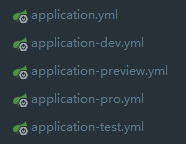
每种环境都对应一个yml文件,然后再application.yml中配置需要使用的环境:
spring:

  #环境 dev|test|pro|preview

  profiles:

    active: dev
可以看出,Spring profile对配置文件的命名是有有要求的,必须是 application- 开头。
除了配置环境之外,一些不随着环境变化而变化的配置也应该放到application.yml中,application-xxx.yml的配置文件最好值存放于环境相关的配置项。
通过改变spring.profiles.active的值来切换不同的环境,这种方法简单易懂,但是其实还有两个问题:
- 每次切换环境都要手动修改
spring.profiles.active的值 - 打包的时候需要手动删除其他的环境的配置文件,不然其他环境的敏感信息会被一起打包
为了解决这两个问题,我们需要 maven profile 的配合。
maven profile
maven的profile可以让我们定义多套配置信息,并指定其激活条件,然后在不同的环境下使用不同的profile配置。
在maven中有两个地方可以配置profile:
pom.xml中:这里面定义的profile作用范围是当前项目。(user)/.m2/setting.xml中:这里面定义的profile作用范围是所有使用了该配置文件的项目。
pom.xml中的profile
在pom.xml中,profile能定义的东西就很多了
<profiles>

    <profile>

        <id>..</id>

        <activation>...</activation>

        <build>...</build>

        <modules>...</modules>

        <repositories>...</repositories>

        <pluginRepositories>...</pluginRepositories>

        <dependencies>...</dependencies>

        <reporting>...</reporting>

        <dependencyManagement>...</dependencyManagement>

        <distributionManagement>...</distributionManagement>

    </profile>

</profiles>
我们从spring profile遗留下来的两个问题来进行分析配置:
每次切换环境都要手动修改
spring.profiles.active的值这个问题通过配置
profile就可以解决,在pom根节点中添加:<profiles>
<profile>
<id>dev</id>
<activation>
<!-- activeByDefault为true表示,激活默认id的profile(这里是dev)-->
<activeByDefault>true</activeByDefault>
</activation>
<!-- properties里面可以添加自定义节点,如下添加了一个env节点 -->
<properties>
<!-- 这个节点的值可以在maven的其他地方引用,即定义了一个叫env的变量 -->
<env>dev</env>
</properties>
</profile>
<profile>
<id>test</id>
<properties>
<env>test</env>
</properties>
</profile>
<profile>
<id>prod</id>
<properties>
<env>prod</env>
</properties>
</profile>
</profiles>
如上可以看到,定义了三套环境,其中
id为dev的是默认环境,三套环境都定义了叫env的变量。如果用的是
idea编译器,添加完成之后,maven空间窗口会多出一个profiles,其中的默认值就是设置的dev。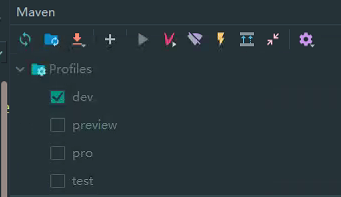
这样的话,最小化的
profiles已经配置好了,通过勾选上图的profiles,就可以快速切换maven的profile环境。现在可以根据勾选来配置
maven profile的环境,但是spring profile还得通过手动修改spring.profiles.active的值来切换,这个问题,可以这么做:还记得
maven profile中定义的env变量吗,现在就可以进行使用了:spring:
profiles:
# 将maven profile和spring profile环境关联起来
active: @env@
当
maven profile将环境切换为test的时候,在pom中定义的id为test的profile环境被激活,在该环境下的env的值是test,maven插件会将@env@替换为test,这样spring profile的环境也随之发生了改变。可以看到,自定的变量
env的值不能乱写,要与spring profile的环境相对应。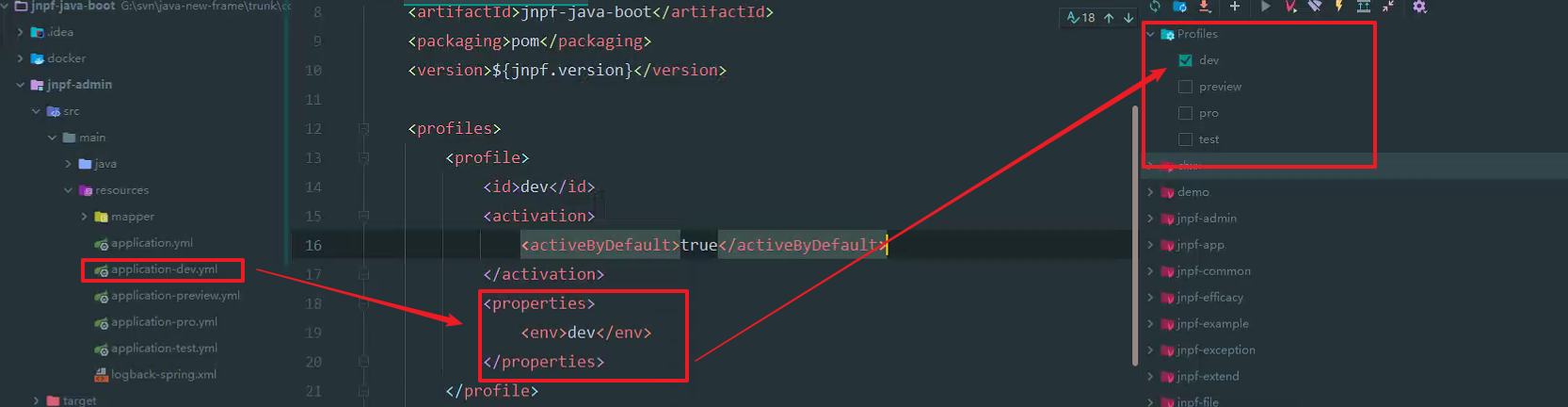
总结一下:
- 先在
pom文件中配置profiles - 然后在
application.yml配置文件中添加spring.profiles.active=@env@
- 先在
打包的时候需要手动删除其他的环境的配置文件,不然其他环境的敏感信息会被一起打包
解决这个问题,需要在
pom的根节点中配置build的信息。<build>
<resources>
<resource>
<directory>src/main/resources</directory>
<excludes>
<!--先排除application开头的配置文件-->
<exclude>application*.yml</exclude>
</excludes>
</resource>
<resource>
<directory>src/main/resources</directory>
<!--filtering 需要设置为 true,这样在include的时候,才会把
配置文件中的@env@ 这个maven`变量`替换成当前环境的对应值 -->
<filtering>true</filtering>
<includes>
<!--引入所需环境的配置文件-->
<include>application.yml</include>
<include>application-${env}.yml</include>
</includes>
</resource>
</resources>
</build>directory:资源文件所在目录includes:需要包含的文件列表excludes:需要排除的文件列表
如上,配置了两个
<resouce>,第一个resouce排除了src/main/resources目录下所有以application开头的配置文件;第二个resouce在第一个的基础上添加了所需的配置文件。注意
application-${env}.yml它是一个动态变化的值,随着当前环境的改变而改变。比如当前环境的id是dev的profile,那么env的值就是dev。这样配置之后,
maven在build的时候,就会根据配置先排除掉指定的配置文件,然后根据当前环境添加所需要的配置文件。
settings.xml中的profile
由于settings.xml的作用范围广,所以profile中只能定义一些公共的信息,如下:
<settings xmlns="http://maven.apache.org/SETTINGS/1.0.0"

  xmlns:xsi="http://www.w3.org/2001/XMLSchema-instance"

  xsi:schemaLocation="http://maven.apache.org/SETTINGS/1.0.0

                      https://maven.apache.org/xsd/settings-1.0.0.xsd">

    ...

    <profiles>

        <profile>

            <id>...</id>

            <activation>...</activation>

            <repositories>...</repositories>

        </profile>

    </profiles>

    ...

</settings>
id:该profile的唯一标识activation:在哪些情况下激活profile,这里有很多中策略可以选择,只要满足其中一个条件就能激活repositories:远程仓库
可以看到,其实能配置的东西有限,所以一般都会配置将maven profile配置在pom.xml中。
[Java][Spring]spring profile与maven profile多环境管理的更多相关文章
- spring 使用 maven profile
先看看 maven 定义 profile 的写法 <!-- profiles --> <profiles> <profile> <activation> ...
- Spring Boot 笔记 (1) - Maven、基本配置、Profile的使用
一. Spring Boot 简介 开箱即用的一站式 Java EE 解决方案 Spring 技术栈的大整合 核心问题 暂时无法回答 Spring Boot 和 SOA 有什么区别? Spring B ...
- [Spring Boot 系列] 集成maven和Spring boot的profile功能
由于项目的需要, 今天给spirng boot项目添加了profile功能.再网上搜索了一圈,也没有找到满意的参考资料,其实配置并不难,就是没有一个one stop(一站式)讲解的地方,所以有了写这篇 ...
- [Spring Boot 系列] 集成maven和Spring boot的profile 专题
maven中配置profile节点: <project> .... <profiles> <profile> <!-- 生产环境 --> <id& ...
- Java & Maven & Spring & Spring Boot
Java & Maven & Spring & Spring Boot Spring Boot sb https://start.spring.io/ Spring 4 htt ...
- 我把自己的java库发布到了maven中央仓库,从此可以像Jackson、Spring的jar一样使用它了
欢迎访问我的GitHub https://github.com/zq2599/blog_demos 内容:所有原创文章分类汇总及配套源码,涉及Java.Docker.Kubernetes.DevOPS ...
- 转 通过 spring 容器内建的 profile 功能实现开发环境、测试环境、生产环境配置自动切换
软件开发的一般流程为工程师开发 -> 测试 -> 上线,因此就涉及到三个不同的环境,开发环境.测试环境以及生产环境,通常 ...
- Spring Boot 中如何配置 Profile
本人免费整理了Java高级资料,涵盖了Java.Redis.MongoDB.MySQL.Zookeeper.Spring Cloud.Dubbo高并发分布式等教程,一共30G,需要自己领取.传送门:h ...
- spring boot 环境配置(profile)切换
Spring Boot 集成教程 Spring Boot 介绍 Spring Boot 开发环境搭建(Eclipse) Spring Boot Hello World (restful接口)例子 sp ...
- spring&pom两种获取profile的方式
一.原理: 1.实现ApplicationContextAware(当一个类实现了ApplicationContextAware这个接口之后,这个类就可以通过setApplicationContext ...
随机推荐
- 启动vue项目失败,报错Failed at the node-sass@4.14.1 postinstall script.
https://www.cnblogs.com/xiaodangshan/p/13061618.html
- C++跨DLL内存所有权问题探幽(一)DLL提供的全局单例模式
最近在开发的时候,特别是遇到关于跨DLL申请对象.指针.内存等问题的时候遇到了这么一个问题. 问题 跨DLL能不能调用到DLL中提供的单例? 问题比较简单,就是我现在有一个进程A,有DLL B DLL ...
- Vue - 组件通信(父子单向传递、父子相互传递、祖孙隔代传递)
父组件向子组件单向传递 父组件:引入子组件后,通过属性绑定的形式,将值传入子组件: ` ` 子组件:子组件通过props接收父组件传入的值; ` {{sonGetParam}} ` 子组件向父组件单向 ...
- C++17 解构绑定
在python中,加入我们有一个函数返回了两个数值,如: def getData(x, y): return x,y 那么我们在使用这个函数时只需要使用两个新变量去接收函数返回值就可以: a,b = ...
- Android Studio 的 Gradle 面板没有 Task
问题描述:Android Studio Gradle 窗口没有显示 task 列表的问题,如下图所示: 网上找了好久都没有找到原因,最后自己摸索,找了解决方法. 解决方法:依次点击:File -> ...
- 阿里云龙蜥8.6部署SQLSERVER2022的过程
阿里云龙蜥8.6部署SQLSERVER2022的过程 背景 之前总结过, 但是发现当时是preview版本. 这里想升级一下, 并且顺便抄一下他的部分说明 下载 wget https://packag ...
- [转帖]tidb数据库5.4.3和6.5.3版本性能测试对比
https://tidb.net/blog/5454621f 一.测试需求: 基于历史原因,我们的业务数据库一直使用5.4.3,最近由于研发提出需求:需要升级到6.5.3版本,基于版本不同,需要做 ...
- [转帖]Nginx应用调优案例
https://bbs.huaweicloud.com/blogs/146367 [摘要] 1 问题背景nginx的应用程序移植到TaiShan服务器上,发现业务吞吐量没有达到硬件预期,需要做相应调优 ...
- Inspur CS5280H BMC重装系统的过程
Inspur CS5280H BMC重装系统的过程 背景 公司里面一台信创海光的设备 默认安装了银河麒麟v10的操作系统 但是在进行瀚高数据库压测时 总会出现无缘无故的宕机的情况. 昨天还特别学习了下 ...
- [转帖]从CPU指令集自主到信息技术产业自主
https://zhuanlan.zhihu.com/p/365210753 现代信息技术的应用都是以计算机为基础,CPU是计算机中的信息处理中枢.CPU指令集是CPU逻辑电路与操作系统和应用程序交流 ...