
spring 使用 maven profile
先看看 maven 定义 profile 的写法
	<!-- profiles -->

	<profiles>

		<profile>

			<activation>

				<activeByDefault>true</activeByDefault>

			</activation>

			<id>dev</id>

			<properties>

				<profile.env>dev</profile.env>

			</properties>

		</profile>

		<profile>

			<id>test</id>

			<properties>

				<profile.env>test</profile.env>

			</properties>

		</profile>

		<profile>

			<id>product</id>

			<properties>

				<profile.env>product</profile.env>

			</properties>

		</profile>

	</profiles>
然后在 spring.yml 里面这个么写

但是 spring 在运行的时候 已经和maven 没有关系了 这时候 ${ 变量名的写法 } 已经不生效了
备注: 这里 ${ 变量名 } 是maven 引用 变量的 写法。
比如:
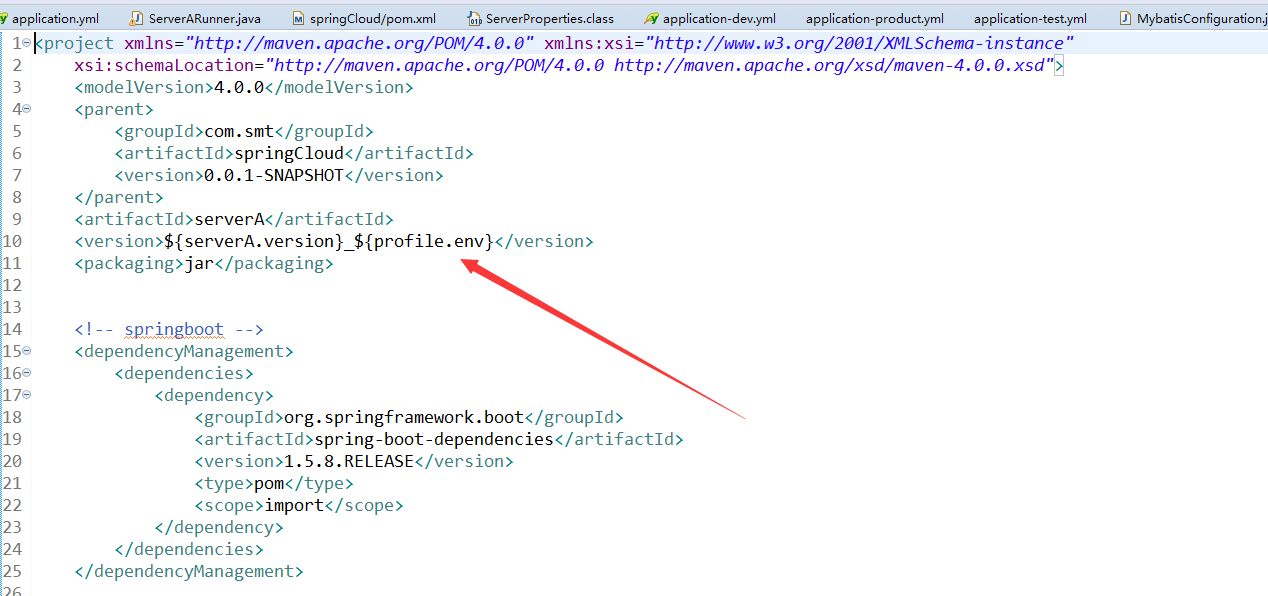
这里的 ${serverA.version}_${profile.env} 分别是引用自 前面配置文件 中定义的 maven 变量 ${serverA.version} 来自 <properties> ${profile.env} 来自 profile

怎么才能让 spring一识别 maven的 表达式呢?我们知道 spring运行在maven 打包以后,所以 不能可能spring运行的时候还能读取到 maven的 变量,所以只能是在maven打包的时候替换文件。 这就是核心思想了。加上下面的代码就可以打包的时候替换了spring.yml 中 maven的 变量了 。
    <resources>

			<resource>

				<directory>src/main/resources/</directory>

				<filtering>true</filtering>

			</resource>

		</resources>
这个 代码 加在 <build> 里面就可以了
	<!-- 指定jdk 的版本 -->

	<build>

		<resources>

			<resource>

				<directory>src/main/resources/</directory>

				<filtering>true</filtering>

			</resource>

		</resources>

		<plugins>

			<plugin>

				<groupId>org.apache.maven.plugins</groupId>

				<artifactId>maven-compiler-plugin</artifactId>

				<version>3.1</version>

				<configuration>

					<source>1.8</source>

					<target>1.8</target>

				</configuration>

			</plugin>

		</plugins>

	</build>
上面 多了一个 修改 jdk 版本的 配置,我的另一篇 博客里面写了 修改 jdk 版本的 maven的 2 中配置方式。
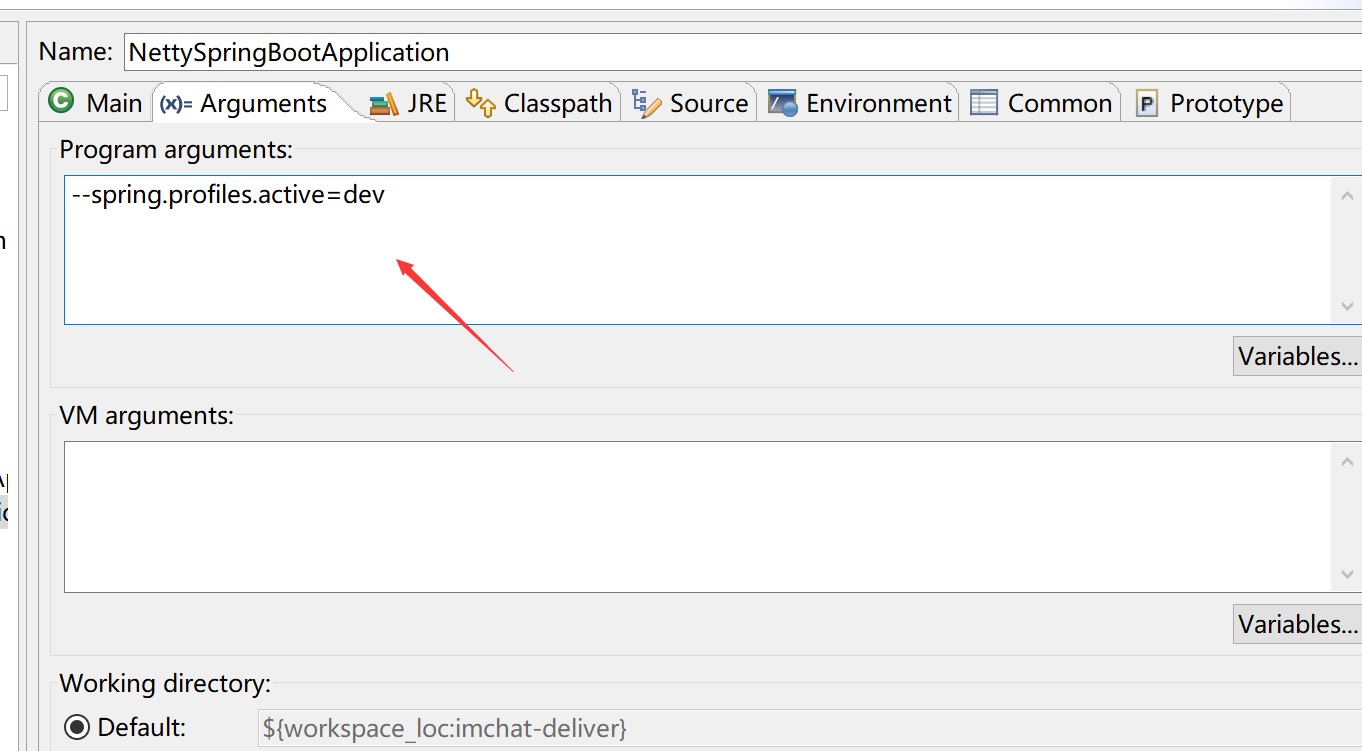
如果需要零时切换 profile 可以在 jar 后面 更上 --spring.profiles.active=dev
java -jar aaa.jar --spring.profiles.active=dev
在 eclipse 中 run 右键 运行配置中指定
spring 使用 maven profile的更多相关文章
- [Spring Boot 系列] 集成maven和Spring boot的profile功能
由于项目的需要, 今天给spirng boot项目添加了profile功能.再网上搜索了一圈,也没有找到满意的参考资料,其实配置并不难,就是没有一个one stop(一站式)讲解的地方,所以有了写这篇 ...
- 集成maven和Spring boot的profile功能
思路:maven支持profile功能,当使用maven profile打包时,可以打包指定目录和指定文件,且可以修改文件中的变量.spring boot也支持profile功能,只要在applica ...
- 集成maven和Spring boot的profile 专题
maven中配置profile节点: <project> .... <profiles> <profile> <!-- 生产环境 --> <id& ...
- 004-集成maven和Spring boot的profile功能打包
参考地址:https://blog.csdn.net/lihe2008125/article/details/50443491 一.主要目标 1.通过mvn在命令行中打包时,可以指定相应的profil ...
- [Spring Boot 系列] 集成maven和Spring boot的profile 专题
maven中配置profile节点: <project> .... <profiles> <profile> <!-- 生产环境 --> <id& ...
- 集成maven和Spring boot的profile
如果在配置中勾选了多套配置,则以pom.xml文件中 profiles中 配置 最后一个配置为准. maven中配置profile节点: <project> .... <profi ...
- Spring Boot Maven Plugin(二):run目标
简介 Spring Boot Maven Plugin插件提供spring boot在maven中的支持.允许你打包可运行的jar包或war包. 插件提供了几个maven目标和Spring Boot ...
- maven profile实现多环境配置
每次项目部署上线都需要手动去修改配置文件(比如数据库配置,或者一个自定义的配置)然后才能打包,很麻烦,网上找到 maven profile可以完成这个工作,记录如下: 环境:eclipse + spr ...
- Spring 快速开始 Profile 和 Bean
和maven profile类似,Spring bean definition profile 有两个组件:声明和激活. [栗子:开发测试环境使用HyperSQL 生产环境使用JNDI上下文根据配置查 ...
随机推荐
- git 系统找不到 指定的路径
git 系统找不到 指定的路径 %HOMEDRIVE%%HOMEPATH% Home 问题解决
- js数组与字符串之间的相互转换
一.数组转字符串 需要将数组元素用某个字符连接成字符串,示例代码如下 <!doctype html> <html> <head> <meta charset= ...
- HDU 1936 区间贪心
/* *区间贪心.前几天刚做了POJ 1328 ...思路完全相同... *最多有100个表情,100行文字.遍历寻找每个表情的所在区间.时间复杂度大约在10^5 ~ 10^6 可以接受. *然后对每 ...
- cas 认证管理器
CAS-默认的认证管理器:AuthenticationManagerImpl <bean id="authenticationManager" class="org ...
- hadoop mongodb install(3)
reference:http://dblab.xmu.edu.cn/blog/868-2/ root@iZuf68496ttdogcxs22w6sZ:~# mv mongodb-linux-x86_6 ...
- 常用docker
随便什么版本的linux 接入daocloud.io 在发现镜像中选择DockerHub 搜索对应的image,然后部署. 手动输入YAML即可 aria: image: cuteribs/aria2 ...
- DevExpress v18.1新版亮点——WinForms篇(二)
用户界面套包DevExpress v18.1日前终于正式发布,本站将以连载的形式为大家介绍各版本新增内容.本文将介绍了DevExpress WinForms v18.1 的新功能,快来下载试用新版本! ...
- REST easy with kbmMW #15 – Handling HTTP POST
我被问到有关如何通过基于kbmMW智能服务(Smart Service)的REST处理POST的问题. 这篇博客文章解释了典型的POST各种形式的访问,以及如何在kbmMW中处理它们. POST变种W ...
- mdadm 创建md 删除md步骤
最近在使用mdadm创建和删除RAID设备.但是在创建和删除过程中会出现创建md0重启后变成md127,删除md127重启后又重新出现的状况.在网上搜索了一下,总结如下: 创建: 1. mdad ...
- ue使用
快捷键CTRL+V:输入代码提示自动补全 编辑器Ultraedit快捷键 说到编辑器的快捷键,VIM是无与伦比的.要反对,也得是带脚踏板的EmaCS.UE还是有差距的,很大差距.注意:VIM是开 ...