
【Azure 应用服务】在Azure App Service多实例的情况下,如何在应用中通过代码获取到实例名(Instance ID)呢?
问题描述
App Service开启多实例后,如何在代码中获取当前请求所真实到达的实例ID(Instance ID)呢?
问题答案
App Service 通过 环境变量的方式 显示的输出实例ID等信息,如:
Website Environment Variables
WEBSITE_SITE_NAME- The name of the site.WEBSITE_SKU- The sku of the site (Possible values:Free,Shared,Basic,Standard).WEBSITE_COMPUTE_MODE- Specifies whether website is on a dedicated or shared VM/s (Possible values:Shared,Dedicated).WEBSITE_HOSTNAME- The Azure Website's primary host name for the site (For example:site.azurewebsites.net). Note that custom hostnames are not accounted for here.WEBSITE_INSTANCE_ID- The id representing the VM that the site is running on (If site runs on multiple instances, each instance will have a different id).WEBSITE_NODE_DEFAULT_VERSION- The default node version this website is using.WEBSOCKET_CONCURRENT_REQUEST_LIMIT- The limit for websocket's concurrent requests.WEBSITE_COUNTERS_ALL- (Windows only) all perf counters (ASPNET, APP and CLR) in JSON format. You can access specific one such as ASPNET byWEBSITE_COUNTERS_ASPNET.
可以通过App Service的高级管理工具(Kudu站点)来查看这些信息:
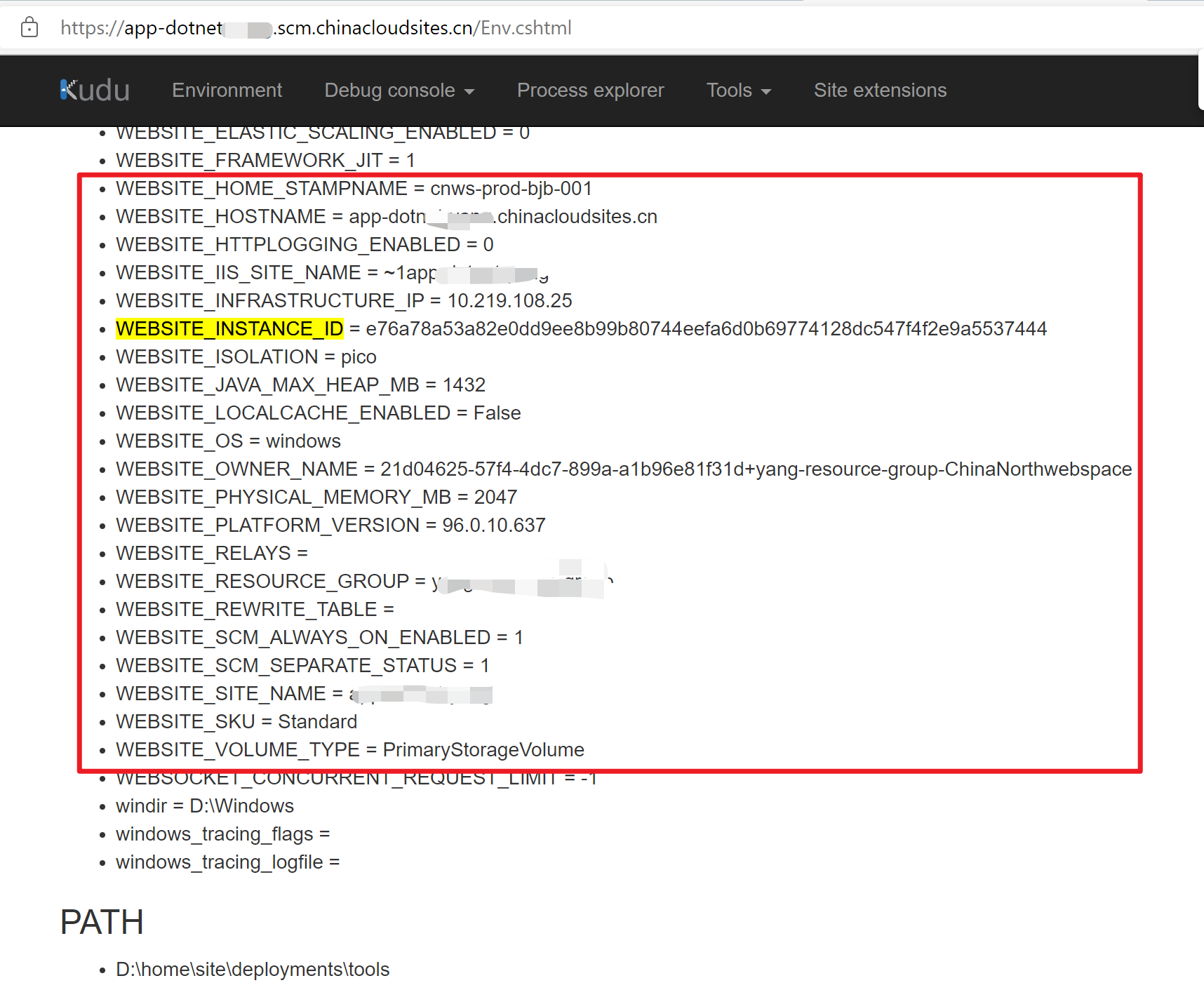
所以如果要在代码中获取Instance ID信息,可以直接通过 var instanceID = Configuration["WEBSITE_INSTANCE_ID"] 获取。全部示例代码为:
Index.cshtml.cs :
using Microsoft.AspNetCore.Mvc;

using Microsoft.AspNetCore.Mvc.RazorPages;

namespace MyFirstAzureWebApp.Pages;

public class IndexModel : PageModel

{

    private readonly IConfiguration Configuration;

    private readonly ILogger<IndexModel> _logger;

    public IndexModel(ILogger<IndexModel> logger, IConfiguration configuration)

    {

        _logger = logger;

        Configuration = configuration;

    }

    public void OnGet()

    {

        var instanceID = Configuration["WEBSITE_INSTANCE_ID"];

        ViewData["InstanceID"] = instanceID;

        //return Content($"Instance ID value: {instanceID} \n");

    }

}
如要快速创建一个ASP.NET应用来验证Instance ID,可以参考文档:https://docs.azure.cn/zh-cn/app-service/quickstart-dotnetcore?tabs=net60#create-an-aspnet-web-app
Index.cshtml 文件内容为:
@page

@model IndexModel

@{

    ViewData["Title"] = "Home page";

}

<div class="text-center">

    <h1 class="display-4">Welcome</h1>

     <div>

        The current Instance ID is:@ViewData["InstanceID"];

    </div>

    <hr />

    <p>Learn about <a href="https://docs.microsoft.com/aspnet/core">building Web apps with ASP.NET Core</a>.</p>

</div>
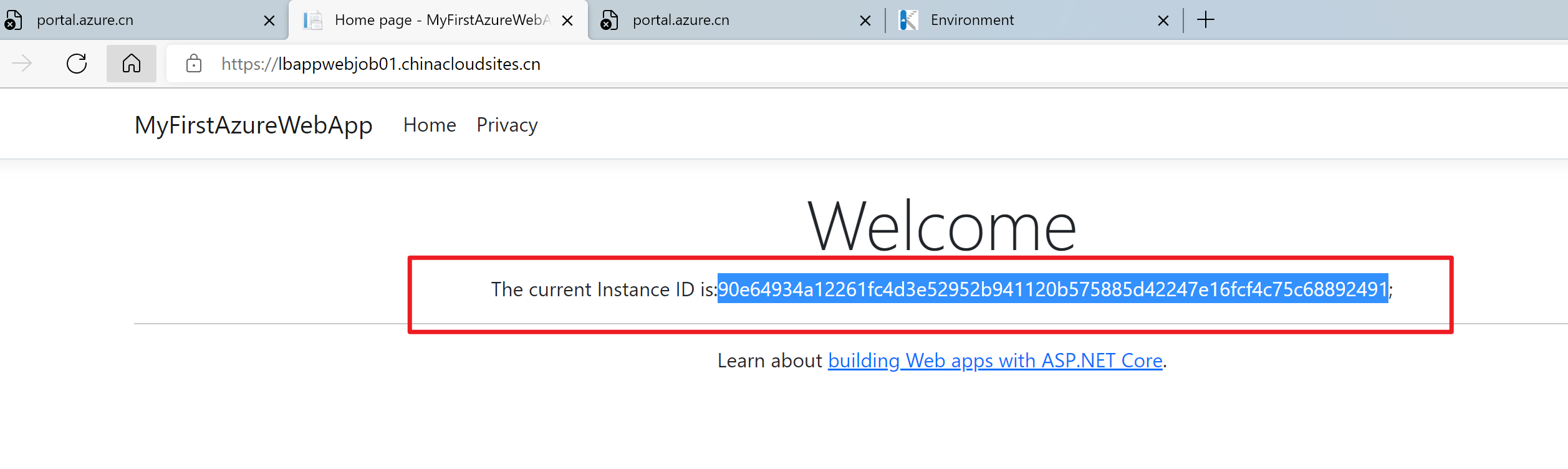
发布到App Service后,就可以检验效果:
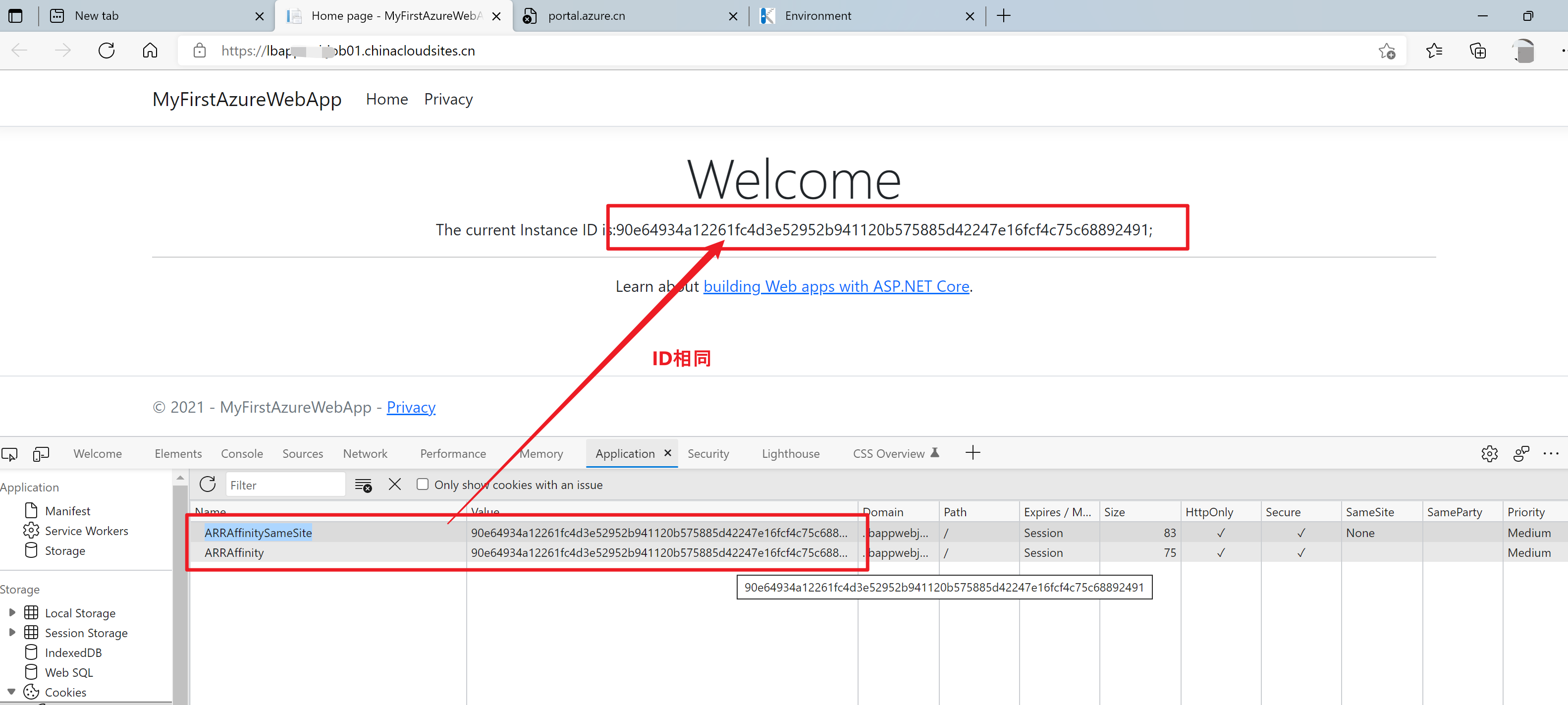
此外,如果App Service开启了ARR Affinity(请求粘连性)功能后,在客户端的Cookie值ARRAffinity和ARRAffinitySameSite中,也是可以找到Instance ID信息。如:
附录一:在Function App中可以通过 Environment.GetEnvironmentVariable("WEBSITE_INSTANCE_ID"); 来获取实例ID, App Service中也一样
using System;

using System.Configuration;

using System.Threading;

using Microsoft.Azure.WebJobs;

using Microsoft.Azure.WebJobs.Host;

using Microsoft.Extensions.Logging;

namespace FunctionAppforTime

{

    public class Function5

    {

        [FunctionName("Function5")]

        public void Run([TimerTrigger("0 */1 * * * *")]TimerInfo myTimer, ILogger log)

        {

            var instanceid = Environment.GetEnvironmentVariable("WEBSITE_INSTANCE_ID");

            log.LogInformation($"function host in: {instanceid}");

            log.LogInformation($"function host in: {instanceid} and sleep 100s");

            Thread.Sleep(100000);

            log.LogInformation($"C# Timer trigger function executed at: {DateTime.Now}");

        }

    }

}
参考资料
Azure runtime environment:https://github.com/projectkudu/kudu/wiki/Azure-runtime-environment#website-environment-variables
快速入门:部署 ASP.NET Web 应用:https://docs.azure.cn/zh-cn/app-service/quickstart-dotnetcore?tabs=net60#create-an-aspnet-web-app
【Azure 应用服务】在Azure App Service多实例的情况下,如何在应用中通过代码获取到实例名(Instance ID)呢?的更多相关文章
- 【Azure 应用服务】一个 App Service 同时部署运行两个及多个 Java 应用程序(Jar包)
问题描述 如何在一个AppService下同时部署运行多个Java 应用程序呢? 问题解答 因为App Service的默认根目录为 wwwroot.如果需要运行多个Java 应用程序,需要在 www ...
- 【Azure 应用服务】在 App Service for Windows 中自定义 PHP 版本的方法
问题描述 在App Service for Windows的环境中,当前只提供了PHP 7.4 版本的选择情况下,如何实现自定义PHP Runtime的版本呢? 如 PHP Version 8.1.9 ...
- 【Azure 应用服务】Azure App Service For Linux 上实现 Python Flask Web Socket 项目 Http/Https
问题描述 在上篇博文"[Azure 应用服务]App Service for Linux 中实现 WebSocket 功能 (Python SocketIO)"中,实现了通过 HT ...
- 【Azure 应用服务】Azure App Service 自带 FTP服务
问题描述 Azure PaaS服务是否有FTP/S服务呢? 回答问题 应用服务(Web App/App Service)在创建时候,默认创建了FTP服务并自动开启,用于应用部署.但它不是适合作为FTP ...
- 【Azure 应用服务】Azure Mobile App (NodeJS) 的服务端部署在App Service for Windows中出现404 Not Found -- The resource you are looking for has been removed, had its name changed, or is temporarily unavailable.
问题描述 使用NodeJS的后端应用,开发一个Mobile App的服务端,手机端通过REST API来访问获取后端数据.在本地编译好后,通过npm start启动项目,访问效果如下: 但是,当把项目 ...
- 【Azure 应用服务】Azure Web App的服务(基于Windows 操作系统部署)在被安全漏洞扫描时发现了TCP timestamps漏洞
问题背景 什么是TCP timestamps(TCP 时间戳)? The remote host implements TCP Timestamps, as defined by RFC1323 (h ...
- 【Azure 应用服务】Azure Function App 执行PowerShell指令[Get-Azsubscription -TenantId $tenantID -DefaultProfile $cxt]错误
问题描述 使用PowerShell脚本执行获取Azure订阅列表的指令(Get-Azsubscription -TenantId $tenantID -DefaultProfile $cxt).在本地 ...
- 【Azure 应用服务】Azure Function HTTP 触发后, 230秒就超时。而其他方式触发的Function, 执行5分钟后也超时,如何调整超时时间?
问题描述 Azure Function HTTP 触发后, 230秒就超时,而其他方式触发的Function, 执行5分钟后也超时,如何调整超时时间? 问题分析 查阅官方文档,对函数应用超时持续时间有 ...
- 【Azure 应用服务】Azure Function 启用 Managed Identity后, Powershell Funciton出现 ERROR: ManagedIdentityCredential authentication failed
问题描述 编写Powershell Function,登录到China Azure并获取Azure AD User信息,但是发现遇见了 [Error] ERROR: ManagedIdentityCr ...
- 【Azure 应用服务】Azure Function集成虚拟网络,设置被同在虚拟网络中的Storage Account触发,遇见Function无法触发的问题
一切为了安全,所有的云上资源如支持内网资源访问,则都可以加入虚拟网络 问题描述 使用Azure Function处理Storage Account中Blob 新增,更新,删除等情况.Storage A ...
随机推荐
- 加快ios的出包速度
在导出ipa时,通过这几种方法,可以更快地导出ipa来进行测试 不勾选bitcode 在导出ipa时,不勾选bitcode,这样会加快出包的速度,但导出来的ipa会大一些,关于bitcode可查看:& ...
- Linux 文本处理三剑客应用
Linux 系统中文本处理有多种不同的方式,系统为我们提供了三个实用命令,来实现对行列的依次处理功能,grep命令文本过滤工具,cut列提取工具,sed文本编辑工具,以及awk文本报告生成工具,利用这 ...
- Linux 系统Apache配置SSL证书
在Centos7系列系统下,配置Apache服务器,给服务器增加SSL证书功能,让页面访问是不再提示不安全,具体操作流程如下. 1.第一步首先需要安装mod_ssl模块,执行yum install - ...
- 6、后端学习规划:Java学习 - 学习规划系列文章
Java语言在现在的编程语言排行榜上也是前5的存在.经过这么些年的发展,Java的发展没有C#这么大,但是在编程领域,因为有MVC架构,以及Spring框架的支持,以及微服务架构等等,Java这些年也 ...
- PHP中的正则表达式相关函数
PHP中的正则表达式相关函数 常用的正则函数 1.执行一个正则表达式匹配 int preg_match ( string pattern , string subject [, array & ...
- Proxmox的local-lvm改文件存储,提升运行速度
介绍 Proxmox的缺省安装会创建 local 和 local-lvm 两个存储.其中local大约磁盘容量的10%,存储类别为目录. local-lvm的存储类别为 lvm-thin. 实际使用中 ...
- CH59X/CH58X/CH57X 片上flash的使用
以CH592F为例:在使用时先看手册对code和data区的划分 一.DataFlash的读写的操作 先看几个操作dataflash的API(读擦写): /** * @brief read Data- ...
- Excel分类后数字类型的内容值后面变为0
背景 在工作中经常遇到从日志或者其他地方拷贝过来的文本,里面使用其他分隔符进行分割.然而,使用Excel的分列功能进行分列后,发现数字类型的数值后面变为0. 有时候我们就是需要原先的数值,该怎么办呢? ...
- Redis缓存相关的几个问题
1 缓存穿透 问题描述 缓存穿透是指查询一个一定不存在的数据,由于缓存是不命中时需要从数据库查询,查不到数据则不写入缓存,这将导致这个不存在的数据每次请求都要到数据库去查询,进而给数据库带来压力. ...
- OpenWrt的多WAN和静态路由设置
配置第二个WAN 增加新VLAN Network->Switch 增加新的VLAN, 默认安装已经存在两个VLAN ID 1和2,新增的VLAND ID为3. 对应这行新记录,将CPU设为tag ...