
CSS – Logical Properties
前言
续上一篇介绍了各种语言的阅读方向. 这一篇来讲一下 Logical Properties. 它与 left to right, right to left, horizontal, vertical 息息相关.
参考:
Youtube – Write better CSS using logical properties
CSS-Tricks – CSS Logical Properties
The Problem
p {

  padding-left: 30px;

  writing-mode: horizontal-tb;

  direction: ltr;

  /* unicode-bidi: bidi-override; */

}
加上一个 padding-left: 30px
效果
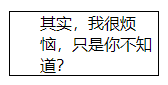
现在把 direction 换成 rtl
p {

  direction: rtl;

}
效果
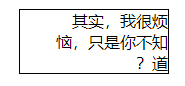
padding-left 依然是左边. 但绝大部分情况下, 我们会希望它在右边.
这就类似使用 Flex 的 align-items 那样, 它的值是 flex-start, flex-end, 而不是 left, right. 因为它会依据 flex-direction 而变化.
flex-direction: row 时, flex-start 指的是 top
flex-direction: column 时, flex-start 指的是 left
很多地方都可以看到 start / end 取代 left / right 的影子. Angular Material 前几年也是一点一点换掉 API 接口的.
Logical Properties – inline / block - start / end
为了解决问题, 就有了所谓的 Logical Properties
我们依然用回 padding 的例子.
padding-left 对应 padding-inline-start
padding-right 对应 padding-inline-end
padding-top 对应 padding-block-start
padding-bottom 对应 padding-block-end
start / end 比较好理解, 毕竟 Flex 也是 start / end.
inline / block 呢?

我是这样记住它的, 上面是 inline 的效果, 东西是横向摆放一排的. 如果用手比划, 那么 2 只手是左右来形容一个 box, 那么就是 left right 咯.
反之形容 block 的 box, 2 只手是上下的, 因为 block 的摆放是往下一个一个 row 的.

所以就对应了, inline = left / right, block = top / bottom.
padding / border / margin / width / height / position
但凡之前有 "方向" 概念的都可以替换成 Logical Properties.
div {

  padding-inline: 1rem; /* padding-left/right */

  padding-block: 1rem; /* padding-top/bottom */

  border-inline: 1rem;

  border-block: 1rem;

  margin-inline-start: 1rem;

  margin-block-end: 1rem;

  inline-size: 100px; /* width */

  max-inline-size: 100px; /* max-width */

  block-size: 100px; /* height */

  inset-inline-start: 1rem; /* left (for position) */

  inset-block-start: 1rem; /* top (for position) */

}
除了 padding, margin, border, 还有 width, height, position 的 top, right, bottom, left 都算有 "方向" 的概念哦.
window.getComputedStyle 获取的值
.btn {

  padding-top: 1rem;

  padding-bottom: 1.5rem;

}
JavaScript
const btn = document.querySelector('.btn');

console.log('block', window.getComputedStyle(btn).paddingBlock); // "16px 24px"
1rem 变成了 16px.
虽然 CSS 写的是 padding-top 和 padding-bottom, 而 JavaScript 拿的是 paddingBlock 但它还是可以拿到的哦,
如果 top, bottom 值一样, 那么 paddingBlock 就只会一个值.
关于 shorthand property 和 inset
padding-inline = padding-inline-start padding-inline-end
padding-block = padding-block-start padding-block-end
padding = top/bottom right/left 这可不是 logical 的哦, 它叫 physical (logical 的反义词是 physical), logical 没有一次性写完的 shorthand. 参考: This issue.
另外, inset 是 position top, right, bottom, left 的 shorthand property. 它和 margin 是等价的. 它也不是 logical 的.
inset-inline = inset-inline-start inset-inline-end (这个就是 logical)

要不要用呢?
参考: Medium – Why CSS Logical Properties Aren’t Ready for Use!
至于要不要用呢? 其实绝大部分项目是没有需求的.
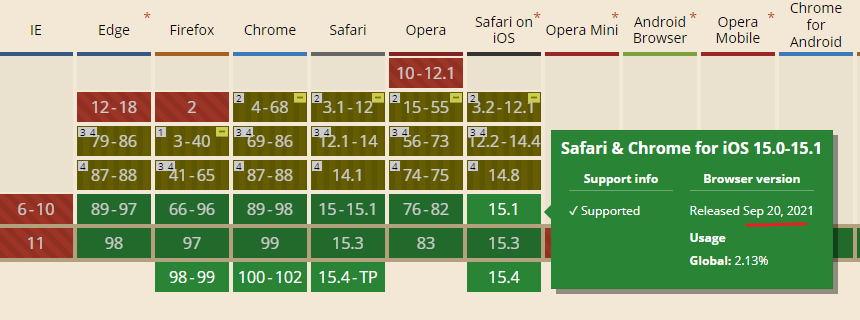
完全支持也是不久前的事情. 但是网站不可能只支持 model browser 吧. 至少也要顾虑到 3-5 年前的设备丫.
像流行框架 Tailwind CSS 就没有build-in 支持, 只是有plugin而且.
还有 shorthand property 到现在草案都还不确定. 所以总结来看, 目前 2022 年用的话还有点早.
个人建议, 如果项目有 logical 需求, 肯定得用.
如果没有, 那么混用也是可以的, 就是写来 for future 或者美观而已. 但不要认为它支持 logical. 这样的 trade-off 也是 ok 的.
CSS – Logical Properties的更多相关文章
- 【CSS】357- 坚定地使用 CSS Custom Properties
自定义属性(Custom Properties)是一个很有魅力的 CSS 新特性,现代浏览器广泛 支持.但是遇到那些不支持 CSS Custom Properties 的老掉牙浏览器我们该怎么办?等着 ...
- CSS 世界中的方位与顺序
在 CSS 中,我们经常会与各种方向方位打交道. 譬如 margin.padding,它们就会有 margin-left.margin-right 或者是 padding-left.padding-r ...
- Change :hover CSS properties with JavaScript
I need to find a way to change CSS :hover properties using JavaScript. For example, suppose I have t ...
- CSS 笔记二(Text/Fonts/Links/Lists)
CSS Text 1> Text Color used to set the color of the text 2> Text Alignment used to set the hor ...
- CSS 笔记一(Selectors/ Backgrounds/ Borders/ Margins/ Padding/ Height and Width)
Selectors/ Backgrounds/ Borders/ Margins/ Padding/ Height and Width CSS Introduction: CSS stands for ...
- 【转】Styling And Animating SVGs With CSS
原文转自:http://www.smashingmagazine.com/2014/11/03/styling-and-animating-svgs-with-css/?utm_source=CSS- ...
- CSS知识点-- Padding
The CSS padding properties define the space between the element border and the element content. Padd ...
- CSS 声明( Declarations )
CSS 声明1可以为空,或者由 CSS 特性( property ),后加一个冒号 ":",跟着是一个特性的值构成.中间可以有空格将它们隔开. 可用以下方式表达: property ...
- 3 Ways to Preload Images with CSS, JavaScript, or Ajax---reference
Preloading images is a great way to improve the user experience. When images are preloaded in the br ...
- CSS变量(自定义属性)实践指南
本文翻译自:https://www.sitepoint.com/practical-guide-css-variables-custom-properties/ 转载请注明出处:葡萄城官网,葡萄城为开 ...
随机推荐
- 解决方案 | vba批量冻结首行,所有sheet一次性设置
Sub FreezeTopRowAllSheets() Dim ws As Worksheet ' 遍历所有工作表 For Each ws In ThisWorkbook.Worksheets ' 激 ...
- [oeasy]python0133_[趣味拓展]颜文字_流石兄弟_表情文字_2ch_kaomoji
颜文字 回忆上次内容 上次我们了解unicode 里面有各种字体 甚至还有emoji emoji 本质上也是文字 按照unicode的方式编码 存储时按照utf-8的方式编码 显示时按照系统定义的 ...
- [oeasy]python0017_解码_decode_字节序列_bytes_字符串_str
解码 decode 回忆上次内容 code就是码 最早也指电报码 后来有各种编码.密码.砝码.条码 都指的是把各种事物编个号 encode就是编码 编码就是给事物编个号 编辑 编码基本了解了 ...
- [rCore学习笔记 017]实现批处理操作系统
写在前面 本随笔是非常菜的菜鸡写的.如有问题请及时提出. 可以联系:1160712160@qq.com GitHhub:https://github.com/WindDevil (目前啥也没有 本章目 ...
- os.popen(cmd) 与 os.system(cmd) 的区别
os.popen(cmd) 与 os.system(cmd) 的区别 1,os.popen(cmd) 不会直接返回任何数据,os.system(cmd) 会直接输出结果(返回的却是int状态码) 2, ...
- Tomcat日志信息有乱码的处理方法
1.问题描述 1.1.Idea中的tomcat日志有乱码 1.2.直接启动tomcat的日志有乱码 1.3.原因分析 问题是由于tomcat使用的编码和操作系统使用的编码不一致导致: Windows1 ...
- 【Java】CompletableFuture 异步任务编排
参考视频资料: https://www.bilibili.com/video/BV1nA411g7d2 https://www.bilibili.com/video/BV1S54y1u79K 一.启动 ...
- 【Vue】Re17 Router 第四部分(参数传递,守卫函数)
一.案例搭建 新建Profile组件 组件写好内容后配置路由 { path : '/profile', component : () => import('../components/Profi ...
- 【SqlServer】02 SSMS工具基本使用入门
之前的安装中除了SqlServer,还有一个SSMS管理工具 数据库的访问依赖于工具 SSMS提供了两种登陆方式: 创建用户: 删除用户: 创建数据库: 删除数据库: 创建表: 设置表的字段,字段名称 ...
- 【Layui】05 选项卡 Tabs
文档位置: https://www.layui.com/doc/element/tab.html 案例演示: <div class="layui-tab"> <u ...