
SpringBoot2 整合OAuth2组件,模拟第三方授权访问
本文源码:GitHub·点这里 || GitEE·点这里
一、模式描述
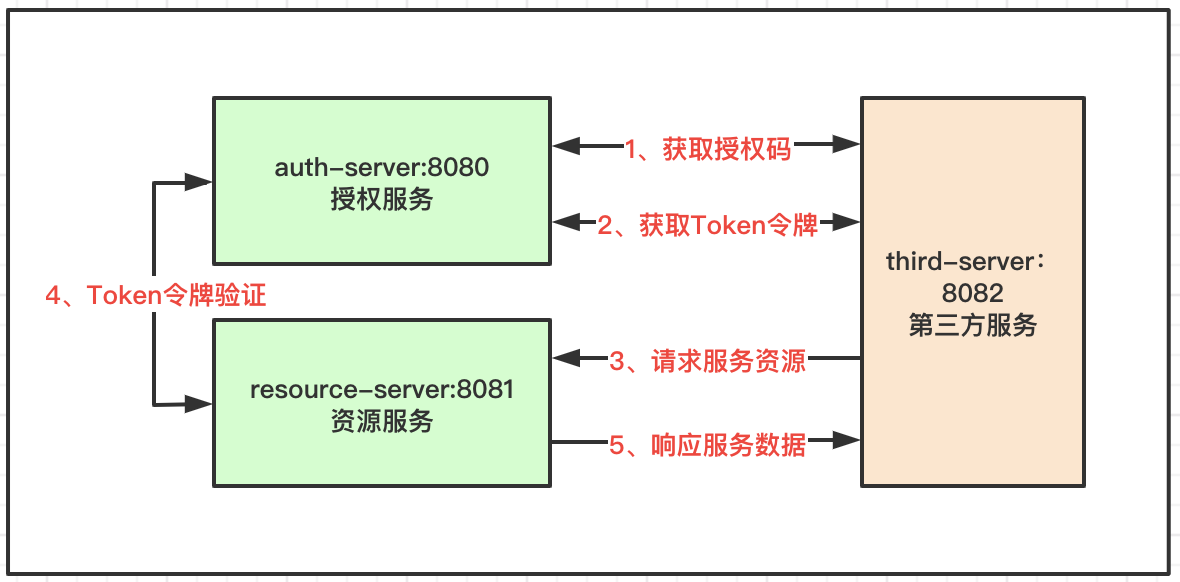
授权服务
验证第三方服务的身份,验证邮箱用户的身份,记录和管理认证Token,为资源服务器提供Token校验。场景:第三方网站借助用户的邮箱登录,并访问邮箱账户的基础信息,头像、名称等。
资源服务
第三方服务通过邮箱账户登录后需要获取的一些信息,即理解为资源,存储邮箱账户的数据资源。
第三方服务
即借助邮箱用户的账户,快速登录第三个服务,免去繁杂的注册流程,有助于快速积累新用户。
交互流程
第三方服务给用户开放快速邮箱登录功能,引导用户调到邮箱认证服务,通过认证后返回身份令牌到第三方服务,第三方服务携带令牌访问邮箱的资源服务,获取一些基本的邮箱用户信息。
二、项目配置管理
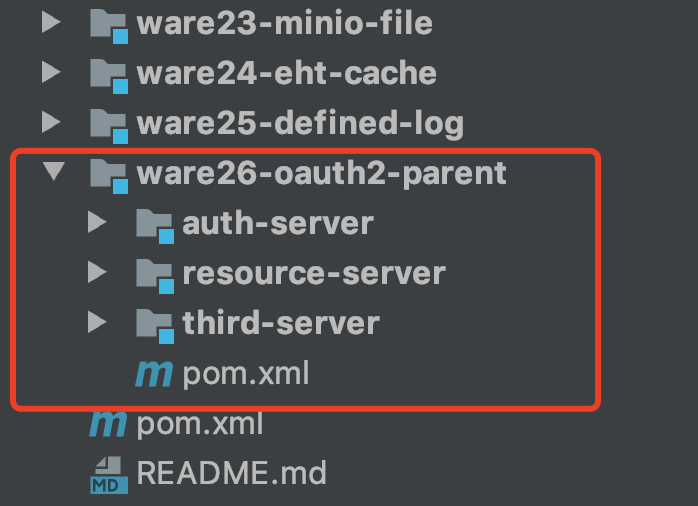
1、案例结构
核心依赖
<dependency>

    <groupId>org.springframework.boot</groupId>

    <artifactId>spring-boot-starter-web</artifactId>

</dependency>

<dependency>

    <groupId>org.springframework.security.oauth</groupId>

    <artifactId>spring-security-oauth2</artifactId>

    <version>2.1.3.RELEASE</version>

</dependency>

<dependency>

    <groupId>org.springframework.boot</groupId>

    <artifactId>spring-boot-starter-security</artifactId>

</dependency>
这里有两个核心组件依赖:OAuth2组件和Security组件。
模块划分
- auth-server:授权服务
- resource-server:资源服务器
- third-server:第三个服务
2、配置描述
【授权服务】
OAuth2配置
这里的配置管理的是第三方的授权流程和发放给第三方的身份证明ClientID和密码,实际的场景就是第三方借助邮箱账号登录,首先就是向邮箱管理方提供材料,获取访问邮箱服务的身份证明,然后才能对接开放服务,这种模式在第三方对接业务中很常见。
/**

 * 模拟第三方授权配置

 */

@EnableAuthorizationServer

@Configuration

public class AuthConfig extends AuthorizationServerConfigurerAdapter {

    @Resource

    ClientDetailsService clientDetailsService;

    /**

     * 资源服务器校验Token

     */

    @Override

    public void configure(AuthorizationServerSecurityConfigurer security) {

        security.checkTokenAccess("permitAll()").allowFormAuthenticationForClients();

    }

    /**

     * 第三方客户端请求配置,和资源服务访问的配置,不设置默认都可以访问,提供默认回调地址

     */

    @Override

    public void configure(ClientDetailsServiceConfigurer clients) throws Exception {

        clients.inMemory()

                .withClient("third01")

                .secret(new BCryptPasswordEncoder().encode("third01"))

                .resourceIds("resource-01")

                .authorizedGrantTypes("authorization_code","refresh_token")

                .scopes("all")

                .redirectUris("http://localhost:8082/notify.html");

    }

    /**

     * 配置访问端点

     */

    @Override

    public void configure(AuthorizationServerEndpointsConfigurer endpoints) {

        endpoints.authorizationCodeServices(authorizationCodeServices()).tokenServices(tokenServices());

    }

    /**

     * 内存管理

     */

    @Bean

    AuthorizationCodeServices authorizationCodeServices() {

        return new InMemoryAuthorizationCodeServices();

    }

    /**

     * Token管理规则

     */

    @Bean

    AuthorizationServerTokenServices tokenServices() {

        DefaultTokenServices services = new DefaultTokenServices();

        services.setClientDetailsService(clientDetailsService);

        services.setSupportRefreshToken(true);

        services.setTokenStore(tokenStore());

        services.setAccessTokenValiditySeconds(3600);

        services.setRefreshTokenValiditySeconds(3600*7);

        return services;

    }

    @Bean

    TokenStore tokenStore() {

        return new InMemoryTokenStore();

    }

}
通常需要数据库存储第三方信息,可以到第OAuth2开源项目中,获取表结构放到本地数据库中,然后这里换成数据源加载模式即可,简单的流程管理都在源码里写了SQL语句,数据源引入即可。
Security配置
/**

 * 模拟本地用户配置

 */

@Configuration

public class SecurityConfig extends WebSecurityConfigurerAdapter {

    /**

     * 密码加密方式

     */

    @Bean

    public PasswordEncoder passwordEncoder(){

        return new BCryptPasswordEncoder();

    }

    /**

     * 内存中虚拟用户和角色

     */

    @Override

    protected void configure(AuthenticationManagerBuilder auth) throws Exception {

        auth.inMemoryAuthentication()

                .withUser("user")

                .password(new BCryptPasswordEncoder().encode("123456"))

                .roles("user");

    }

    /**

     * 表单登录

     */

    @Override

    protected void configure(HttpSecurity http) throws Exception {

        http.csrf().disable().formLogin();

    }

}
基于这里的配置管理邮箱用户的认证流程,例如使用邮箱账号密码登录验证,判断授权是否成立,这里管理的是服务本地的邮箱账号,基于数据源存储数据在下面案例中都有。
- 案例一:JWT组件管理身份验证机制
- 案例二:Shiro组件实现用户权限管理
- 案例三:Security用户安全认证流程
关于Spring框架中安全认证的相关的几个组件,在使用OAuth2之前可以先了解一下。
【资源服务】
主要功能有三块,配置第三方携带的Token身份令牌校验机制,即访问授权服务校验接口,这里是OAuth2自定义好的接口;配置resourceId资源服务的编号,用来控制第三个服务能访问的资源服务范围,属于大的权限点控制;模拟校验用户的Role角色,较精细的控制权限。
/**

 * 资源服务管理配置

 */

@Configuration

@EnableResourceServer

public class ResourceServerConfig extends ResourceServerConfigurerAdapter {

    /**

     * Token令牌校验

     */

    @Bean

    RemoteTokenServices tokenServices() {

        RemoteTokenServices services = new RemoteTokenServices();

        services.setCheckTokenEndpointUrl("http://localhost:8080/oauth/check_token");

        services.setClientId("third01");

        services.setClientSecret("third01");

        return services;

    }

    /**

     * 服务资源ID配置

     */

    @Override

    public void configure(ResourceServerSecurityConfigurer resources) throws Exception {

        resources.resourceId("resource-01").tokenServices(tokenServices());

    }

    /**

     * 模拟用户权限规则

     */

    @Override

    public void configure(HttpSecurity http) throws Exception {

        http.authorizeRequests()

                .antMatchers("/user/**").hasRole("user")

                .anyRequest().authenticated();

    }

}
【第三方服务】
主要提供两个流程的模拟:请求授权服务获取身份令牌;携带身份令牌请求资源服务获取数据。这里则是授权码回调接口的处理方式。
@Controller

public class NotifyController {

    private static final Logger LOG = LoggerFactory.getLogger(NotifyController.class);

    @Resource

    private RestTemplate restTemplate;

    @GetMapping("/notify.html")

    public String notify(String code, Model model) {

        if (code != null) {

            MultiValueMap<String, String> map = new LinkedMultiValueMap<>();

            map.add("code", code);

            map.add("client_id", "third01");

            map.add("client_secret", "third01");

            map.add("redirect_uri", "http://localhost:8082/notify.html");

            map.add("grant_type", "authorization_code");

            Map<String,String> resp = restTemplate.postForObject("http://localhost:8080/oauth/token", map, Map.class);

            String accessToken = resp.get("access_token");

            LOG.info("身份令牌:{}",accessToken);

            HttpHeaders headers = new HttpHeaders();

            headers.add("Authorization", "Bearer " + accessToken);

            HttpEntity<Object> httpEntity = new HttpEntity<>(headers);

            ResponseEntity<String> entity = restTemplate.exchange("http://localhost:8081/user/resource", HttpMethod.GET, httpEntity, String.class);

            model.addAttribute("notifyMsg", entity.getBody());

        }

        return "notify";

    }

}
三、测试流程
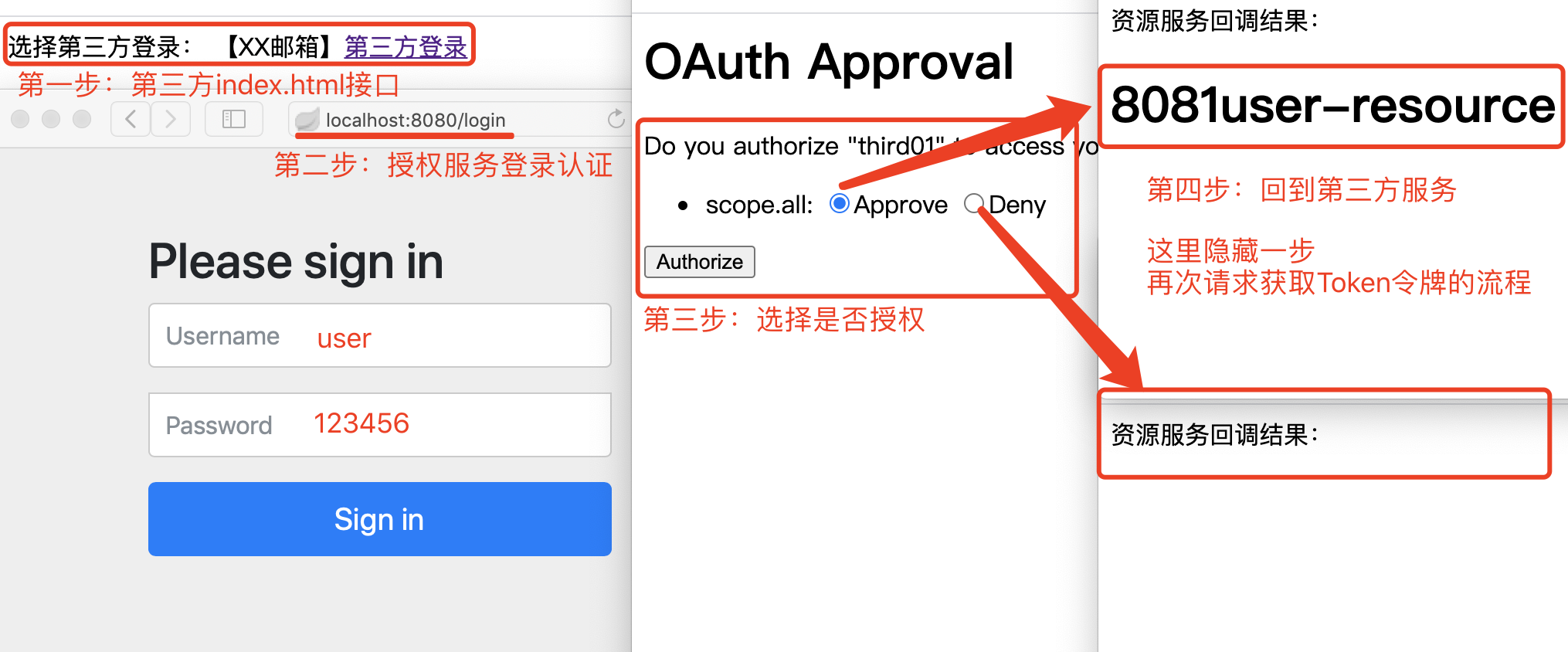
通过上述测试流程,对比常见的第三方登录机制,理解OAuth2的授权码模式。
四、源代码地址
GitHub·地址

https://github.com/cicadasmile/middle-ware-parent

GitEE·地址

https://gitee.com/cicadasmile/middle-ware-parent
推荐阅读:编程体系整理
| 序号 | 项目名称 | GitHub地址 | GitEE地址 | 推荐指数 |
|---|---|---|---|---|
| 01 | Java描述设计模式,算法,数据结构 | GitHub·点这里 | GitEE·点这里 | ☆☆☆☆☆ |
| 02 | Java基础、并发、面向对象、Web开发 | GitHub·点这里 | GitEE·点这里 | ☆☆☆☆ |
| 03 | SpringCloud微服务基础组件案例详解 | GitHub·点这里 | GitEE·点这里 | ☆☆☆ |
| 04 | SpringCloud微服务架构实战综合案例 | GitHub·点这里 | GitEE·点这里 | ☆☆☆☆☆ |
| 05 | SpringBoot框架基础应用入门到进阶 | GitHub·点这里 | GitEE·点这里 | ☆☆☆☆ |
| 06 | SpringBoot框架整合开发常用中间件 | GitHub·点这里 | GitEE·点这里 | ☆☆☆☆☆ |
| 07 | 数据管理、分布式、架构设计基础案例 | GitHub·点这里 | GitEE·点这里 | ☆☆☆☆☆ |
| 08 | 大数据系列、存储、组件、计算等框架 | GitHub·点这里 | GitEE·点这里 | ☆☆☆☆☆ |
SpringBoot2 整合OAuth2组件,模拟第三方授权访问的更多相关文章
- SpringBoot2 整合Kafka组件,应用案例和流程详解
本文源码:GitHub·点这里 || GitEE·点这里 一.搭建Kafka环境 1.下载解压 -- 下载 wget http://mirror.bit.edu.cn/apache/kafka/2.2 ...
- SpringBoot2 整合JTA组件,多数据源事务管理
本文源码:GitHub·点这里 || GitEE·点这里 一.JTA组件简介 1.JTA基本概念 JTA即Java-Transaction-API,JTA允许应用程序执行分布式事务处理,即在两个或多个 ...
- SpringBoot2 整合Ehcache组件,轻量级缓存管理
本文源码:GitHub·点这里 || GitEE·点这里 一.Ehcache缓存简介 1.基础简介 EhCache是一个纯Java的进程内缓存框架,具有快速.上手简单等特点,是Hibernate中默认 ...
- SpringBoot2 整合 Zookeeper组件,管理架构中服务协调
本文源码:GitHub·点这里 || GitEE·点这里 一.Zookeeper基础简介 1.概念简介 Zookeeper是一个Apache开源的分布式的应用,为系统架构提供协调服务.从设计模式角度来 ...
- SpringBoot2 整合Nacos组件,环境搭建和入门案例详解
本文源码:GitHub·点这里 || GitEE·点这里 一.Nacos基础简介 1.概念简介 Nacos 是构建以"服务"为中心的现代应用架构,如微服务范式.云原生范式等服务基础 ...
- Spring Security 实战干货:OAuth2第三方授权初体验
1. 前言 Spring Security实战干货系列 现在很多项目都有第三方登录或者第三方授权的需求,而最成熟的方案就是OAuth2.0授权协议.Spring Security也整合了OAuth2. ...
- QQ第三方授权登录OAuth2.0实现(Java)
准备材料 1.已经备案好的域名 2.服务器(域名和服务器为统一主体或域名已接入服务器) 3.QQ号 4.开发流程:https://wiki.connect.qq.com/%E5%87%86%E5%A4 ...
- SpringBoot基于JustAuth实现第三方授权登录
1. 简介 随着科技时代日渐繁荣,越来越多的应用融入我们的生活.不同的应用系统不同的用户密码,造成了极差的用户体验.要是能使用常见的应用账号实现全应用的认证登录,将会更加促进应用产品的推广,为生活 ...
- OAuth2.0认证和授权原理
什么是OAuth授权? 一.什么是OAuth协议 OAuth(开放授权)是一个开放标准. 允许第三方网站在用户授权的前提下访问在用户在服务商那里存储的各种信息. 而这种授权无需将用户提供用户名和密 ...
随机推荐
- DC靶机1-9合集
DC1 文章前提概述 本文介绍DC-1靶机的渗透测试流程 涉及知识点(比较基础): nmap扫描网段端口服务 msf的漏洞搜索 drupal7的命令执行利用 netcat反向shell mysql的基 ...
- WebsitePanel密码解密
WebsitePanel是一套Windows系统中的虚拟主机管理系统,可以同时管理多台服务器. 通过反编译该系统的dll发现该系统的密码加密方式可逆. 解密流程 1,获取密钥 密钥保存在 Enter ...
- python3使用HTMLTestRunner生成测试报告
自动化测试运行完了需要直观的了解测试结果,需要用到第三方的模块HTMLTestRunner. 一:下载 HTMLTestRunner 下载路径:https://pypi.python.org/pypi ...
- Java基础教程——解析注解
解析注解 Java 5开始,java.lang.reflect包下的反射API可以在运行时读取Annotation. 应用:定义一个自动执行方法的注解,解析注解.通过反射执行方法,替代配置文件. pa ...
- 手把手教你使用Vue/React/Angular三大框架开发Pagination分页组件
DevUI是一支兼具设计视角和工程视角的团队,服务于华为云DevCloud平台和华为内部数个中后台系统,服务于设计师和前端工程师.官方网站:devui.designNg组件库:ng-devui(欢迎S ...
- Java 在Excel中添加分离型饼图、环形图
一.概述 Excel中可支持多种不同类型的图表,本文介绍如何绘制分离型饼图和环形图.其中,分离型饼图的绘制可分为整体分离型(即设置饼图分离程度)和局部分离(即设置点爆炸型值)两种情况.下面将以Java ...
- Django 在test.py 中测试文件的配置
import os import sys if __name__ == "__main__": os.environ.setdefault("DJANGO_SETTING ...
- Python to Exe By Install PyInstaller on Win7-64bit
本文主要记录为史振华在尝试转换PY文件为EXE文件过程中各种疑惑和最终解决方法,尝试了PYTHON 2.7/3.5/3.6及其相关依赖pywin32-222.win32/pywin32-222.win ...
- jwt介绍
jwt原理 最简单理解:jwt本质就是, 把用户信息通过加密后生成的一个字符串 JWT的原则是在服务器身份验证之后,将生成一个JSON对象并将其发送回用户 { "UserName" ...
- JZOJ【NOIP2012模拟8.9】2020.10.5 T1
逐个击破 题目 Description 三大战役的平津战场上,傅作义集团在以北平.天津为中心,东起唐山西至张家口的铁路线上摆起子一字长蛇阵,并企图在溃败时从海上南逃或向西逃窜.为了就地歼敌不让其逃走, ...