
SpringMVC请求映射handler源码解读
请求映射源码
首先看一张请求完整流转图(这里感谢博客园上这位大神的图,博客地址我忘记了):

前台发送给后台的访问请求是如何找到对应的控制器映射并执行后续的后台操作呢,其核心为DispatcherServlet.java与HandlerMapper。在spring boot初始化的时候,将会加载所有的请求与对应的处理器映射为HandlerMapper组件。我们可以在springMVC的自动配置类中找到对应的Bean。
@Bean

@Primary

@Override

public RequestMappingHandlerMapping requestMappingHandlerMapping(

    @Qualifier("mvcContentNegotiationManager") ContentNegotiationManager contentNegotiationManager,

    @Qualifier("mvcConversionService") FormattingConversionService conversionService,

    @Qualifier("mvcResourceUrlProvider") ResourceUrlProvider resourceUrlProvider) {

    // Must be @Primary for MvcUriComponentsBuilder to work

    return super.requestMappingHandlerMapping(contentNegotiationManager, conversionService,

                                              resourceUrlProvider);

}

@Bean

public WelcomePageHandlerMapping welcomePageHandlerMapping(ApplicationContext applicationContext,

                                                           FormattingConversionService mvcConversionService, ResourceUrlProvider mvcResourceUrlProvider) {

    WelcomePageHandlerMapping welcomePageHandlerMapping = new WelcomePageHandlerMapping(

        new TemplateAvailabilityProviders(applicationContext), applicationContext, getWelcomePage(),

        this.mvcProperties.getStaticPathPattern());

    welcomePageHandlerMapping.setInterceptors(getInterceptors(mvcConversionService, mvcResourceUrlProvider));

    welcomePageHandlerMapping.setCorsConfigurations(getCorsConfigurations());

    return welcomePageHandlerMapping;

}
请求将首先执行FrameworkServlet下的service方法根据request请求的method找到对应的do**方法。
@Override

protected void service(HttpServletRequest request, HttpServletResponse response)

    throws ServletException, IOException {

    HttpMethod httpMethod = HttpMethod.resolve(request.getMethod());

    if (httpMethod == HttpMethod.PATCH || httpMethod == null) {

        processRequest(request, response);

    }

    else {

        //父类根据method参数执行doGet,doPost,doDelete等

        super.service(request, response);

    }

}
而这些do**其都会进入核心方法,以doGet为例。
@Overrideprotected

final void doGet(HttpServletRequest request, HttpServletResponse response) throws ServletException, IOException {

    //核心方法

    processRequest(request, response);

}
protected final void processRequest(HttpServletRequest request, HttpServletResponse response)

    throws ServletException, IOException {

    try {

    //进入此核心方法

    doService(request, response);

}

catch (ServletException | IOException ex) {

    failureCause = ex;

    throw ex;

}

catch (Throwable ex) {

    failureCause = ex;

    throw new NestedServletException("Request processing failed", ex);

}

finally {

    resetContextHolders(request, previousLocaleContext, previousAttributes);

    if (requestAttributes != null) {

        requestAttributes.requestCompleted();

    }

    logResult(request, response, failureCause, asyncManager);

    publishRequestHandledEvent(request, response, startTime, failureCause);

}
processRequest()方法中重点在doService(request, response);,而其核心处理逻辑位于DispatchServletl类重写的方法,如下。
@Override

	protected void doService(HttpServletRequest request, HttpServletResponse response) throws Exception {

  ····

      try {

          //这里为实际分发控制器的逻辑,其内部是找到对应的handlerMapper

          doDispatch(request, response);

      }

        finally {

            if (!WebAsyncUtils.getAsyncManager(request).isConcurrentHandlingStarted()) {

                // Restore the original attribute snapshot, in case of an include.

                if (attributesSnapshot != null) {

                    restoreAttributesAfterInclude(request, attributesSnapshot);

                }

            }

            if (requestPath != null) {

                ServletRequestPathUtils.clearParsedRequestPath(request);

            }

        }

}
接下来看分发处理逻辑方法,其中重要的方法都使用了原生的注释。接下来分别分析核心源码。
protected void doDispatch(HttpServletRequest request, HttpServletResponse response) throws Exception {

    HttpServletRequest processedRequest = request;

    HandlerExecutionChain mappedHandler = null;

    boolean multipartRequestParsed = false;

    WebAsyncManager asyncManager = WebAsyncUtils.getAsyncManager(request);

    try {

        ModelAndView mv = null;

        Exception dispatchException = null;

        try {

            processedRequest = checkMultipart(request);

            multipartRequestParsed = (processedRequest != request);

            // Determine handler for the current request.

            mappedHandler = getHandler(processedRequest);

            if (mappedHandler == null) {

                noHandlerFound(processedRequest, response);

                return;

            }

            // Determine handler adapter for the current request.

            HandlerAdapter ha = getHandlerAdapter(mappedHandler.getHandler());

            // Process last-modified header, if supported by the handler.

            String method = request.getMethod();

            boolean isGet = "GET".equals(method);

            if (isGet || "HEAD".equals(method)) {

                long lastModified = ha.getLastModified(request, mappedHandler.getHandler());

                if (new ServletWebRequest(request, response).checkNotModified(lastModified) && isGet) {

                    return;

                }

            }

            if (!mappedHandler.applyPreHandle(processedRequest, response)) {

                return;

            }

            // Actually invoke the handler.

            mv = ha.handle(processedRequest, response, mappedHandler.getHandler());

            if (asyncManager.isConcurrentHandlingStarted()) {

                return;

            }

            applyDefaultViewName(processedRequest, mv);

            mappedHandler.applyPostHandle(processedRequest, response, mv);

        }

        catch (Exception ex) {

            dispatchException = ex;

        }

        catch (Throwable err) {

            // As of 4.3, we're processing Errors thrown from handler methods as well,

            // making them available for @ExceptionHandler methods and other scenarios.

            dispatchException = new NestedServletException("Handler dispatch failed", err);

        }

        processDispatchResult(processedRequest, response, mappedHandler, mv, dispatchException);

    }

    catch (Exception ex) {

        triggerAfterCompletion(processedRequest, response, mappedHandler, ex);

    }

    catch (Throwable err) {

        triggerAfterCompletion(processedRequest, response, mappedHandler,

                               new NestedServletException("Handler processing failed", err));

    }

    finally {

        if (asyncManager.isConcurrentHandlingStarted()) {

            // Instead of postHandle and afterCompletion

            if (mappedHandler != null) {

                mappedHandler.applyAfterConcurrentHandlingStarted(processedRequest, response);

            }

        }

        else {

            // Clean up any resources used by a multipart request.

            if (multipartRequestParsed) {

                cleanupMultipart(processedRequest);

            }

        }

    }

}
首先是分析getHandler(),找到对应的处理器映射逻辑。
protected HandlerExecutionChain getHandler(HttpServletRequest request) throws Exception {

    if (this.handlerMappings != null) {

        for (HandlerMapping mapping : this.handlerMappings) {

            HandlerExecutionChain handler = mapping.getHandler(request);

            if (handler != null) {

                return handler;

            }

        }

    }

    return null;

}
我们将断点标记在getHandler方法上时,可以清除看到handlerMappings,如图。
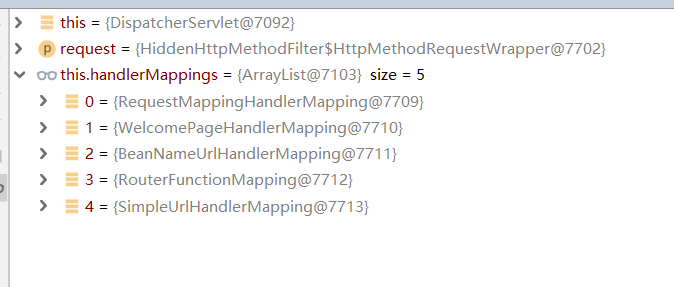
这里,用户请求与处理器的映射关系都在RequestMapperHandlerMapping中,而欢迎页处理请求则在WelcomePageHanderMapping中进行映射。
以下为RequestMapperHandlerMapping中映射部分截图,可以看到用户的所有请求映射这里面都有:
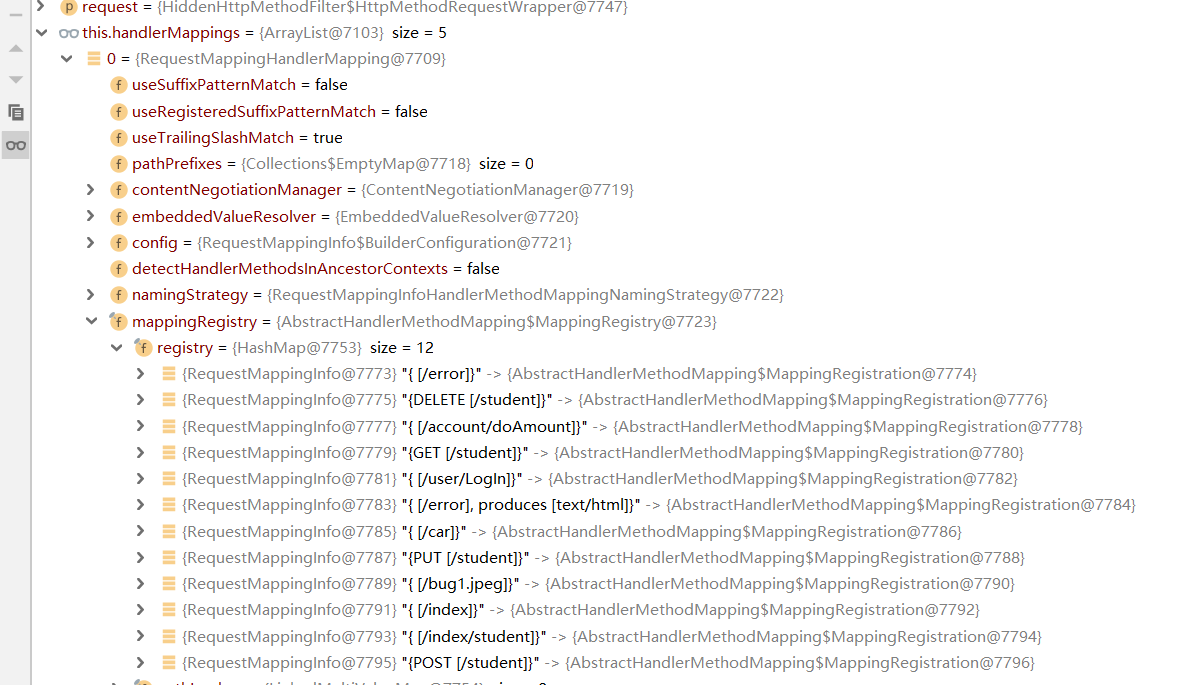
getHandler()后的方法是通过比较request请求中method与HandlerMapper中相同url下的method,再进行唯一性校验,不通过异常,通过找到唯一的handler。
后续,通过handler找到处理的设配器,通过适配器得到一个ModelAndView对象,这个对象就是最后返回给前端页面的对象。
至此,一个请求完整映射到返回前端结束。
说明:这是实现了FramworkServlet的doService方法,FramworkServlet继承自HttpServlet,并且重写了父类中的doGet(),doPost(),doPut(),doDelete 等方法,在这些重写的方法里都调用了 processRquest() 方法做请求处理,进入processRquest()可以看到里面调用了FramworkServlet中定义的doService() 方法。
SpringMVC请求映射handler源码解读的更多相关文章
- SpringMVC源码解读 - HandlerMapping
SpringMVC在请求到handler处理器的分发这步是通过HandlerMapping模块解决的.handlerMapping 还处理拦截器. 先看看HandlerMapping的继承树吧 可以大 ...
- SpringMVC源码解读 - RequestMapping注解实现解读 - RequestCondition体系
一般我们开发时,使用最多的还是@RequestMapping注解方式. @RequestMapping(value = "/", param = "role=guest& ...
- Flask(4)- flask请求上下文源码解读、http聊天室单聊/群聊(基于gevent-websocket)
一.flask请求上下文源码解读 通过上篇源码分析,我们知道了有请求发来的时候就执行了app(Flask的实例化对象)的__call__方法,而__call__方法返回了app的wsgi_app(en ...
- flask的请求上下文源码解读
一.flask请求上下文源码解读 通过上篇源码分析( ---Flask中的CBV和上下文管理--- ),我们知道了有请求发来的时候就执行了app(Flask的实例化对象)的__call__方法,而__ ...
- SpringMVC源码解读 - RequestMapping注解实现解读
SpringMVC源码解读 - RequestMapping注解实现解读 - RequestCondition体系 https://www.cnblogs.com/leftthen/p/520840 ...
- Alamofire源码解读系列(十二)之请求(Request)
本篇是Alamofire中的请求抽象层的讲解 前言 在Alamofire中,围绕着Request,设计了很多额外的特性,这也恰恰表明,Request是所有请求的基础部分和发起点.这无疑给我们一个Req ...
- SpringMVC源码解读 - RequestMapping注解实现解读 - RequestMappingInfo
使用@RequestMapping注解时,配置的信息最后都设置到了RequestMappingInfo中. RequestMappingInfo封装了PatternsRequestCondition, ...
- CesiumJS 2022^ 源码解读[7] - 3DTiles 的请求、加载处理流程解析
目录 1. 3DTiles 数据集的类型 2. 创建瓦片树 2.1. 请求入口文件 2.2. 创建树结构 2.3. 瓦片缓存机制带来的能力 3. 瓦片树的遍历更新 3.1. 三个大步骤 3.2. 遍历 ...
- Jfinal启动源码解读
本文对Jfinal的启动源码做解释说明. PS:Jfinal启动容器可基于Tomcat/Jetty等web容器启动,本文基于Jetty的启动方式做启动源码的解读和分析,tomcat类似. 入口 JF ...
随机推荐
- C# 类(9) - 接口 Interface
Interface 接口 类似 抽象类,也不能被实例化...(前面说的静态类,加上抽象类,还有这个,都3个了)接口其实比 抽象类 更加抽象.接口的方法(这个方法还不能有实体代码,和抽象类的抽象方法差不 ...
- js screen size check
js screen size check js 屏幕尺寸检测 window.screen API screen; window.screen.width; window.screen.height; ...
- taro list render bug
taro list render bug 列表渲染 https://taro-docs.jd.com/taro/docs/list.html not support jsx map 垃圾微信 cons ...
- HTML5 & custom element & template
HTML5 & custom element & template template https://codepen.io/xgqfrms/pen/eYYExvp https://cs ...
- Xpath in JavaScript
test html <p>title</p> <ul class="list a" id="list"> <li> ...
- 图解 git 流程
图解 git 流程 Github 开源项目 1 动画 2 web repl 3 online git cli & create remote branch # Create a new bra ...
- PAUL ADAMS ARCHITECT:澳大利亚楼市保持涨势
澳大利亚最新房价变化显示,住宅价格指数连续第10周上涨,包括五个主要首府城市的上涨了0.29%. 12月截至24日,布里斯班以1.03%涨幅领跑,五个首府城市平均涨幅0.78%. 在过去3个月里,悉尼 ...
- Mosquitto
mosquitto可连接远程服务器及本地服务器. mosquitto可在一个节点内建立一个连接用于收发,也可在一个节点内建立多个连接用于收发.建立一个连接用于收发时,会有初始部分帧的延迟.(可能由于内 ...
- 学习String源码的部分方法
先看构造器: private final char value[]; //char类型的数组 以下均会用到 private int hash; //缓存字符串的哈希值 //以下均会用到 public ...
- 【Notes_4】现代图形学入门——光栅化、离散化三角形、深度测试与抗锯齿
光栅化 Viewport Transform(视口变换) 将经过MVP变换后得到的单位空间模型变换到屏幕上,屏幕左边是左下角为原点. 所以视口变换的矩阵 \[M_{viewport}=\begin{p ...