
WCF寄宿到Windows Service
WCF寄宿到Windows Service[1]
2014-06-14
WCF寄宿到Windows Service
在前面创建一个简单的WCF程序,我们把WCF的服务寄宿到了Host这个控制台项目中了。下面将介绍如何把WCF的服务寄宿到Windows服务中(源代码):
1. 删除原来Host控制台项目,然后在solution上右键,新建一个WindowService项目。如下图:
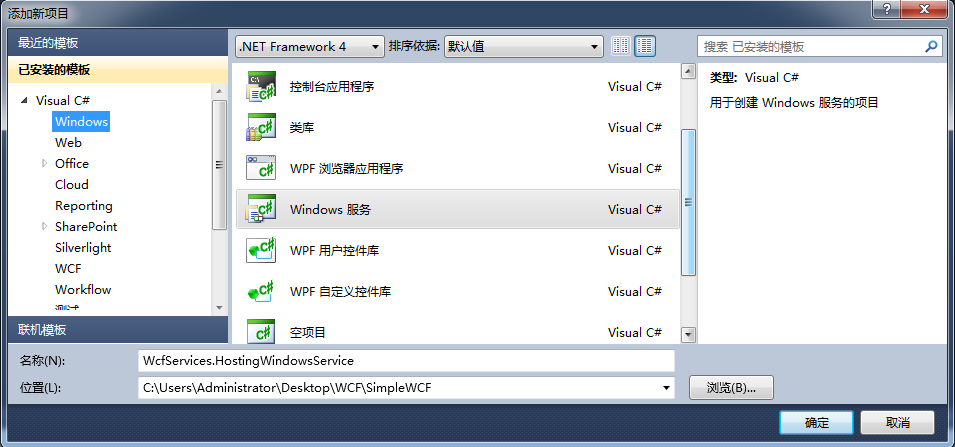
2.对WcfServices.HostingWindowsSerice项目添加对Contracts项目、Service项目和System.ServiceModel的引用。
3.将WcfServices.HostingWindowsSerice项目中的Class1.cs文件重命名为CalculatorHost.cs,然后打开这个文件,里面代码如下:
 using System.ServiceProcess;

 using System.ServiceModel;

 using WcfServices.Services;

 namespace WcfServices.HostingWindowsService

 {

     public partial class CalculatorHost : ServiceBase

     {

         private ServiceHost _host;

         public ServiceHost Host

         {

             get { return _host; }

             set { _host = value; }

         }

         public CalculatorHost()

         {

             InitializeComponent();

         }

         protected override void OnStart(string[] args)

         {

             Host = new ServiceHost(typeof(CalculatorService));

             Host.Open();

         }

         protected override void OnStop()

         {

             if (Host != null)

             {

                 Host.Close();

                 Host = null;

             }

         }

     }

 }
4.CalculatorHost.cs[Design]的界面上右键,选择添加安装器(Add Installer)。这时,项目里会自动生成一个ProjectInstaller.cs文件。
5.打开ProjectInstaller.cs[Design]的设计界面,将会出现下图:
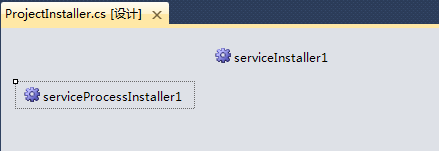
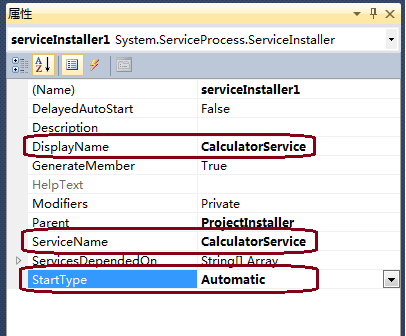
6.选中serviceInstaller1,打开它的属性视图(Ctrl W,P),修改属性。如下图所示:
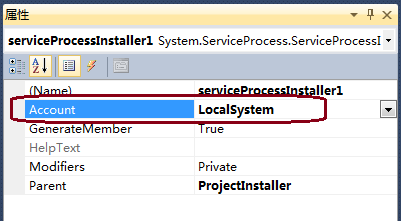
7.接着选中serviceProcessInstaller1,打开它的属性视图,修改属性。如下图:(这里服务账号也可以是其他的。)
8.接下来我们看看这个项目里的program.cs文件。代码如下:
 using System.ServiceProcess;

 namespace WcfServices.HostingWindowsService

 {

     static class Program

     {

         /// <summary>

         /// 应用程序的主入口点。

         /// </summary>

         static void Main()

         {

             ServiceBase[] ServicesToRun;

             ServicesToRun = new ServiceBase[]

             {

                 new CalculatorHost()

             };

             ServiceBase.Run(ServicesToRun);

         }

     }

 }
9.这些都做好了之后,在WcfServices.HostingWindowsSerice项目中添加服务端的配置文件。这个在上一节中也写过,代码如下:
 <?xml version="1.0" encoding="utf-8" ?>

 <configuration>

   <system.serviceModel>

     <behaviors>

       <serviceBehaviors>

         <behavior name="CaclulaterBehavior">

           <serviceMetadata httpGetEnabled="true" />

         </behavior>

       </serviceBehaviors>

     </behaviors>

     <services>

       <service behaviorConfiguration="CaclulaterBehavior" name="WcfServices.Services.CalculatorService">

         <endpoint address="http://localhost:8080/calculatorservice" binding="basicHttpBinding"

             bindingConfiguration="" contract="WcfServices.Contracts.ICalculator" />

         <host>

           <baseAddresses>

             <add baseAddress="http://localhost:8080/calculatorservice" />

           </baseAddresses>

         </host>

       </service>

     </services>

   </system.serviceModel>

 </configuration>
10.Build项目WcfServices.HostingWindowsSerice,查看生成的文件如下:
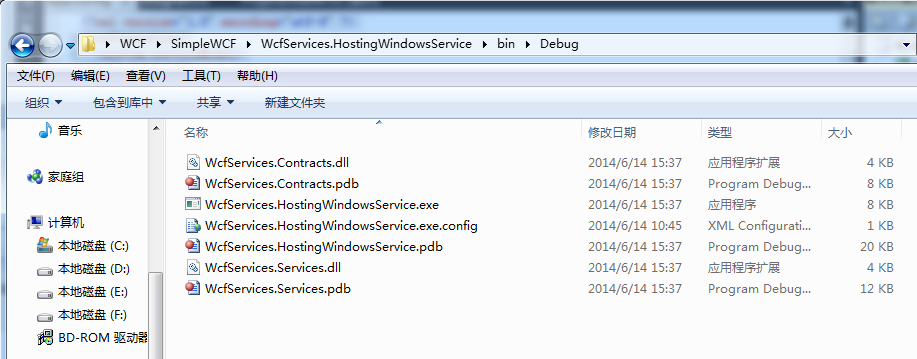
将整个debug文件夹中文件拷出来,放到另外一个目录下。比如D:\WCF\CalculatorService中。后面我们注册的windows服务将从这个目录下找exe文件。
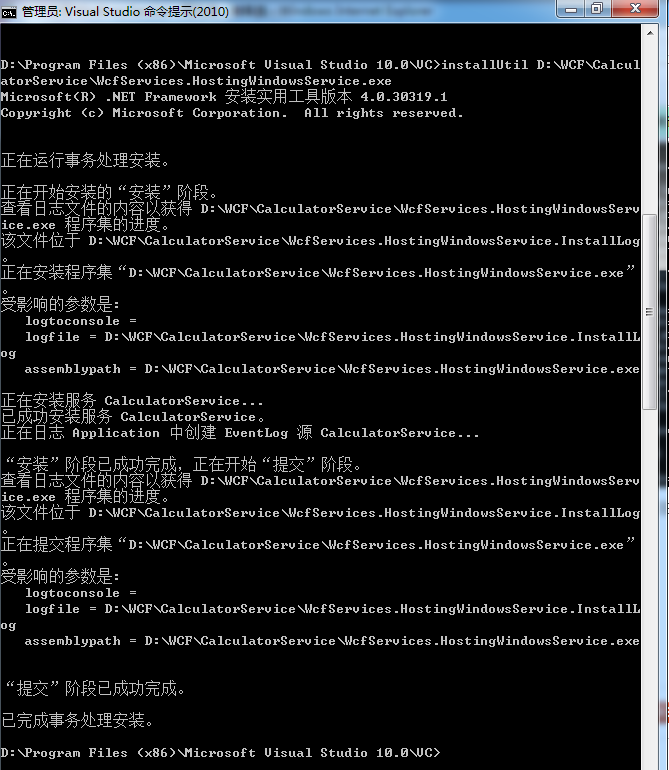
11.下面就是要注册了。我们用InstallUtil.exe来注册(当然你也可以用sc)。打开InstallUtil.exe在我的电脑的目录是:C:\WINDOWS\Microsoft.NET\Framework\v4.0.30319。你可以从命令行进如这个目录,然后执行InstallUtil命令。也可以在所有程序中找到visual studio Tools,里面的visual studio command prompt命令行工具。执行安装的命令是InstallUtil D:\WCF\CalculatorService\WcfServices.HostingWindowsSerice.exe
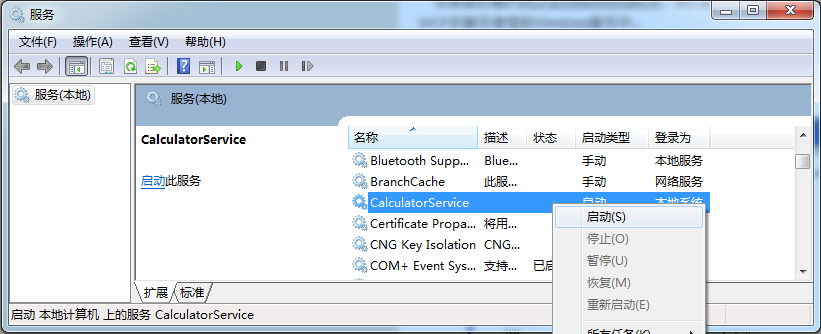
12.成功后,你就可以在控制面板->管理工具->服务中找到它了,如下图:
参考:
[1] WCF注册Windows Service http://www.cnblogs.com/judastree/archive/2012/08/29/2662184.html
WCF寄宿到Windows Service的更多相关文章
- WCF寄宿到Windows Service[1]
WCF寄宿到Windows Service 返回 在前面创建一个简单的WCF程序,我们把WCF的服务寄宿到了Host这个控制台项目中了.下面将介绍如何把WCF的服务寄宿到Windows服务中(源代码) ...
- 重温WCF之构建一个简单的WCF(一)(2)通过Windows Service寄宿服务和WCF中实现操作重载
参考地址:http://www.cnblogs.com/zhili/p/4039111.html 一.如何在Windows Services中寄宿WCF服务 第一步:创建Windows 服务项目,具体 ...
- WCF学习之旅—WCF服务的Windows 服务程序寄宿(十一)
上接 WCF学习之旅—WCF服务部署到IIS7.5(九) WCF学习之旅—WCF服务部署到应用程序(十) 七 WCF服务的Windows 服务程序寄宿 这种方式的服务寄宿,和IIS一样有一个一样 ...
- 编写寄宿于windows服务的WCF服务
由于业务中有些任务需要在后台静默长期运行,或者有些服务队响应的要求比较苛刻,这样的WCF服务就不适合寄宿于IIS中.IIS每隔一段时间w3wp进程会闲置超时,造成服务的运行停止,因此这种耗时或者定时任 ...
- 将WCF寄宿在托管的Windows服务中
在我之前的一篇博客中我介绍了如何发布WCF服务并将该服务寄宿于IIS上,今天我再来介绍一种方式,就是将WCF服务寄宿在Windows服务中,这样做有什么好处呢?当然可以省去部署IIS等一系列的问题,能 ...
- WCF寄宿控制台.WindowsService.WinFrom.WebAPI寄宿控制台和windows服务
先建立wcf类库.会默认生成一些试用代码.如下: public class Service1 { public string GetData(int value) { return string.Fo ...
- 创建寄宿在Windows服务中的WCF服务
1.创建Windows服务项目 2.Server1改名为你想要的名称,比如WinServer 3.在项目中新建一个WCF文件夹,用于存放wcf服务文件. 注:在WcfServer类的上面还要添加 [S ...
- WCF Windows Service Using TopShelf and ServiceModelEx z
http://lourenco.co.za/blog/2013/08/wcf-windows-service-using-topshelf-and-servicemodelex/ There are ...
- WCF - Windows Service Hosting
WCF - Windows Service Hosting The operation of Windows service hosting is a simple one. Given below ...
随机推荐
- 解决 windows10 system service exception蓝屏
解决方法: WINDOWS/system32/config/RegBack/SYSTEM/* 复制到 WINDOWS/system32/config/*下
- java 获取昨天日期
Calendar cal=Calendar.getInstance(); cal.add(Calendar.DATE,-1); Date d=cal.getTime(); SimpleDateForm ...
- 【WebKit内核 CEF3 】 第一篇:下载分支代码并本地编译
关于CEF Chromium Embedded Framework 简单说就是 WebKit内核的 对外绑定. 当前主流浏览器内核 一.Trident内核代表产品Internet Explorer ...
- 微信小程序条码、二维码生成模块
代码地址如下:http://www.demodashi.com/demo/13994.html 一.前期准备工作 软件环境:微信开发者工具 官方下载地址:https://mp.weixin.qq.co ...
- result-charts
<%@ page language="java" contentType="text/html; charset=UTF-8" pageEncoding= ...
- 【mysql】Innodb三大特性之insert buffer
一.什么是insert buffer insert buffer是一种特殊的数据结构(B+ tree)并不是缓存的一部分,而是物理页,当受影响的索引页不在buffer pool时缓存 secondar ...
- 页面livereload width grunt
step-1. 安装node 环境 step-2. npm install grunt-cli \ grunt http://www.gruntjs.net/docs/getting-sta ...
- 学习WCF笔记之二
一.学习文章http://www.cnblogs.com/iamlilinfeng/archive/2012/09/25/2700049.html 二.步骤 学习WFC,按照大神的文章一步步学习,不过 ...
- Jmeter -----计数器(counter)
计数器的定义 Allows the user to create a counter that can be referenced anywhere in the Thread Group. The ...
- RHCE7 管理II-2 通过grep使用正则表达式
grep -i:忽略大小写 -n:表示行数 找出含有root的行 # grep root /etc/passwd root:x:::root:/root:/bin/bash ::operator:/r ...