
require.js入门指南(二)
*:first-child {
margin-top: 0 !important;
}
body>*:last-child {
margin-bottom: 0 !important;
}
/* BLOCKS
=============================================================================*/
p, blockquote, ul, ol, dl, table, pre {
margin: 15px 0;
}
/* HEADERS
=============================================================================*/
h1, h2, h3, h4, h5, h6 {
margin: 20px 0 10px;
padding: 0;
font-weight: bold;
-webkit-font-smoothing: antialiased;
}
h1 tt, h1 code, h2 tt, h2 code, h3 tt, h3 code, h4 tt, h4 code, h5 tt, h5 code, h6 tt, h6 code {
font-size: inherit;
}
h1 {
font-size: 28px;
color: #000;
}
h2 {
font-size: 24px;
border-bottom: 1px solid #ccc;
color: #000;
}
h3 {
font-size: 18px;
}
h4 {
font-size: 16px;
}
h5 {
font-size: 14px;
}
h6 {
color: #777;
font-size: 14px;
}
body>h2:first-child, body>h1:first-child, body>h1:first-child+h2, body>h3:first-child, body>h4:first-child, body>h5:first-child, body>h6:first-child {
margin-top: 0;
padding-top: 0;
}
a:first-child h1, a:first-child h2, a:first-child h3, a:first-child h4, a:first-child h5, a:first-child h6 {
margin-top: 0;
padding-top: 0;
}
h1+p, h2+p, h3+p, h4+p, h5+p, h6+p {
margin-top: 10px;
}
/* LINKS
=============================================================================*/
a {
color: #4183C4;
text-decoration: none;
}
a:hover {
text-decoration: underline;
}
/* LISTS
=============================================================================*/
ul, ol {
padding-left: 30px;
}
ul li > :first-child,
ol li > :first-child,
ul li ul:first-of-type,
ol li ol:first-of-type,
ul li ol:first-of-type,
ol li ul:first-of-type {
margin-top: 0px;
}
ul ul, ul ol, ol ol, ol ul {
margin-bottom: 0;
}
dl {
padding: 0;
}
dl dt {
font-size: 16px;
font-weight: bold;
font-style: italic;
padding: 0;
margin: 15px 0 5px;
}
dl dt:first-child {
padding: 0;
}
dl dt>:first-child {
margin-top: 0px;
}
dl dt>:last-child {
margin-bottom: 0px;
}
dl dd {
margin: 0 0 15px;
padding: 0 15px;
}
dl dd>:first-child {
margin-top: 0px;
}
dl dd>:last-child {
margin-bottom: 0px;
}
/* CODE
=============================================================================*/
pre, code, tt {
font-size: 14px;
font-family: Consolas, "Liberation Mono", Courier, monospace;
}
code, tt {
margin: 0 0px;
padding: 0px 0px;
white-space: nowrap;
border: 1px solid #eaeaea;
background-color: #f8f8f8;
border-radius: 3px;
}
pre>code {
margin: 0;
padding: 0;
white-space: pre;
border: none;
background: transparent;
}
pre {
background-color: #f8f8f8;
border: 1px solid #ccc;
font-size: 14px;
line-height: 19px;
overflow: auto;
padding: 6px 10px;
border-radius: 3px;
}
pre code, pre tt {
background-color: transparent;
border: none;
}
kbd {
-moz-border-bottom-colors: none;
-moz-border-left-colors: none;
-moz-border-right-colors: none;
-moz-border-top-colors: none;
background-color: #DDDDDD;
background-image: linear-gradient(#F1F1F1, #DDDDDD);
background-repeat: repeat-x;
border-color: #DDDDDD #CCCCCC #CCCCCC #DDDDDD;
border-image: none;
border-radius: 2px 2px 2px 2px;
border-style: solid;
border-width: 1px;
font-family: "Helvetica Neue",Helvetica,Arial,sans-serif;
line-height: 10px;
padding: 1px 4px;
}
/* QUOTES
=============================================================================*/
blockquote {
border-left: 4px solid #DDD;
padding: 0 15px;
color: #777;
}
blockquote>:first-child {
margin-top: 0px;
}
blockquote>:last-child {
margin-bottom: 0px;
}
/* HORIZONTAL RULES
=============================================================================*/
hr {
clear: both;
margin: 15px 0;
height: 0px;
overflow: hidden;
border: none;
background: transparent;
border-bottom: 4px solid #ddd;
padding: 0;
}
/* TABLES
=============================================================================*/
table th {
font-weight: bold;
}
table th, table td {
border: 1px solid #ccc;
padding: 6px 13px;
}
table tr {
border-top: 1px solid #ccc;
background-color: #fff;
}
table tr:nth-child(2n) {
background-color: #f8f8f8;
}
/* IMAGES
=============================================================================*/
img {
max-width: 100%
}
-->
前一篇文章我们已经在页面中引入了
require.js,现在我们学习如何使用它.假设我现在要使用jquery,那么该怎么做?
把
jquery.js包含进项目中,我们先把它放在js文件夹下.
在
index.html页中使用requireJS的require方法,把jquery加载到页面中来.代码如下:<!DOCTYPE html>
<html lang="zh-CN">
<head>
<meta charset="UTF-8">
<script src="js/require.js"></script>
<title>requireJS</title>
<script>
require(['js/jquery'],function(jquery){
alert($);
})
</script>
</head>
<body> </body>
</html>
这里需要注意:
需要引入的模块文件,写在
require()函数中的第一个参数中,它包括模块的路径和文件名,不带.js后缀. 路径在这里是相对index.html的路径.文件名是jquery.js,但是不带后缀,所以写为js/jquery.大家看到,第一个参数实际上是一个数组,我们传入的每个模块,都是数组的一个元素.
第二个参数是一个函数,我们把模块引入以后,需要执行的操作,都写在这个函数里.
这个函数的形式参数就是前面传进来的模块,并且顺序要和模块在数组中的顺序一致.因为模块和参数是一一对应的,你可以为模块起一个你喜欢的名字,但是不能和模块中向外部暴露的变量名有冲突.比如我引入了jquery模块,在形式参数里,我给它起名为$,这个就和模块向外部暴露的$()函数名冲突了.


如果我把参数改为jquery,如图:


注意:请不要更改jquery这个模块的名字,会导致错误.
下面是代码运行结果截图:
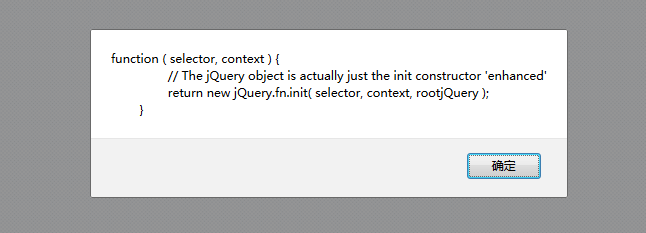
说明jquery.js已经被成功导入页面中了.
require.js入门指南(二)的更多相关文章
- require.js入门指南(三)
*:first-child { margin-top: 0 !important; } body>*:last-child { margin-bottom: 0 !important; } /* ...
- require.js入门指南(一)
*:first-child { margin-top: 0 !important; } body>*:last-child { margin-bottom: 0 !important; } /* ...
- 《Three.js 入门指南》3.0 - 代码构建的最基本结构。
3.0 代码构建的最基本结构 说明: 我们必需首先知道,Three.js 的一些入门级概念: 我们需要知道,OpenGL 是一套三维实现的标准,为什么说是标准,因为它是跨平台,跨语言的.甚至CAD以及 ...
- d3.js 入门指南 - 仪表盘
D3的全称是Data-Driven Documents(数据驱动的文档),是一个用来做数据可视化的JavaScript函数库,而JavaScript文件的后缀通常为.js,所以D3被称为D3.js. ...
- d3.js 入门指南
说到数据可视化,我们会行到很多优秀的框架,像echarts.highcharts,这些框架很优雅,健壮,能满足我们对可视化的大部分需求,但是缺点也很明显,就是这些框架几乎是不可定制化的,当遇到特殊的需 ...
- 《Three.js 入门指南》3.1.2 - 一份整齐的代码结构以及使用ORBIT CONTROLS插件(轨道控制)实现模型控制
3.1.2 正式代码结构 & ORBIT CONTROLS插件(轨道控制) 说明 本节内容属于插入节,<Three.js入门指南>这本书中,只是简单的介绍了一些概念,是一本基础的入 ...
- 《Three.js 入门指南》0 - 说明
本笔记,摘自:<Three.js 入门指南>一书 地址链接为:https://www.ituring.com.cn/book/miniarticle/58552 本书的前言摘录: 本书结构 ...
- Vue.js 入门指南之“前传”(含sublime text 3 配置)
题记:关注Vue.js 很久了,但就是没有动手写过一行代码,今天准备入手,却发现自己比菜鸟还菜,于是四方寻找大牛指点,才终于找到了入门的“入门”,就算是“入门指南”的“前传”吧.此文献给跟我一样“白痴 ...
- require.js 入门学习 (share)
以下内容转自阮一峰老师的网络日志:http://www.ruanyifeng.com/blog/2012/11/require_js.html 更多学习资源: require.js官网:http:// ...
随机推荐
- 利用Android手机里的摄像头进行拍照
------- 源自梦想.永远是你IT事业的好友.只是勇敢地说出我学到! ---------- 1.在API Guides中找到Camera,里面讲解了如何使用系统自带的摄像头进行工作,之后我会试着翻 ...
- Amazon教程:刚买就降价!避免损失,申请PRICE MATCH(价格保护)的方法
Amazon的商品价格波动频繁,虽然老白通常都在价格较低的时机向大家推荐,但是经常有降了又降的情况,刚下的单还没到手就又降价了,这种滋味肯定不好受.Amazon客服明确告诉老白一周内降价都可以申请PR ...
- sift算法中翻译的第11页中比值问题
没下载下来... http://download.csdn.net/detail/shwaicy1314/7320695 原文翻译.应该是 2004年lowe写的吧 第八页 图C展示的 是小于0.03 ...
- python 打包exe注意的问题
教程百度.谷歌都有,本文讲讲安装时出错的问题. 教程:http://keliang.blog.51cto.com/3359430/661884 1.cxfreeze 找不到路径时: 需要修改Scrip ...
- 数理方程:Laplace变换 & 留数(更新中)
更新:25 APR 2016 Laplace变换 设函数\(f(t)\)在\(t>0\)时有定义,积分 \(F(s)=\int_0^{+\infty}f(t)e^{-st}dt \qquad ( ...
- Table of Contents - Git
Downloading and Installing Git Download for Linux and Unix Integration with Eclipse Eclipse 提交工程至 G ...
- 【Quote】What is Mono
What is Mono Mono is a software platform designed to allow developers to easily create cross platfor ...
- (转)浅谈.NET下的多线程和并行计算(一)前言
转载——原文地址:http://www.cnblogs.com/lovecindywang/archive/2009/12/25/1632014.html 作为一个ASP.NET开发人员,在之前的开发 ...
- 十七、Android学习笔记_Android 使用 搜索框
1.在资源文件夹下创建xml文件夹,并创建一个searchable.xml: android:searchSuggestAuthorityshux属性的值跟实现SearchRecentSuggesti ...
- Hive通过查询语句向表中插入数据注意事项
最近在学习使用Hive(版本0.13.1)的过程中,发现了一些坑,它们或许是Hive提倡的比关系数据库更加自由的体现(同时引来一些问题),或许是一些bug.总而言之,这些都需要使用Hive的开发人员额 ...