
安卓Design包下的TextInputLayout和FloatingActionButton的简单使用
终于介绍到Design包的最后的东西了。
也很简单,一个是TextInputLayout。
TextInputLayout作为一个父容器,包含一个新的EditText,可以给EditText添加意想不到的效果,特别在注册功能开发中,用处非常广泛。
它可以直接提示输入错误,而不至于像以前一样总是点击按钮后才能检测出输入的错误,当有很多输出框的时候更是难以区分。。
并且还可以把hint 默认提示值放到上面去。
项目已经同步至:https://github.com/nanchen2251/CoordinatorLayout 包含了前面的demo代码
实现界面大概是这样的。
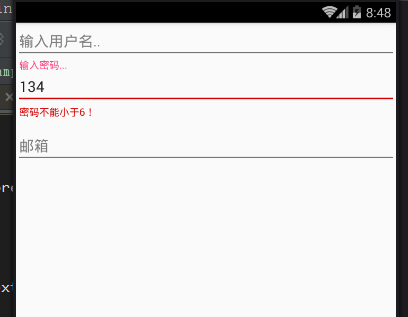
当你输入正确后是这样的。
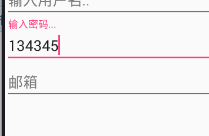
实现代码也很简单。
添加一个监听焦点事件
  @Override

    protected void onCreate(Bundle savedInstanceState) {

        super.onCreate(savedInstanceState);

        setContentView(R.layout.activity_text_input);

        textInput = (TextInputLayout) findViewById(R.id.text_input_layout);

        textInput.getEditText().addTextChangedListener(this);

    }

    @Override

    public void beforeTextChanged(CharSequence s, int start, int count, int after) {

    }

    @Override

    public void onTextChanged(CharSequence s, int start, int before, int count) {

    }

    //完成

    @Override

    public void afterTextChanged(Editable s) {

        if(s.length()<6){

            textInput.setError("密码不能小于6!");

            textInput.setErrorEnabled(true);

        }else{

            textInput.setErrorEnabled(false);

        }

    }
XML文件中的定义
<?xml version="1.0" encoding="utf-8"?>

<LinearLayout

    xmlns:android="http://schemas.android.com/apk/res/android"

    xmlns:tools="http://schemas.android.com/tools"

    android:layout_width="match_parent"

    android:layout_height="match_parent"

    android:orientation="vertical"

    tools:context="com.example.nanchen.designcoodinatordemo.TextInputActivity">

    <EditText

        android:layout_width="match_parent"

        android:hint="输入用户名.."

        android:layout_height="wrap_content"/>

    <android.support.design.widget.TextInputLayout

        android:layout_width="match_parent"

        android:id="@+id/text_input_layout"

        android:layout_height="wrap_content">

        <EditText

            android:layout_width="match_parent"

            android:hint="输入密码..."

            android:layout_height="wrap_content"/>

    </android.support.design.widget.TextInputLayout>

    <android.support.design.widget.TextInputEditText

        android:layout_width="match_parent"

        android:layout_height="wrap_content"

        android:hint="邮箱"/>

</LinearLayout>
然后再来看一下FloatingActionButton。
其实它就是一个可以悬浮的Button,可以把它放在CoordinatorLayout的容器中并重写FloatingActionButton的Behavior可以达到想要的效果。
这里是下拉隐藏。
package com.example.nanchen.designcoodinatordemo;

import android.content.Context;

import android.support.design.widget.CoordinatorLayout;

import android.support.design.widget.FloatingActionButton;

import android.util.AttributeSet;

import android.view.View;

/**

 * 自定义Behavior

 * Created by 南尘 on 16-7-14.

 */

public class MyBehavior extends FloatingActionButton.Behavior {

    //写了这个构造方法才能在XML文件中直接指定

    public MyBehavior(Context context, AttributeSet attrs) {

        super();

    }

    @Override

    public boolean onStartNestedScroll(CoordinatorLayout coordinatorLayout, FloatingActionButton child, View directTargetChild, View target, int nestedScrollAxes) {

        return true;//返回true代表我们关心这个滚动事件

    }

    @Override

    public void onNestedPreScroll(CoordinatorLayout coordinatorLayout, FloatingActionButton child, View target, int dx, int dy, int[] consumed) {

        super.onNestedPreScroll(coordinatorLayout, child, target, dx, dy, consumed);

        if (dy < 0) {//向下滚动

//            ViewCompat.animate(child).scaleX(1).alpha(1).start();

            child.show();

        } else {//向上滚动

//            ViewCompat.animate(child).scaleX(0).alpha(0).start();

            child.hide();

        }

    }

}
FloatingActionButton是有show和hide显示和隐藏方法的。
具体图就不截了,本人做不来gif动图,略显尴尬,不过抽时间一定好好学学!
安卓Design包下的TextInputLayout和FloatingActionButton的简单使用的更多相关文章
- 安卓Design包之Toolbar控件的使用
转自:ToolBar的使用 ToolBar的出现是为了替换之前的ActionBar的各种不灵活使用方式,相反,ToolBar的使用变得非常灵活,因为它可以让我们自由往里面添加子控件.低版本要使用的话, ...
- 安卓Design包之TabLayout控件的使用
转自: 安卓Design包之TabLayout控件的简单使用 Google在2015的IO大会上,给我们带来了更加详细的Material Design设计规范,同时,也给我们带来了全新的Android ...
- 安卓Design包之TabLayout控件的简单使用
Google在2015的IO大会上,给我们带来了更加详细的Material Design设计规范,同时,也给我们带来了全新的Android Design Support Library,在这个supp ...
- 安卓Design包之AppBar和Toolbar的联用
前面讲了Design包的的CoordinatorLayout和SnackBar的混用,现在继续理解Design包的AppBar; AppBarLayout跟它的名字一样,把容器类的组件全部作为AppB ...
- 安卓Design包之超强控件CoordinatorLayout与SnackBar的简单使用
在前面的Design中,学习使用了TabLayout,NavigationView与DrawerLayout实现的神奇效果,今天就带来本次Design包中我认为最有意义的控件CoordinatorLa ...
- 安卓Design包之NavigationView结合DrawerLayout,toolbar的使用,FloatingActionButton
注意:使用前需要添加Design依赖包,使用toolbar时需要隐藏标题头 FloatingActionButton 悬浮按钮:FloatingActionButton是重写ImageView的,所有 ...
- 安卓Design包之CollapsingToolbarLayout(可折叠的工具栏布局)的简单使用
转自: CollapsingToolbarLayout的使用 注意:使用前需要添加Design依赖包,使用toolbar时需要隐藏标题头 CollapsingToolbarLayout作用是提供了一个 ...
- 安卓Design包之CoordinatorLayout配合AppBarLayout,ToolBar,TabLaout的使用
转载: CoordinatorLayout配合AppBarLayout,Toolbar和TabLayout的使用 控件的简单介绍: AppBarLayout:它是继承LinerLayout实现的一个V ...
- 使用Design包实现QQ动画侧滑效果和滑动菜单导航
Google在2015的IO大会上,给我们带来了更加详细的Material Design设计规范,同时,也给我们带来了全新的Android Design Support Library,在这个supp ...
随机推荐
- 从Script到Code Blocks、Code Behind到MVC、MVP、MVVM
刚过去的周五(3-14)例行地主持了技术会议,主题正好是<UI层的设计模式——从Script.Code Behind到MVC.MVP.MVVM>,是前一天晚上才定的,中午花了半小时准备了下 ...
- C# 利用性能计数器监控网络状态
本例是利用C#中的性能计数器(PerformanceCounter)监控网络的状态.并能够直观的展现出来 涉及到的知识点: PerformanceCounter,表示 Windows NT 性能计数器 ...
- 03.LoT.UI 前后台通用框架分解系列之——多样的表格
LOT.UI分解系列汇总:http://www.cnblogs.com/dunitian/p/4822808.html#lotui LoT.UI开源地址如下:https://github.com/du ...
- Spring之旅(2)
Spring简化Java的下一个理念:基于切面的声明式编程 3.应用切面 依赖注入的目的是让相互协作的组件保持松散耦合:而AOP编程允许你把遍布应用各处的功能分离出来形成可重用的组件. AOP面向切面 ...
- Android学习路线总结,绝对干货
title: Android学习路线总结,绝对干货 tags: Android学习路线,Android学习资料,怎么学习android grammar_cjkRuby: true --- 一.前言 不 ...
- CRL快速开发框架系列教程七(使用事务)
本系列目录 CRL快速开发框架系列教程一(Code First数据表不需再关心) CRL快速开发框架系列教程二(基于Lambda表达式查询) CRL快速开发框架系列教程三(更新数据) CRL快速开发框 ...
- C#如何在PDF文件添加图片印章
文档中添加印章可以起一定的作用,比如,防止文件随意被使用,或者确保文档内容的安全性和权威性.C#添加图片印章其实也有很多实现方法,这里我使用的是免费的第三方软件Free Spire.PDF,向大家阐述 ...
- C++随笔:.NET CoreCLR之GC探索(4)
今天继续来 带大家讲解CoreCLR之GC,首先我们继续看这个GCSample,这篇文章是上一篇文章的继续,如果有不清楚的,还请翻到我写的上一篇随笔.下面我们继续: // Initialize fre ...
- springmvc SSM 多数据源 shiro redis 后台框架 整合
A集成代码生成器 [正反双向(单表.主表.明细表.树形表,开发利器)+快速构建表单 下载地址 ; freemaker模版技术 ,0个代码不用写,生成完整的一个模块,带页面.建表sql脚本,处理类 ...
- SharePoint2016安装的过程的”Microsoft.SharePoint.Upgrade.SPUpgradeException”错误解决方法
前提 在windows server 2012的服务器上运行安装sharepoint2016出现如下错误: Could not load file or assembly ‘Microsoft.Dat ...