
SPRING IN ACTION 第4版笔记-第九章Securing web applications-009-拦截请求()
一、
对特定的请求拦截
For example, consider the requests served by the Spittr application. Certainly, the
home page is public and doesn’t need to be secured. Likewise, since all Spittle
objects are essentially public, the pages that display Spittle s don’t require security.
Requests that create a Spittle , however, should only be performed by an authenti-
cated user. Similarly, although user profile pages are public and don’t require authen-
tication, if you were to handle a request for /spitters/me to display the current user’s
profile, then authentication is required to know whose profile to show.
The key to fine-tuning security for each request is to override the configure
(HttpSecurity) method. The following code snippet shows how you might override
configure(HttpSecurity) to selectively apply security to different URL paths.
 @Override

 protected void configure(HttpSecurity http) throws Exception {

     http

         .authorizeRequests()

         .antMatchers("/spitters/me").authenticated()

         .antMatchers(HttpMethod.POST, "/spittles").authenticated()

         .anyRequest().permitAll();

 }
The HttpSecurity object given to configure() can be used to configure several
aspects of HTTP security. Here you’re calling authorizeRequests() and then calling
methods on the object it returns to indicate that you want to configure request-level
security details. The first call to antMatchers() specifies that requests whose path is
/spitters/me should be authenticated. The second call to antMatchers() is even
more specific, saying that any HTTP POST request to /spittles must be authenticated.
Finally, a call to anyRequests() says that all other requests should be permitted, not
requiring authentication or any authorities.
(1)用通配符
.antMatchers("/spitters/**").authenticated();
(2)写多个路径
.antMatchers("/spitters/**", "/spittles/mine").authenticated();
(3)Whereas the antMatchers() method works with paths that may contain Ant-style wild-
cards, there’s also a regexMatchers() method that accepts regular expressions to
define request paths. For example, the following snippet uses a regular expression
that’s equivalent to /spitters/** (Ant-style):
.regexMatchers("/spitters/.*").authenticated();
(4)全部可配置的方法
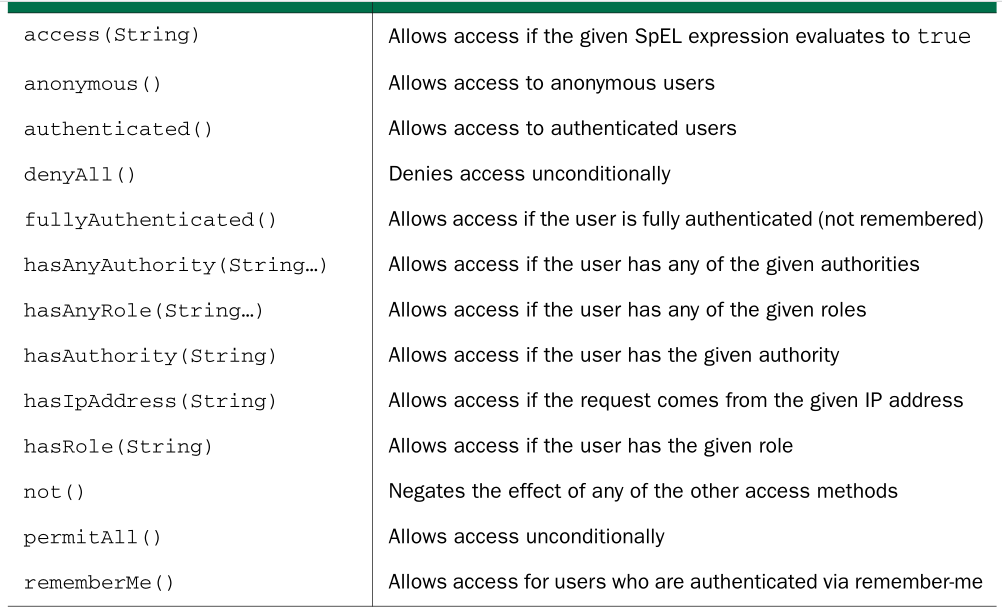
(1)you could change the previous configure() method to require that the user not only be authenticated, but also have ROLE_SPITTER authority:
@Override

protected void configure(HttpSecurity http) throws Exception {

    http

        .authorizeRequests()

        .antMatchers("/spitters/me").hasAuthority("ROLE_SPITTER")

        .antMatchers(HttpMethod.POST, "/spittles")

        .hasAuthority("ROLE_SPITTER")

        .anyRequest().permitAll();

}
或
@Override

protected void configure(HttpSecurity http) throws Exception {

    http

        .authorizeRequests()

        .antMatchers("/spitter/me").hasRole("SPITTER")

        .antMatchers(HttpMethod.POST, "/spittles").hasRole("SPITTER")

        .anyRequest().permitAll();

}
You can chain as many calls to antMatchers() , regexMatchers() , and anyRequest()
as you need to fully establish the security rules around your web application. You
should know, however, that they’ll be applied in the order given. For that reason, it’s
important to configure the most specific request path patterns first and the least spe-
cific ones (such as anyRequest() ) last. If not, then the least specific paths will trump
the more specific ones.
SPRING IN ACTION 第4版笔记-第九章Securing web applications-009-拦截请求()的更多相关文章
- SPRING IN ACTION 第4版笔记-第九章Securing web applications-011-把敏感信息请求转为https(requiresChannel())
1.把包含敏感信息的请求转为https请求,则较为安全,但如何只把有需要安全的请求转为https,而不是不加分辩就把所有请求都转为https呢?可以用requiresChannel() @Overri ...
- SPRING IN ACTION 第4版笔记-第九章Securing web applications-001-SpringSecurity简介(DelegatingFilterProxy、AbstractSecurityWebApplicationInitializer、WebSecurityConfigurerAdapter、@EnableWebSecurity、@EnableWebMvcS)
一.SpringSecurity的模块 At the least, you’ll want to include the Core and Configuration modules in your ...
- SPRING IN ACTION 第4版笔记-第九章Securing web applications-010-拦截请求
一. What if you wanted to restrict access to certain roles only on Tuesday? Using the access() method ...
- SPRING IN ACTION 第4版笔记-第九章Securing web applications-008-使用非关系型数据库时如何验证用户(自定义UserService)
一. 1.定义接口 Suppose that you need to authenticate against users in a non-relational database suchas Mo ...
- SPRING IN ACTION 第4版笔记-第九章Securing web applications-007-设置LDAP server比较密码(contextSource、root()、ldif()、)
一.LDAP server在哪 By default, Spring Security’s LDAP authentication assumes that the LDAP server is li ...
- SPRING IN ACTION 第4版笔记-第九章Securing web applications-004-对密码加密passwordEncoder
一. 1.Focusing on the authentication query, you can see that user passwords are expected to be stored ...
- SPRING IN ACTION 第4版笔记-第九章Securing web applications-003-把用户数据存在数据库
一. 1.It’s quite common for user data to be stored in a relational database, accessed via JDBC . To c ...
- SPRING IN ACTION 第4版笔记-第九章Securing web applications-002-把用户数据存在memory里(AuthenticationManagerBuilder、 UserDetailsManagerConfigurer.UserDetailsBuilder)
Spring Security is extremely flexible and is capable of authenticating users against virtually any d ...
- SPRING IN ACTION 第4版笔记-第九章Securing web applications-006-用LDAP比较密码(passwordCompare()、passwordAttribute("passcode")、passwordEncoder(new Md5PasswordEncoder()))
一. The default strategy for authenticating against LDAP is to perform a bind operation,authenticatin ...
随机推荐
- AE实现投影定义和投影转换
添加引用ESRI.ArcGIS.DataManagementTools 1.获取要定义和要转换的投影 IWorkspaceFactory wsf = new ShapefileWorkspaceFac ...
- What is a First Chance Exception?
Refrences: http://blogs.msdn.com/b/davidklinems/archive/2005/07/12/438061.aspx To be continued...
- Ubuntu 截屏
一个图说明: 系统设置->键盘->快捷键->屏幕截图 里面可以查看及修改快捷键
- 安装MySQL总结
由于MySQL的版本不同,所以会有不同的安装方式.在下以Linux系统下MySQL5.1.19版本为例,进行安装,初学还望指正. 一.安装编译软件(简单的yum安装) gcc gcc-c++ ncur ...
- 【转载】GDB反向调试(Reverse Debugging)
记得刚开始学C语言的时候,用vc的F10来调试程序,经常就是一阵狂按,然后一不小心按过了.结果又得从头再来,那时候我就问我的老师,能不能倒退回去几步.我的老师很遗憾地和我说,不行,开弓没有回头箭.这句 ...
- Hadoop fs命令详解
本文非原创,转载自http://www.superwu.cn/2013/07/31/312 另外参考:http://www.blogjava.net/changedi/archive/2013/08/ ...
- Java 学习计划
第一部分 在搭建SSM的过程中,可能会经常接触到一个叫maven的工具.这个工具也是你以后工作当中几乎是必须要使用的工具,所以你在搭建SSM的过程中,也可以顺便了解一下maven的知识.在你目前这个阶 ...
- struts2全注解Action配置
- 用JS写的放大镜
代码如下 <!DOCTYPE html> <html> <head> <meta charset="utf-8"> <meta ...
- 如何设置eclipse开发的web工程自动发布到tomcat的webapps下?
使用eclipse开发web工程,在配置好服务器(tomcat)之后运行该web工程,发现能正常运行.但是问题在于,当你打开tomcat路径\webapps时,会发现没有该web应用(你的web工程名 ...