
bootstrap table 前后端分页(超级简单)
前端分页:数据库查询所有的数据,在前端进行分页
后端分页:每次只查询当前页面加载所需要的那几条数据
jquery谁都有,不说了
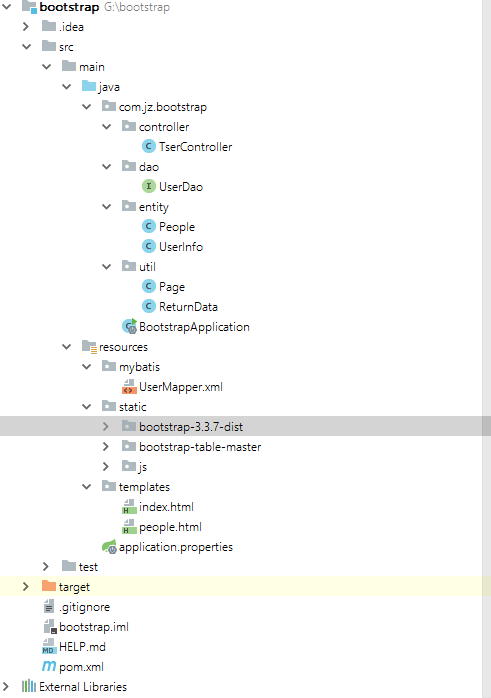
项目结构:TestController命名打错了,请无视。。
一,前端分页
前端分页比较简单,只需要把数据都传到前端,让bootstrap table自己处理显示就行了
1.随便建个userinfo数据库
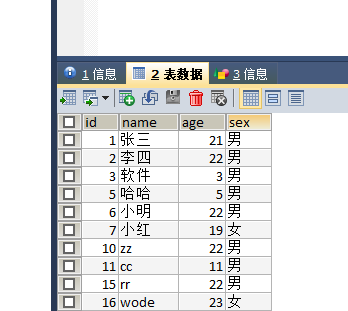
2.entity,dao,xml,controlle代码如下
public class UserInfo {

    private Integer id;

    private String name;

    private Integer age;

    private String sex;

}

public interface UserDao {

    List<UserInfo> findAll();

}

  <select id="findAll" resultType="com.jz.bootstrap.entity.UserInfo">

     select * from userinfo

     </select>

   @Resource

    private UserDao ud;

    //前端分页

    @RequestMapping("/index")

    public  String index(){

        return "index";

    }

    @RequestMapping("/findALL")

    @ResponseBody

    public List<UserInfo> findAll(){

        List< UserInfo> list = ud.findAll();

        return list;

    }
3,页面 我用的是thymeleaf模板,模板不同的照自己模板语法引入js即可,只需要声明个table
<!DOCTYPE html>

<html lang="en" xmlns:th=http://www.thymeleaf.org>

<head>

    <meta charset="UTF-8">

    <title>Title</title>

    <link th:href="@{/bootstrap-3.3.7-dist/css/bootstrap.css}" rel="stylesheet"/>

    <link th:href="@{/bootstrap-table-master/dist/bootstrap-table.css}" rel="stylesheet"/>

    <script th:src="@{/js/jquery-3.3.1.min.js}"></script>

    <script th:src="@{/bootstrap-3.3.7-dist/js/bootstrap.js}"></script>

    <script th:src="@{/bootstrap-table-master/dist/bootstrap-table.js}"></script>

    <script th:src="@{/bootstrap-table-master/dist/locale/bootstrap-table-zh-CN.js}"></script>

</head>

<body>

<h2>前端分页</h2>

<table id="mytable"></table>

</body>

<script>

    $(document).ready(function () {

        $("#mytable").bootstrapTable({

            url:"/findALL",  //请求地址

            striped : true, //是否显示行间隔色

            pageNumber : , //初始化加载第一页

            pagination : true,//是否分页

            sidePagination : 'client',//server:服务器端分页|client:前端分页

            pageSize : ,//单页记录数

            pageList : [ , ],//可选择单页记录数

            showRefresh : true,//刷新按钮

           columns : [ {

                title : 'id',

                field : 'id',

                sortable : true

            }, {

                title : '姓名',

                field : 'name',

                sortable : true

            }, {

                title : '年龄',

                field : 'age',

                sortable : true

            },{

                title : '性别',

                field : 'sex',

                sortable : true

            }]

        })

    })

</script>

</html>
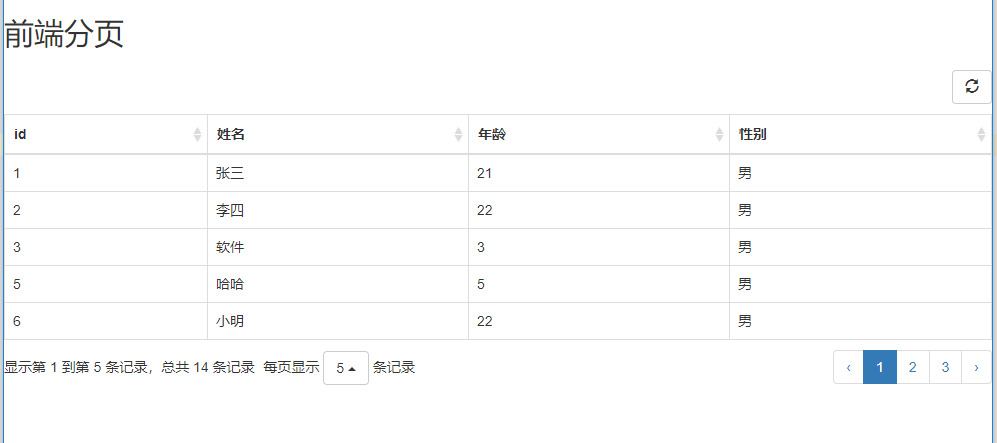
4.完成效果图
二,后端分页
1.封装一个Page工具类
public class Page {

    private int pageNumber; //每页的条数

    private int offset; //数据库查询索引

  //get,set省略

}
2.复制一下UserInfo类重命名People,并继承Page
public class People  extends Page {

    private Integer id;

    private String name;

    private Integer age;

    private String sex;

    //...

}
3.封装一个ReturnData类,作为返回数据实体类,它有两个参数,一个表示数据集合,一个是数据总条数
/**

 * 返回数据实体类

 * @param <T>

 */

public class ReturnData <T>{

    //数据集合

    private List<T> rows = new ArrayList<T>();

    //数据总条数

    private int total;

  //...

}
4.dao接口,加两个方法即可
public interface UserDao {

   // List<UserInfo> findAll();

    List<People> getAll(People people);

    int getTatlo();

}
5.xml 文件,一样的,加两个查询语句即可
 <select id="getAll" resultType="com.jz.bootstrap.entity.People">

     select * from userinfo  LIMIT  #{offset},#{pageNumber}

     </select>

     <select id="getTatlo" resultType="java.lang.Integer">

     select count(1) from userinfo

     </select>
6.controller
 @Resource

    private UserDao ud;

//后端分页

    @RequestMapping("/people")

    public  String people(){

        return "people";

    }

    @RequestMapping("/getAll")

    @ResponseBody

    public ReturnData<People> getAll(People people){

        ReturnData<People> peopleData = new ReturnData<People>();

        //得到总页数

        int totle = ud.getTatlo();

        peopleData.setTotal(totle);

        //得到user数据对象

        List<People> plist = ud.getAll(people);

        peopleData.setRows(plist);

        return  peopleData;

    }
7.页面;和前端分页一样的,只是请求地址和分页方式变了一下,另外向后台传了两个分页查询参数
<!DOCTYPE html>

<html lang="en" xmlns:th=http://www.thymeleaf.org>

<head>

    <meta charset="UTF-8">

    <title>Title</title>

    <link th:href="@{/bootstrap-3.3.7-dist/css/bootstrap.css}" rel="stylesheet"/>

    <link th:href="@{/bootstrap-table-master/dist/bootstrap-table.css}" rel="stylesheet"/>

    <script th:src="@{/js/jquery-3.3.1.min.js}"></script>

    <script th:src="@{/bootstrap-3.3.7-dist/js/bootstrap.js}"></script>

    <script th:src="@{/bootstrap-table-master/dist/bootstrap-table.js}"></script>

    <script th:src="@{/bootstrap-table-master/dist/locale/bootstrap-table-zh-CN.js}"></script>

</head>

<body>

<h2>后端分页</h2>

<table id="mytable"></table>

</body>

<script>

    $(document).ready(function () {

        $("#mytable").bootstrapTable({

            url:"/getAll",   //请求地址

            striped : true, //是否显示行间隔色

            pageNumber : 1, //初始化加载第一页

            pagination : true,//是否分页

            sidePagination : 'server',//server:服务器端分页|client:前端分页

            pageSize : 5,//单页记录数

            pageList : [ 5, 10, 20],//可选择单页记录数

            showRefresh : true,//刷新按钮

            queryParams : function(params) {//上传服务器的参数

                var temp = {

                    offset :params.offset + 0,// SQL语句起始索引

                    pageNumber : params.limit  // 每页显示数量

                };

                return temp;

            },columns : [ {

                title : 'id',

                field : 'id',

                sortable : true

            }, {

                title : '姓名',

                field : 'name',

                sortable : true

            }, {

                title : '年龄',

                field : 'age',

                sortable : true

            },{

                title : '性别',

                field : 'sex',

                sortable : true

            }]

        })

    })

</script>

</html>
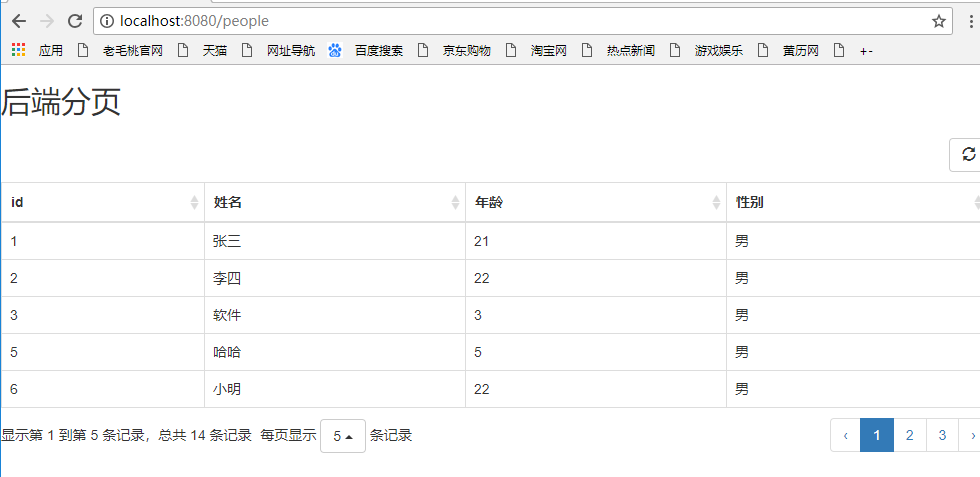
8.效果图
完事收工。。
bootstrap table 前后端分页(超级简单)的更多相关文章
- 前后端分离,简单JWT登录详解
前后端分离,简单JWT登录详解 目录 前后端分离,简单JWT登录详解 JWT登录流程 1. 用户认证处理 2. 前端登录 3. 前端请求处理 4. 后端请求处理 5. 前端页面跳转处理 6. 退出登录 ...
- Bootstrap-table学习笔记(二)——前后端分页模糊查询
在使用过程中,一边看文档一边做,遇到了一些困难的地方,在此记录一下,顺便做个总结: 1,前端分页 2,后端分页 3,模糊查询 前端分页相当简单,在我添加了2w条测试数据的时候打开的很流畅,没有卡顿. ...
- BootStrap table服务端分页
涉及到的内容: 1.bootstrap-table插件: 2.mybatisplus分页查询: 3.spring封装对象匹配bootstrap-table插件格式: 4.sql查询隐藏手机号中间四位. ...
- Thymeleaf前后端分页查询
分页查询是一个很常见的功能,对于分页也有很多封装好的轮子供我们使用. 比如使用mybatis做后端分页可以用Pagehelper这个插件,如果使用SpringDataJPA更方便,直接就内置的分页查询 ...
- 关于bootstrap table的server分页
首先是bootstrap初始化的表格参数: // 初始化Table oTableInit.Init = function() { $('#booksTable').bootstrapTable({ u ...
- SQL前后端分页
/class Page<T> package com.neusoft.bean; import java.util.List; public class Page<T> { p ...
- [转]Bootstrap table后端分页(ssm版)
原文地址:https://www.cnblogs.com/flyins/p/6752285.html 说明bootstrap table可以前端分页,也可以后端sql用limit分页.这里讲的是后端分 ...
- Bootstrap table后端分页(ssm版)
说明bootstrap table可以前端分页,也可以后端sql用limit分页.这里讲的是后端分页,即实用limit.性能较好,一般均用这种源码下载地址:https://git.oschina.ne ...
- Bootstrap table前端分页(ssm版)
说明bootstrap table可以前端分页,也可以后端sql用limit分页.前端分页下性能和意义都不大,故一般情况下不用这种,请看我的另一篇后端分页的博客源码下载地址:https://git.o ...
随机推荐
- python读取数据库并把数据写入本地文件
一,介绍 上周用jmeter做性能测试时,接口B传入的参数需要依赖接口A生成的借贷申请ID,接口A运行完需要把生成的借贷申请ID导出来到一个文件,作为参数传给接口B,刚开始的时候,手动去数据库倒, 倒 ...
- python numpy库的基本内容
import numpy as np np.getfromtxt("路径",delimiter = "," ,dtype = str) #读取txt文件数据 ...
- wordCount剖析Spark模型
- vs code代码对齐快捷键
vscode缩进快捷键: 选中文本: Ctrl + [ 和 Ctrl + ] 实现文本的向左移动或者向右移动: vscode代码对齐快捷键: 选中文本: Shift + ...
- xgboost 最优参数, df某一个字段进行字符串搜索
0.909323 with: {'max_depth': 6, 'min_child_weight': 0.8, 'n_estimators': 800} df_huoguo = df[df.c ...
- JS变量类型与计算
一.题目 1.JS中使用typeof能得到哪些类型? 2.何时使用===何时使用==? 3.JS中有哪些内置函数? 4.JS变量按照存储方式区分为哪些类型,并描述其特点? 5.如何理解JSON? 知识 ...
- python处理Excel - xlrd xlwr openpyxl
python处理Excel - xlrd xlwr openpyxl 1 xlrd和xlwt Todo: 使用xlrd和xlwt读写Excel文件的方法和示例代码,待续... 参考链接: Creati ...
- Nginx配置不当可能导致的安全问题
Nginx配置不当可能导致的安全问题 Auther: Spark1e目前很多网站使用了nginx或者tenginx(淘宝基于Nginx研发的web服务器)来做反向代理和静态服务器,ningx的配置文件 ...
- ios APNS注册失败 本地push
- (void)addLocalNotice:(NSString *)titlepush { if (@available(iOS 10.0, *)) { UNUserNotificationCent ...
- 67.web--手机端兼容性问题
H5页面窗口自动调整到设备宽度,并禁止用户缩放页面 <meta name="viewport" content="width=device-width,initia ...