
jupyter notebook 代码补全插件工具-nbextensions(并修改默认的工作目录)
# conda install -c conda-forge jupyter_contrib_nbextensions
Collecting package metadata: done
Solving environment: done
==> WARNING: A newer version of conda exists. <==
current version: 4.6.8
latest version: 4.6.12
Please update conda by running
$ conda update -n base conda
## Package Plan ##
environment location: S:\Users\jiangshan\Anaconda3
added / updated specs:
- jupyter_contrib_nbextensions
The following packages will be downloaded:
package | build
---------------------------|-----------------
conda-4.6.12 | py37_0 920 KB conda-forge
jupyter_contrib_core-0.3.3 | py_2 15 KB conda-forge
jupyter_contrib_nbextensions-0.5.1| py37_0 19.5 MB conda-forge
jupyter_highlight_selected_word-0.2.0| py37_1000 13 KB conda-forge
jupyter_latex_envs-1.4.4 | py37_1000 753 KB conda-forge
jupyter_nbextensions_configurator-0.4.1| py37_0 487 KB conda-forge
------------------------------------------------------------
Total: 21.7 MB
The following NEW packages will be INSTALLED:
jupyter_contrib_c~ conda-forge/noarch::jupyter_contrib_core-0.3.3-py_2
jupyter_contrib_n~ conda-forge/win-64::jupyter_contrib_nbextensions-0.5.1-py37_0
jupyter_highlight~ conda-forge/win-64::jupyter_highlight_selected_word-0.2.0-py37_1000
jupyter_latex_envs conda-forge/win-64::jupyter_latex_envs-1.4.4-py37_1000
jupyter_nbextensi~ conda-forge/win-64::jupyter_nbextensions_configurator-0.4.1-py37_0
The following packages will be UPDATED:
conda anaconda/cloud/conda-forge::conda-4.6~ --> conda-forge::conda-4.6.12-py37_0
Proceed ([y]/n)?
Downloading and Extracting Packages
jupyter_contrib_core | 15 KB | ###################################################### | 100%
conda-4.6.12 | 920 KB | ######################################################### | 100%
jupyter_highlight_se | 13 KB | ##################################################### | 100%
jupyter_latex_envs-1 | 753 KB | ##################################################### | 100%
jupyter_nbextensions | 487 KB | ######################################################### | 100%
jupyter_contrib_nbex | 19.5 MB | ######################################################## | 100%
Preparing transaction: done
Verifying transaction: done
Executing transaction: |..................
# conda install -c conda-forge jupyter_nbextensions_configurator
# jupyter contrib nbextension install --user
# jupyter nbextensions_configurator enable --user
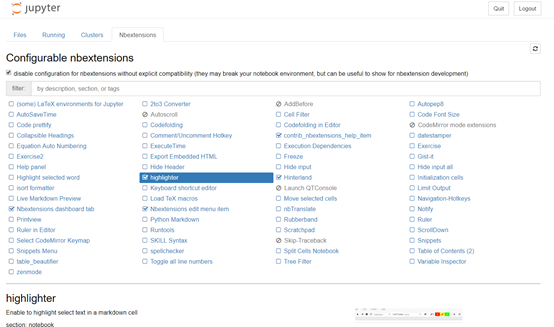
=============================安装步骤==========================
conda install -c conda-forge jupyter_contrib_nbextensions jupyter_nbextensions_configurator
jupyter contrib nbextension install --user
jupyter nbextensions_configurator enable --user
重启 jupyter notebook 你的工作目录
==============================================================
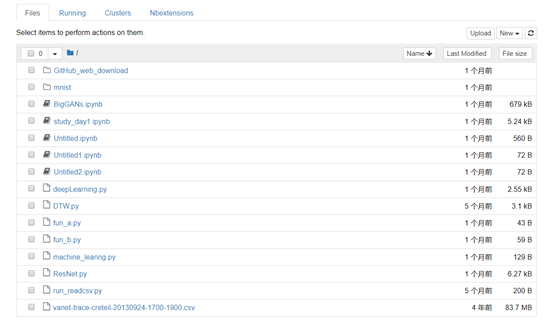
Nbextensions

Jupyter notebook改变默认的工作目录
查看配置文件位置
jupyter notebook --generate-config
Writing default config to: C:\Users\jiangshan\.jupyter\jupyter_notebook_config.py
打开jupyter_notebook_config.py找到如下
## The directory to use for notebooks and kernels.
#c.NotebookApp.notebook_dir = ''这一行修改如下:
windows是双斜杠(\\),linux是反斜杠(/)
c.NotebookApp.notebook_dir = 'F:\\workspace'
jupyter notebook 代码补全插件工具-nbextensions(并修改默认的工作目录)的更多相关文章
- jupyter lab最强代码补全插件
1 简介 提起kite相信不少朋友都有印象,它是一个功能非常强大的代码补全工具,目前可用于Python与javascript,为许多知名的编辑器譬如Vs Code.Pycharm提供对应的插件. 图1 ...
- Jupyter Notebook自动补全
大多数程序员都非常熟悉不同的自动补全工具.然而,我注意到许多数据科学家还没有使用它.如果你是他们中的一员,是时候开始使用这个提高效率的工具了 什么是自动补全? 它是你的编程环境提供的一种功能,用于完成 ...
- Windows 10环境安装VIM代码补全插件YouCompleteMe
Windows 10环境安装VIM代码补全插件YouCompleteMe 折腾一周也没搞定Windows下安装VIM代码补全插件YouCompleteMe,今天在家折腾一天总算搞定了.关键问题是在于P ...
- Sublime text代码补全插件(支持Javascript、JQuery、Bootstrap框架)
Sublime text代码补全插件(支持Javascript.JQuery.Bootstrap框架) 插件名称:javascript-API-Completions 支持Javascript.J ...
- MaxScript代码补全插件
MaxScript代码补全插件 作者Nik,原文发布于ScriptSpot 安装后max自带脚本编辑器会有自动补全,效果如下:
- Jupyter notebook 自动补全
Jupyter notebook 自动补全 Jupyter notebook使用默认的自动补全是关掉的.要打开自动补全,需修改默认配置. ipython profile create 以上命令会 ...
- Jupyter Notebook修改默认的工作目录
Jupyter Notebook修改默认的工作目录 方法1:通过配置文件修改 只适合从命令行启动notebook生成配置文件,如果你已经在windows环境变量中设置好了jupyter noteboo ...
- jupyter notebook自动补全功能实现
Jupyter notebook使用默认的自动补全是关掉的.要打开自动补全,需修改默认配置. 命令行中输入:ipython profile create 以上命令会在~/.ipython/profil ...
- Vim使用Vundle安装代码补全插件(YouCompleteMe)
安装 Vundle 它的使用方法很简单,安装一个插件只需要在 ~/.vimrc 按照规则中添加 Plugin 的名称,某些需要添加路径,之后在 Vim 中使用:PluginInstall既可以自动化安 ...
随机推荐
- 如何用ABP框架快速完成项目(3) - 为什么要使用ABP和ABP框架简介
首先先讲为什么要使用ABP? 当然是因为使用ABP可以快速完成项目啦. 时间就是金钱, 效率就是生命嘛 有了ABP, 你就节省了写如下模块的时间: CRUD数据库基本操作 校验 异常处理 日志 权 ...
- Linux 安装 tomcat
创建目录 cd /usr mkdir tomcat cd tomcat 上传 tomcat rz.ftp 或者 wget 都可以 解压 tar -xzvf apache-tomcat-8.0.53.t ...
- Mysql LIMIT 分页
格式: LIMIT index, size // index:从哪一行(第几条)开始查,size:多少条 分页: LIMIT (currentPage-1)*pageSize, pageSiz ...
- Sysbench Sysbench在centos系统下的安装
Sysbench在centos系统下的安装 by:授客 QQ:1033553122 测试环境: CentOS-7-x86_64-DVD-1503-01.iso 下载地址: http:/ ...
- CentOS 7.x默认没有ifconfig?!
刚装了CentOS 7.0,安装界面非常漂亮,装完后发现没有ifconfig命令.yum install net-tools后出现. 有两个可能,一个是mini版本的原因,二一个可能我在安装过程中配置 ...
- spring学习总结——装配Bean学习一(自动装配)
一.Spring配置的可选方案 Spring容器负责创建应用程序中的bean并通过DI来协调这些对象之间的关系.但是,作为开发人员,你需要告诉Spring要创建哪些bean并且如何将其装配在一起.当描 ...
- ORA-12514, TNS:listener does not currently know of service requested in connect descriptor案例2
今天使用SQL Developer连接一台测试服务器数据库(ORACLE 11g)时,遇到了"ORA-12514, TNS:listener does not currently know ...
- Tomcat8-windows不能在本地计算机启动tomcat,有更多的信息,查阅系统事件日志。
tomcat启动不了,也卸载不了. 本人的一个解决方法: 本来jdk和jre是装在g盘的同一个文件夹里的,后来删了他们.再安装的时候jdk安装回原来的地方,jre安装到c盘. 现在需要卸载到他们,重新 ...
- 特别篇:Hyper-v群集模拟实战演示
介绍 由于前面几张的都是直接整理了下 九叔的hyper-v电子书发上来的,个人觉得他写的不是最详细,因此今天我按照自己的实际情况来写个模拟的实战演示.所有的东西都通过VMware WorkStatio ...
- python爬虫之天气预报网站--查看最近(15天)的天气信息(正则表达式)
python爬虫之天气预报网站--查看最近(15天)的天气信息(正则表达式) 思路: 1.首先找到一个自己想要查看天气预报的网站,选择自己想查看的地方,查看天气(例:http://www.tianqi ...