
数据可视化基础专题(十三):Matplotlib 基础(五)常用图表(三)环形图、热力图、直方图
环形图
环形图其实是另一种饼图,使用的还是上面的 pie() 这个方法,这里只需要设置一下参数 wedgeprops 即可。
例子一:
import matplotlib.pyplot as plt

# 中文和负号的正常显示

plt.rcParams['font.sans-serif']=['SimHei']

plt.rcParams['axes.unicode_minus'] = False

# 数据

edu = [0.2515,0.3724,0.3336,0.0368,0.0057]

labels = ['中专','大专','本科','硕士','其他']

# 让本科学历离圆心远一点

explode = [0,0,0.1,0,0]

# 将横、纵坐标轴标准化处理,保证饼图是一个正圆,否则为椭圆

plt.axes(aspect='equal')

# 自定义颜色

colors=['#9999ff','#ff9999','#7777aa','#2442aa','#dd5555'] # 自定义颜色

# 绘制饼图

plt.pie(x=edu,  # 绘图数据

    explode = explode,  # 突出显示大专人群

    labels = labels,  # 添加教育水平标签

    colors = colors,  # 设置饼图的自定义填充色

    autopct = '%.1f%%',  # 设置百分比的格式,这里保留一位小数

    wedgeprops = {'width': 0.3, 'edgecolor':'green'}

    )

# 添加图标题

plt.title('xxx 公司员工教育水平分布')

# 保存图形

plt.savefig('pie_demo1.png')
这个示例仅仅在前面示例的基础上增加了一个参数 wedgeprops 的设置,我们看下结果:

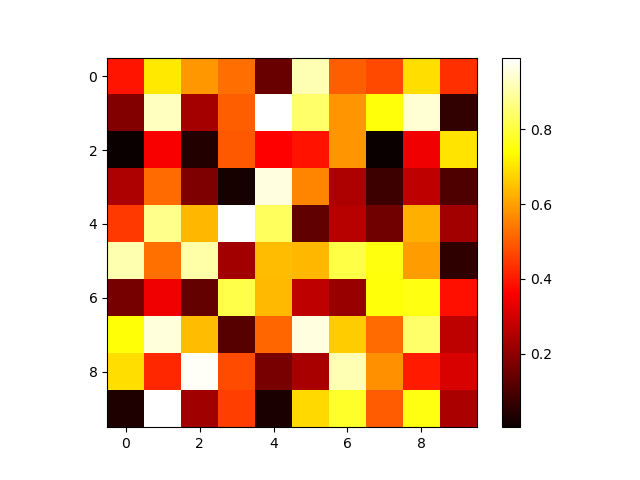
热力图
plt.imshow(x, cmap)
import numpy as np

import matplotlib.pyplot as plt

x = np.random.rand(10, 10)

plt.imshow(x, cmap=plt.cm.hot)

# 显示右边颜色条

plt.colorbar()

plt.savefig('imshow_demo.png')
例子二
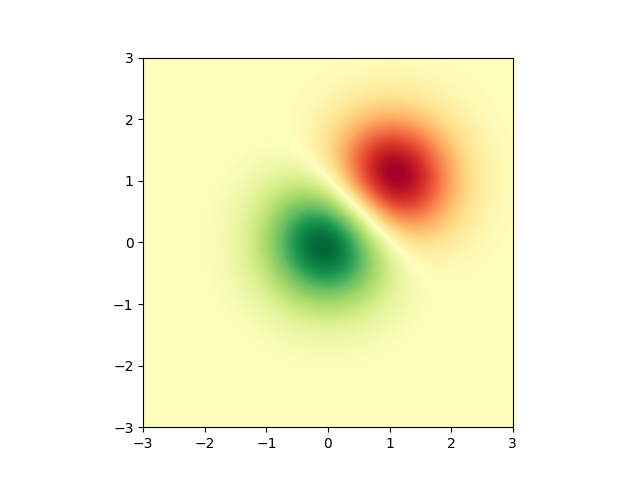
import numpy as np

import matplotlib.cm as cm

import matplotlib.pyplot as plt

import matplotlib.cbook as cbook

from matplotlib.path import Path

from matplotlib.patches import PathPatch
delta = 0.025

x = y = np.arange(-3.0, 3.0, delta)

X, Y = np.meshgrid(x, y)

Z1 = np.exp(-X**2 - Y**2)

Z2 = np.exp(-(X - 1)**2 - (Y - 1)**2)

Z = (Z1 - Z2) * 2

fig, ax = plt.subplots()

im = ax.imshow(Z, interpolation='bilinear', cmap=cm.RdYlGn,

               origin='lower', extent=[-3, 3, -3, 3],

               vmax=abs(Z).max(), vmin=-abs(Z).max())

plt.show()
例子3
import matplotlib.pyplot as plt

import numpy as np

def func3(x, y):

    return (1 - x / 2 + x**5 + y**3) * np.exp(-(x**2 + y**2))

# make these smaller to increase the resolution

dx, dy = 0.05, 0.05

x = np.arange(-3.0, 3.0, dx)

y = np.arange(-3.0, 3.0, dy)

X, Y = np.meshgrid(x, y)

# when layering multiple images, the images need to have the same

# extent.  This does not mean they need to have the same shape, but

# they both need to render to the same coordinate system determined by

# xmin, xmax, ymin, ymax.  Note if you use different interpolations

# for the images their apparent extent could be different due to

# interpolation edge effects

extent = np.min(x), np.max(x), np.min(y), np.max(y)

fig = plt.figure(frameon=False)

Z1 = np.add.outer(range(8), range(8)) % 2  # chessboard

im1 = plt.imshow(Z1, cmap=plt.cm.gray, interpolation='nearest',

                 extent=extent)

Z2 = func3(X, Y)

im2 = plt.imshow(Z2, cmap=plt.cm.viridis, alpha=.9, interpolation='bilinear',

                 extent=extent)

plt.show()

直方图
例子1
import matplotlib.pyplot as plt

import numpy as np

from matplotlib import colors

from matplotlib.ticker import PercentFormatter

# Fixing random state for reproducibility

np.random.seed(19680801)
N_points = 100000

n_bins = 20

# Generate a normal distribution, center at x=0 and y=5

x = np.random.randn(N_points)

y = .4 * x + np.random.randn(100000) + 5

fig, axs = plt.subplots(1, 2, sharey=True, tight_layout=True)

# We can set the number of bins with the `bins` kwarg

axs[0].hist(x, bins=n_bins)

axs[1].hist(y, bins=n_bins)

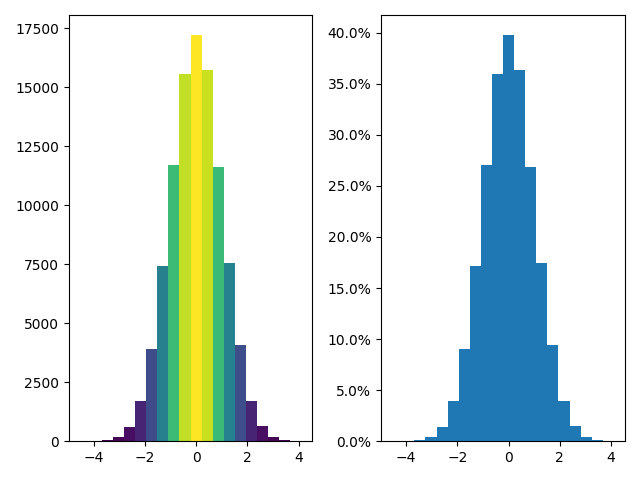
例子2
fig, axs = plt.subplots(1, 2, tight_layout=True)

# N is the count in each bin, bins is the lower-limit of the bin

N, bins, patches = axs[0].hist(x, bins=n_bins)

# We'll color code by height, but you could use any scalar

fracs = N / N.max()

# we need to normalize the data to 0..1 for the full range of the colormap

norm = colors.Normalize(fracs.min(), fracs.max())

# Now, we'll loop through our objects and set the color of each accordingly

for thisfrac, thispatch in zip(fracs, patches):

    color = plt.cm.viridis(norm(thisfrac))

    thispatch.set_facecolor(color)

# We can also normalize our inputs by the total number of counts

axs[1].hist(x, bins=n_bins, density=True)

# Now we format the y-axis to display percentage

axs[1].yaxis.set_major_formatter(PercentFormatter(xmax=1))
数据可视化基础专题(十三):Matplotlib 基础(五)常用图表(三)环形图、热力图、直方图的更多相关文章
- 数据可视化利器pyechart和matplotlib比较
python中用作数据可视化的工具有多种,其中matplotlib最为基础.故在工具选择上,图形美观之外,操作方便即上乘. 本文着重说明常见图表用基础版matplotlib和改良版pyecharts作 ...
- 数据可视化:绘图库-Matplotlib
为什么要绘图? 一个图表数据的直观分析,下面先看一组北京和上海上午十一点到十二点的气温变化数据: 数据: 这里我用一段代码生成北京和上海的一个小时内每分钟的温度如下: import random co ...
- 数据可视化(一)-Matplotlib简易入门
本节的内容来源:https://www.dataquest.io/mission/10/plotting-basics 本节的数据来源:https://archive.ics.uci.edu/ml/d ...
- 数据可视化实例(十三): 发散型文本 (matplotlib,pandas)
偏差 (Deviation) https://datawhalechina.github.io/pms50/#/chapter11/chapter11 发散型文本 (Diverging Texts) ...
- [原创.数据可视化系列之十三]idw反距离权重插值算法的javascript代码实现
图形渲染中,idw反距离权重插值算法是一个应用非常广泛的方法,但是js实现的比较少,目前实现一个: //idw算法 //输入[[x:0,y:0,v:0],[x:0,y:0,v:0],[x:0,y:0, ...
- 数据可视化之powerBI技巧(十五)采悟:Power BI动态技巧:动态显示数据层级
今天给大家分享一个动态显示数据层级的技巧,效果如下: 无论想按什么维度.什么顺序查看分析数据,只需要选择不同的切片器组合就行了. 方法如下:01 | 把数据聚合为分析需要的最细粒度 本文假设最细分析粒 ...
- 数据可视化之DAX篇(十五)Power BI按表筛选的思路
https://zhuanlan.zhihu.com/p/121773967 数据分析就是筛选.分组.聚合的过程,关于筛选,可以按一个维度来筛选,也可以按多个维度筛选,还有种常见的方式是,利用几个特 ...
- 数据可视化之PowerQuery篇(十五)如何使用Power BI计算新客户数量?
https://zhuanlan.zhihu.com/p/65119988 每个企业的经营活动都是围绕着客户而开展的,在服务好老客户的同时,不断开拓新客户是每个企业的经营目标之一. 开拓新客户必然要付 ...
- 4.5Python数据处理篇之Matplotlib系列(五)---plt.pie()饼状图
目录 目录 前言 (一)简单的饼状图 (二)添加阴影和突出部分 (三)显示图例和数据标签: 目录 前言 饼状图需要导入的是: plt.pie(x, labels= ) (一)简单的饼状图 (1)说明: ...
- 关系网络数据可视化:3. 案例:公司职员关系图表 & 导演演员关系网络可视化
1. 公司职员关系图表 节点和边界数据 节点是指每个节点本身的数据,代表公司职工的名称:属性(Country).分类(Category)和地区(Region,给每个节点定义的属性数据).文件必须是.c ...
随机推荐
- (转)Zookeeper全解析——Paxos作为灵魂
原计划在介绍完ZK Client之后就着手ZK Server的介绍,但是发现ZK Server所包含的内容实在太多,并不是简简单单一篇Blog就能搞定的.于是决定从基础搞起比较好. 那么ZK Serv ...
- 小孩学习编程的绝佳游戏——CodeMonkey
CodeMonkey于2014年1月在以色列成立.它的愿景是建立一个全球性的学习平台,让孩子们通过游戏的方式学习.发现.创造和分享,同时在此过程中获得编程这一项21世纪必备的技能. 通常提到CodeM ...
- 「雅礼集训 2017 Day4」洗衣服
题目 点这里看题目. 分析 首先考虑只有洗衣机的情况.我们可以想到,当前洗衣任务结束越早的洗衣机应该被先用,因此可以用堆来动态维护. 再考虑有烘干机的情况.很显然,越晚洗完的衣服应该越早烘 ...
- css 那些使用小技巧(兼容性)
1. inline-block 的兼容性问题 display:inline-block; *display:inline; *zoom:1; 2. Microsoft Edge 自动给数字加下划线 在 ...
- Android学习笔记基于监听的事件处理
事件处理流程 代码格式: Button btn1 = findViewById(R.id.btn1); btn1.setOnClickListener(new View.OnClickListener ...
- cb19a_c++_只适合string类型的操作_提取_追加_替换
*cb19a_c++_只适合string类型的操作_提取_追加_替换三个substr重载函数-获取一个字符串的一部分六个append重载函数-追加字符十个replace重载函数-替换更换 重载函数越多 ...
- fork,vfork和clone底层实现
分类: LINUX2011-10-13 09:33 1116人阅读 评论(0) 收藏 举报 structdstsignalthreadnulldomain fork,vfork,clone都是linu ...
- jmeter组件中 测试计划,线程组,sampler等等
[测试计划] 这边用户定义的变量,定义整个测试中使用的重复值(全局变量),一般定义服务器的ip,端口号 [线程组] 关于,线程组,我简单聊聊,有不对的地方欢迎大家拨乱反正 线程数:你需要运行的线程 比 ...
- Lucene5多条件查询
lucene是一个很强大的搜索工具,最近公司项目上用到,结合JAVA1234所讲,对多条件查询做出总结 先描述一下我的多条件需求,如果和您的类似,继续往下看. 1.我的Lucene搜索会在很多地方使用 ...
- 解决React Native安装应用到真机(红米3S)报Execution failed for task ':app:installDebug'的错误
报错信息如下: :app:installDebug Installing APK 'app-debug.apk' on 'Redmi 3S - 6.0.1'Unable to install D:\R ...