
shiro系列五、shiro密码MD5加密
Shiro-密码的MD5加密
1.密码的加密
在数据表中存的密码不应该是123456,而应该是123456加密之后的字符串,而且还要求这个加密算法是不可逆的,即由加密后的字符串不能反推回来原来的密码,如果能反推回来那这个加密是没有意义的。
著名的加密算法,比如 MD5,SHA1
2.MD5加密
1). 如何把一个字符串加密为MD5
2). 使用MD5加密算法后,前台用户输入的字符串如何使用MD5加密,需要做的是将当前的Realm 的credentialsMatcher属性,替换为Md5CredentialsMatcher 由于Md5CredentialsMatcher已经过期了,推荐使用HashedCredentialsMatcher 并设置加密算法即可。

/**

 * {@code HashedCredentialsMatcher} implementation that expects the stored {@code AuthenticationInfo} credentials to be

 * MD5 hashed.

 * <p/>

 * <b>Note:</b> <a href="http://en.wikipedia.org/wiki/MD5">MD5</a> and

 * <a href="http://en.wikipedia.org/wiki/SHA_hash_functions">SHA-1</a> algorithms are now known to be vulnerable to

 * compromise and/or collisions (read the linked pages for more).  While most applications are ok with either of these

 * two, if your application mandates high security, use the SHA-256 (or higher) hashing algorithms and their

 * supporting <code>CredentialsMatcher</code> implementations.</p>

 *

 * @since 0.9

 * @deprecated since 1.1 - use the HashedCredentialsMatcher directly and set its

 *             {@link HashedCredentialsMatcher#setHashAlgorithmName(String) hashAlgorithmName} property.

 */

public class Md5CredentialsMatcher extends HashedCredentialsMatcher {

    public Md5CredentialsMatcher() {

        super();

        setHashAlgorithmName(Md5Hash.ALGORITHM_NAME);

    }

}
3.使用MD5加密
1). 修改配置文件的Realm 的默认的credentialsMetcher 为
<bean id="jdbcRealm" class="com.java.shiro.realms.ShiroRealm">

        <property name="credentialsMatcher">

            <bean class="org.apache.shiro.authc.credential.HashedCredentialsMatcher">

                <property name="hashAlgorithmName" value="MD5"></property> <!-- 加密算法的名称 -->

                <property name="hashIterations" value="1024"></property> <!-- 配置加密的次数 -->

            </bean>

        </property>

    </bean>
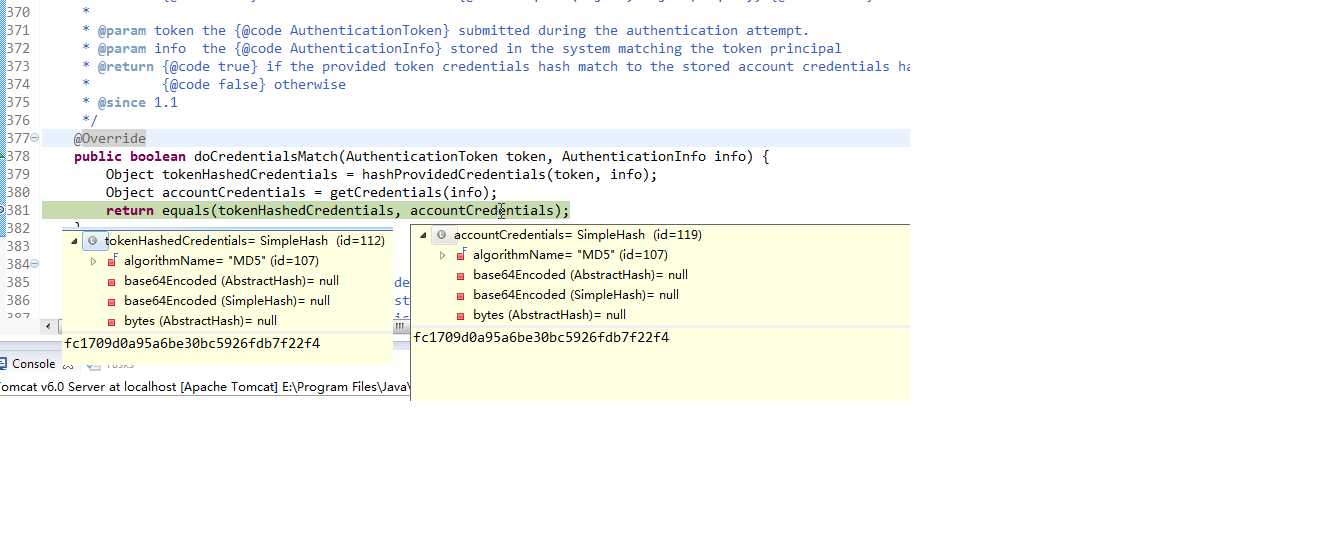
2). 通过断点可以看到,实际的加密为

3). 通过 new SimpleHash(hashAlgorithmName, credentials, salt, hashIterations); 我们可以得到"123456"经过MD5 加密1024后的字符串;
public static void main(String[] args) {

        String hashAlgorithmName = "MD5";

        String credentials = "123456";

        int hashIterations = 1024;

        Object obj = new SimpleHash(hashAlgorithmName, credentials, null, hashIterations);

        System.out.println(obj);

    }
将realm中的 明文123456改为fc1709d0a95a6be30bc5926fdb7f22f4
在进行登录测试。
登录成功。
4. 以上的加密还存在问题,如果两个人的密码一样,即存在数据表里中的两个加密后的字符串一样,然而我们希望即使两个人的密码一样,加密后的两个字符串也不一样。即需要用到MD5盐值加密。
1).修改Realm使用盐值加密 完整的ShiroRealm.java
public class ShiroRealm extends AuthenticatingRealm {

    @Override

    protected AuthenticationInfo doGetAuthenticationInfo(

            AuthenticationToken token) throws AuthenticationException {

        System.out.println("doGetAuthenticationInfo " + token);

        // 1. 把AuthenticationToken 转换为UsernamePasswordToken

        UsernamePasswordToken up = (UsernamePasswordToken) token;

        // 2. 从UsernamePasswordToken 中来获取username

        String username = up.getUsername();

        // 3. 调用数据库的方法,从数据库中查询username对应的用户记录

        System.out.println("从数据库中获取userName :" + username + " 所对应的用户信息.");

        // 4. 若用户不存在,则可以抛出 UnknownAccoountException 异常

        if ("unknown".equals(username)) {

            throw new UnknownAccountException("用户不存在");

        }

        // 5. 根据用户信息的情况,决定是否需要抛出其他的AuthencationException 异常 假设用户被锁定

        if ("monster".equals(username)) {

            throw new LockedAccountException("用户被锁定");

        }

        // 6. 根据用户的情况,来构建AuthenticationInfo 对象并返回,通常使用的是

        // SimpleAuthenticationInfo

        // 以下信息是从数据库获取的.

        Object principal = username; // principal 认证的实体信息.

                                        // 可以是username,也可以是数据表对应的用户的实体类对象

//        String credentials = "fc1709d0a95a6be30bc5926fdb7f22f4"; // credentials:密码

        String credentials = null; // credentials:密码

        String realmName = getName();

        AuthenticationInfo info = null;/*new SimpleAuthenticationInfo(principal, credentials, realmName);*/

        if("admin".equals(username)){

            credentials = "038bdaf98f2037b31f1e75b5b4c9b26e";

        }else if("user".equals(username)){

            credentials = "098d2c478e9c11555ce2823231e02ec1";

        }

        ByteSource credentialsSalt = ByteSource.Util.bytes(username);//这里的参数要给个唯一的;


        info = new SimpleAuthenticationInfo(principal, credentials, credentialsSalt, realmName);

        return info;

    }

}
上边的密码我们可用mian方法得到
public static void main(String[] args) {

        String hashAlgorithmName = "MD5";

        String credentials = "123456";

        int hashIterations = 1024;

        ByteSource credentialsSalt = ByteSource.Util.bytes("user");

        Object obj = new SimpleHash(hashAlgorithmName, credentials, credentialsSalt, hashIterations);

        System.out.println(obj);

    }
经过测试,登录成功。
2). 笔记
- 1. 为什么使用 MD5 盐值加密:
- 希望即使两个原始密码相同,加密得到的两个字符串也不同。
- 2. 如何做到:
- 1). 在 doGetAuthenticationInfo 方法返回值创建 SimpleAuthenticationInfo 对象的时候, 需要使用SimpleAuthenticationInfo(principal, credentials, credentialsSalt, realmName) 构造器
- 2). 使用 ByteSource.Util.bytes() 来计算盐值.
- 3). 盐值需要唯一: 一般使用随机字符串或 user id
- 4). 使用 new SimpleHash(hashAlgorithmName, credentials, salt, hashIterations); 来计算盐值加密后的密码的值.
shiro系列五、shiro密码MD5加密的更多相关文章
- python接口自动化测试二十七:密码MD5加密 ''' MD5加密 ''' # 由于MD5模块在python3中被移除 # 在python3中使用hashlib模块进行md5操作 import hashlib # 待加密信息 str = 'asdas89799,.//plrmf' # 创建md5对象 hl = hashlib.md5() # Tips # 此处必须声明encode # 若写法为
python接口自动化测试二十七:密码MD5加密 ''' MD5加密 '''# 由于MD5模块在python3中被移除# 在python3中使用hashlib模块进行md5操作import has ...
- java ldap用户密码md5加密
在这里不过多介绍ldap,因为这样的文章特别多,这里就简单直接的记录这一个问题. 在springboot中通过引入spring-boot-starter-data-ldap,使用LdapTemplat ...
- 1.关于QT中json数据处理和密码md5加密
新建一个Qt空项目 17Json.pro HEADERS += \ MyWidget.h SOURCES += \ MyWidget.cpp QT += widgets gui MyWidget ...
- python接口自动化测试二十七:密码MD5加密
# MD5加密 # 由于MD5模块在python3中被移除# 在python3中使用hashlib模块进行md5操作import hashlib def MD5(str): # 创建md5对象 hl ...
- nodejs 用户登录密码md5加密
jade文件 div.login ul.inp-content li span= '用户名:' input.ui-input1#input1(placeholder='请输入手机号') li sp ...
- SpringBoot 密码MD5加密
public class PasswordEncrypt { public static String encodeByMd5(String string) throws NoSuchAlgorith ...
- Sql 数据库 用户密码MD5加密
直接给代码先 DECLARE @TAB TABLE( NAEM VARCHAR(50) ) DECLARE @PA VARCHAR(50) DECLARE @A VARCHAR(10) SET @A= ...
- 系统开发中使用拦截器校验是否登录并使用MD5对用户登录密码进行加密
项目名称:客户管理系统 项目描述: 项目基于javaEE平台,B/S模式开发.使用Struts2.Hibernate/Spring进行项目框架搭建.使用Struts中的Action 控制器进行用户访问 ...
- shiro密码的比对,密码的MD5加密,MD5盐值加密,多个Relme
有具体问题的可以参考之前的关于shiro的博文,关于shiro的博文均是一次工程的内容 密码的比对 通过AuthenticatingRealm的CredentialsMatcher方法 密码的加密 ...
随机推荐
- Linux记录-Nginx+Tomcat负载均衡配置
Nginx负载均衡配置及策略: 轮询(默认) 优点:实现简单缺点:不考虑每台服务器的处理能力配置示例如下:upstream www.xxx.com {# 需要负载的server列表server www ...
- Hive开启mapjoin优化、并行执行、动态分区
1. mapjoin优化适合小表join大表 set hive.optimize.skewjoin=true; //有数据倾斜时开启负载均衡,默认false set hive.auto.convert ...
- SqlServer触发器常用语法AFTER、INSTEAD OF及其详解
先创建一个简单的触发器 CREATE TRIGGER trigger_name ON table_name [WITH ENCRYPTION] FOR | AFTER | INSTEAD OF [DE ...
- 【tensorflow】tensorflow官网进不去,因为它的地址改变了
以前的网址是https://www.tensorflow.org/,当时得fq才能打开,现在这个我fq都打不开了. 现在新网址是https://tensorflow.google.cn/这个不fq都可 ...
- 原生JavaScript常用本地浏览器存储方法二(cookie)
JavsScript Cookie概述 cookie是浏览器提供的一种机制,它将document对象的cookie属性提供给JavaScript.可以由JavaScript对其进行控制,而并不是Jav ...
- Keil MDK仿真调试STM32的时候直接进入SystemInit函数
1. 仿真的时候,进入之后 2. 说是main()未定义,可是明明定义了,什么原因?喔,看错了,是--main.对比了一下和正常工厂的配置,都一样,换个jlink V9测试一下吧.换了个ST LINK ...
- Traking-Learning-Detection TLD经典论文部分翻译
摘要 本文研究视频流中未知目标的长期跟踪问题.在第一帧,通过选定位置和大小定义跟踪目标.在接下来的每一帧中,跟踪任务是确定目标的位置和大小或者说明目标不存在.我们提出了一种新颖的跟踪框架(TLD),明 ...
- Select 查询语句
1.1 查询语句 1.1.1 select select 用于从数据看查询数据.语法 select field1,filed2,.. . from tablename [where cond ...
- java当中JDBC当中的transaction例子
[学习笔记] 7.jdbc的transaction例子: import java.sql.*; public class MySQlTransaction1 { public static void ...
- Word 中批量修改所有表格格式样式
1. 引言 我们在使用Word排版编写书籍时候,可能会带有许多表格,上百,甚至上千个表格都是有可能的.这么多的表格对于后期的样式修改是非常不利的,有什么好的方法能够一次性修改文档中所有的表格,将其统一 ...