
Unity 项目中委托Delegate用法案例
Unity中Delegate的用法场景
|
本文提供全流程,中文翻译。 Chinar 坚持将简单的生活方式,带给世人! (拥有更好的阅读体验 —— 高分辨率用户请根据需求调整网页缩放比例) |
|
Chinar —— 心分享、心创新! 助力快速理解 C# Delegate的基本用法 为新手节省宝贵的时间,避免采坑! |
Chinar 教程效果:
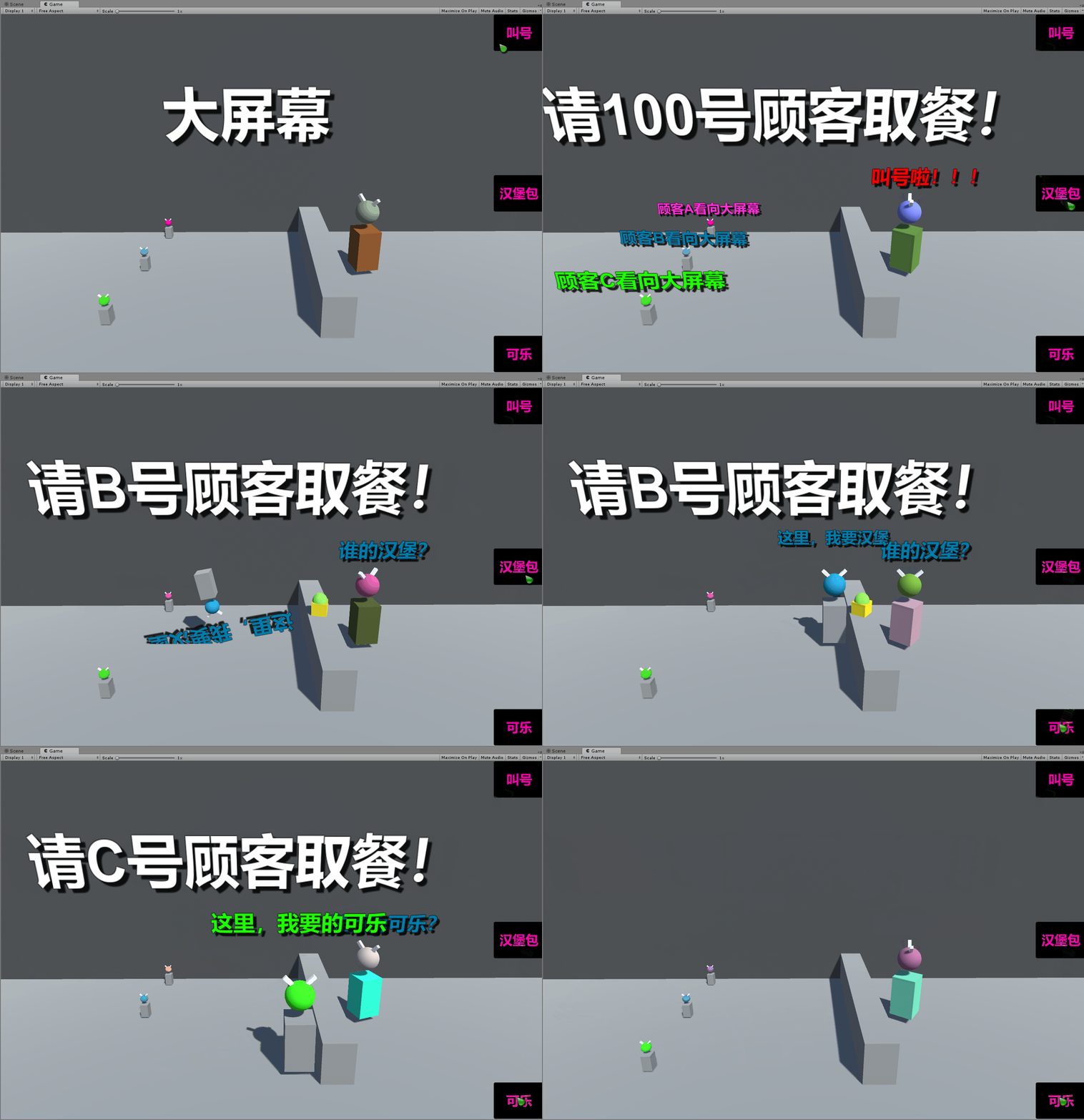
全文高清图片,点击即可放大观看 (很多人竟然不知道)
1
Delegate —— 委托
Unity 中,委托多用于当某个值,或者物体状态发生改变的时候
其他一些操作需要同时进行监听
一旦状态发生,改变,所有注册在委托中的函数,都会被调用

当警察出来的时候,小偷就得逃跑
当服务员叫餐叫号的时候,叫到谁,就该谁取餐
等等,诸如此类的场景
2
Store Model —— 商店模式
这里以一个简单的 商店模式 来模拟流程
用委托实现,群体的函数、方法注册到对象中
注意:
我们需要 1 个主脚本用来管理 :服务员
3 个顾客类:顾客 A/B/C
为了更加生动, Chinar 用了 iTween 来处理动画效果
页面布局如下
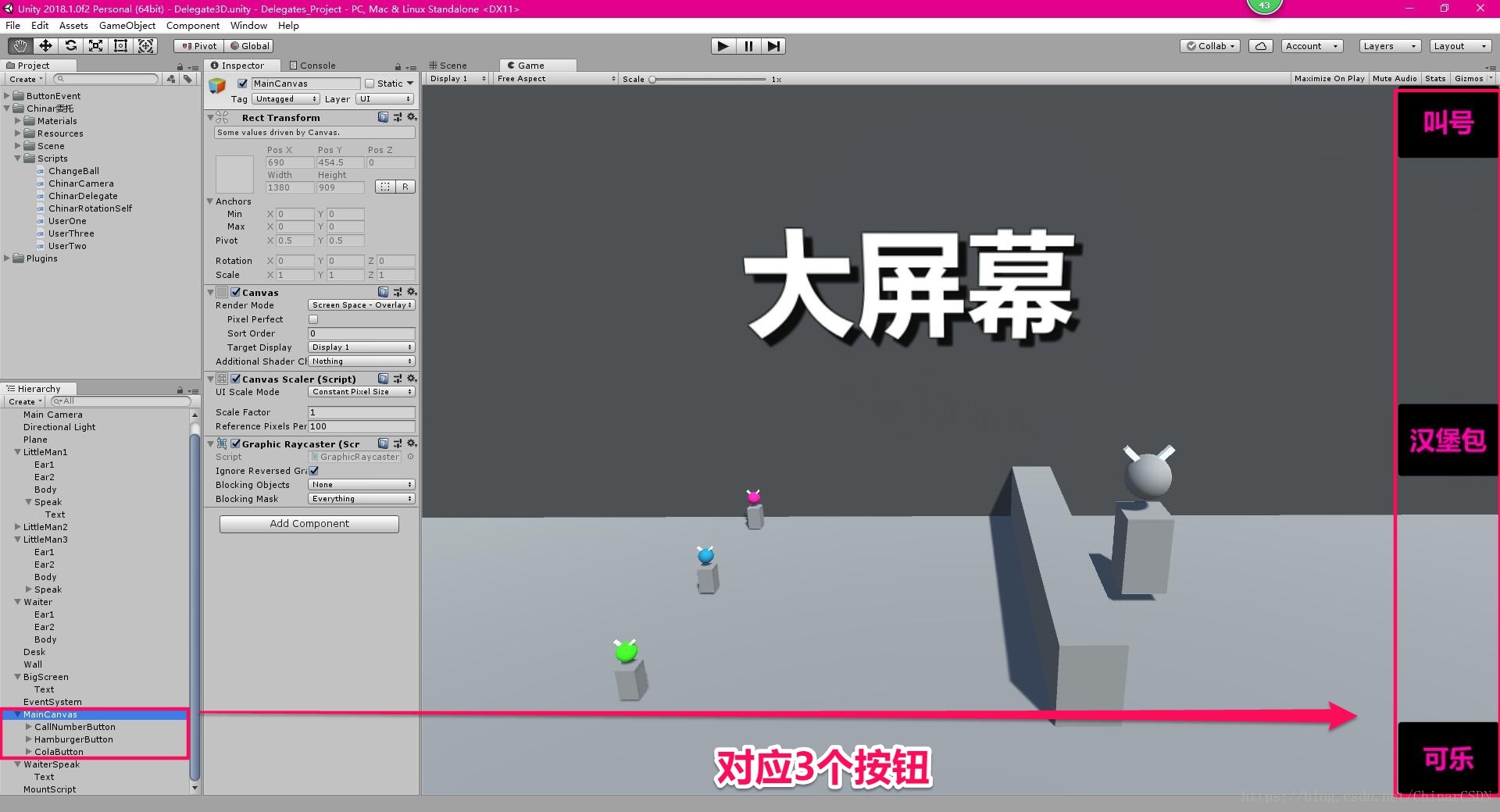
采用委托的方式,通知所有顾客,谁该干什么
分别通知对应群体对象
3
Waiter —— 服务员脚本
服务员脚本,用于管理委托对象,并在相应的按钮中调用对象
然后委托对象,状态发生改变,就会通知所有注册到对象中的函数,都被调用
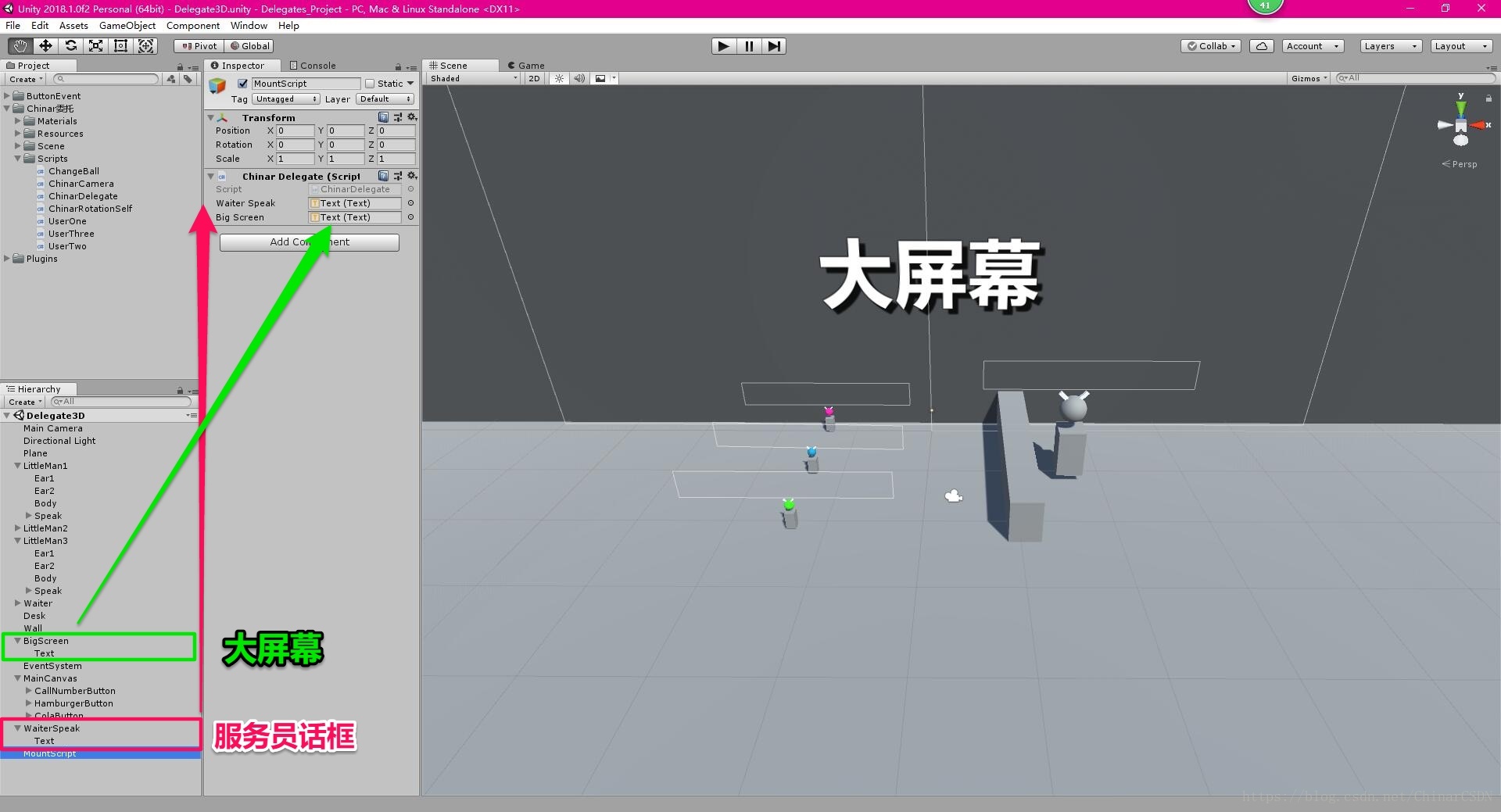
using System.Collections;

using UnityEngine;

using UnityEngine.UI;

//委托传递的是方法/函数

public delegate void CallNumber(); //使用时,必须要声明委托对象;返回值类型,要与将要注册到委托对象中的函数,返回值类型保持一致!

public delegate int GetOuntHandler(); /*也就是:委托方法和被委托方法的类型必须保持一致*/

public delegate bool SomeFood(string food);

/*以上是委托函数的声明方式*/

/// <summary>

/// Chinar委托测试类

/// </summary>

public class ChinarDelegate : MonoBehaviour

{

    //方法是引用类型的对象

    //委托将一个函数 转换成了一个函数对象

    //可以将 这个函数 以 对象 的形式进行传递

    public CallNumber callNumber;  //定义委托对象   这里定义的是一个委托对象

    public SomeFood   someFood;    //定义一个有参数有返回值的委托

    public Text       WaiterSpeak; //服务员说话内容文本

    public Text       BigScreen;   //服务员说话内容文本

    public GameObject G2GameObject;

    /// <summary>

    /// 叫号方法 —— 绑定按钮

    /// </summary>

    public void OnClickCallNumber()

    {

        callNumber();

        Content(Color.red, "叫号啦!!!", "请100号顾客取餐!");

    }

    /// <summary>

    /// 汉堡包 —— 绑定按钮

    /// </summary>

    public void OnClickHamburger()

    {

        if (!GameObject.Find("Hamburger(Clone)")) Instantiate(Resources.Load("Hamburger"));

        someFood("汉堡");

        Content(UserTwo.temporaryText.color, "谁的汉堡?", "请B号顾客取餐!");

    }

    /// <summary>

    /// 可乐 —— 绑定按钮

    /// </summary>

    public void OnClickCola()

    {

        someFood("可乐");

        Content(UserTwo.temporaryText.color, "谁点的可乐?", "请C号顾客取餐!");

    }

    /// <summary>

    /// 封装内容简化代码

    /// </summary>

    /// <param name="color"></param>

    /// <param name="speak"></param>

    /// <param name="bigScreen"></param>

    private void Content(Color color, string speak, string bigScreen)

    {

        WaiterSpeak.text  = speak;

        WaiterSpeak.color = color;

        BigScreen.text    = bigScreen;

        StopCoroutine(ClearText());

        StartCoroutine(ClearText());

    }

    /// <summary>

    /// 清理文本内容

    /// </summary>

    /// <returns></returns>

    IEnumerator ClearText()

    {

        yield return new WaitForSeconds(3);

        WaiterSpeak.text = "";

        BigScreen.text   = "";

    }

    public static void Move(GameObject gameObject)

    {

        iTween.MoveTo(gameObject, iTween.Hash("time",                                     .7f, "x",     6.69f,                         "y",        8.6f, "easetype", iTween.EaseType.easeOutCubic));

        iTween.MoveTo(gameObject, iTween.Hash("time",                                     .7f, "x",     -13.38f,                       "y",        2.8f, "easetype", iTween.EaseType.easeOutCubic, "delay", 2.4f));

        iTween.ScaleTo(gameObject.transform.Find("Speak").gameObject, iTween.Hash("time", .7f, "scale", new Vector3(0.3f, 0.3f, 0.3f), "easetype", iTween.EaseType.easeOutCubic));

        iTween.ScaleTo(gameObject.transform.Find("Speak").gameObject, iTween.Hash("time", .7f, "scale", new Vector3(1,    1,    1),    "easetype", iTween.EaseType.easeOutCubic, "delay", 2.4f));

        iTween.ScaleTo(gameObject,                                    iTween.Hash("time", .7f, "scale", new Vector3(3,    3,    3),    "easetype", iTween.EaseType.easeOutCubic));

        iTween.ScaleTo(gameObject,                                    iTween.Hash("time", .7f, "scale", new Vector3(1,    1,    1),    "easetype", iTween.EaseType.easeOutCubic, "delay", 2.4f));

        iTween.RotateTo(gameObject, iTween.Hash("time",                                   .7f, "z",     -360.01f,                      "easetype", iTween.EaseType.easeOutCubic));

    }

}
4
Client A/B/C Class —— 顾客A/B/C脚本
3 个顾客类:顾客 A/B/C
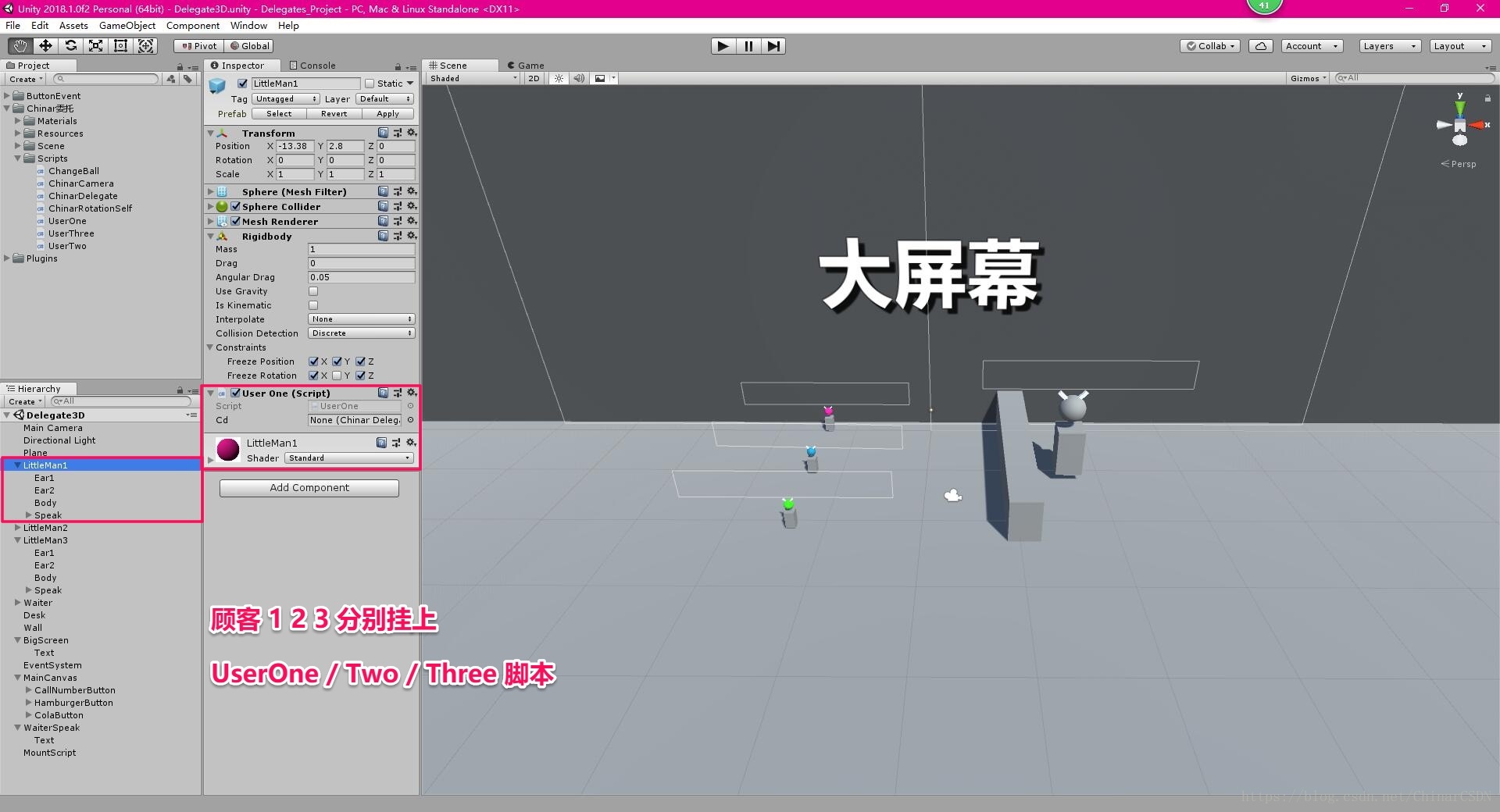
using System.Collections;

using UnityEngine;

using UnityEngine.UI;

/// <summary>

/// 顾客A

/// </summary>

public class UserOne : MonoBehaviour

{

    public  ChinarDelegate Cd;            //声明委托对象所在的类对象//实例化一个类对象 在内存中重新开辟一块内存空间 创建了一个新的类对象

    public static Text temporaryText; //临时文本,设置公有静态是为了 方便调用颜色属性,去改变服务员文本颜色

    void Start()

    {

        Cd            = GameObject.Find("MountScript").GetComponent<ChinarDelegate>(); //赋值

        Cd.callNumber += LookScreen;

        temporaryText = transform.Find("Speak/Text").GetComponent<Text>();

        //添加委托函数

        //委托函数的添加方式:可以用 = 号

        //如果想添加多个委托 需要用 +=号

        //删除委托用: -=

    }

    /// <summary>

    /// 抬头看大屏幕

    /// </summary>

    public void LookScreen()

    {

        temporaryText.text = "顾客A看向大屏幕";

        StopCoroutine(ClearText());

        StartCoroutine(ClearText());

    }

    /// <summary>

    /// 清理文本内容

    /// </summary>

    /// <returns></returns>

    IEnumerator ClearText()

    {

        yield return new WaitForSeconds(3);

        temporaryText.text = "";

    }

}
顾客 B:
using System.Collections;

using UnityEngine;

using UnityEngine.UI;

/// <summary>

/// 顾客B

/// </summary>

public class UserTwo : MonoBehaviour

{

    public        ChinarDelegate Cd;

    public static Text           temporaryText; //临时文本,设置公有静态是为了 方便调用颜色属性,去改变服务员文本颜色

    void Start()

    {

        Cd            =  GameObject.Find("MountScript").GetComponent<ChinarDelegate>();

        Cd.callNumber += LookScreen; //2添加委托函数

        Cd.someFood   += WaitHamburger;

        temporaryText =  transform.Find("Speak/Text").GetComponent<Text>();

    }

    /// <summary>

    /// 服务员叫汉堡时,委托事件才会触发

    /// </summary>

    public bool WaitHamburger(string food)

    {

        if (food == "汉堡")

        {

            temporaryText.text = "这里,我要汉堡";

            ChinarDelegate.Move(gameObject);

            iTween.MoveTo(GameObject.Find("Hamburger(Clone)"), iTween.Hash("oncomplete", "DestroyHamburger", "oncompletetarget", gameObject,           "time",     .7f,                          "x",     -13.38, "y", 2.8f, "easetype", iTween.EaseType.easeOutCubic, "delay", 2.4f));

            iTween.ScaleTo(GameObject.Find("Hamburger(Clone)"), iTween.Hash("time",      .7f,                "scale",            new Vector3(0, 0, 0), "easetype", iTween.EaseType.easeOutCubic, "delay", 2.4f));

            StopCoroutine(ClearText());

            StartCoroutine(ClearText());

            return true;

        }

        return false;

    }

    private void DestroyHamburger()

    {

        Destroy(GameObject.Find("Hamburger(Clone)"));

    }

    /// <summary>

    /// 抬头看大屏幕

    /// </summary>

    public void LookScreen()

    {

        temporaryText.text = "顾客B看向大屏幕";

        StopCoroutine(ClearText());

        StartCoroutine(ClearText());

    }

    /// <summary>

    /// 清理文本内容

    /// </summary>

    /// <returns></returns>

    IEnumerator ClearText()

    {

        yield return new WaitForSeconds(3);

        temporaryText.text = "";

    }

}
顾客 C:
using System.Collections;

using UnityEngine;

using UnityEngine.UI;

/// <summary>

/// 顾客C

/// </summary>

public class UserThree : MonoBehaviour

{

    public        ChinarDelegate Cd;            //委托对象

    public static Text           temporaryText; //临时文本,设置公有静态是为了 方便调用颜色属性,去改变服务员文本颜色

    void Start()

    {

        Cd            =  GameObject.Find("MountScript").GetComponent<ChinarDelegate>(); //获取对象

        Cd.callNumber += LookScreen;                                                    //当 叫号的委托对象中,有多个方法调用时,需要用 += 添加

        Cd.someFood   += WaitCola;                                                      //委托对象添加 顾客3的可乐

        temporaryText =  transform.Find("Speak/Text").GetComponent<Text>();

    }

    /// <summary>

    /// 服务员叫可乐时,委托事件才会触发

    /// </summary>

    public bool WaitCola(string food)

    {

        if (food == "可乐")

        {

            temporaryText.text = "这里,我要的可乐";

            ChinarDelegate.Move(gameObject);

            StopCoroutine(ClearText());

            StartCoroutine(ClearText());

            return true;

        }

        return false;

    }

    /// <summary>

    /// 抬头看大屏幕

    /// </summary>

    public void LookScreen()

    {

        temporaryText.text = "顾客C看向大屏幕";

        StopCoroutine(ClearText());

        StartCoroutine(ClearText());

    }

    /// <summary>

    /// 清理文本内容

    /// </summary>

    /// <returns></returns>

    IEnumerator ClearText()

    {

        yield return new WaitForSeconds(3);

        temporaryText.text = "";

    }

}
5
Demo —— 演示样本
Chinar 提供了演示样本,节省大家搭建界面的时间
便于大家理解
支持
May Be —— 搞开发,总有一天要做的事!
|
拥有自己的服务器,无需再找攻略! Chinar 提供一站式教程,闭眼式创建! 为新手节省宝贵时间,避免采坑! |
先点击领取 —— 阿里全产品优惠券 (享受最低优惠)
1 —— 云服务器超全购买流程 (新手必备!)
2 —— 阿里ECS云服务器自定义配置 - 购买教程(新手必备!)
3—— Windows 服务器配置、运行、建站一条龙 !
4 —— Linux 服务器配置、运行、建站一条龙 !

" role="presentation">
技术交流群:806091680 ! Chinar 欢迎你的加入
END
本博客为非营利性个人原创,除部分有明确署名的作品外,所刊登的所有作品的著作权均为本人所拥有,本人保留所有法定权利。违者必究
对于需要复制、转载、链接和传播博客文章或内容的,请及时和本博主进行联系,留言,Email: ichinar@icloud.com
对于经本博主明确授权和许可使用文章及内容的,使用时请注明文章或内容出处并注明网址>
Unity 项目中委托Delegate用法案例的更多相关文章
- 关于 Unity 项目中的 Mono 堆内存泄露
关于 Unity 项目中的 Mono 堆内存泄露 题记:这是补一篇应该在将近一年前就应该写的记录,今天终于补上. 内存泄露是一个老话题了,之前我专门写过一篇 排查 Lua 虚拟机内存泄露 的文章,并且 ...
- 关于Unity项目中创建项目遇到的一些问题
1.Unity调用Android的方法默认不是在UI线程执行,所以在Android上写一些页面的重绘的方法,让Unity去调用时,注意要在Android中添加对应的runOnUiThread才可以: ...
- Scala进阶之路-Scala中的枚举用法案例展示
Scala进阶之路-Scala中的枚举用法案例展示 作者:尹正杰 版权声明:原创作品,谢绝转载!否则将追究法律责任. Scala中的枚举值和Java中的枚举值有点差别,不过使用起来也都差大同小异,我这 ...
- 在Unity项目中使用Git
(搬运自我在SegmentFault的博客) 本文参考了Unity官网的Mastering Unity Project Folder Structure - Version Control Syste ...
- Unity项目中的资源管理
这是我在2017金山技术开放日分享的部分内容.从贴图资源格式配置的介绍开始,引申出资源配置工具,最后再谈谈一整套项目资源管理方案.在GitHub上可以获取到资源配置工具的代码,是基于下面理念的一份简单 ...
- jQuery中的ajax用法案例
什么是 AJAX? AJAX = 异步 JavaScript 和 XML(Asynchronous JavaScript and XML). 简短地说,在不重载整个网页的情况下,AJAX 通过后台加载 ...
- 开启Unity项目中VS工程的属性面板
https://www.cnblogs.com/CodeGize/p/7859656.html Unity生成的VS工程一般是无法打开属性面板的.但是事实上,如果使用VS for unity,通过配置 ...
- Unity NGUI中Anchor的用法
unity版本 4.5.1 NGUI版本 3.6.5 通过NGUI中的Anchor设置按钮位置. 1.首先用NGUI创建两个按钮,按钮的创建在Hierachy窗口中必须按如下形式: Anchor用于确 ...
- Java项目中使用Redis缓存案例
缓存的目的是为了提高系统的性能,缓存中的数据主要有两种: 1.热点数据.我们将经常访问到的数据放在缓存中,降低数据库I/O,同时因为缓存的数据的高速查询,加快整个系统的响应速度,也在一定程度上提高并发 ...
随机推荐
- 从tcp的角度看,打开一个网页到底发生了什么
使用wireshark进行抓包分析:新建表达式过滤器,选择协议,字段,匹配方式,应用就能筛选出想要的数据包. 一个示例:(tcp.srcport == 1523 or tcp.dstport == 1 ...
- 牛客网 PAT 算法历年真题 1011 : 个位数统计 (15)
个位数统计 (15) 时间限制 1000 ms 内存限制 32768 KB 代码长度限制 100 KB 判断程序 Standard (来自 小小) 题目描述 给定一个k位整数N = dk-1*10k- ...
- 使用Swagger2构建强大的RESTful API文档(1)(二十二)
由于Spring Boot能够快速开发.便捷部署等特性,相信有很大一部分Spring Boot的用户会用来构建RESTful API.而我们构建RESTful API的目的通常都是由于多终端的原因,这 ...
- JAVA的SPI简单应用
最近在研究dubbo时,发现了JAVA的SPI特性.SPI的全名为Service Provider Interface,是JDK内置的一种服务发现机制. 具体实现: 1.定义一个接口 public i ...
- xshellDoc_1base
1◆ 到根目录 cd / 2◆ 创建文件夹 mkdir test 3◆ 到目录 cd /root/test/~~ 4◆修改文件名 mv test testbak 5◆ 查看 ls ...
- ubuntu shell编程笔记
and 命令 if [ A -a B ] then else fi while [ ] do done set command set these are parameters $1 s ...
- Win10系列:VC++ Direct3D模板介绍3
(4)Render函数 默认定义在CubeRenderer.cpp源文件中的Render函数用于绘制立体图形,此函数的实现代码如下所示: void CubeRenderer::Render() { ...
- Player Settings 导出设置
Player Settings is where you define various parameters (platform specific) for the final game that y ...
- Python Django 之 静态文件存放设置
一.静态文件存放路径设置STATICFILES_DIRS 1.在django项目目录下面新建静态文件保存目录 2.在setting中添加相应寻找静态文件目录的配置 STATICFILES_DIRS=( ...
- Json使用示例
使用Json,可以下载如下所示的6个Jar包 整个工程目录结构如下: 简单的用法: package json; import net.sf.json.JSONArray; import net.sf. ...