
Android中使用shape制作一个旋转的progressbar
public class ZNtestResActivity extends Activity {

    @Override

    public void onCreate(Bundle savedInstanceState) {

        super.onCreate(savedInstanceState);

        setContentView(R.layout.detail_progress);

    }

}

detail_progress布局文件:

<?xml version="1.0" encoding="utf-8"?>

<LinearLayout xmlns:android="http://schemas.android.com/apk/res/android"

    android:id="@id/detail_progress"

    android:layout_width="fill_parent"

    android:layout_height="fill_parent"

    android:layout_gravity="center"

    android:gravity="center" >

    <ProgressBar

        style="@style/progress_bar_style"

        android:layout_width="wrap_content"

        android:layout_height="wrap_content" />

    <TextView

        android:layout_width="wrap_content"

        android:layout_height="wrap_content"

        android:layout_gravity="center_vertical"

        android:layout_marginLeft="5.0dip"

        android:text="@string/data_loading"

        android:textColor="@color/text_gray"

        android:textSize="16.0dip" />

</LinearLayout>

样式文件文件:

  <style name="progress_bar_style" parent="@android:style/Widget.ProgressBar">

        <item name="android:indeterminateDrawable">@drawable/progress_bar</item>

   </style>

//使用shape定义的progressbar的效果文件

<?xml version="1.0" encoding="utf-8"?>

<rotate xmlns:android="http://schemas.android.com/apk/res/android"

    android:fromDegrees="0.0"

    android:pivotX="50.0%"

    android:pivotY="50.0%"

    android:toDegrees="360.0" >

    <shape

        android:innerRadiusRatio="3.0"

        android:shape="ring"

        android:thicknessRatio="8.0"

        android:useLevel="false" >

        <gradient

            android:centerColor="#ffffffff"

            android:centerY="0.5"

            android:endColor="#ff000000"

            android:startColor="#ff000000"

            android:type="sweep"

            android:useLevel="false" />

    </shape>

</rotate>
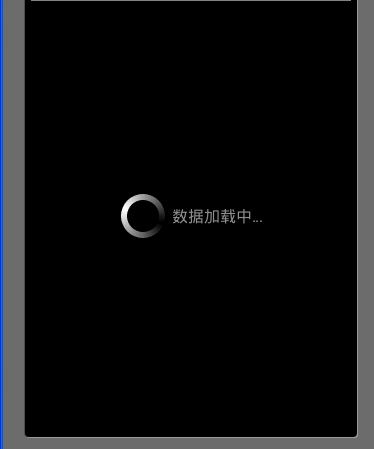
运行效果:
Android中使用shape制作一个旋转的progressbar的更多相关文章
- Android中的Shape使用总结
参考:http://www.cnblogs.com/gzggyy/archive/2013/05/17/3083218.html 在Android程序开发中,我们经常会去用到Shape这个东西去定义各 ...
- Android中使用shape来定义控件
本文章转接于:http://kofi1122.blog.51cto.com/2815761/521605 Android中常常使用shape来定义控件的一些显示属性,今天看了一些shape的使用,对s ...
- Android中的shape
在Android程序开发中,我们经常会去用到Shape这个东西去定义各种各样的形状,shape可以绘制矩形环形以及椭圆,所以只需要用椭圆即可,在使用的时候将控件比如imageview或textview ...
- Android中使用shape实现EditText圆角
之前看到手机上的百度editText控件是圆角的就尝试做了一下,看了看相关的文章. 因为代码少,看看就知道了.所以下面我就直接贴上代码供大家参考,有其他的好方法记得分享哦~ 整个代码不涉及JAVA代码 ...
- android中自定义shape
<shape> <!-- 实心 --> <solid android:color="#ff9d77"/> <!-- 渐变 --> & ...
- Swift 中使用 SwiftyJSON 制作一个比特币价格 APP
Swift 中处理 JSON 数据有很多种方式,可以使用原生的 NSJSONSerialization,也可以使用很多第三方库.原生的 NSJSONSerialization 方式这篇文章中介绍过.这 ...
- (转)Android中的Shape使用总结
http://blog.csdn.net/bear_huangzhen/article/details/24488337 在Android程序开发中,我们经常会去用到Shape这个东西去定义各种各样的 ...
- Android 中类似ModelWindow的一个实现
Android里一般的画面(Activity)都是尽量占满整个屏幕,这样符合单线程的设计, 而有些类似popup之类的子画面,却希望他弹出来的时候表现的如同web的模态窗口 (ModelWindow, ...
- 【Android 应用开发】Android中使用ViewPager制作广告栏效果 - 解决ViewPager占满全屏页面适配问题
. 参考界面 : 携程app首页的广告栏, 使用ViewPager实现 自制页面效果图 : 源码下载地址: http://download.csdn.net/detail/han1202 ...
随机推荐
- cocos2dx3.0 超级马里奥开发笔记(两)——正确的规划游戏逻辑
我将不得不拿出一个完整的开发笔记.由于个人原因.代码已OK该,博客,那么就不要粘贴代码,直接解释了整个游戏设计,更确切地说,当新手应该注意的地方发展. 1.继承类和扩展作用的权----展阅读(MVC) ...
- XgCalendar日历插件动态添加参数
在使用xgcalendar日历插件的时候,参数数组并非只有类型.显示时间.时区等这些参数,还可以根据extParam自定义参数扩展搜索条件,例如根据用户Id搜索不同用户的日历信息,需要将用户的Id存在 ...
- NYOJ 980 格子刷油漆 动态规划
这道题目状态转移方程比较复杂,刚开始以为没这么多情况,看了好多大牛的博客再加上与同学讨论才看懂,写下心得. 因为起点不固定,所以我们一个一个来考虑,先从角上考虑,设三个数组来表示分别为D,A,Sum, ...
- NYOJ528 找球号(三)位运算
找球号(三) 时间限制:2000 ms | 内存限制:3000 KB 难度:2 描述 xiaod现在正在某个球场负责网球的管理工作.为了方便管理,他把每个球都编了号,且每个编号的球的总个数都是 ...
- block为什么要用copy,runtime的简单使用
分享一篇文章:link
- NYOJ737
题意:给n堆石子,按照顺序排列,只能相邻两堆石子合并,求最后合并为一堆时所花费的最小代价,石子合并代价为两堆石子之和. 输入: n(石子堆数) Xi(每堆石子个数) 输出: T(最小代价) 思路:经典 ...
- hdu 1232
以前写的.....拿出来看看.... 并查集模板: #include <iostream> #include <string> using namespace std; int ...
- HTML中常用的列表标签
- memcache如何模糊查询
是新的方法,还是get方法本身就有这个功能? 需要用到递归遍历的方法,将所有的key-value扫描出来.
- Cer Crt Pem Pfx 证书格式转换
1.从pfx格式的证书提取出密钥和证书set OPENSSL_CONF=openssl.cnfopenssl pkcs12 -in my.pfx -nodes -out server.pemopens ...