
NX二次开发:保存时导出PDF并打开
该工程为在保存时执行开发的功能,函数入口点ufput。其他还有新建、打开、另存等都可以加入开发的操作,具体看UF_EXIT下的介绍。
用户出口是一个可选特性,允许你在NX中某些预定义的位置(或出口)自动运行Open C API程序。如果你进入其中一个出口,NX会检查你是否定义了指向Open C API程序位置的指针。如果定义了指针,NX将运行Open C API程序。指针是一个环境变量。
注意:
一定要设置环境变量指向自己生成的DLL。例如:USER_FILE=E:\workspace\Infore\tcnx_project\application\tcnx_project.dll
  1 // Mandatory UF Includes

  2 #include <uf.h>

  3 #include <uf_object_types.h>

  4 #include <uf_draw.h>

  5 #include <uf_part.h>

  6

  7 // Internal+External Includes

  8 #include <NXOpen/Annotations.hxx>

  9 #include <NXOpen/Assemblies_Component.hxx>

 10 #include <NXOpen/Assemblies_ComponentAssembly.hxx>

 11 #include <NXOpen/Body.hxx>

 12 #include <NXOpen/BodyCollection.hxx>

 13 #include <NXOpen/Face.hxx>

 14 #include <NXOpen/Line.hxx>

 15 #include <NXOpen/NXException.hxx>

 16 #include <NXOpen/NXObject.hxx>

 17 #include <NXOpen/Part.hxx>

 18 #include <NXOpen/PartCollection.hxx>

 19 #include <NXOpen/Session.hxx>

 20

 21 #include <NXOpen/PrintPDFBuilder.hxx>

 22 #include <NXOpen/PlotManager.hxx>

 23 #include <NXOpen/Drawings_DrawingSheet.hxx>

 24 #include <NXOpen/NXObjectManager.hxx>

 25

 26 // Std C++ Includes

 27 #include <iostream>

 28 #include <sstream>

 29 #include <vector>

 30 #include <string>

 31 #include <algorithm>

 32 #include <tchar.h>

 33 #include <atlconv.h>

 34 #include <shellapi.h>

 35

 36 #include <windows.h>

 37 #undef CreateDialog

 38 #pragma comment(lib,"shell32.lib")

 39

 40 using namespace NXOpen;

 41 using std::string;

 42 using std::exception;

 43 using std::stringstream;

 44 using std::endl;

 45 using std::cout;

 46 using std::cerr;

 47

 48

 49 //------------------------------------------------------------------------------

 50 // Unload Handler

 51 //------------------------------------------------------------------------------

 52 extern "C" DllExport int ufusr_ask_unload()

 53 {

 54     return (int)NXOpen::Session::LibraryUnloadOptionImmediately;// 调试用

 55     //return (int)NXOpen::Session::LibraryUnloadOptionAtTermination;// 程序发布用

 56     //return (int)NXOpen::Session::LibraryUnloadOptionExplicitly;

 57 }

 58

 59 int exportDwg2PDF(double &xDimension, double &yDimension, std::string &waterRemark, tag_t &sheetTAG, std::string &exportPath, bool appendStatus)

 60 {

 61     try{

 62         if (xDimension < 200 || yDimension < 200 || sheetTAG == NULL_TAG || exportPath.empty() == true)

 63             return -1;

 64

 65         NXOpen::Session *theSession = NXOpen::Session::GetSession();

 66         NXOpen::Part *workPart(theSession->Parts()->Work());

 67         NXOpen::Part *displayPart(theSession->Parts()->Display());

 68         NXOpen::PrintPDFBuilder *printPDFBuilder1;

 69         printPDFBuilder1 = workPart->PlotManager()->CreatePrintPdfbuilder();

 70

 71         printPDFBuilder1->SetScale(1.0);

 72         printPDFBuilder1->SetSize(NXOpen::PrintPDFBuilder::SizeOptionScaleFactor);

 73         printPDFBuilder1->SetOutputText(NXOpen::PrintPDFBuilder::OutputTextOptionPolylines);

 74         printPDFBuilder1->SetXDimension(xDimension);

 75         printPDFBuilder1->SetYDimension(yDimension);

 76         printPDFBuilder1->SetColors(NXOpen::PrintPDFBuilder::ColorBlackOnWhite);

 77         printPDFBuilder1->SetWidths(NXOpen::PrintPDFBuilder::WidthCustomThreeWidths);

 78         printPDFBuilder1->SetRasterImages(true);

 79         printPDFBuilder1->SetImageResolution(NXOpen::PrintPDFBuilder::ImageResolutionOptionHigh);

 80         printPDFBuilder1->SetAddWatermark(true);

 81         printPDFBuilder1->SetWatermark(waterRemark.c_str());

 82         printPDFBuilder1->SetAppend(appendStatus);

 83

 84         std::vector<NXOpen::NXObject *> sheets1(1);

 85         NXOpen::Drawings::DrawingSheet *drawingSheet1(dynamic_cast<NXOpen::Drawings::DrawingSheet *>(NXOpen::NXObjectManager::Get(sheetTAG)));

 86         sheets1[0] = drawingSheet1;

 87         printPDFBuilder1->SourceBuilder()->SetSheets(sheets1);

 88         printPDFBuilder1->SetFilename(exportPath);

 89

 90         NXOpen::NXObject *nXObject1;

 91         nXObject1 = printPDFBuilder1->Commit();

 92         printPDFBuilder1->Destroy();

 93         return 0;

 94     }

 95     catch (const exception& e2){

 96         UI::GetUI()->NXMessageBox()->Show("Exception", NXOpen::NXMessageBox::DialogTypeError, e2.what());

 97         throw;

 98     }

 99 }

100

101 int getSheetInfos()

102 {

103     // 获取显示部件及图纸信息

104     int _errCode = 0;

105     tag_t dispTAG = UF_PART_ask_display_part();

106     char part_fspec[MAX_FSPEC_BUFSIZE] = { 0 };

107     if (_errCode = UF_PART_ask_part_name(dispTAG, part_fspec) != 0) return _errCode;

108

109     std::string strPartName(part_fspec);

110     transform(strPartName.begin(), strPartName.end(), strPartName.begin(), ::tolower);

111     if (strPartName.find("dwg") == string::npos) return -1;

112

113     int num_draws = 0;

114     tag_t *drawTAGs = nullptr;

115     if (_errCode = UF_DRAW_ask_drawings(&num_draws, &drawTAGs) != 0)

116         return _errCode;

117

118     string export_path = strPartName.substr(0, strPartName.find_last_of("."));

119     for (int idx = 0; idx < num_draws; idx++){

120         // 导出PDF

121         UF_DRAW_info_t drawInfos;

122         _errCode = UF_DRAW_ask_drawing_info(drawTAGs[0], &drawInfos);

123         double xDimension = drawInfos.size.custom_size[0];

124         double yDimension = drawInfos.size.custom_size[1];

125         _errCode = exportDwg2PDF(xDimension, yDimension, string("huangym1\r\n2023-03-25"), drawTAGs[idx], export_path + ".pdf", false);

126         string tempStr(export_path + ".pdf");

127

128         // 打开PDF

129         USES_CONVERSION;

130         const WCHAR * cLineChar = A2W(tempStr.c_str());

131

132         SHELLEXECUTEINFO sei;

133         ZeroMemory(&sei, sizeof(SHELLEXECUTEINFO));//使用前最好清空

134         sei.cbSize = sizeof(SHELLEXECUTEINFO);//管理员权限执行cmd,最基本的使用与 ShellExecute 类似

135         sei.lpFile = cLineChar;

136         sei.nShow = SW_SHOW;

137         sei.lpVerb = _T("open");

138         BOOL bResult = ShellExecuteEx(&sei);

139         if (bResult)//执行成功

140         {

141             if (sei.hProcess)//指定 SEE_MASK_NOCLOSEPROCESS 并其成功执行,则 hProcess 将会返回执行成功的进程句柄

142                 WaitForSingleObject(sei.hProcess, INFINITE);//等待执行完毕

143         }

144     }

145     if (drawTAGs){

146         UF_free(drawTAGs);

147         drawTAGs = nullptr;

148     }

149     return _errCode;

150 }

151

152 //========================

153 // 保存操作入口点函数

154 //========================

155 extern "C" DllExport void ufput()

156 {

157     try{

158         if (UF_initialize()) return;

159

160         getSheetInfos();

161

162         UF_terminate();

163     }

164     catch (const NXException& e1)

165     {

166         UI::GetUI()->NXMessageBox()->Show("NXException", NXOpen::NXMessageBox::DialogTypeError, e1.Message());

167     }

168     catch (const exception& e2)

169     {

170         UI::GetUI()->NXMessageBox()->Show("Exception", NXOpen::NXMessageBox::DialogTypeError, e2.what());

171     }

172     catch (...)

173     {

174         UI::GetUI()->NXMessageBox()->Show("Exception", NXOpen::NXMessageBox::DialogTypeError, "Unknown Exception.");

175     }

176 }
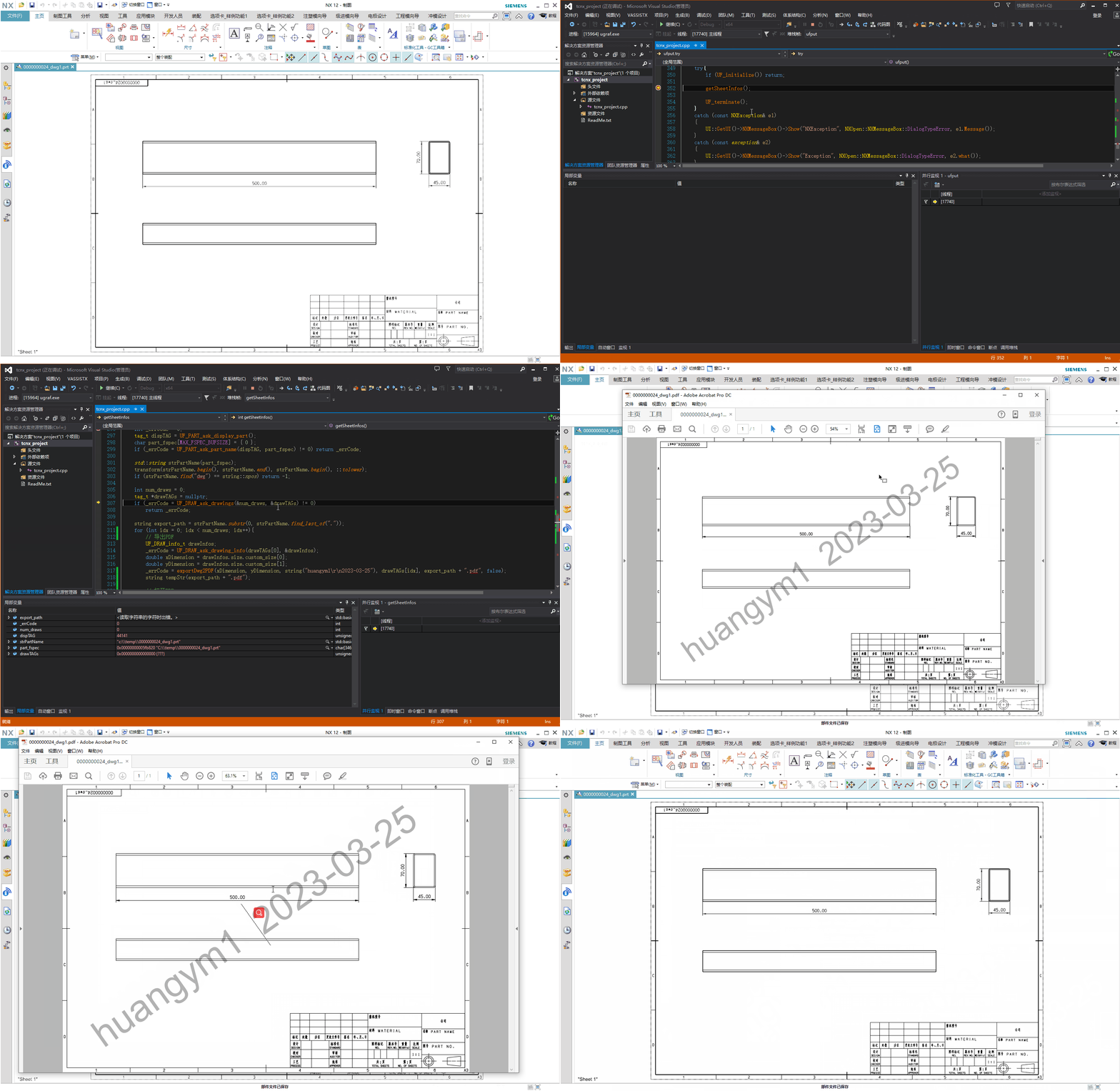
GIF动图展示:
NX二次开发:保存时导出PDF并打开的更多相关文章
- NX二次开发-NXOPEN工程图导出CAD图纸DxfdwgCreator *dxfdwgCreator1;
没有什么可以看的,NXOPEN直接录制一下导出CAD就可以了.录制出来自己挑需要的代码拿过来改一下. NX9+VS2012 #include <NXOpen/Part.hxx> #incl ...
- NX二次开发-UFUN将工程图转成CGM和PDF文件UF_CGM_export_cgm
文章转载自唐康林NX二次开发论坛,原文出处: http://www.nxopen.cn/thread-126-1-1.html 刚才有同学问到这个问题,如果是用NXOpen来做,直接录制一下就可以了: ...
- NX二次开发-UFUN获取NX系统默认导出CGM的选项设置UF_CGM_ask_default_export_options
文章转载自唐康林NX二次开发论坛,原文出处: http://www.nxopen.cn/thread-126-1-1.html 刚才有同学问到这个问题,如果是用NXOpen来做,直接录制一下就可以了: ...
- NX二次开发-UFUN获取当前导出CGM选项设置UF_CGM_ask_session_export_options
文章转载自唐康林NX二次开发论坛,原文出处: http://www.nxopen.cn/thread-126-1-1.html 刚才有同学问到这个问题,如果是用NXOpen来做,直接录制一下就可以了: ...
- NX二次开发-UFUN修改当前导出CGM文件选项设置UF_CGM_set_session_export_options
文章转载自唐康林NX二次开发论坛,原文出处: http://www.nxopen.cn/thread-126-1-1.html 刚才有同学问到这个问题,如果是用NXOpen来做,直接录制一下就可以了: ...
- C#进行Visio二次开发之文件导出及另存Web页面
在我前面很多关于Visio的开发过程中,介绍了各种Visio的C#开发应用场景,包括对Visio的文档.模具文档.形状.属性数据.各种事件等相关的基础处理,以及Visio本身的整体项目应用,虽然时间过 ...
- NX二次开发-BlockUI对话框嵌套MFC对话框制作进度条
半年前在一些QQ群看到有大神NX二次开发做出了进度条,那个时候我还不会弄,也不知道怎么弄得,后来断断续续得研究了一下,直到今天我把它做出来了.内心还是很喜悦的!回想自己这两年当初从没公司肯给我做NX二 ...
- 【NX二次开发】按层查找工作部件中的对象 UF_LAYER_cycle_by_layer
第一次调用 :返回第一个启用层中的第一个对象. 第二次调用 :返回下一个已启用层中的下一个对象. 最后一次调用:当所有对象都被耗尽时,将返回object_tag = NULL_TAG. 在循环数据库时 ...
- 【NX二次开发】查找部件中的对象 UF_OBJ_cycle_objs_in_part
返回所有层上指定类型部件中的所有对象,不管它们的当前显示状态如何.这个例程不返回表达式.指定对象.临时(系统创建的)对象或休眠对象.休眠对象指的是从模型中删除的对象例如,如果你混合了一条边,那么这条边 ...
- 【NX二次开发】大开眼界,DLL还可以这么调!
NX二次开发应用程序有交互式.批处理和远程3中模式.交互模式的应用程序(.dll)在NX界面环境下运行.dll以动态链接库的方式被加载到NX的进程空间中.dll可以通过下列几种方式执行. 1.直接激活 ...
随机推荐
- iOS开发--APP性能检测方案汇总
1 . CPU 占用率 CPU作为手机的中央处理器,可以说是手机最关键的组成部分,所有应用程序都需要它来调度运行,资源有限.所以当我们的APP因设计不当,使 CPU 持续以高负载运行,将会出现APP卡 ...
- Check If Binary Tree Is Completed
Check if a given binary tree is completed. A complete binary tree is one in which every level of the ...
- Flutter在iOS中一些点
1. ios对Flutter有如下依赖 Flutter.framework: Flutter engine等: APP.framework:业务代码, 由dart代码生成.App.framew ...
- SQL server——基础篇之数据完整性
定义:保证数据库中的数据在逻辑上的一致性.正确性和可靠性. 作用:防止无效数据或错误数据进入数据库 数据完整性包括:实体完整性.域完整性和参照完整性 实体完整性 规定表的每一行记录在表中是唯一的 实体 ...
- 连接打印机Lodop
<div class="panel-body"> <div class="row show-grid"> <div class=& ...
- 理解 Shell
理解 Shell shell 的父子关系 用于登录的某个虚拟控制器终端,或在 GUI 中运行终端仿真器时所启动的默认的交互 shell,是一个父 shell.本书到目前为止都是父 shell 提供 C ...
- Activity基础知识
Activity 一.Activity是什么 Activity是一种可以包含用户界面的组件,主要用于和用户进行交互.一个应用程序可以包含零个或多个活动. 二.活动的基本用法 1. 手动创建活动 打 ...
- .netCore Nuget包引用记录
1.画图 System.Drawing.Common 2.
- 5、什么是MIME
MIME 类型 媒体类型(通常称为 Multipurpose Internet Mail Extensions 或 MIME 类型 )是一种标准,用来表示文档.文件或字节流的性质和格式.它在IETF ...
- 【基础知识】C++算法基础(头文件配置、获取输入、输出)
基础的头文件配置.输入输出 <iostream> 和<iostream.h>的区别:加.h是C中的做法,C++里一般不加.h,但相应的,要加using namspace std ...