
Android 基于蓝牙的方向控制器
最近开发了一个蓝牙控制器App,用手机远程控制小球的运动。
包含了一些基础知识:多线程使用,页面UI数据更新,按钮事件,选择项功能,蓝牙功能(蓝牙打开,蓝牙搜索,蓝牙连接,蓝牙命令发送,蓝牙命令接收)。
开发环境为:Android Studio+Java,蓝牙模块HC-06(自发自收模式)。
实现代码
主Activity代码:
 package com.example.cxk.lightballcontroller;

 import android.app.Activity;

 import android.bluetooth.BluetoothAdapter;

 import android.bluetooth.BluetoothDevice;

 import android.bluetooth.BluetoothSocket;

 import android.content.BroadcastReceiver;

 import android.content.Context;

 import android.content.Intent;

 import android.content.IntentFilter;

 import android.os.Bundle;

 import android.os.Handler;

 import android.os.Message;

 import android.view.Menu;

 import android.view.MenuItem;

 import android.view.View;

 import android.widget.AdapterView;

 import android.widget.ArrayAdapter;

 import android.widget.Button;

 import android.widget.CompoundButton;

 import android.widget.EditText;

 import android.widget.Spinner;

 import android.widget.Switch;

 import android.widget.TextView;

 import android.widget.Toast;

 import java.io.IOException;

 import java.io.InputStream;

 import java.io.OutputStream;

 import java.lang.ref.WeakReference;

 import java.util.ArrayList;

 import java.util.List;

 import java.util.Set;

 import java.util.UUID;

 public class MainActivity extends Activity {

     private Switch bluetoothSwitch;

     private Button bluetoothSearch;

     private Spinner bluetoothList;

     private Button bluetoothConnect;

     private TextView recvData;

     private EditText sendData;

     private Button bluetoothSend;

     private Button upSend;

     private Button leftSend;

     private Button downSend;

     private Button rightSend;

     private BluetoothAdapter bluetoothAdapter;

     private List<String> list = new ArrayList<String>();

     private ArrayAdapter<String> adapter;

     private String strMacAddress;

     private boolean booleanConnect = false;

     private ConnectedThread connectedThread;

     private MyHandler myHandler = new MyHandler(this);

     @Override

     protected void onCreate(Bundle savedInstanceState) {

         super.onCreate(savedInstanceState);

         setContentView(R.layout.activity_main);

         bluetoothSwitch = (Switch) findViewById(R.id.swtch);

         bluetoothSearch = (Button) findViewById(R.id.search);

         bluetoothList = (Spinner) findViewById(R.id.list);

         bluetoothConnect = (Button) findViewById(R.id.connect);

         recvData = (TextView) findViewById(R.id.recvdata);

         sendData = (EditText) findViewById(R.id.senddata);

         bluetoothSend = (Button) findViewById(R.id.send);

         upSend = (Button)findViewById(R.id.BtnUp);

         leftSend = (Button)findViewById(R.id.BtnLeft);

         downSend = (Button)findViewById(R.id.BtnDown);

         rightSend = (Button)findViewById(R.id.BtnRight);

         bluetoothAdapter = BluetoothAdapter.getDefaultAdapter();

         if(bluetoothAdapter == null){

             //表明此手机不支持蓝牙

             Toast.makeText(MainActivity.this, "未发现蓝牙设备", Toast.LENGTH_SHORT).show();

             return;

         }

         if (bluetoothAdapter.isEnabled()) {

             bluetoothSwitch.setChecked(true);

         }

         adapter = new ArrayAdapter<String>(this,android.R.layout.simple_spinner_item, list);

         adapter.setDropDownViewResource(android.R.layout.simple_spinner_dropdown_item);

         bluetoothList.setAdapter(adapter);

         bluetoothList.setOnItemSelectedListener(new AdapterView.OnItemSelectedListener() {

             @Override

             public void onItemSelected(AdapterView<?> adapterView, View view, int i, long l) {

                 strMacAddress = adapter.getItem(i);

                 adapterView.setVisibility(View.VISIBLE);

             }

             @Override

             public void onNothingSelected(AdapterView<?> adapterView) {

             }

         });

         bluetoothSwitch.setOnCheckedChangeListener(new CompoundButton.OnCheckedChangeListener() {

             @Override

             public void onCheckedChanged(CompoundButton compoundButton, boolean b) {

                 if (b) {

                     if (!bluetoothAdapter.isEnabled()) { //蓝牙未开启,则开启蓝牙

                         Intent enableIntent = new Intent(BluetoothAdapter.ACTION_REQUEST_ENABLE);

                         startActivity(enableIntent);

                     } else {

                         Toast.makeText(MainActivity.this, "蓝牙已开启", Toast.LENGTH_SHORT).show();

                     }

                 } else {

                     bluetoothAdapter.disable();

                     Toast.makeText(MainActivity.this, "蓝牙已关闭", Toast.LENGTH_SHORT).show();

                 }

             }

         });

         bluetoothSearch.setOnClickListener(new View.OnClickListener() {

             @Override

             public void onClick(View view) {

                 if (bluetoothAdapter == null) {

                     Toast.makeText(MainActivity.this, "未发现蓝牙设备", Toast.LENGTH_SHORT).show();

                     return;

                 } else if (!bluetoothAdapter.isEnabled()) {

                     Toast.makeText(MainActivity.this, "蓝牙设备未开启", Toast.LENGTH_SHORT).show();

                 }

                 Set<BluetoothDevice> pairedDevices = bluetoothAdapter.getBondedDevices();

                 if (pairedDevices.size() > 0) {

                     for (BluetoothDevice device : pairedDevices) {

                         adapter.remove(device.getAddress());

                         adapter.add(device.getAddress());

                     }

                 } else {

                     //注册,当一个设备被发现时调用mReceive

                     IntentFilter filter = new IntentFilter(BluetoothDevice.ACTION_FOUND);

                     registerReceiver(mReceiver, filter);

                 }

             }

         });

         bluetoothConnect.setOnClickListener(new View.OnClickListener() {

             @Override

             public void onClick(View view) {

                 if (strMacAddress == null) {

                     Toast.makeText(MainActivity.this, "请先搜索设备", Toast.LENGTH_SHORT).show();

                 } else {

                     BluetoothDevice device = bluetoothAdapter.getRemoteDevice(strMacAddress);

                     ConnectThread connectThread = new ConnectThread(device);

                     connectThread.start();

                 }

             }

         });

         bluetoothSend.setOnClickListener(new View.OnClickListener() {

             @Override

             public void onClick(View view) {

                 if (booleanConnect == false) {

                     Toast.makeText(MainActivity.this, "请先连接设备", Toast.LENGTH_SHORT).show();

                 } else {

                     String strSendData = new String(sendData.getText().toString());

                     connectedThread.write(strSendData.getBytes());

                     sendData.setText("");

                 }

             }

         });

         upSend.setOnClickListener(new View.OnClickListener() {

             @Override

             public void onClick(View view) {

                 if (booleanConnect == false) {

                     Toast.makeText(MainActivity.this, "请先连接设备", Toast.LENGTH_SHORT).show();

                 } else {

                     String str = "ONA\n";

                     String strSendData = new String(str);

                     connectedThread.write(strSendData.getBytes());

                     sendData.setText("");

                 }

             }

         });

         downSend.setOnClickListener(new View.OnClickListener() {

             @Override

             public void onClick(View view) {

                 if (booleanConnect == false) {

                     Toast.makeText(MainActivity.this, "请先连接设备", Toast.LENGTH_SHORT).show();

                 } else {

                     String str = "ONB\n";

                     String strSendData = new String(str);

                     connectedThread.write(strSendData.getBytes());

                     sendData.setText("");

                 }

             }

         });

         leftSend.setOnClickListener(new View.OnClickListener() {

             @Override

             public void onClick(View view) {

                 if (booleanConnect == false) {

                     Toast.makeText(MainActivity.this, "请先连接设备", Toast.LENGTH_SHORT).show();

                 } else {

                     String str = "ONC\n";

                     String strSendData = new String(str);

                     connectedThread.write(strSendData.getBytes());

                     sendData.setText("");

                 }

             }

         });

         rightSend.setOnClickListener(new View.OnClickListener() {

             @Override

             public void onClick(View view) {

                 if (booleanConnect == false) {

                     Toast.makeText(MainActivity.this, "请先连接设备", Toast.LENGTH_SHORT).show();

                 } else {

                     String str = "OND\n";

                     String strSendData = new String(str);

                     connectedThread.write(strSendData.getBytes());

                     sendData.setText("");

                 }

             }

         });

     }

 /////////////////////////////////////////////////////////////////////////////////////////////////////////////

     private static class MyHandler extends Handler {

         WeakReference<MainActivity> mActivity;

         MyHandler(MainActivity activity) {

             mActivity = new WeakReference<MainActivity>(activity);

         }

         @Override

         public void handleMessage(Message msg) {

             MainActivity theActivity = mActivity.get();

             theActivity.recvData.append(msg.obj.toString());

         }

     }

     @Override

     protected void onDestroy() {

         if (connectedThread != null) {

             connectedThread.cancel();

         }

         super.onDestroy();

     }

     private BroadcastReceiver mReceiver = new BroadcastReceiver() {

         @Override

         public void onReceive(Context context, Intent intent) {

             String action = intent.getAction();

             if(BluetoothDevice.ACTION_FOUND.equals(action)){

                 BluetoothDevice device = intent.getParcelableExtra(BluetoothDevice.EXTRA_DEVICE);

                 // 已经配对的则跳过

                 if (device.getBondState() != BluetoothDevice.BOND_BONDED) {

                     adapter.add(device.getAddress());

                 }

             }else if (BluetoothAdapter.ACTION_DISCOVERY_FINISHED.equals(action)) {  //搜索结束

                 if (adapter.getCount() == 0) {

                     Toast.makeText(MainActivity.this, "没有搜索到设备", Toast.LENGTH_SHORT).show();

                 }

             }

         }

     };

     private class ConnectThread extends Thread{

         private BluetoothSocket mmsocket;

         private BluetoothDevice mmdevice;

         public ConnectThread(BluetoothDevice device){

             mmdevice = device;

             BluetoothSocket tmp = null;

             try {

                 tmp = mmdevice.createRfcommSocketToServiceRecord(UUID.fromString("00001101-0000-1000-8000-00805F9B34FB"));

             } catch (IOException e) {

             }

             mmsocket = tmp;

         }

         public void run(){

             bluetoothAdapter.cancelDiscovery();    //取消设备查找

             try {

                 mmsocket.connect();

             } catch (IOException e) {

                 try {

                     mmsocket.close();

                 } catch (IOException e1) {

                 }

                 //连接失败

                 return;

             }

             booleanConnect = true;

             //新建一个数据交换线程

             connectedThread = new ConnectedThread(mmsocket);

             connectedThread.start();

         }

         public void cancel() {

             try {

                 mmsocket.close();

             } catch (IOException e) {

             }

         }

     }

     private class ConnectedThread extends Thread{

         private BluetoothSocket mmsocket;

         private InputStream inStream;

         private OutputStream outStream;

         public ConnectedThread(BluetoothSocket socket){

             mmsocket = socket;

             try {

                 //获得输入输出流

                 inStream = mmsocket.getInputStream();

                 outStream = mmsocket.getOutputStream();

             } catch (IOException e) {

             }

         }

         public void run(){

             byte[] buff = new byte[1];

             int len = 0;

             //读数据需不断监听,写不需要

             while(true){

                 try {

                     len = inStream.read(buff);

                     //把读取到的数据发送给UI进行显示

                     String strBuffer = new String(buff);

                     Message toMain = myHandler.obtainMessage();

                     toMain.obj = strBuffer;

                     myHandler.sendMessage(toMain);

                 } catch (IOException e) {

                     break;

                 }

             }

         }

         public void write(byte[] buffer) {

             try {

                 outStream.write(buffer);

             } catch (IOException e) {

             }

         }

         public void cancel() {

             try {

                 mmsocket.close();

             } catch (IOException e) {

             }

         }

     }

     @Override

     public boolean onCreateOptionsMenu(Menu menu) {

         // Inflate the menu; this adds items to the action bar if it is present.

         getMenuInflater().inflate(R.menu.menu_main, menu);

         return true;

     }

     @Override

     public boolean onOptionsItemSelected(MenuItem item) {

         // Handle action bar item clicks here. The action bar will

         // automatically handle clicks on the Home/Up button, so long

         // as you specify a parent activity in AndroidManifest.xml.

         int id = item.getItemId();

         //noinspection SimplifiableIfStatement

         if (id == R.id.action_settings) {

             super.finish();

             return true;

         }

         return super.onOptionsItemSelected(item);

     }

 }
界面代码:
 <LinearLayout xmlns:android="http://schemas.android.com/apk/res/android"

     xmlns:tools="http://schemas.android.com/tools"

     android:layout_width="match_parent"

     android:layout_height="match_parent"

     android:orientation="vertical"

     android:paddingLeft="@dimen/activity_horizontal_margin"

     android:paddingRight="@dimen/activity_horizontal_margin"

     android:paddingTop="@dimen/activity_vertical_margin"

     android:paddingBottom="@dimen/activity_vertical_margin"

     tools:context=".MainActivity"

     android:weightSum="1">

     <Switch

         android:id="@+id/swtch"

         android:textOn="@string/open"

         android:textOff="@string/close"

         android:layout_width="wrap_content"

         android:layout_height="48dp"

         android:layout_gravity="center_horizontal" />

     <LinearLayout

         android:layout_width="fill_parent"

         android:layout_height="wrap_content"

         android:orientation="horizontal"

         android:weightSum="1">

         <Button

             android:id="@+id/search"

             android:text="@string/search"

             android:layout_width="wrap_content"

             android:layout_height="37dp"

             android:background="#ff9ed7ff" />

         <Spinner

             android:id="@+id/list"

             android:layout_width="162dp"

             android:layout_height="48dp"

             android:layout_weight="1.17" />

         <Button

             android:id="@+id/connect"

             android:text="@string/connect"

             android:layout_width="93dp"

             android:layout_height="38dp"

             android:background="#ff9ed7ff" />

     </LinearLayout>

     <LinearLayout

         android:layout_width="fill_parent"

         android:layout_height="wrap_content"

         android:orientation="horizontal">

     </LinearLayout>

     <RelativeLayout

         android:layout_width="350dp"

         android:layout_height="112dp"

         android:layout_gravity="center_horizontal"

         android:id="@+id/DirectionPanel">

         <Button

             android:layout_width="wrap_content"

             android:layout_height="wrap_content"

             android:text="@string/up"

             android:id="@+id/BtnUp"

             android:layout_above="@+id/BtnRight"

             android:layout_centerHorizontal="true"

             android:background="#ffd0e2ff" />

         <Button

             android:layout_width="wrap_content"

             android:layout_height="wrap_content"

             android:text="@string/left"

             android:id="@+id/BtnLeft"

             android:layout_alignParentBottom="true"

             android:layout_toLeftOf="@+id/BtnUp"

             android:background="#ffd0e2ff" />

         <Button

             android:layout_width="wrap_content"

             android:layout_height="wrap_content"

             android:text="@string/right"

             android:id="@+id/BtnRight"

             android:layout_alignTop="@+id/BtnLeft"

             android:layout_toRightOf="@+id/BtnUp"

             android:background="#ffd0e2ff" />

     </RelativeLayout>

     <Button

         android:layout_width="wrap_content"

         android:layout_height="wrap_content"

         android:text="@string/down"

         android:id="@+id/BtnDown"

         android:layout_alignParentBottom="true"

         android:layout_centerHorizontal="true"

         android:layout_gravity="center_horizontal"

         android:background="#ffd0e2ff" />

     <EditText

         android:id="@+id/senddata"

         android:layout_width="356dp"

         android:layout_height="wrap_content"

         android:layout_weight="0.18" />

     <Button

         android:id="@+id/send"

         android:text="@string/send"

         android:layout_width="84dp"

         android:layout_height="33dp"

         android:background="#ff9ed7ff"

         android:layout_gravity="right" />

     <TextView

         android:text="@string/recv"

         android:layout_width="wrap_content"

         android:layout_height="wrap_content" />

     <ScrollView

         android:layout_width="match_parent"

         android:layout_height="66dp"

         android:id="@+id/scrollView"

         android:layout_weight="0.82"

         android:background="#ffc8c8c8">

         <TextView

             android:id="@+id/recvdata"

             android:layout_width="fill_parent"

             android:layout_height="wrap_content"

             android:layout_weight="0.99"

             android:background="#ffc8c8c8" />

     </ScrollView>

 </LinearLayout>
实现的效果
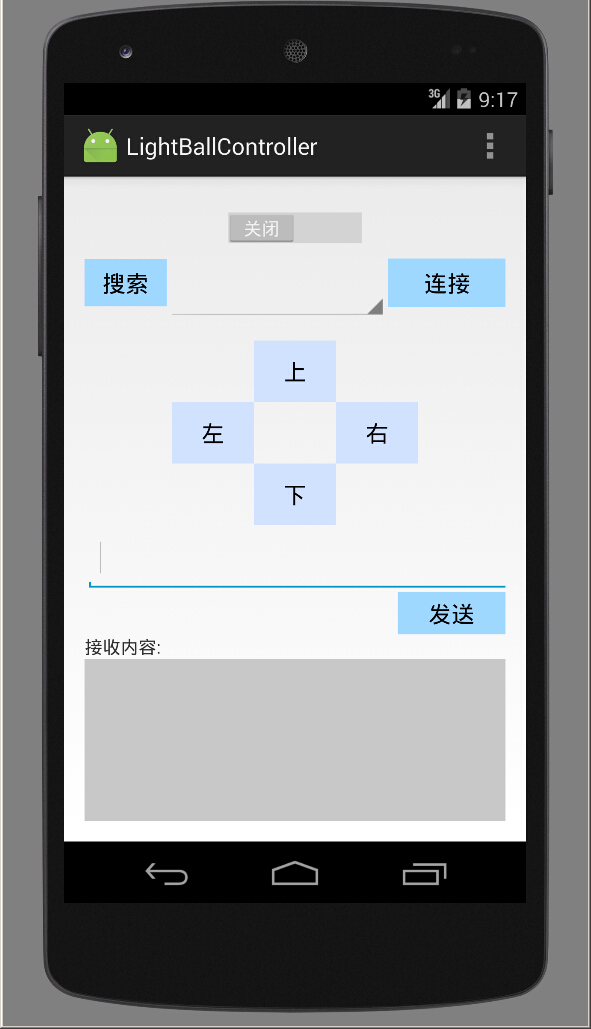
实现工程代码:蓝牙控制器
参考资料:
http://www.pudn.com/downloads691/sourcecode/comm/android/detail2784484.html
Android 基于蓝牙的方向控制器的更多相关文章
- 【源代码】基于Android和蓝牙的单片机温度採集系统
如需转载请标明出处:http://blog.csdn.net/itas109 QQ技术交流群:129518033 STC89C52单片机通过HC-06蓝牙模块与Android手机通信实例- 基于And ...
- Android Studio 蓝牙开发实例——基于Android 6.0
因项目需要做一个Android 的蓝牙app来通过手机蓝牙传输数据以及控制飞行器,在此,我对这段时间里写的蓝牙app的代码进行知识梳理和出现错误的总结. 该应用的Compile Sdk Version ...
- 【转】Android bluetooth介绍(二): android blueZ蓝牙代码架构及其uart 到rfcomm流程
原文网址:http://blog.sina.com.cn/s/blog_602c72c50102uzoj.html 关键词:蓝牙blueZ UART HCI_UART H4 HCI L2CAP ...
- Android 串口蓝牙通信开发Java版本
Android串口BLE蓝牙通信Java版 0. 导语 Qt on Android 蓝牙通信开发 我们都知道,在物联网中,BLE蓝牙是通信设备的关键设备.在传统的物联网应用中,无线WIFI.蓝牙和Zi ...
- Android 低功耗蓝牙BLE 开发注意事项
基本概念和问题 1.蓝牙设计范式? 当手机通过扫描低功耗蓝牙设备并连接上后,手机与蓝牙设备构成了客户端-服务端架构.手机通过连接蓝牙设备,可以读取蓝牙设备上的信息.手机就是客户端,蓝牙设备是服务端. ...
- 【腾讯优测干货分享】Android 相机预览方向及其适配探索
本文来自于腾讯bugly开发者社区,未经作者同意,请勿转载,原文地址:http://dev.qq.com/topic/583ba1df25d735cd2797004d 由于Android系统的开放策略 ...
- ubuntu16.04连接android手机蓝牙共享网络热点
最近的想要用android手机蓝牙共享wifi网络给ubuntu16.04系统用,查了好多资料,发现网上很少有有用的.自己实践后分享如下. 第一步:手机与电脑配对: 该步骤比较简单,网 ...
- Android BLE 蓝牙编程(一)
最近在研究这个,等我有时间来写吧! 终于在端午节给自己放个假,现在就来说说关于android蓝牙ble的 最近的学习成果吧!! 需要材料(写个简单教程吧--关于小米手环的哦!嘿嘿) Android 手 ...
- Android基于XMPP的即时通讯3-表情发送
这篇博文主要讲表情发送的一些东西. 参考:Android基于XMPP的即时通讯1-基本对话 1.准备好资源文件 采用的是emoji的表情,我打包好了,下载地址:http://files.cnblogs ...
随机推荐
- Mac Sublime Vim模式 方向键无法长按
终端输入 sublime2: defaults write com.sublimetext.2 ApplePressAndHoldEnabled -bool false sublime3: defau ...
- 用VIM查看编辑二进制文件
用VIM查看编辑二进制文件 vim可以很方便地编辑二进制文件,个人认为它比emacs的二进制编辑方式更好用.vim中二进制文件的编辑是先通过外部程序xxd来把文件dump成其二进制的文本形式,然后就可 ...
- kvm 简单了解
网络: *主机(装有ESX的PC服务器)简称host,虚拟机简称guest *Host的一个或多个网卡组成一个虚拟交换机,虚拟交换机上创建端口组label,端口组指定vlan tag,虚拟机指定网络标 ...
- FileZilla 配置备份与还原【转】
FileZilla是一款免费开源的FTP软件,安装和配置都很简单.在安装目录下的FileZilla Server Interface.xml和FileZilla Server.xml两个文件是程序的配 ...
- github--403错误
错误信息如下: $ git push origin master error: The requested URL returned error: while accessing https://gi ...
- request机制
每个框架中都有处理请求的机制(request),但是每个框架的处理方式和机制是不同的 为了了解Flask的request中都有什么东西,首先我们要写一个前后端的交互 基于HTML + Flask 写一 ...
- ZOJ 1610 Count the Colors(区间染色)
题目大意:多组数据,每组给一个n(1=<n<=8000),下面有n行,每行有l,r,color(1=<color<=8000),表示将l~r颜色变为color,最后求各种颜色( ...
- Codeforces 776C - Molly's Chemicals(思维+前缀和)
题目大意:给出n个数(a1.....an),和一个数k,问有多少个区间的和等于k的幂 (1 ≤ n ≤ 10^5, 1 ≤ |k| ≤ 10, - 10^9 ≤ ai ≤ 10^9) 解题思路:首先, ...
- Maven_pom文件常用
<project xmlns="http://maven.apache.org/POM/4.0.0" xmlns:xsi="http://www.w3.org/20 ...
- 在LoadRunner中从数组类型的参数随机取值的方法
在LoadRunner中从数组类型的参数随机取值的方法 使用web_reg_save_param做关联后,有时候会有多个匹配值. 为了模仿用户行为随机取一个值为后续transcation所用,可以使用 ...