
使用Mondrian Virtual OLAP Cube 实现星座模型并在saiku展现分析
1.什么是星座模型?
2.哪些地方可以用到星座模型?
3.Mondrian怎么构建星座模型,构建过程又涉及到哪些理论概念。
答1:这里描述了维度模型常用的 星型、雪花、星座模型,简而言之就是多事实表模型。
[转载] 第二篇 数据仓库与数据集市建模
答2:例如有个场景,通过资产负债及损益表计算应收款周转天数。其中资产负债表和损益表都有对应单独的数据视图
计算公式如下:
应收款周转天数 = 360/(([Total 本期发生数],[营业收入])/(([Total 年初数],[应收账款])+([Total 期末数],[应收账款]))/2)
=360/损益表中项目为[营业收入]的本期发生数合计 /(资产负债表中项目为[应收账款]的年初数合计+年末数合计)/2
=360/损益表中项目为[营业收入]的本期发生数合计 /(资产负债表中项目为[应收账款]的年平均数
为了实现上述统计,如果使用传统物理模型去串表则容易产生数据冗余的情况。具体如何冗余自己脑补一下吧。为了解决上述问题则通过建立逻辑模型进行计算处理。
答3:
Mondrian实现理论上的星座模型过程涉及到哪些概念呢?见下图
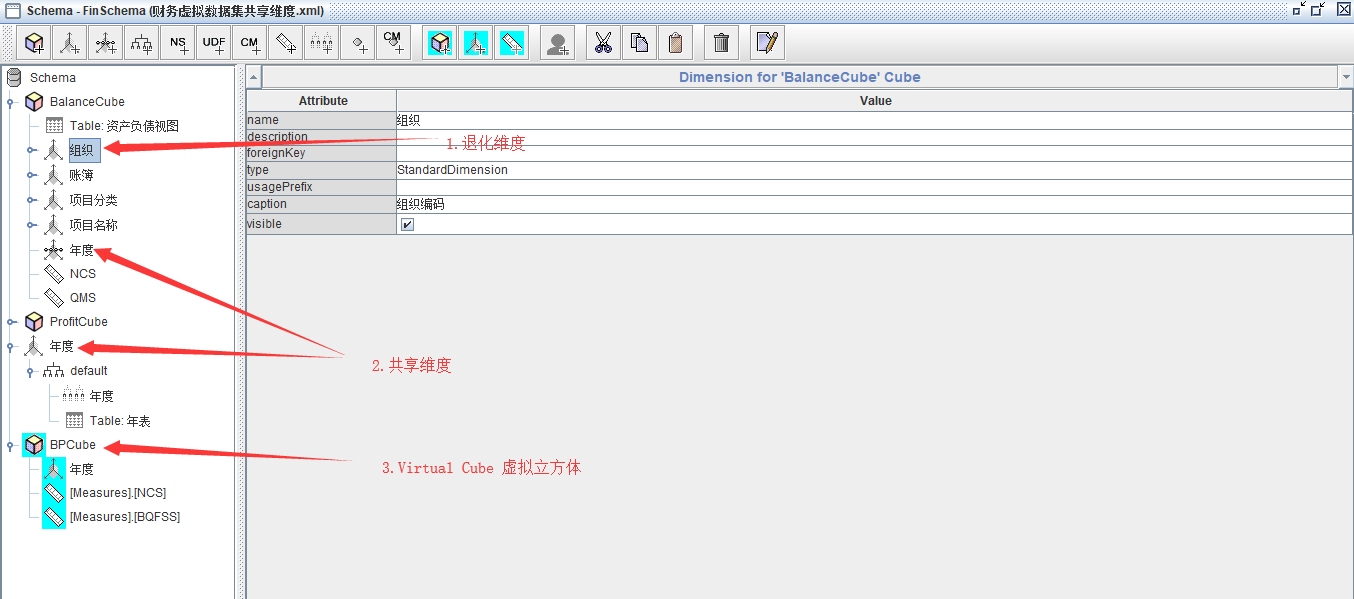
1.退化维度的概念参考这里
维度-退化维度
组织这里为什么会被称为退化维度?因为在资产负债视图中,已经包含了组织编码和组织名称字段,不需要另外串表来实现,所以叫退化维度。基本一个资产负债视图事实表就替代了N个维度表。
见SQL查询资产负债视图
select * from 资产负债视图

2.共享维度的概念参考这里:
维度-共享维度
模型中建立了年度的共享维度,并在资产负债视图、损益视图都调用了年度共享维度。
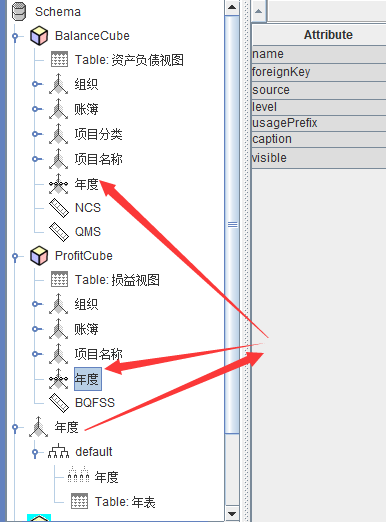
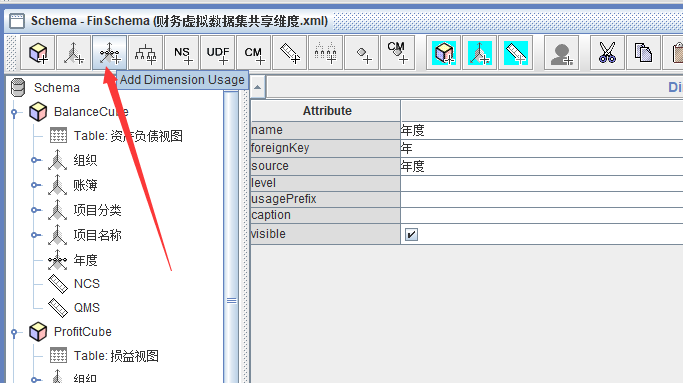
实现方法就是在需要使用共享维度的Cube外面建一个维度,然后在各个Cube需要引用共享维度的使用添加对共享维度的引用。
为了模拟方便,手工建立了年度、月度的维度表
 create Table 年表

 (

 id int,

 年度 int

 )

 create Table 月表

 (

 id int,

 FYEARID int,

 月份 int

 )

 insert into 年表(id,年度)

 select 1,2018

 union all

 select 2,2019

 insert into 月表(id,FYEARID,月份)

 select 1,1,1

 union all

 select 2,1,2

 union all

 select 3,1,3

 union all

 select 4,1,4

 union all

 select 5,1,5

 union all

 select 6,1,6

 union all

 select 7,1,7

 union all

 select 8,1,8

 union all

 select 9,1,9

 union all

 select 10,1,10

 union all

 select 11,1,11

 union all

 select 12,1,12

 select * from  年表

 select * from  月表

 insert into 月表(id,FYEARID,月份)

 select 21,2,1

 union all

 select 22,2,2

 union all

 select 23,2,3

 union all

 select 24,2,4

 union all

 select 25,2,5

 union all

 select 26,2,6

 union all

 select 27,2,7

 union all

 select 28,2,8

 union all

 select 29,2,9

 union all

 select 30,2,10

 union all

 select 31,2,11

 union all

 select 32,2,12
3.重点就是建立虚拟立方体了,
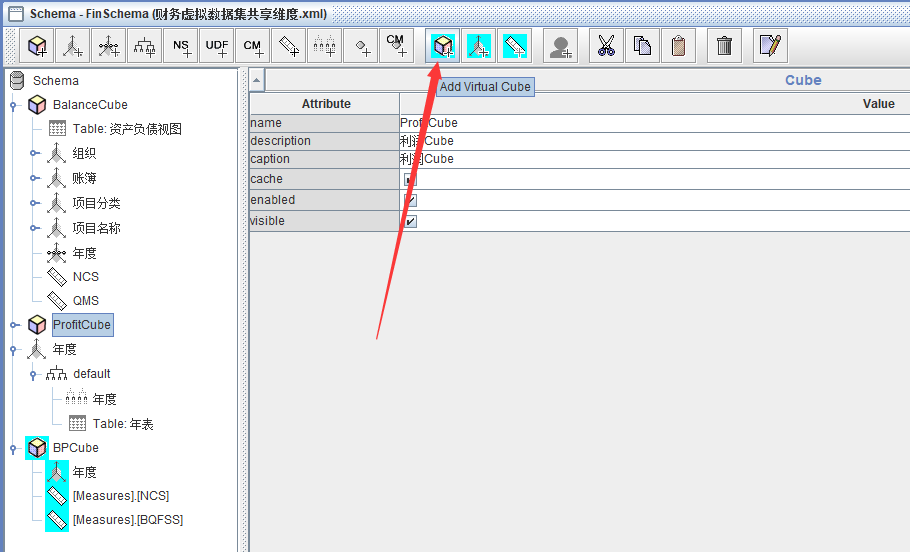
其实这里虚拟立方体就是星座模型的载体。
Mondrain官方给了虚拟立方体的解释(Virtual OLAP Cubes) https://help.pentaho.com/Documentation/7.1/0N0/020/040/000
另外一个老外那里给了虚拟立方体的定义案例可以参考 https://diethardsteiner.github.io/mondrian/2017/03/20/Mondrian-Multivalued-Dimension-Attribute.html
其实前面的准备工作做好了,后面建立虚拟立方体的工作就很简单了。
首先,命名
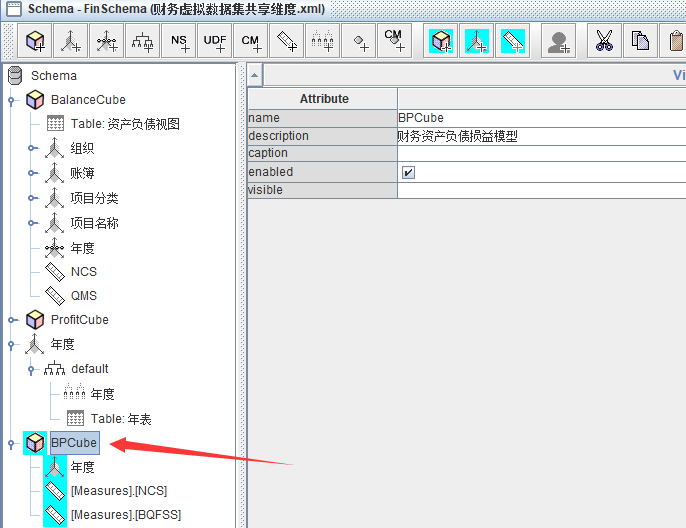
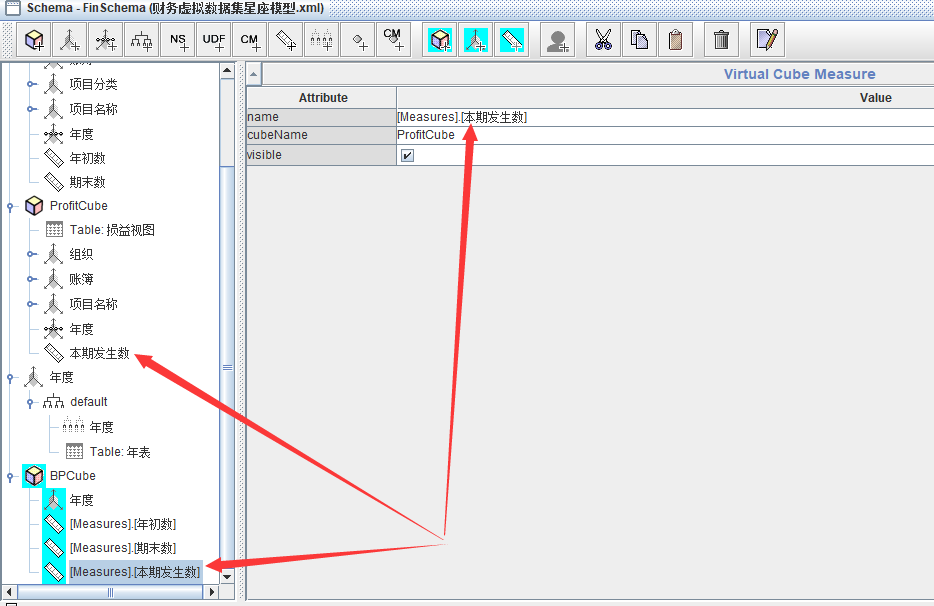
然后加入共享维度,注意共享维度不需要填写 cubeName。
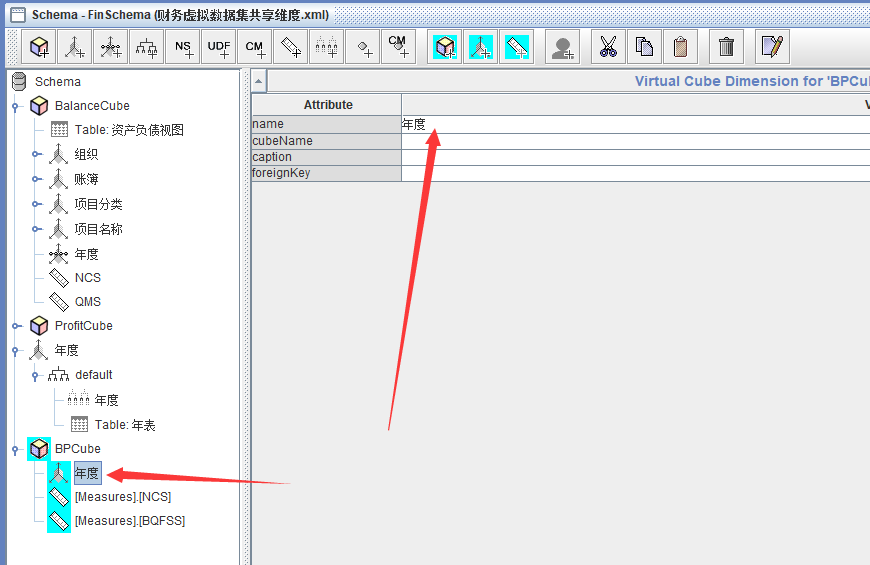
最后是调用资产负债Cube和损益Cube的度量值
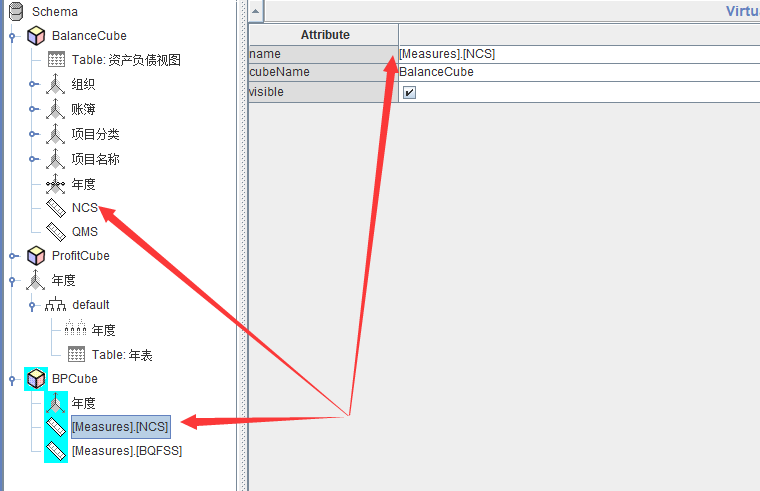
例如:调用资产负债Cube的年初数度量值,cubeName选择资产负债Cube的名称【BalanceCube】。
而name这里写法,[注意]、[注意]、[注意],必须先填写前缀 [Mesures]. 再加上各个Cube的度量值名称,外面加上中括号[]。
资产负债的年初数度量值写法应该是
[Mesures].[NCS]
损益的本期发生数写法则应该是
[Mesures].[BQFSS]
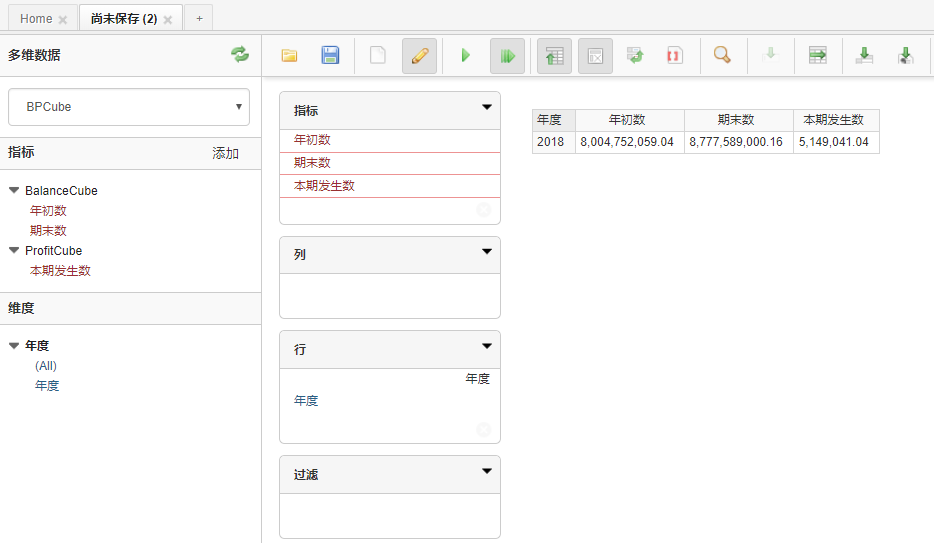
保存,上传到Saiku,预览一下模型。
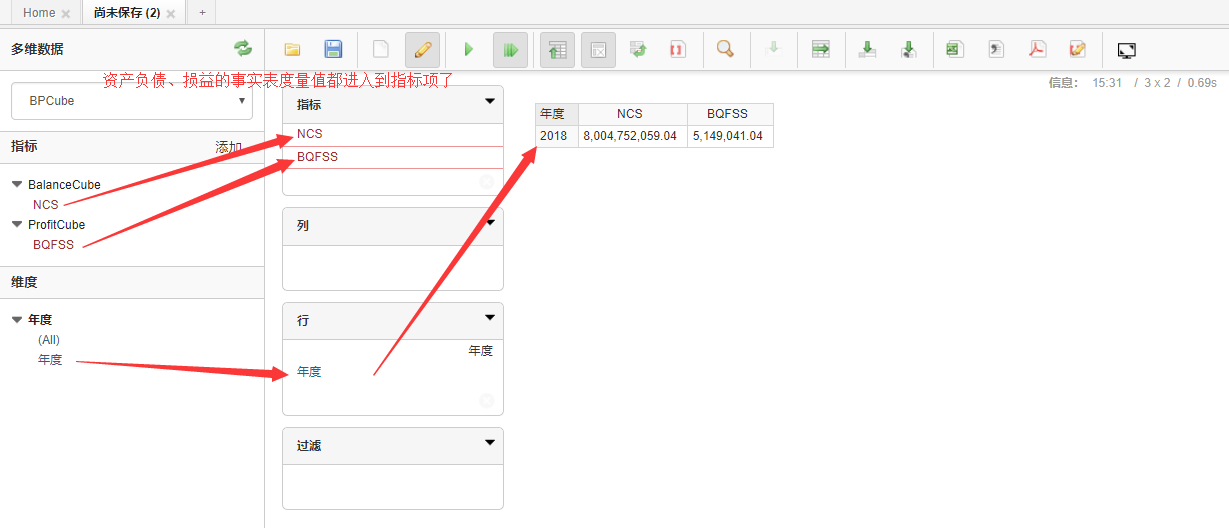
至此,通过Mondrian构建星座模型的工作已成功完成,具体自己调整可以继续。
附上Schema文件
<Schema name="FinSchema" description="财务模式" measuresCaption="财务模式">

  <Dimension type="StandardDimension" visible="true" name="年度">

    <Hierarchy visible="true" hasAll="true" allMemberName="所有年度" allMemberCaption="所有年度" primaryKey="年度">

      <Table name="年表" schema="dbo" alias="">

      </Table>

      <Level name="年度" visible="true" column="年度" nameColumn="年度" type="Integer" uniqueMembers="false">

      </Level>

    </Hierarchy>

  </Dimension>

  <Cube name="BalanceCube" caption="资产负债Cube" visible="true" description="资产负债Cube" cache="true" enabled="true">

    <Table name="资产负债视图" schema="dbo">

    </Table>

    <Dimension type="StandardDimension" visible="true" highCardinality="false" name="组织" caption="组织编码">

      <Hierarchy visible="true" hasAll="true" allMemberName="所有组织" allMemberCaption="所有组织">

        <Level name="组织编码" visible="true" column="组织编码" nameColumn="组织名称" type="String" uniqueMembers="false" levelType="Regular" hideMemberIf="Never">

        </Level>

        <Level name="组织名称" visible="true" column="组织名称" type="String" uniqueMembers="false" levelType="Regular" hideMemberIf="Never">

        </Level>

      </Hierarchy>

    </Dimension>

    <Dimension type="StandardDimension" visible="true" highCardinality="false" name="账簿">

      <Hierarchy name="BookHierarchy" visible="true" hasAll="true" allMemberName="所有账簿" allMemberCaption="所有账簿">

        <Level name="账簿名称" visible="true" column="账簿名称" type="String" uniqueMembers="false" levelType="Regular" hideMemberIf="Never">

        </Level>

      </Hierarchy>

    </Dimension>

    <Dimension type="StandardDimension" visible="true" highCardinality="false" name="项目分类">

      <Hierarchy name="ItemTypeHierarchy" visible="true" hasAll="true" allMemberName="所有分类" allMemberCaption="所有分类">

        <Level name="项目分类" visible="true" column="项目分类" type="String" uniqueMembers="false" levelType="Regular" hideMemberIf="Never">

        </Level>

      </Hierarchy>

    </Dimension>

    <Dimension type="StandardDimension" visible="true" highCardinality="false" name="项目名称">

      <Hierarchy name="ItemHierarchy" visible="true" hasAll="true" allMemberName="所有项目" allMemberCaption="所有项目">

        <Level name="项目名称" visible="true" column="项目名称" type="String" uniqueMembers="false" levelType="Regular" hideMemberIf="Never">

        </Level>

      </Hierarchy>

    </Dimension>

    <DimensionUsage source="年度" name="年度" visible="true" foreignKey="年">

    </DimensionUsage>

    <Measure name="NCS" column="年初数" aggregator="sum" visible="true">

    </Measure>

    <Measure name="QMS" column="期末数" aggregator="sum" visible="true">

    </Measure>

  </Cube>

  <Cube name="ProfitCube" caption="利润Cube" visible="true" description="利润Cube" cache="true" enabled="true">

    <Table name="损益视图" schema="dbo">

    </Table>

    <Dimension type="StandardDimension" visible="true" highCardinality="false" name="组织">

      <Hierarchy visible="true" hasAll="true" allMemberName="所有组织" allMemberCaption="所有组织">

        <Level name="组织编码" visible="true" column="组织编码" nameColumn="组织编码" type="String" uniqueMembers="false" levelType="Regular" hideMemberIf="Never">

        </Level>

        <Level name="组织名称" visible="true" column="组织名称" type="String" uniqueMembers="false" levelType="Regular" hideMemberIf="Never">

        </Level>

      </Hierarchy>

    </Dimension>

    <Dimension type="StandardDimension" visible="true" highCardinality="false" name="账簿">

      <Hierarchy visible="true" hasAll="true" allMemberName="所有账簿" allMemberCaption="所有账簿">

        <Level name="账簿名称" visible="true" column="账簿名称" type="String" uniqueMembers="false" levelType="Regular" hideMemberIf="Never">

        </Level>

      </Hierarchy>

    </Dimension>

    <Dimension type="StandardDimension" visible="true" highCardinality="false" name="项目名称">

      <Hierarchy visible="true" hasAll="true" allMemberName="所有项目名称" allMemberCaption="所有项目名称">

        <Level name="项目名称" visible="true" column="项目名称" type="String" uniqueMembers="false" levelType="Regular" hideMemberIf="Never">

        </Level>

      </Hierarchy>

    </Dimension>

    <DimensionUsage source="年度" name="年度" visible="true" foreignKey="年">

    </DimensionUsage>

    <Measure name="BQFSS" column="本期发生数" datatype="Numeric" aggregator="sum" visible="true">

    </Measure>

  </Cube>

  <VirtualCube enabled="true" name="BPCube" description="财务资产负债损益模型">

    <VirtualCubeDimension name="年度">

    </VirtualCubeDimension>

    <VirtualCubeMeasure cubeName="BalanceCube" name="[Measures].[NCS]" visible="true">

    </VirtualCubeMeasure>

    <VirtualCubeMeasure cubeName="ProfitCube" name="[Measures].[BQFSS]" visible="true">

    </VirtualCubeMeasure>

  </VirtualCube>

</Schema>
使用Mondrian Virtual OLAP Cube 实现星座模型并在saiku展现分析的更多相关文章
- 在Mondrian Virtual OLAP Cube中观察星座模型多事实表度量值的聚合
这样设置的Schema文件会怎么样呢?用Saiku预览一下. 如果这时候想同时引用两个项目进行计算就会出问题了.那么这种情况怎么解决? 参考网上一段实现思路 <VirtualCube name= ...
- C1WPF制作OLAP Cube浏览工具
经过前期一段时间对WPF的学习了解,相信大家对WPF有了一定的了解.今天我们一起来了解使用Component One(简称C1)的WPF控件制作CUBE浏览工具.其实这个OLAP控件官方已经有了很详细 ...
- JPMML解析PMML模型并导入数据进行分析生成结果
JPMML解析Random Forest模型并使用其预测分析 导入Jar包 maven 的pom.xml文件中添加jpmml的依赖 <dependency> <groupId> ...
- YII用户注冊和用户登录(三)之模型中规则制定和分析
3 模型中规则制定和分析 YII模型主要分为两类,一个数据模型,处理和数据库相关的增删改查.继承CActiveRecord.还有一个是表单模型,继承CFormModel.不与数据库进行交互.操作与数据 ...
- [iTyran原创]iPhone中OpenGL ES显示3DS MAX模型之一:OBJ格式分析
[iTyran原创]iPhone中OpenGL ES显示3DS MAX模型之一:OBJ文件格式分析作者:yuezang - iTyran 在iOS的3D开发中常常需要导入通过3DS MAX之类 ...
- 【原创】linux设备模型之kset/kobj/ktype分析
背 景 Read the fucking source code! --By 鲁迅 A picture is worth a thousand words. --By 高尔基 说明: Kernel版本 ...
- OLAP引擎:基于Presto组件进行跨数据源分析
一.Presto概述 1.Presto简介 Presto是一个开源的分布式SQL查询引擎,适用于交互式分析查询,数据量支持GB到PB字节,Presto虽然具备解析SQL的能力,但它并不属于标准的数据库 ...
- 最大熵模型(Maximum Entropy Models)具体分析
因为本篇文章公式较多,csdn博客不同意复制公式,假设将公式一一保存为图片在上传太繁琐了,就用word排好版后整页转为图片传上来了.如有错误之处.欢迎指正.
- Java内存模型之从JMM角度分析DCL
DCL,即Double Check Lock,中卫双重检查锁定.其实DCL很多人在单例模式中用过,LZ面试人的时候也要他们写过,但是有很多人都会写错.他们为什么会写错呢?其错误根源在哪里?有什么解决方 ...
随机推荐
- Python学习笔记_读Excel去重
读取一个Excel文件,按照某列关键字,如果有重复则去掉 这里不介绍所有的解决办法,只是列出一个办法. 软件环境: OS:Win10 64位 Python 3.7 测试路径:D:\Work\Pytho ...
- ssh 连接缓慢解决方法
ssh 连接缓慢解决方法 摘自:https://blog.csdn.net/qq_14821541/article/details/61915589 2017年03月13日 12:00:38 所以怎样 ...
- Mybatis:传入参数方式以及#{}与${}的区别
一.在MyBatis的select.insert.update.delete这些元素中都提到了parameterType这个属性.MyBatis现在可以使用的parameterType有基本数据类型和 ...
- centOS下JDK1.8的安装
1.下载JDK1.8 http://www.oracle.com/technetwork/java/javase/downloads/jdk8-downloads-2133151.html 有两种格式 ...
- C# 加密(Encrypt) 解密(Decrypt) 操作类 java与 C# 可以相互加密解密
public sealed class EncryptUtils { #region Base64加密解密 /// <summary> /// Base64加密 /// </summ ...
- 【小梅哥FPGA进阶教程】第十四章 TFT屏显示图片
十四.TFT屏显示图片 本文由杭电网友曾凯峰贡献,特此感谢 学习了小梅哥的TFT显示屏驱动设计后,想着在此基础上通过TFT屏显示一张图片,有了这个想法就开始动工了.首先想到是利用FPGA内部ROM存储 ...
- iTerm2 + Oh My Zsh 打造舒适终端体验
iTerm2 + Oh My Zsh 打造舒适终端体验 写在前面 最终效果图: 因为powerline以及homebrew均需要安装command line tool,网络条件优越的同学在执行本文下面 ...
- jira项目管理平台搭建
参考文档:http://www.cnblogs.com/ilanni/p/6200875.html 一.环境准备 jira7.2的运行是需要依赖java环境的,也就是说需要安装jdk并且要是1.8 ...
- java学习(六)面向对象 final关键字 多态
1.被fnial修饰的方法不能被重写,常见的为修饰类,方法,变量 /* final可以修饰类,方法,变量 特点: final可以修饰类,该类不能被继承. final可以修饰方法,该方法不能被重写.(覆 ...
- [LeetCode 题解]: Two Sum
前言 [LeetCode 题解]系列传送门: http://www.cnblogs.com/double-win/category/573499.html 1.题目描述 Given an a ...