
Android有趣的全透明效果--Activity及Dialog的全透明(附android系统自带图标大全)[转]
原文地址:http://blog.csdn.net/sodino/article/details/5822147
1.Activity全透明
同学zzm给了这个有趣的代码,现在公布出来。
先在res/values下建colors.xml文件,写入:
<? xml   version = "1.0"   encoding = "UTF-8" ?>

< resources >

    < color   name = "transparent" > #9000 </ color >

</ resources >
这个值设定了整个界面的透明度,为了看得见效果,现在设为透明度为56%(9/16)左右。
再在res/values/下建styles.xml,设置程序的风格
<?xml version="1.0" encoding="utf-8"?>

<resources>

    <style name="Transparent">

        <item name="android:windowBackground">@color/transparent</item>

        <item name="android:windowIsTranslucent">true</item>

        <item name="android:windowAnimationStyle">@+android:style/Animation.Translucent</item>

    </style>

</resources>
最后一步,把这个styles.xml用在相应的Activity上。即在AndroidManifest.xml中的任 意<activity>标签中添加
- android:theme = "@style/transparent"
如果想设置所有的activity都使用这个风格,可以把这句标签语句添加在<application>中。
最后运行程序,哈哈,是不是发现整个界面都被蒙上一层半透明了。最后可以把背景色#9000换成#0000,运行程序后,就全透明了,看得见背景下 的所有东西可以却都操作无效。呵呵....
2.Dialog全透明
1.准备保留边框的全透明素材如下图:

2.在values中新建一styles.xml文件,内容如下:
<?xml version="1.0" encoding="UTF-8"?>

<resources>

    <style name="TANCStyle" parent="@android:style/Theme.Dialog">

        <!-- 更换背景图片实现全透明 -->

        <item name="android:windowBackground">@drawable/panel_background_sodino1</item>

        <!-- 屏幕背景不变暗 -->

        <item name="android:backgroundDimEnabled">false</item>

        <!-- 更改对话框标题栏 -->

        <item name="android:windowTitleStyle">@style/TitleStyle</item>

    </style>

    <style name="TitleStyle" parent="@android:style/DialogWindowTitle">

        <item name="android:textAppearance">@style/TitleText</item>

    </style>

    <style name="TitleText" parent="@android:style/TextAppearance.DialogWindowTitle">

        <!-- 设置Dialog标题栏文字颜色。 -->

        <item name="android:textColor">#000</item>

    </style>

</resources>
3.在layout文件夹下新建一文件句为main_dialog.xml,内容如下:
<?xml version="1.0" encoding="UTF-8"?>

<RelativeLayout xmlns:android="http://schemas.android.com/apk/res/android"

    android:layout_width="wrap_content"

    android:layout_height="wrap_content"

    android:background="#0000">

    <ScrollView android:id="@+id/ScrollView01"

        android:layout_width="wrap_content"

        android:layout_height="200px"

        android:layout_below="@+id/ImageView01"

        android:background="#0000">

        <TextView android:id="@+id/TextView01"

            android:text="SodinoText"

            android:textColor="#f000"

            android:layout_width="wrap_content"

            android:layout_height="wrap_content"

            android:background="#0000"

        ></TextView>

    </ScrollView>

    <Button android:id="@+id/btnCancel"

        android:layout_below="@id/ScrollView01"

        android:layout_width="wrap_content"

        android:layout_height="wrap_content"

        android:layout_centerHorizontal="true"

        android:text="Cancel">

    </Button>

</RelativeLayout>
4.Activity代码如下:
package lab.sodino.tanc;

import android.app.Activity;

import android.app.Dialog;

import android.os.Bundle;

import android.view.View;

import android.widget.Button;

import android.widget.TextView;

public class TANCAct extends Activity {

    /** Called when the activity is first created. */

    @Override

    public void onCreate(Bundle savedInstanceState) {

        super.onCreate(savedInstanceState);

        setContentView(R.layout.main);

        Button btnShow = (Button) findViewById(R.id.btnShow);

        btnShow.setOnClickListener(new Button.OnClickListener() {

            public void onClick(View view) {

                showTANC(

                        "This is my custom dialog box",

                        "TextContent/nWhen a dialog is requested for the first time, Android calls onCreateDialog(int)  from your Activity, which is where you should instantiate the Dialog. This callback method is passed the same ID that you passed to showDialog(int). After you create the Dialog, return the object at the end of the method.",

                        "http://blog.csdn.net/sodino");

            }

        });

    }

    private void showTANC(String header, String content, String url) {

        final Dialog dialog = new Dialog(this, R.style.TANCStyle);

        dialog.setContentView(R.layout.main_dialog);

        dialog.setTitle(header);

        dialog.setCancelable(true);

        TextView textView01 = (TextView) dialog.findViewById(R.id.TextView01);

        textView01.setText(content + content + content);

        Button btnCancel = (Button) dialog.findViewById(R.id.btnCancel);

        btnCancel.setOnClickListener(new Button.OnClickListener() {

            public void onClick(View view) {

                dialog.cancel();

            }

        });

        dialog.show();

    }

}
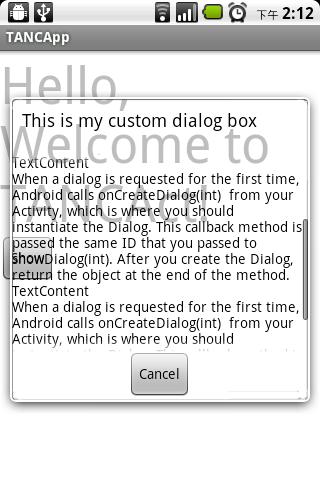
最后效果图:
Android有趣的全透明效果--Activity及Dialog的全透明(附android系统自带图标大全)[转]的更多相关文章
- 茴香豆的第五种写法---设置ExpandableListView系统自带图标按下效果
1 编写groupindicator_selector.xml如下: <?xml version="1.0" encoding="utf-8"?> ...
- android系统自带图标
android:src="@android:drawable/ic_media_rew"
- android系统自带图标集合(android.R.drawable查看)
alert_dark_frame alert_light_frame arrow_down_float arrow_up_float bottom_bar btn_default btn_defaul ...
- 【Unity Shader】(五) ------ 透明效果之半透明效果的实现及原理
笔者使用的是 Unity 2018.2.0f2 + VS2017,建议读者使用与 Unity 2018 相近的版本,避免一些因为版本不一致而出现的问题 [Unity Shader学习笔记](三) -- ...
- Unity3D学习(八):《Unity Shader入门精要》——透明效果
前言 在实时渲染中要实现透明效果,通常会在渲染模型时控制它的透明通道. Unity中通常使用两种方法来实现透明 :(1)透明度测试(AlphaTest)(2)透明度混合(AlphaBlend).前者往 ...
- Android基础总结(六)Activity
创建第二个Activity(掌握) 需要在清单文件中为其配置一个activity标签 标签中如果带有这个子节点,则会在系统中多创建一个快捷图标 <intent-filter> <ac ...
- Android 编程下实现 Activity 的透明效果
实现方式一(使用系统透明样式) 通过配置 Activity 的样式来实现,在 AndroidManifest.xml 找到要实现透明效果的 Activity,在 Activity 的配置中添加如下的代 ...
- Android学习之Android 5.0分享动画实现微信点击全屏效果
Android5.0过渡动画,请看 http://blog.csdn.net/qq_16131393/article/details/51112772 今天用分享动画实现微信点击全屏效果 本文源代码下 ...
- Android课程---Android设置透明效果的三种方法(转)
1.使用Android系统自带的透明效果资源 <Button android:background="@android:color/transparent"/> ...
随机推荐
- C#如何:启用和禁用自动绑定重定向 (微软)
https://msdn.microsoft.com/zh-cn/library/2fc472t2.aspx 如何:启用和禁用自动绑定重定向 .NET Framework (current versi ...
- Django 组件-用户认证
用户认证 auth模块 from django.contrib import auth 1.1 .authenticate() 提供了用户认证,即验证用户名以及密码是否正确,一般需要username ...
- NoSQL v.s. RDB
RDB 相对于 NoSQL 的劣势: 1. 集中式单点架构 2. 固定的数据模型: 可扩展性差,缺乏处理半结构化和非结构化数据的能力. 3. 扩容成本高:处理海量数据时存在性能瓶颈,大数据时代的存储需 ...
- 初学java记录
记录一: if语句: if(x < y) System.out.println("x is less than y"); 记录二: 强制转换字符类型赋值的方法: num2= ...
- JAVA代码实现从文件写入东西后有读出来=========FileInputStream
总结: 这个原理是,先把for循环里的数从程序读到文件里,然后把文件把内容读到程序里 package com.a.b; import java.io.FileInputStream; import j ...
- 【学徒日记】Unity 动画调用事件
http://note.youdao.com/noteshare?id=a15f965fc57a0b25c87ee09388cf0f4a 具体内容看上面的链接. 1. 在脚本里写一个函数,它的参数只能 ...
- mydumper 找不到libmysqlclient.so.20
报错信息: mydumper: error while loading shared libraries: libmysqlclient.so.20: cannot open shared objec ...
- CocoStudio资源区导入Plist/PSD文件
这两种文件在使用中和普通文件稍有不同,下作简单介绍.如有不适的地方欢迎批评指正. 首先简单说一下Plist文件,Plist文件通常用于储存用户设置,也可以用于存储捆绑的信息,该功能在旧式的Mac OS ...
- Apache 的编译安装
直接看步骤: 1.安装必备环境:gcc.pcre .................................. 2.安装apr.apr-util 3.解压编译安装Apache: ./confi ...
- php switch
php switch switch用法类型与if,但是为了方便 不用写那么多个elseif.所以要判断 多个变量的时候我们可以使用switch <?php $email="admin& ...