
AntZipUtils【基于Ant的Zip压缩解压缩工具类】
版权声明:本文为HaiyuKing原创文章,转载请注明出处!
前言
Android 压缩解压zip文件一般分为两种方式:
- 基于JDK的Zip压缩工具类
该版本存在问题:压缩时如果目录或文件名含有中文,压缩后会变成乱码;
使用Java的zip包可以进行简单的文件压缩和解压缩处理时,但是遇到包含中文汉字目录或者包含多层子目录的复杂目录结构时,容易出现各种各样的问题。
- 基于Ant的Zip压缩工具类
需要第三方JAR包:Apache的ant.jar;
解决了上面存在的问题。
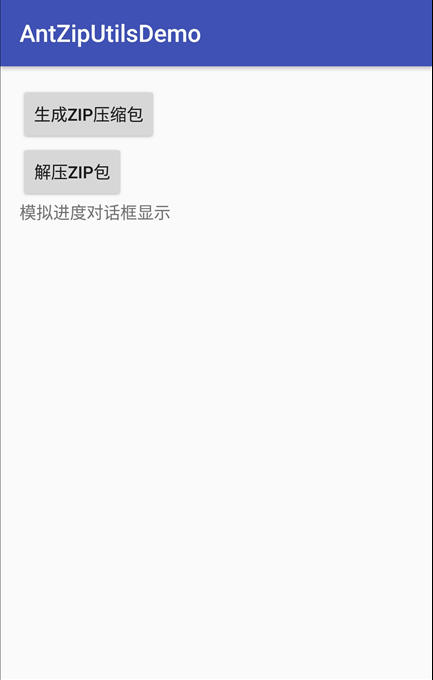
效果图
代码分析
常用的方法:
压缩文件:
makeZip(String[] srcFilePaths, String zipPath)
解压文件:
unZip(String zipFilePath, String targetDirPath)
使用步骤
一、项目组织结构图
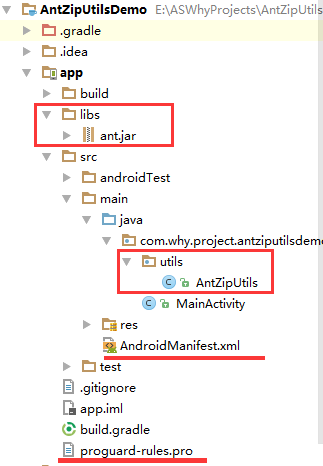
注意事项:
1、 导入类文件后需要change包名以及重新import R文件路径
2、 Values目录下的文件(strings.xml、dimens.xml、colors.xml等),如果项目中存在,则复制里面的内容,不要整个覆盖
二、导入步骤
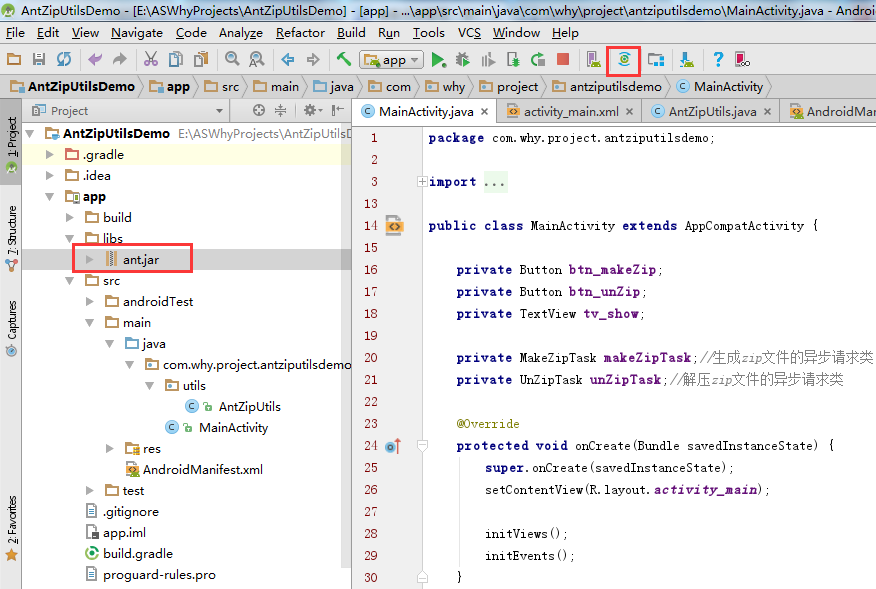
将相关jar包复制到项目的libs目录下并同步Gradle File
jar包下载地址:链接:http://pan.baidu.com/s/1c1DlLc8 密码:8aq7
将AntZipUtils文件复制到项目中
package com.why.project.antziputilsdemo.utils;

import android.util.Log;

import org.apache.tools.zip.ZipEntry;

import org.apache.tools.zip.ZipFile;

import org.apache.tools.zip.ZipOutputStream;

import java.io.BufferedInputStream;

import java.io.BufferedOutputStream;

import java.io.File;

import java.io.FileInputStream;

import java.io.FileNotFoundException;

import java.io.FileOutputStream;

import java.io.IOException;

import java.io.InputStream;

import java.util.Enumeration;

import java.util.zip.ZipException;

/**

 * @Create By HaiyuKing

 * @Used 基于Ant的Zip压缩工具类

 * @参考资料 http://yunzhu.iteye.com/blog/1480293

 * http://www.cnblogs.com/wainiwann/archive/2013/07/17/3196196.html

 * http://blog.csdn.net/growing_tree/article/details/46009813

 * http://www.jb51.net/article/69773.htm

 */

public class AntZipUtils {

    public static final String ENCODING_DEFAULT = "UTF-8";

    public static final int BUFFER_SIZE_DIFAULT = 1024;

    /**生成ZIP压缩包【建议异步执行】

     * @param srcFilePaths - 要压缩的文件路径字符串数组【如果压缩一个文件夹,则只需要把文件夹目录放到一个数组中即可】

     * @param zipPath - 生成的Zip路径*/

    public static void makeZip(String[] srcFilePaths, String zipPath)throws Exception {

        makeZip(srcFilePaths, zipPath, ENCODING_DEFAULT);

    }

    /**生成ZIP压缩包【建议异步执行】

     * @param srcFilePaths - 要压缩的文件路径字符串数组

     * @param zipPath - 生成的Zip路径

     * @param encoding - 编码格式*/

    public static void makeZip(String[] srcFilePaths, String zipPath,String encoding) throws Exception {

        File[] inFiles = new File[srcFilePaths.length];

        for (int i = 0; i < srcFilePaths.length; i++) {

            inFiles[i] = new File(srcFilePaths[i]);

        }

        makeZip(inFiles, zipPath, encoding);

    }

    /**生成ZIP压缩包【建议异步执行】

     * @param srcFiles - 要压缩的文件数组

     * @param zipPath - 生成的Zip路径*/

    public static void makeZip(File[] srcFiles, String zipPath) throws Exception {

        makeZip(srcFiles, zipPath, ENCODING_DEFAULT);

    }

    /**生成ZIP压缩包【建议异步执行】

     * @param srcFiles - 要压缩的文件数组

     * @param zipPath - 生成的Zip路径

     * @param encoding - 编码格式*/

    public static void makeZip(File[] srcFiles, String zipPath, String encoding)

            throws Exception {

        ZipOutputStream zipOut = new ZipOutputStream(new BufferedOutputStream(new FileOutputStream(zipPath)));

        zipOut.setEncoding(encoding);

        for (int i = 0; i < srcFiles.length; i++) {

            File file = srcFiles[i];

            doZipFile(zipOut, file, file.getParent());

        }

        zipOut.flush();

        zipOut.close();

    }

    private static void doZipFile(ZipOutputStream zipOut, File file, String dirPath) throws FileNotFoundException, IOException {

        if (file.isFile()) {

            BufferedInputStream bis = new BufferedInputStream(new FileInputStream(file));

            String zipName = file.getPath().substring(dirPath.length());

            while (zipName.charAt(0) == '\\' || zipName.charAt(0) == '/') {

                zipName = zipName.substring(1);

            }

            ZipEntry entry = new ZipEntry(zipName);

            zipOut.putNextEntry(entry);

            byte[] buff = new byte[BUFFER_SIZE_DIFAULT];

            int size;

            while ((size = bis.read(buff, 0, buff.length)) != -1) {

                zipOut.write(buff, 0, size);

            }

            zipOut.closeEntry();

            bis.close();

        } else {

            File[] subFiles = file.listFiles();

            for (File subFile : subFiles) {

                doZipFile(zipOut, subFile, dirPath);

            }

        }

    }

    /**解压ZIP包【建议异步执行】

     * @param zipFilePath ZIP包的路径

     * @param targetDirPath 指定的解压缩文件夹地址 */

    public static void unZip(String zipFilePath, String targetDirPath)throws IOException,Exception {

        unZip(new File(zipFilePath), targetDirPath);

    }

    /**解压ZIP包【建议异步执行】

     * @param zipFile ZIP包的文件

     * @param targetDirPath 指定的解压缩目录地址 */

    public static void unZip(File zipFile, String targetDirPath) throws IOException,Exception {

        //先删除,后添加

        if (new File(targetDirPath).exists()) {

            new File(targetDirPath).delete();

        }

        new File(targetDirPath).mkdirs();

        ZipFile zip = new ZipFile(zipFile);

        Enumeration<ZipEntry> entries = (Enumeration<ZipEntry>) zip.getEntries();

        while (entries.hasMoreElements()) {

            ZipEntry zipEntry = entries.nextElement();

            if (zipEntry.isDirectory()) {

                // TODO

            } else {

                String zipEntryName = zipEntry.getName();

                if(zipEntryName.contains("../")){//2016-08-25

                    throw new Exception("unsecurity zipfile");

                }else{

                    if (zipEntryName.indexOf(File.separator) > 0) {

                        String zipEntryDir = zipEntryName.substring(0, zipEntryName.lastIndexOf(File.separator) + 1);

                        String unzipFileDir = targetDirPath + File.separator + zipEntryDir;

                        File unzipFileDirFile = new File(unzipFileDir);

                        if (!unzipFileDirFile.exists()) {

                            unzipFileDirFile.mkdirs();

                        }

                    }

                    InputStream is = zip.getInputStream(zipEntry);

                    FileOutputStream fos = new FileOutputStream(new File(targetDirPath + File.separator + zipEntryName));

                    byte[] buff = new byte[BUFFER_SIZE_DIFAULT];

                    int size;

                    while ((size = is.read(buff)) > 0) {

                        fos.write(buff, 0, size);

                    }

                    fos.flush();

                    fos.close();

                    is.close();

                }

            }

        }

    }

    /**

     * 使用Apache工具包解压缩zip文件 【使用Java的zip包可以进行简单的文件压缩和解压缩处理时,但是遇到包含中文汉字目录或者包含多层子目录的复杂目录结构时,容易出现各种各样的问题。】

     * @param sourceFilePath 指定的解压缩文件地址

     * @param targetDirPath  指定的解压缩目录地址

     * @throws IOException

     * @throws FileNotFoundException

     * @throws ZipException

     */

    public static void uncompressFile(String sourceFilePath, String targetDirPath)throws IOException, FileNotFoundException, ZipException,Exception{

       BufferedInputStream bis;

       ZipFile zf = new ZipFile(sourceFilePath, "GBK");

       Enumeration entries = zf.getEntries();

       while (entries.hasMoreElements()){

           ZipEntry ze = (ZipEntry) entries.nextElement();

           String entryName = ze.getName();

           if(entryName.contains("../")){//2016-08-25

                throw new Exception("unsecurity zipfile");

           }else{

               String path = targetDirPath + File.separator + entryName;

               Log.d("AntZipUtils", "path="+path);

               if (ze.isDirectory()){

                   Log.d("AntZipUtils","正在创建解压目录 - " + entryName);

                   File decompressDirFile = new File(path);

                   if (!decompressDirFile.exists()){

                       decompressDirFile.mkdirs();

                   }

               } else{

                   Log.d("AntZipUtils","正在创建解压文件 - " + entryName);

                   String fileDir = path.substring(0, path.lastIndexOf(File.separator));

                   Log.d("AntZipUtils", "fileDir="+fileDir);

                   File fileDirFile = new File(fileDir);

                   if (!fileDirFile.exists()){

                       fileDirFile.mkdirs();

                   }

                   BufferedOutputStream bos = new BufferedOutputStream(new FileOutputStream(targetDirPath + File.separator + entryName));

                   bis = new BufferedInputStream(zf.getInputStream(ze));

                   byte[] readContent = new byte[1024];

                   int readCount = bis.read(readContent);

                   while (readCount != -1){

                       bos.write(readContent, 0, readCount);

                       readCount = bis.read(readContent);

                   }

                   bos.close();

               }

           }

       }

       zf.close();

    }

}
AntZipUtils.java
在AndroidManifest.xml中添加权限
<?xml version="1.0" encoding="utf-8"?>

<manifest xmlns:android="http://schemas.android.com/apk/res/android"

          package="com.why.project.antziputilsdemo">

    <!-- ======================(AntZipUtils)========================== -->

    <!-- 在SD卡中创建与删除文件权限 -->

    <uses-permission android:name="android.permission.MOUNT_UNMOUNT_FILESYSTEMS" />

    <!-- 向SD卡写入数据权限 -->

    <uses-permission android:name="android.permission.REORDER_TASKS"/>

    <uses-permission android:name="android.permission.READ_EXTERNAL_STORAGE"/>

    <uses-permission android:name="android.permission.WRITE_SETTINGS"/>

    <uses-permission android:name="android.permission.WRITE_EXTERNAL_STORAGE"/>

    <application

        android:allowBackup="true"

        android:icon="@mipmap/ic_launcher"

        android:label="@string/app_name"

        android:supportsRtl="true"

        android:theme="@style/AppTheme">

        <activity android:name=".MainActivity">

            <intent-filter>

                <action android:name="android.intent.action.MAIN"/>

                <category android:name="android.intent.category.LAUNCHER"/>

            </intent-filter>

        </activity>

    </application>

</manifest>
添加运行时权限的处理(本demo中采用的是修改targetSDKVersion=22)
三、使用方法
package com.why.project.antziputilsdemo;

import android.os.AsyncTask;

import android.os.Bundle;

import android.os.Environment;

import android.support.v7.app.AppCompatActivity;

import android.util.Log;

import android.view.View;

import android.widget.Button;

import android.widget.TextView;

import com.why.project.antziputilsdemo.utils.AntZipUtils;

public class MainActivity extends AppCompatActivity {

    private Button btn_makeZip;

    private Button btn_unZip;

    private TextView tv_show;

    private MakeZipTask makeZipTask;//生成zip文件的异步请求类

    private UnZipTask unZipTask;//解压zip文件的异步请求类

    @Override

    protected void onCreate(Bundle savedInstanceState) {

        super.onCreate(savedInstanceState);

        setContentView(R.layout.activity_main);

        initViews();

        initEvents();

    }

    @Override

    public void onPause() {

        super.onPause();

        //cancel方法只是将对应的AsyncTask标记为cancel状态,并不是真正的取消线程的执行,在Java中并不能粗暴的停止线程,只能等线程执行完之后做后面的操作

        if (makeZipTask != null && makeZipTask.getStatus() == AsyncTask.Status.RUNNING) {

            makeZipTask.cancel(true);

        }

        if (unZipTask != null && unZipTask.getStatus() == AsyncTask.Status.RUNNING) {

            unZipTask.cancel(true);

        }

    }

    private void initViews() {

        btn_makeZip = (Button) findViewById(R.id.btn_makeZip);

        btn_unZip = (Button) findViewById(R.id.btn_unZip);

        tv_show = (TextView) findViewById(R.id.tv_show);

    }

    private void initEvents() {

        btn_makeZip.setOnClickListener(new View.OnClickListener() {

            @Override

            public void onClick(View v) {

                //生成ZIP压缩包【建议异步执行】

                makeZipTask = new MakeZipTask();

                makeZipTask.execute();

            }

        });

        btn_unZip.setOnClickListener(new View.OnClickListener() {

            @Override

            public void onClick(View v) {

                //解压ZIP包【建议异步执行】

                unZipTask = new UnZipTask();

                unZipTask.execute();

            }

        });

    }

    /**

     * 压缩文件的异步请求任务

     *

     */

    public class MakeZipTask extends AsyncTask<String, Void, String>{

        @Override

        protected void onPreExecute() {

            //显示进度对话框

            //showProgressDialog("");

            tv_show.setText("正在压缩...");

        }

        @Override

        protected String doInBackground(String... params) {

            String data = "";

            if(! isCancelled()){

                try {

                    String[] srcFilePaths = new String[1];

                    srcFilePaths[0] = Environment.getExternalStorageDirectory() + "/why";

                    String zipPath = Environment.getExternalStorageDirectory() + "/why.zip";

                    AntZipUtils.makeZip(srcFilePaths,zipPath);

                } catch (Exception e) {

                    e.printStackTrace();

                }

            }

            return data;

        }

        @Override

        protected void onPostExecute(String result) {

            super.onPostExecute(result);

            if(isCancelled()){

                return;

            }

            try {

                Log.w("MainActivity","result="+result);

            }catch (Exception e) {

                if(! isCancelled()){

                    //showShortToast("文件压缩失败");

                    tv_show.setText("文件压缩失败");

                }

            } finally {

                if(! isCancelled()){

                    //隐藏对话框

                    //dismissProgressDialog();

                    tv_show.setText("压缩完成");

                }

            }

        }

    }

    /**

     * 解压文件的异步请求任务

     *

     */

    public class UnZipTask extends AsyncTask<String, Void, String>{

        @Override

        protected void onPreExecute() {

            //显示进度对话框

            //showProgressDialog("");

            tv_show.setText("正在解压...");

        }

        @Override

        protected String doInBackground(String... params) {

            String data = "";

            if(! isCancelled()){

                try {

                    String zipPath = Environment.getExternalStorageDirectory() + "/why.zip";

                    String targetDirPath = Environment.getExternalStorageDirectory() + "/why";

                    AntZipUtils.unZip(zipPath,targetDirPath);

                } catch (Exception e) {

                    e.printStackTrace();

                }

            }

            return data;

        }

        @Override

        protected void onPostExecute(String result) {

            super.onPostExecute(result);

            if(isCancelled()){

                return;

            }

            try {

                Log.w("MainActivity","result="+result);

            }catch (Exception e) {

                if(! isCancelled()){

                    //showShortToast("文件解压失败");

                    tv_show.setText("文件解压失败");

                }

            } finally {

                if(! isCancelled()){

                    //隐藏对话框

                    //dismissProgressDialog();

                    tv_show.setText("解压完成");

                }

            }

        }

    }

}
压缩文件效果:

解压文件效果:

混淆配置
#=====================基于Ant的Zip压缩工具类 =====================

#android Studio环境中不需要,eclipse环境中需要

#-libraryjars libs/ant.jar

#不混淆第三方jar包中的类

-dontwarn org.apache.tools.**

-keep class org.apache.tools.**{*;}
参考资料
【文件压缩】 Android Jar、Zip文件压缩和解压缩处理
项目demo下载地址
https://github.com/haiyuKing/AntZipUtilsDemo
AntZipUtils【基于Ant的Zip压缩解压缩工具类】的更多相关文章
- Java操作zip压缩和解压缩文件工具类
需要用到ant.jar(这里使用的是ant-1.6.5.jar) import java.io.File; import java.io.FileInputStream; import java.io ...
- ZIP解压缩工具类
import java.io.File; import org.apache.tools.ant.Project; import org.apache.tools.ant.taskdefs.Expan ...
- GZIP压缩、解压缩工具类
GZIP压缩.解压缩工具类: public class GZIPUtiles { public static String compress(String str) throws IOExceptio ...
- 使用JDK的zip编写打包工具类
JDK自带的zip AIP在java.util.zip包下面,主要有以下几个类: java.util.zip.ZipEntryjava.util.zip.ZipInputStreamjava.util ...
- 基于AQS实现的Java并发工具类
本文主要介绍一下基于AQS实现的Java并发工具类的作用,然后简单谈一下该工具类的实现原理.其实都是AQS的相关知识,只不过在AQS上包装了一下而已.本文也是基于您在有AQS的相关知识基础上,进行讲解 ...
- Qt之QuaZIP(zip压缩/解压缩)
简述 QuaZIP是使用Qt/C++对ZLIB进行简单封装的用于压缩及解压缩ZIP的开源库.适用于多种平台,利用它可以很方便的将单个或多个文件打包为zip文件,且打包后的zip文件可以通过其它工具打开 ...
- java代理使用 apache ant实现文件压缩/解压缩
[背景] 近日在研究web邮件下载功能,下载的邮件能够导入foxmail邮件client.可是批量下载邮件还需将邮件打成一个压缩包. 从网上搜索通过java实现文件压缩.解压缩有非常多现成的样例. [ ...
- Qt之zip压缩/解压缩(QuaZIP)
摘要: 简述 QuaZIP是使用Qt/C++对ZLIB进行简单封装的用于压缩及解压缩ZIP的开源库.适用于多种平台,利用它可以很方便的将单个或多个文件打包为zip文件,且打包后的zip文件可以通过其它 ...
- RDIFramework.NET ━ .NET快速信息化系统开发框架 V3.2 新增解压缩工具类ZipHelper
在项目对文件进行解压缩是非常常用的功能,对文件进行压缩存储或传输可以节省流量与空间.压缩文件的格式与方法都比较多,比较常用的国际标准是zip格式.压缩与解压缩的方法也很多,在.NET 2.0开始,在S ...
随机推荐
- 实现自动SSH连接
#!/usr/bin/expect set timeout 10 set username [lindex $argv 0] set password [lindex $argv 1] set hos ...
- 【爆料】-《西悉尼大学毕业证书》UWS一模一样原件
☞西悉尼大学毕业证书[微/Q:865121257◆WeChat:CC6669834]UC毕业证书/联系人Alice[查看点击百度快照查看][留信网学历认证&博士&硕士&海归&a ...
- Jmeter----【Mac电脑】环境配置与打开Jmeter界面
前提条件:打开Jmeter界面,首先需要安装java并配置环境变量. 第一步:下载并安装jdk和环境配置 java jdk下载:http://www.oracle.com/technetwork/ja ...
- C#8.0可空引用类型的使用注意要点
最近VS2019正式版发布了,装下来顺便试用了一下C#8.0,最大的看点应该就是可空引用类型了.不过C#8.0仍然处于Beta的状态,而且试用时也遇到了几个坑. 背景知识说明: 所谓的可空引用类型是指 ...
- 微服务架构 - 搭建docker本地镜像仓库并提供权限校验及UI界面
搭建docker本地镜像仓库并提供权限校验及UI界面 docker本地镜像仓库的作用跟maven私服差不多,特别是公司级或者是小组级开发好的docker仓库可以上传到本地镜像仓库中,需要用时,直接从本 ...
- STM32学习笔记(二):GPIO口工作原理
STM32每个IO口具有7个寄存器来控制,每个IO口都可以自由进行编程控制,我们编程实际上控制的是通过控制那7个寄存器来控制我们的IO口,我们可以通过编程控制IO口,把IO口配置成如下八种模式: 1. ...
- SpringCloud分布式微服务搭建(一)
本例子主要使用了eureka集群作为注册中心来保证高可用,客户端来做ribbon服务提供者的负载均衡. 负载均衡有两种,第一种是nginx,F5这种集中式的LB,对所有的访问按照某种策略分发. 第二种 ...
- AWVS12 介绍和安装详解 -- For Windows10
一.AWVS介绍: Acunetix Web Vulnerability Scanner,简称:AWVS,是一个自动化的Web安全测试工具,它可以扫描Web站点和Web应用. AWVS可以快速扫描SQ ...
- 【ODI】| 数据ETL:从零开始使用Oracle ODI完成数据集成(二)
前一节已经完成了Oracle数据库和ODI的安装,并已经为ODI在Oracle数据库中创建了两个用户,分别用于存放主资料库数据和工作资料库数据,在ODI中完成主资料库和工作资料库的创建,也分别为其创建 ...
- Java进阶篇设计模式之十二 ---- 备忘录模式和状态模式
前言 在上一篇中我们学习了行为型模式的策略模式(Strategy Pattern)和模板模式(Template Pattern).本篇则来学习下行为型模式的两个模式,备忘录模式(Memento Pat ...