
Tornadofx学习笔记(2)——FxRecyclerView控件的打造
Tornadofx是基于javafx的一个kotlin框架,用来写些电脑版的小程序
FxRecyclerView基于Scroll Pane控件,仿造Android中的RecyclerView,实现的一款tornadofx的控件
github
需求
由于我的之前做的几个项目都是那种类似下载列表的功能,蓝奏云批量下载和m3u8下载合并器
之所以抛弃了javafx的原因,是因为javafx中的动态添加控件比较麻烦,于是便是转到了tornadofx这个框架来。
tornadofx中动态添加控件的步骤虽然比javafx中要简单,但是,我还是觉得有些麻烦
于是我就参考了Android中的RecyclerView使用思路,打造出这个名为FxRecyclerView的控件,可以更加方便的动态进行控件的增删查改
功能介绍
- 动态添加ItemView
- 动态删除ItemView
- 动态更新itemView
- 快捷绑定单击/右击事件
功能演示
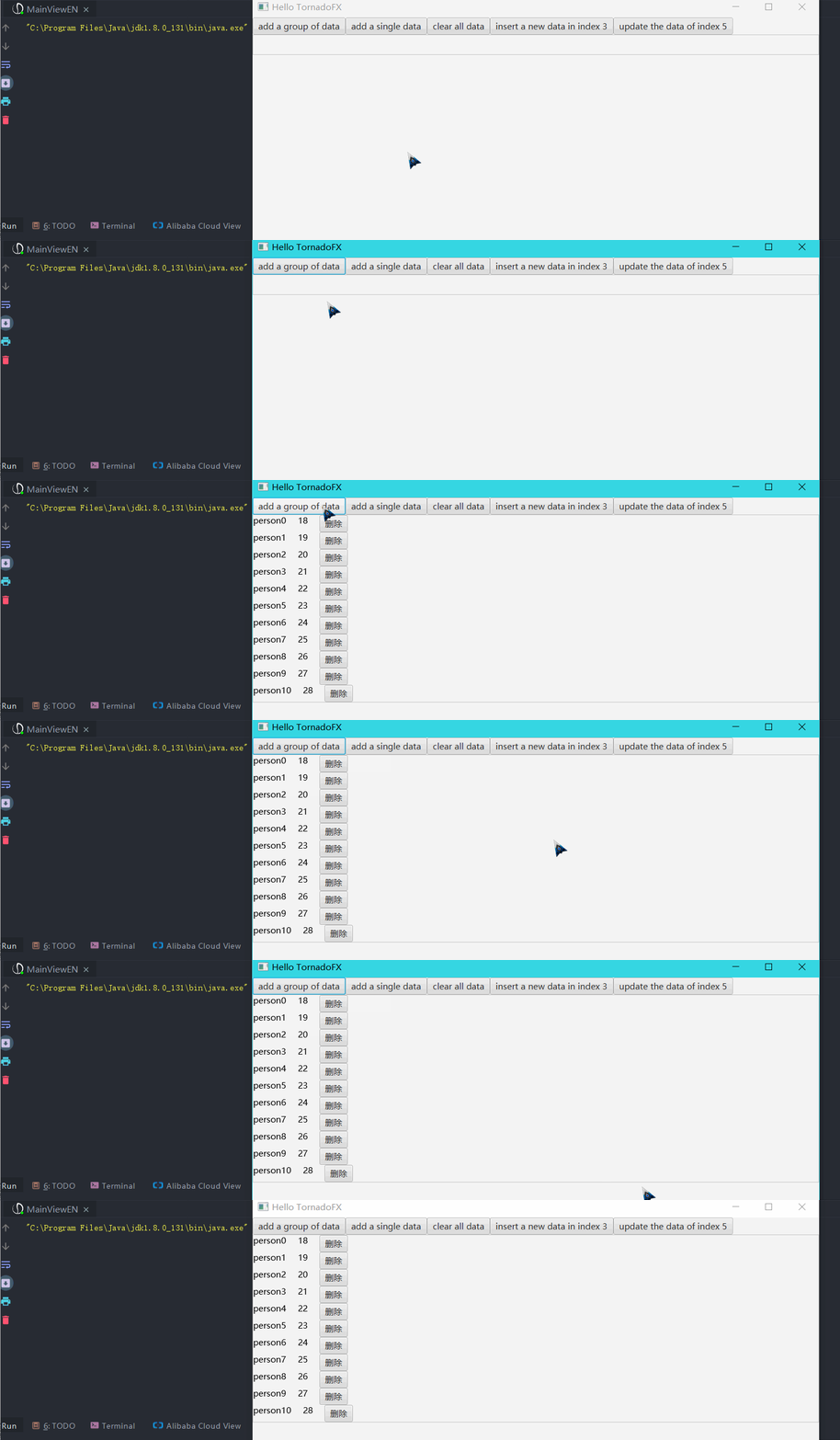
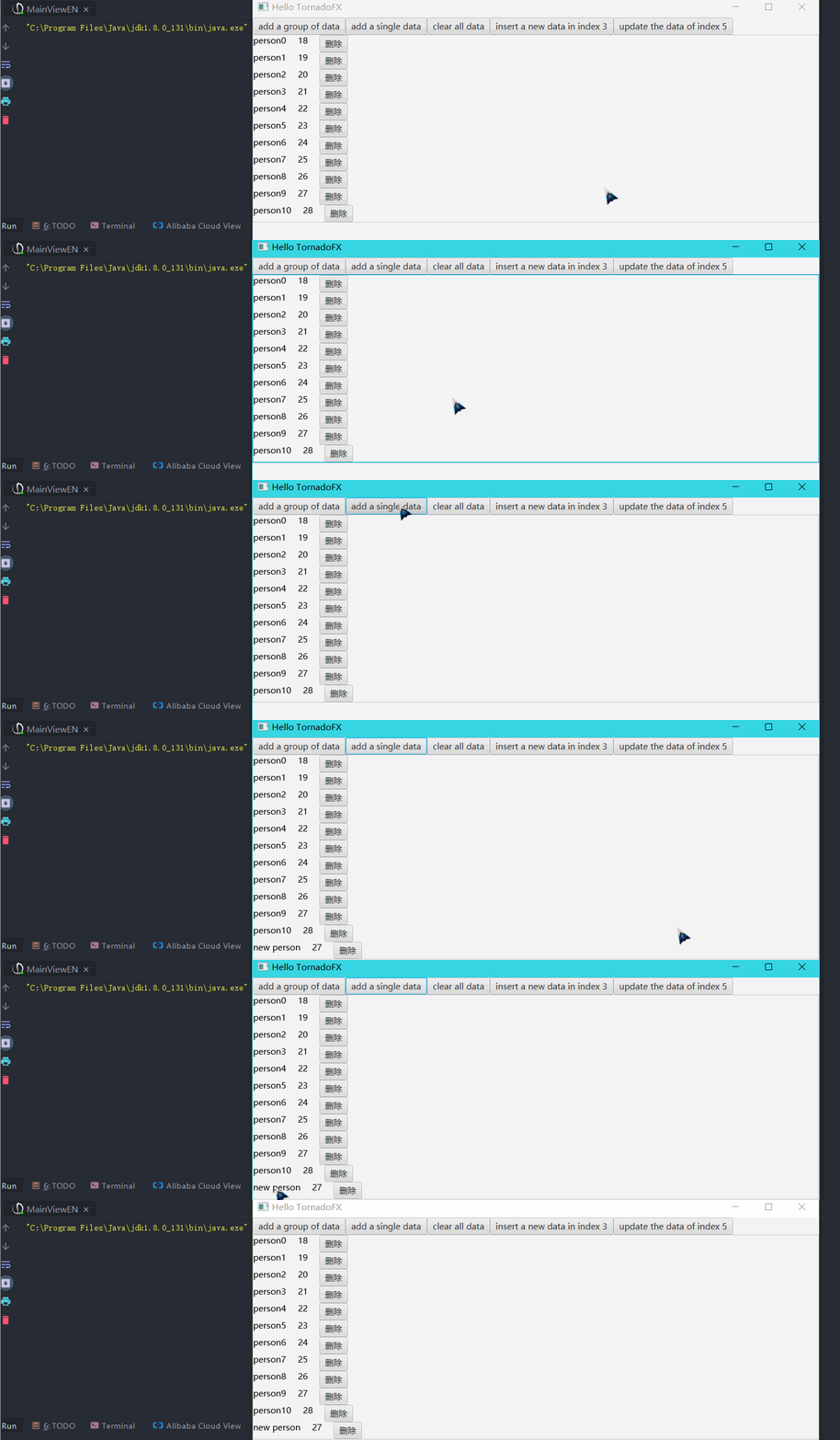
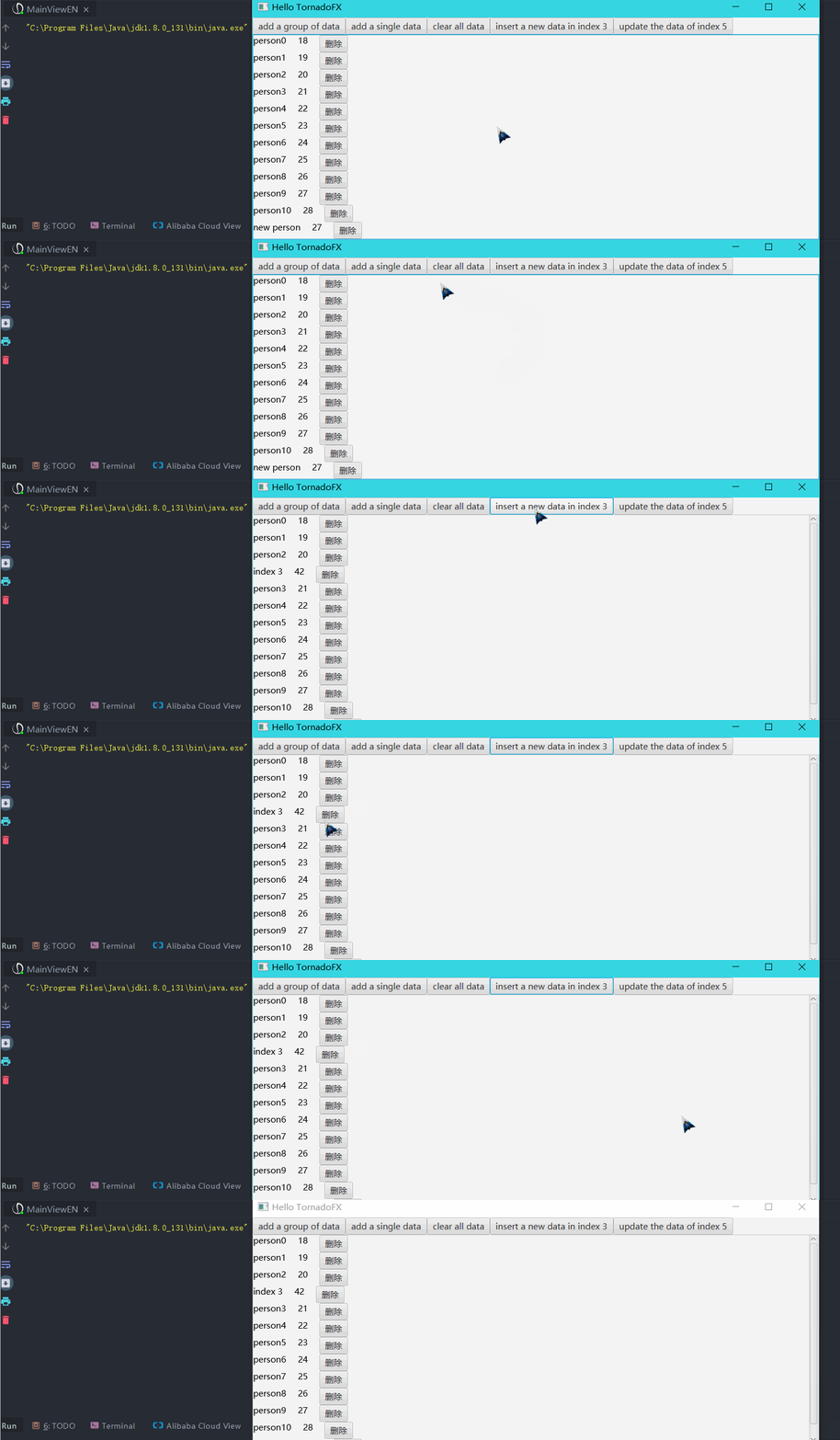
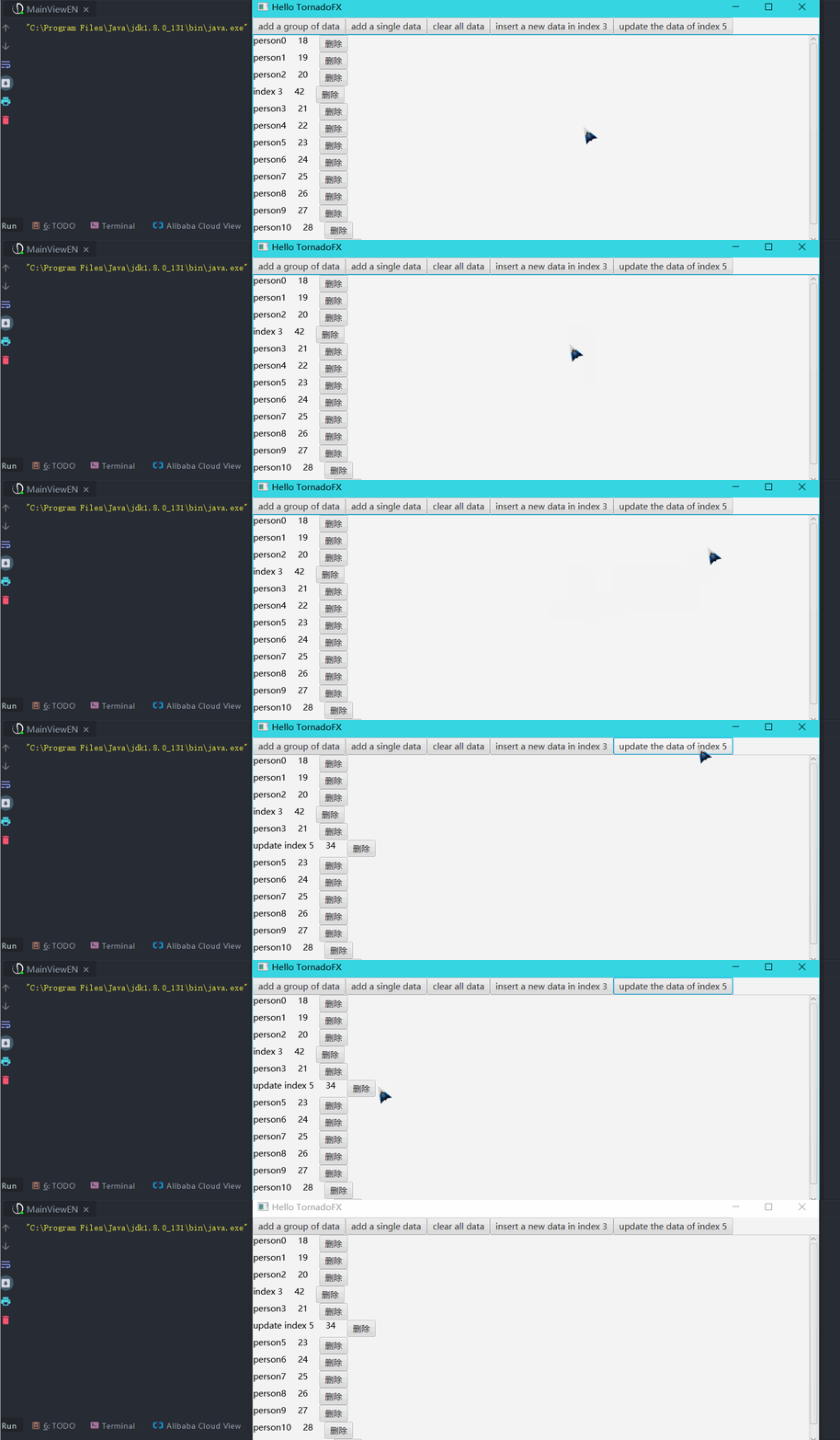
上波gif动态图就能很好说明了
1.添加一组数据
2.添加一个数据
3.指定坐标插入一个数据
4.更新指定坐标的数据
5.单击/右击事件
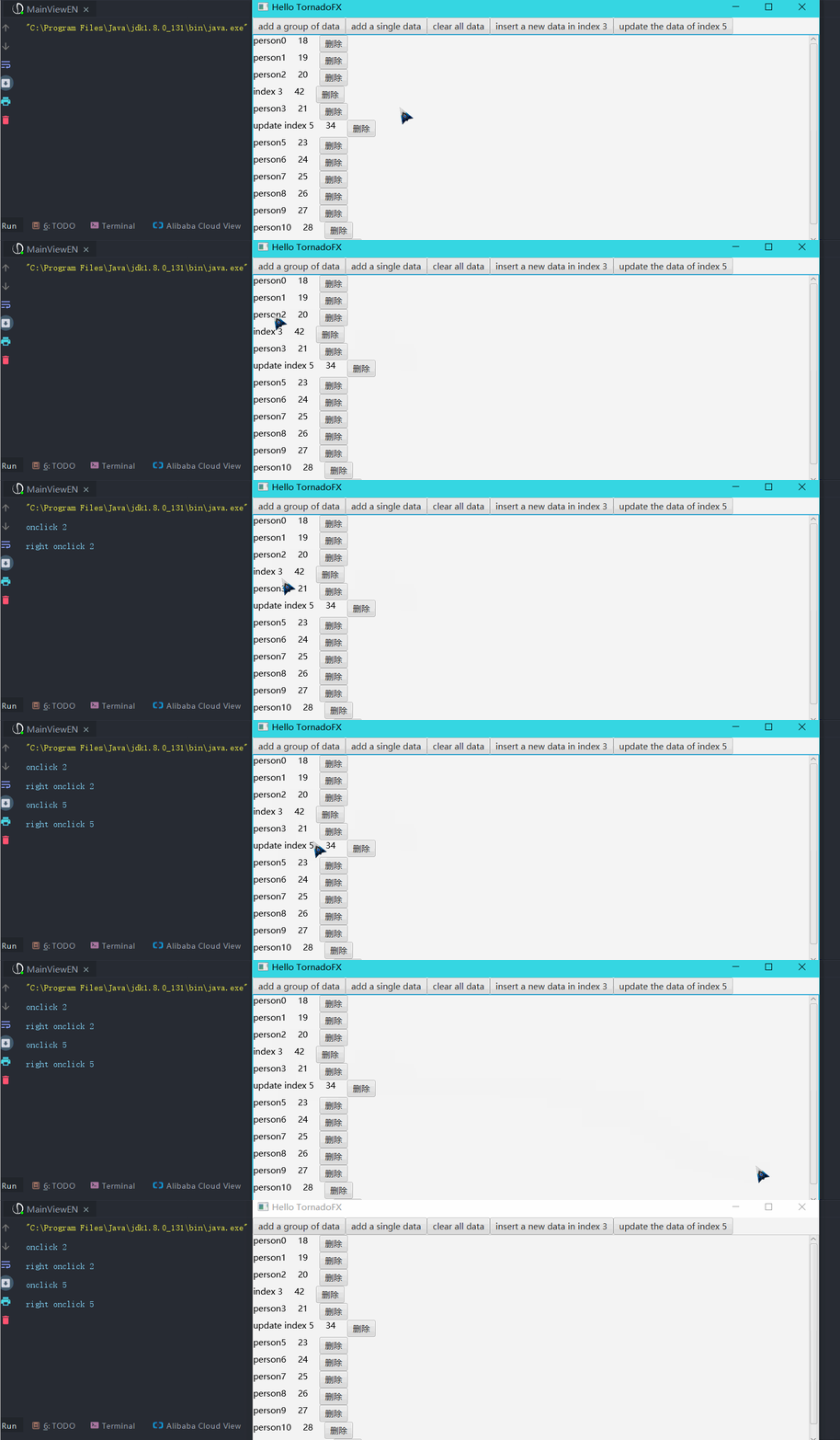
6.移出指定坐标数据/移出所有数据
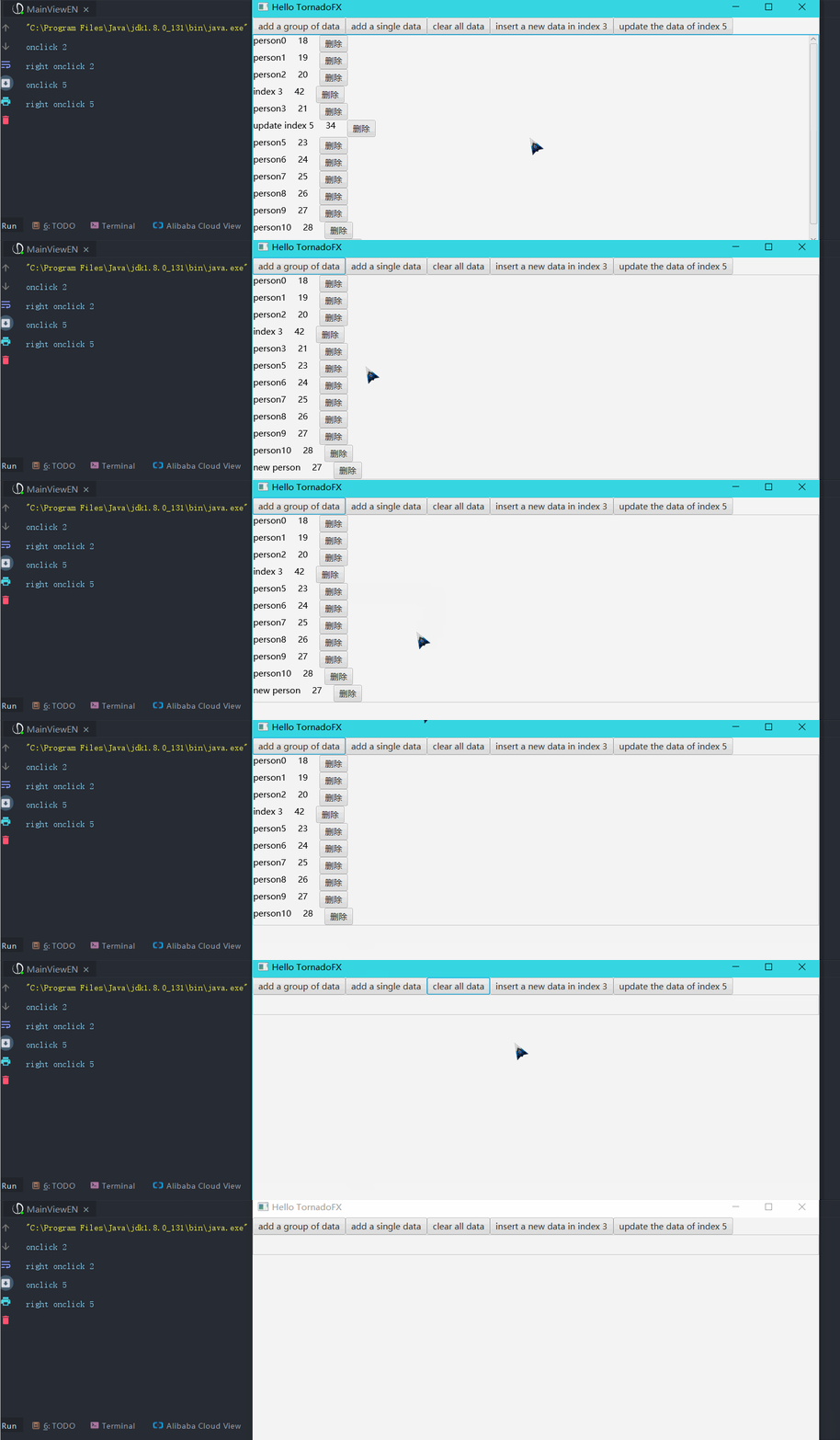
使用
1.复制FxRecyclerView源码
下载我下面给出的kt文件,复制到你的tornadofx项目中
FxRecyclerView.kt
2.创建bean类
这个没啥好说的,就是一个存数据的bean类,如一个Person类,根据自己的情况与需求创建
data class Person(var name: String,var age:String)
3.创建ItemView
这个就是列表中的每一项View,需要继承tornadofx中的View,我这里就是显示Person的name和age属性,比较简单演示一下
为了简单起见,我的ItemView起名为ItemView,各位使用的过程中可以自由更改名字
import javafx.scene.control.Button

import javafx.scene.text.Text

import tornadofx.*

/**

 *

 * @author StarsOne

 * @date Create in  2020/1/21 0021 18:36

 * @description

 *

 */

class ItemView : View("My View") {

    var nameTv by singleAssign<Text>()

    var ageTv by singleAssign<Text>()

    var deleteBtn by singleAssign<Button>()

    override val root = hbox {

        spacing = 20.0

        nameTv = text()

        ageTv = text()

        deleteBtn = button("删除")

    }

}

data class Person(var name: String,var age:String)
4.界面添加FxRecyclerView
package com.example.demo.view

import tornadofx.*

class MainView : View("Hello TornadoFX") {

	//创建FxRecyclerView需要使用到泛型,第一个是bean类,第二个是ItemView

    val rv = FxRecyclerView<Person,ItemView>()

    override val root = vbox {

        //省略...

		this+=rv

    }

}
4.创建RvAdapter
RvAdapter是抽象类,所以得通过继承并实现其中的几个方法
//创建数据

val dataList = arrayListOf<Person>()

for (i in 0..10) {

	dataList.add(Person("张三$i",(18+i).toString()))

}

//重写RVAdapter的方法

val adapter = object :RVAdapter<Person,ItemView>(dataList){

	override fun onRightClick(itemView: ItemView, position: Int) {

		//右击事件

		println("右击$position")

	}

	override fun onClick(itemView: ItemView, position: Int) {

		//单击事件

		println("单击$position")

	}

	override fun onCreateView(): ItemView {

		//必须实现

		//返回ItemVIew的实例

		return ItemView()

	}

	override fun onBindData(itemView: ItemView, bean: Person, position: Int) {

		//必须实现

		//将bean类中的数据绑定到itemView中

		itemView.nameTv.text = bean.name

		itemView.ageTv.text  = bean.age

		itemView.deleteBtn.setOnAction {

			rv.remove(position)

		}

	}

}

//设置FxRecyclerView的adapter

rv.adapter = adapter
使用补充
PS:以下的方法都是rv调用(FxRecyclerView对象)
| 方法名 | 参数说明 | 方法说明 |
|---|---|---|
| setWidth(double) | double类型的数值 | 设置宽度 |
| setHegiht(double) | double类型的数值 | 设置高度 |
| setIsShowHorizontalBar(String) | 显示方式,never(不显示) always(一直显示) asneed(自动根据需要显示) | 设置是否显示水平滚动条 |
| addList(arraylist) | ArrayList类型的一组数据 | 添加一组数据,同时更新视图 |
| addList(list) | List类型的一组数据 | 添加一组数据,同时更新视图 |
| add(beanT) | 添加一个数据,同时更新视图 | |
| add(bean,int) | 在列表的指定位置插入指定bean数据对应的itemView。 将当前位于该位置的itemView(如果有)和任何后续的itemView(向其索引添加一个)移动。 | |
| update(bean,int) | 更新指定位置的数据及itemView视图 | |
| update(bean,oldBean) | 更新列表中存在的数据,替换为新的数据,同时更新视图 | |
| remove(bean) | 移出某个数据,同时更新视图 | |
| remove(index) | 移出列表中指定位置的数据,同时更新视图 | |
| removeAll() | 移出列表所有数据,同时更新视图 |
FxRecyclerView源码
由于kotlin文件可以写多个类,我的类都写在了一个文件里
package com.starsone.fxrecyclerview.view

import javafx.scene.control.ScrollPane

import javafx.scene.input.MouseButton

import javafx.scene.layout.VBox

import tornadofx.*

/**

 *

 * @author StarsOne

 * @date Create in  2020/1/20 0020 21:19

 * @description

 *

 */

class FxRecyclerView<beanT : Any, itemViewT : View> : View {

    var adapter: RVAdapter<beanT, itemViewT>? = null

        set(value) {

            field = value

            val adapter = value as RVAdapter<beanT, itemViewT>

            val beanList = adapter.beanList

            val itemViewList = adapter.itemViewList

            for (index in 0 until beanList.size) {

                val itemView = adapter.onCreateView()

                //绑定bean数据到itemView

                adapter.onBindData(itemView, beanList[index], index)

                //itemView添加到列表中

                itemViewList.add(itemView)

                //添加到RecyclerView的主容器中

                container.add(itemView)

                itemView.root.setOnMouseClicked {

                    if (it.button == MouseButton.PRIMARY) {

                        //单击事件回调

                        adapter.onClick(itemView, index)

                    }

                    if (it.button == MouseButton.SECONDARY) {

                        //右击事件回调

                        adapter.onRightClick(itemView, index)

                    }

                }

            }

        }

    var container = vbox { }

    constructor() {

        root.add(container)

    }

    constructor(vBox: VBox) {

        container = vBox

        root.add(container)

    }

    override val root = scrollpane {

        vbox { }

    }

    /**

     * 设置宽度

     */

    fun setWidth(width: Double) {

        root.prefWidth = width

    }

    /**

     * 设置[height]

     */

    fun setHeight(height: Double) {

        root.prefHeight = height

    }

    /**

     * 设置水平滚动条的显示方式

     * @param way 显示方式,never(不显示) always(一直显示) asneed(自动根据需要显示)

     */

    fun setIsShowVerticalBar(way: String) {

        when (way) {

            "never" -> root.hbarPolicy = ScrollPane.ScrollBarPolicy.NEVER

            "always" -> root.hbarPolicy = ScrollPane.ScrollBarPolicy.ALWAYS

            "asneed" -> root.hbarPolicy = ScrollPane.ScrollBarPolicy.AS_NEEDED

        }

    }

    /**

     * 添加一个列表的数据(arraylist)

     */

    fun addList(beanList: ArrayList<beanT>) {

        for (bean in beanList) {

            add(bean)

        }

    }

    /**

     * 添加一个列表的数据(list)

     */

    fun addList(beanList: List<beanT>) {

        for (bean in beanList) {

            add(bean)

        }

    }

    fun add(bean: beanT) {

        val beanList = adapter?.beanList

        val itemViewList = adapter?.itemViewList

        val index = beanList?.size as Int - 1

        beanList.add(bean)

        val itemView = adapter?.onCreateView() as itemViewT

        //invoke onBindData method to bind the bean data to te item view

        adapter?.onBindData(itemView, bean, index)

        //add the item view in the item view list

        itemViewList?.add(itemView)

        //add to the recyclerview container

        container.add(itemView)

        itemView.root.setOnMouseClicked {

            if (it.button == MouseButton.PRIMARY) {

                //单击

                adapter?.onClick(itemView, index)

            }

            if (it.button == MouseButton.SECONDARY) {

                //右击

                adapter?.onRightClick(itemView, index)

            }

        }

    }

    /**

     * 在列表的指定位置插入指定bean数据对应的itemView。 将当前位于该位置的itemView(如果有)和任何后续的itemView(向其索引添加一个)移动。

     * @param bean bean数据

     * @param index 要插入的下标

     */

    fun add(bean: beanT, index: Int) {

        val beanList = adapter?.beanList

        val itemViewList = adapter?.itemViewList

        beanList?.add(index, bean)

        val itemView = adapter?.onCreateView() as itemViewT

        //invoke onBindData method to bind the bean data to te item view

        adapter?.onBindData(itemView, bean, index)

        //add the item view in the item view list

        itemViewList?.add(index, itemView)

        //add to the recyclerview container

        container.addChildIfPossible(itemView.root, index)

        itemView.root.setOnMouseClicked {

            if (it.button == MouseButton.PRIMARY) {

                //单击

                adapter?.onClick(itemView, index)

            }

            if (it.button == MouseButton.SECONDARY) {

                //右击

                adapter?.onRightClick(itemView, index)

            }

        }

        //更新点击事件的回调

        for (i in index + 1 until itemViewList?.size as Int) {

            val itemView1 = itemViewList[i]

            adapter?.onBindData(itemView1, beanList!![i], i)

            itemView1.root.setOnMouseClicked {

                if (it.button == MouseButton.PRIMARY) {

                    //单击

                    adapter?.onClick(itemView1, i)

                }

                if (it.button == MouseButton.SECONDARY) {

                    //右击

                    adapter?.onRightClick(itemView1, i)

                }

            }

        }

    }

    /**

     * 更新指定位置的itemView

     */

    fun update(bean: beanT, index: Int) {

        remove(index)

        add(bean, index)

    }

    /**

     * 寻找列表中与oldBean相同的第一个元素,将其内容进行修改,同时更新界面的显示

     * @param bean 新的数据

     * @param oldBean 列表中已存在的数据

     */

    fun update(bean: beanT, oldBean: beanT) {

        val beanList = adapter?.beanList

        val index = beanList?.indexOf(oldBean) as Int

        if (index != -1) {

            update(bean, index)

        } else {

            println("列表中不存在该元素")

        }

    }

    fun remove(bean: beanT) {

        val beanList = adapter?.beanList

        val index = beanList?.indexOf(bean) as Int

        remove(index)

    }

    /**

     * 移出指定下标的itemview

     * @param index 下标

     */

    fun remove(index: Int) {

        val beanList = adapter?.beanList

        val itemViewList = adapter?.itemViewList

        beanList?.removeAt(index)

        val itemView = itemViewList!![index]

        itemView.removeFromParent()

        itemViewList.remove(itemView)

        for (i in index until beanList?.size as Int) {

            adapter?.onBindData(itemViewList[i], beanList[i], i)

            val itemView = itemViewList[i]

            itemView.root.setOnMouseClicked {

                if (it.button == MouseButton.PRIMARY) {

                    //单击

                    adapter?.onClick(itemView, i)

                }

                if (it.button == MouseButton.SECONDARY) {

                    //右击

                    adapter?.onRightClick(itemView, i)

                }

            }

        }

    }

    /**

     * 移出所有控件

     */

    fun removeAll() {

        val itemViewList = adapter?.itemViewList as ArrayList<itemViewT>

        val beanList = adapter?.beanList as ArrayList<beanT>

        for (itemView in itemViewList) {

            itemView.removeFromParent()

        }

        itemViewList.removeAll(itemViewList)

        beanList.removeAll(beanList)

    }

}

/**

 * 适配器

 * @author StarsOne

 * @date Create in  2020/1/20 0020 21:51

 * @description

 *

 */

abstract class RVAdapter<beanT : Any, itemViewT : View> {

    val beanList = arrayListOf<beanT>()

    val itemViewList = arrayListOf<itemViewT>()

    constructor(bean: beanT) {

        beanList.add(bean)

    }

    constructor(beanList: List<beanT>) {

        this.beanList.addAll(beanList)

    }

    constructor(beanList: ArrayList<beanT>) {

        this.beanList.addAll(beanList)

    }

    /**

     * 设置返回ItemView

     */

    abstract fun onCreateView(): itemViewT

    abstract fun onBindData(itemView: itemViewT, bean: beanT, position: Int)

    abstract fun onClick(itemView: itemViewT, position: Int)//单击

//    abstract fun onDoubleClick(itemView: itemViewT, position: Int)//双击

    abstract fun onRightClick(itemView: itemViewT, position: Int)//右击

}
Tornadofx学习笔记(2)——FxRecyclerView控件的打造的更多相关文章
- WPF-学习笔记 动态修改控件Margin的值
原文:WPF-学习笔记 动态修改控件Margin的值 举例说明:动态添加一个TextBox到Grid中,并设置它的Margin: TextBox text = new TextBox(); t_gri ...
- 【jQuery UI 1.8 The User Interface Library for jQuery】.学习笔记.4.Tabs控件
之前,我们已经介绍了 jQuery UI 库,CSS 框架.下面,我们将学习这些有增强可视化效果,高度可配置的用户交互组件. Tab 的特性是,点击 tab 后,会高亮该 tab,并显示他的关联con ...
- Android学习笔记_30_常用控件使用
一.状态栏通知(Notification): 如果需要查看消息,可以拖动状态栏到屏幕下方即可查看消息.发送消息的代码如下: public void sendNotice(View v){ int ic ...
- 学习笔记:UpdatePanel控件
Asp.net UpdatePanel 允许用户构建一个丰富的,以客户端为中心的应用程序,引用UpdatePanel控件,能够实现页面的部分刷新,一个包含scriptManage和 UpdatePan ...
- 【jQuery UI 1.8 The User Interface Library for jQuery】.学习笔记.9.Progressbar控件
Progressbar控件用来显示任意进程的完成百分比. 默认安装启用 配置选项 控件暴露的事件API progressbar暴露的独一无二的方法 一些现实生活的例子 当前版本中,我们或系统必须明确进 ...
- 【jQuery UI 1.8 The User Interface Library for jQuery】.学习笔记.8.Datepicker控件
默认datepicker的安装启用 探索它的配置选项 安装启用一个触发按钮 配置一个供选择的动画 dateFormat选项 简单的国际化 多月datepicker 日期范围选择 datepicker的 ...
- 【jQuery UI 1.8 The User Interface Library for jQuery】.学习笔记.7.Slider控件
默认slider的安装启用 为slider自定义风格 修改配置选项 创建一个垂直的slider 设置最大最小值,和默认值 启用多个 手柄 和 范围 slider内置的回调事件 slider的方法 这个 ...
- 【jQuery UI 1.8 The User Interface Library for jQuery】.学习笔记.6.Dialog控件
习惯上,我们播放一条简短的信息,或向浏览者询问一个问题,都会用到dialog. 创建一个基本的dialog 使用dialog 选项 形式 启用内置动画 给dialog添加按钮 使用dialog回调函数 ...
- 【jQuery UI 1.8 The User Interface Library for jQuery】.学习笔记.5.Accordion控件
accordion是另一个UI控件,能允许你将一组content加入相互分隔的.能够被浏览者的交互打开或关闭的panels中.因此,它大多数的content在初始化的时候是隐藏的,很像tabs控件.每 ...
随机推荐
- springboot多租户设计
1. 概述 根据不同用户的请求,选择不同的数据源,不同的数据源可以是Oracle.MySQL或者其它.用到的技术栈,没有什么复杂的技术,可以看到,依赖也就加了几个而已,如下: 2. 先睹为快 如下图, ...
- myeclipse上进行tomcat远程调试
1.将Tomcat中的bin目录下的startup.bat启动脚本复制一份到本目录下并且修改名字为startup-debug.bat,然后打开startup-debug.bat文件 再startup- ...
- 使用poi读写excel、向excel追加数据等,包括.xls和.xlsx文档
1.使用maven引入jar包 <dependency> <groupId>org.apache.poi</groupId> <artifactId>p ...
- 洛谷$P3647\ [APIO2014]$连珠线 换根$dp$
正解:换根$dp$ 解题报告: 传送门! 谁能想到$9102$年了$gql$居然还没写过换根$dp$呢,,,$/kel$ 考虑固定了从哪个点开始之后,以这个点作为根,蓝线只可能是直上直下的,形如&qu ...
- Java 迭代器须知 | “for each”与迭代器的关系
Iterator接口包含4个方法: 通过反复调用next方法就可以逐个访问集合中的每个元素.需要注意,如果到达了集合的末尾,再次调用next方法将会抛出一个NoSuchElementException ...
- 浅谈Java中接口与抽象类的异同
浅谈Java中接口与抽象类的异同 抽象类和接口这两个概念困扰了我许久,在我看来,接口与抽象类真的十分相似.期间也曾找过许许多多的资料,参考了各路大神的见解,也只能是简简单单地在语法上懂得两者的区别.硬 ...
- 2020了你还不会Java8新特性?(五)收集器比较器用法详解及源码剖析
收集器用法详解与多级分组和分区 为什么在collectors类中定义一个静态内部类? static class CollectorImpl<T, A, R> implements Coll ...
- .sarut后缀病毒,勒索病毒
前两天朋友的电脑中所有的文件后缀名都被改为.sarut 一看就是中了勒索病毒 每个文件夹下都有一个勒索信 查资料后发现这个病毒是STOP病毒的变种 可能是朋友使用windows激活工具了,然后这个病毒 ...
- 命令别名设定:alias,unalias 历史命令:history
1.别名设定举例 alias lm=‘ls -al | more’ 还可以取代现有指令 alias rm='rm -i' 查询现有别名 alias 取消别名 unalias lm 2.历史命令:his ...
- Cesium本地影像与地形服务发布
目录 1 数据切片 1.1 影像处理 1.2 地形处理 2 Web应用服务器安装与配置 2.1 Tomcat安装及配置 2.2 IIS安装及配置 3 本地影像与地形服务发布 4 参考资料 @(目录) ...