
NVelocity学习笔记一——linq2sql+NVelocity完整demo
(一)前言
刚刚进入新公司,看公司的项目,发现开发流程几乎和以前的完全不同,再看看页面布局竟然没有发现html。神马情况????一番探究发现使用了NVelocity模板引擎开发的。于是乎花了半天的时间比划着公司的项目做了一个小demo,也算是熟悉一下这种开发方式吧,同时也给将要学习这方面东西的朋友留个小教程。
(二)实战
说明:因为公司项目数据库操作使用的是linq2sql,所以我也就拿这个操作数据库了(汗,其实我也没用过linq2SQL,都是EF,其实都差不多)。
第一步:
新建解决方案ProTest,不说了。
第二步:
新建类库LinqToSql,右击类库添加LinqToSql类。如图:
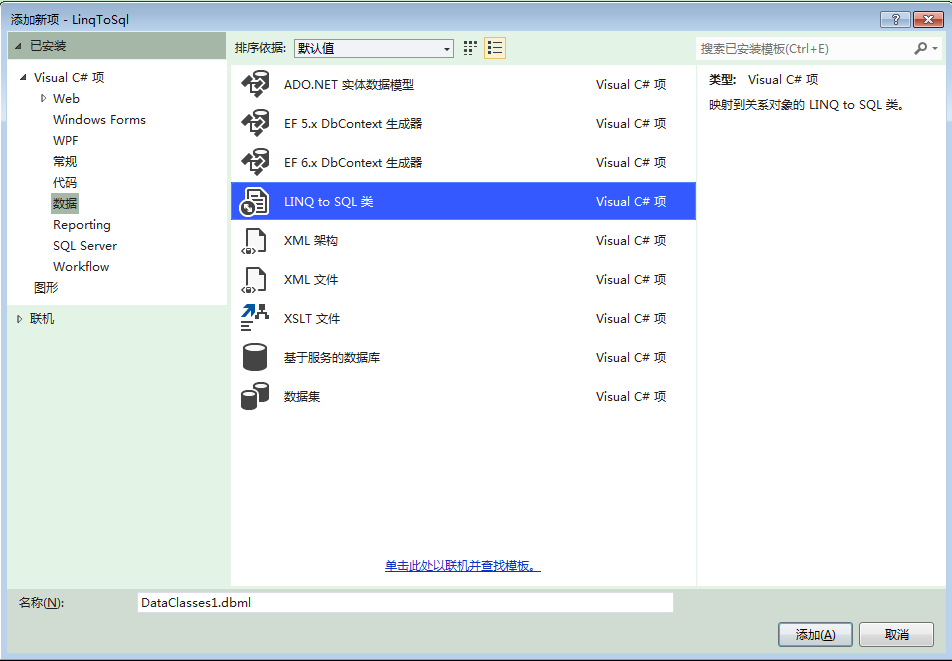
第三步:
将需要的表拖放到设计器上,会自动生成一些方法。
第四步:
新建一个操作数据库的实例类。
using System;

using System.Collections.Generic;

using System.Configuration;

using System.Linq;

using System.Text;

using System.Threading.Tasks;

namespace LinqToSql

{

    public class DBContextFactory

    {

        public static  DBDataContext GetDBContext()

        {

            return new DBDataContext(ConfigurationManager.ConnectionStrings["school"].ConnectionString);

        }

    }

}
第五步:
新建网站,引用类库linqtosql,同时添加System.Data.Linq.dll和NVelocity.dll类库(可以在官网http://nvelocity.codeplex.com/下载)。
新建如下文件夹:

ClassView类用于取数据,Template文件夹下为静态模板。如下:
 <!DOCTYPE html PUBLIC "-//W3C//DTD XHTML 1.0 Transitional//EN" "http://www.w3.org/TR/xhtml1/DTD/xhtml1-transitional.dtd">

 <html xmlns="http://www.w3.org/1999/xhtml">

 <head>

     <meta http-equiv="Content-Type" content="text/html; charset=utf-8" />

     <meta name="description" content="">

     <meta name="keywords" content="">

     <title>$Title</title>

 </head>

 <body>

   <table>

     #foreach($item in $ClassView.GetList(30))

     <tr><td>$item.Id</td><td>$item.Name</td></tr>

     #end

   </table>

 </body>

 </html>
可以看出其中标记了一些NVelocity模板引擎的语法。
第六步:
清空aspx页面中的html代码,只保留第一行声明。如图:

第七步:
在aspx.cs页面中做如下处理:
 using System;

 using System.Collections.Generic;

 using System.Linq;

 using System.Web;

 using System.Web.UI;

 using System.Web.UI.WebControls;

 //

 using Commons.Collections;

 using NVelocity;

 using NVelocity.App;

 using NVelocity.Runtime;

 using System.Configuration;

 using System.Runtime.Remoting.Contexts;

 using NVelocity.Context;

 using System.IO;

 public partial class ClassList : System.Web.UI.Page

 {

     protected void Page_Load(object sender, EventArgs e)

     {

         //1.创建VelocityEngine实例对象

         VelocityEngine engine = new VelocityEngine();

         //2.读取模板路径,可以定义几套模板利于动态换肤

         string templateRoad = ConfigurationManager.AppSettings["tmpDir"];

         //3.使用设置初始化VelocityEngine

         ExtendedProperties props = new ExtendedProperties();

         props.AddProperty(RuntimeConstants.RESOURCE_LOADER, "file");

         props.AddProperty(RuntimeConstants.INPUT_ENCODING, "utf-8");

         props.AddProperty(RuntimeConstants.OUTPUT_ENCODING, "utf-8");

         props.AddProperty(RuntimeConstants.FILE_RESOURCE_LOADER_PATH, Server.MapPath(templateRoad));

         engine.Init(props);

         //4.模板引擎从文件中读取模板

         Template tmp = engine.GetTemplate(@"class_tmp.vm");

         //5.为模板变量赋值

         IContext context = new VelocityContext();

         context.Put("Title", "first nvelocity");

         context.Put("ClassView",new ClassView());

         //6.合并模板和流写出器

         StringWriter write = new StringWriter();

         tmp.Merge(context, write);

         Response.Write(write.ToString());

     }

 }
第八步:
结果如下:

(三)总结
这里面的东西其实还有很多,这里我也是刚刚了解………………
NVelocity学习笔记一——linq2sql+NVelocity完整demo的更多相关文章
- JPG学习笔记3(附完整代码)
#topics h2 { background: rgba(43, 102, 149, 1); border-radius: 6px; box-shadow: 0 0 1px rgba(95, 90, ...
- JPG学习笔记4(附完整代码)
#topics h2 { background: rgba(43, 102, 149, 1); border-radius: 6px; box-shadow: 0 0 1px rgba(95, 90, ...
- Cesium学习笔记(七):Demo学习(自由控制飞行的飞机)[转]
https://blog.csdn.net/umgsoil/article/details/74923013# 这是官方的教程Demo,名字叫Use HeadingPitchRoll,顾名思义,就是教 ...
- python学习笔记十四:wxPython Demo
一.简介 wxPython是Python语言的一套优秀的GUI图形库,允许Python程序员很方便的创建完整的.功能键全的GUI用户界面. wxPython是作为优秀的跨平台GUI库wxWidgets ...
- webrtc学习笔记2(Android端demo代码结构)
最近正在修改webrtc的Android端demo和服务器交互的内容,介绍一下demo的大体结构吧,以便能快速回忆. 环境:Android5.0以上.libjingle_peerconnection_ ...
- Django学习笔记----settings and database_based App demo
原文参考docs.djangoproject.com, what can manage.py utility do? find here. 1.Database Setup 编辑settings.py ...
- 大数据学习笔记——Spark完全分布式完整部署教程
Spark完全分布式完整部署教程 继Mapreduce之后,作为新一代并且是主流的计算引擎,学好Spark是非常重要的,这一篇博客会专门介绍如何部署一个分布式的Spark计算框架,在之后的博客中,更会 ...
- JPG学习笔记1(附完整代码)
#topics h2 { background: rgba(43, 102, 149, 1); border-radius: 6px; box-shadow: 0 0 1px rgba(95, 90, ...
- JPG学习笔记2(附完整代码)
#topics h2 { background: rgba(43, 102, 149, 1); border-radius: 6px; box-shadow: 0 0 1px rgba(95, 90, ...
随机推荐
- 十五天精通WCF——第六天 你必须要了解的3种通信模式
wcf已经说到第六天了,居然还没有说到这玩意有几种通信模式,惭愧惭愧,不过很简单啦,单向,请求-响应,双工模式,其中的第二种“请求-响应“ 模式,这个大家不用动脑子都清楚,这一篇我大概来分析下. 一: ...
- Sql Server之旅——第十二站 sqltext的参数化处理
说到sql的参数化处理,我也是醉了,因为sql引擎真的是一个无比强大的系统,我们平时做系统的时候都会加上缓存,我想如果没有缓存,就不会有什么 大网站能跑的起来,而且大公司一般会在一个东西上做的比较用心 ...
- const,readonly 这些你真的懂吗? 也许会被面试到哦。。。
首先不可否认,这些在面试上会经常被面试官问起,但是你回答的让面试官满意吗?当然如果你知道了这些原理,或许你就不 怕了.既然说到了原理,我们还是从MSDN说起. 一:值得推敲的几个地方 1.先来看看ms ...
- Oracle索引梳理系列(二)- Oracle索引种类及B树索引
版权声明:本文发布于http://www.cnblogs.com/yumiko/,版权由Yumiko_sunny所有,欢迎转载.转载时,请在文章明显位置注明原文链接.若在未经作者同意的情况下,将本文内 ...
- WCF绑定和行为在普通应用和SilverLight应用一些对比
本文版权归mephisto和博客园共有,欢迎转载,但须保留此段声明,并给出原文链接,谢谢合作. 阅读目录 介绍 绑定 普通应用和SilverLight应用区别 本文版权归mephisto和博客园共有, ...
- Oracle not in子连接查询不到值的问题(not in 不能查询null数据)
前几天在项目中,做数据导入时,发现not in和in 查出来的条数不互补.ATABLE2明明中有些记录在ATABLE3中不存在,但是not in时查不出记录. CREATE TABLE ATABLE2 ...
- Windows7 系统 CMD命令行,点阵字体不能改变大小以及中文乱码的问题
之前装了oracle 11g后,发现开机速度竟然奇葩的达到了3分钟.经过旁边大神指点,说是因为oracle某个(具体不清楚)服务,在断网的时候会不断的ping网络,导致速度变慢.然后就关服务呗,然后一 ...
- pwd, cd, ls, touch, mkdir, rmdir, rm
学习Shell命令最好的资料当然的是$man, 绝对是查找命令的第一大杀器,但是我们有时只是想实现某个功能,甚至连这个命令是什么都不知道,又或者不想淹没在man里大段大段的英文里,大家可以参考Linu ...
- 《PHP开发APP接口》笔记
PHP开发APP接口 [TOC] 课程地址 imooc PHP开发APP接口 学习要点 APP接口简介 封装通信接口方法 核心技术 APP接口实例 服务器端 -> 数据库|缓存 -> 调用 ...
- android widget包说明与应用
widget包是存放自定义组件 开发自定义组件: 其实Android API开发指南中的App Widgets章节 已经说得很清楚了,下面只是对自己的理解进行一次梳理. -- AppWidget 就是 ...