
Thymeleaf 模板引擎简介
目录
Thymeleaf 模板引擎
1、Thymeleaf 是 Web 和独立环境的现代服务器端 Java 模板引擎,能够处理HTML,XML,JavaScript,CSS 甚至纯文本。
2、Thymeleaf 的主要目标是提供一种优雅和高度可维护的创建模板的方式。为了实现这一点,它建立在自然模板的概念上,将其逻辑注入到模板文件中,不会影响模板被用作设计原型。这改善了设计的沟通,弥补了设计和开发团队之间的差距。
3、Thymeleaf 也从一开始就设计了Web标准 - 特别是 HTML5 - 允许您创建完全验证的模板,Spring Boot 官方推荐使用 thymeleaf 而不是 JSP。
4、Thymeleaf 官网:https://www.thymeleaf.org/
5、Thymeleaf 在 Github 的主页:https://github.com/thymeleaf/thymeleaf
6、Spring Boot 中使用 Thymeleaf 模板引擎时非常简单,因为 Spring Boot 已经提供了默认的配置,比如解析的文件前缀,文件后缀,文件编码,缓存等等,程序员需要的只是写 html 中的内容即可,可以参考《Spring Boot 引入 Thymeleaf 及入门》
模板引擎
1)市面上主流的 Java 模板引擎有:JSP、Velocity、Freemarker、Thymeleaf
2)JSP本质也是模板引擎,Spring Boot 官方推荐使用 “Thymeleaf”模板引擎
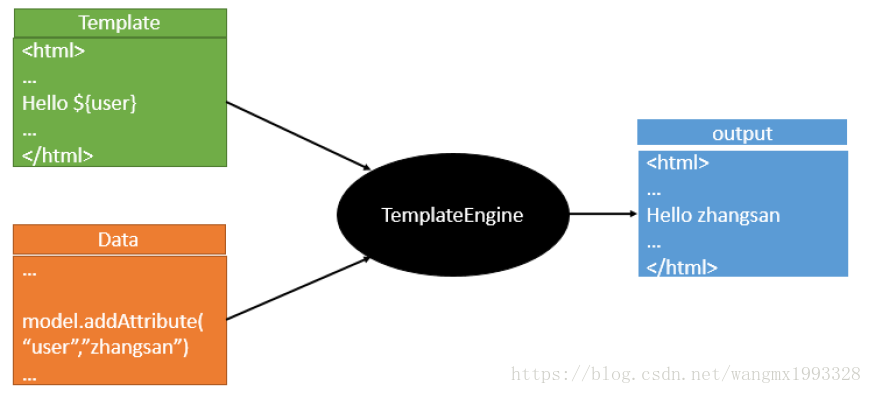
3)模板引擎原理图如下,模板引擎的作用都是将模板(页面)和数据进行整合然后输出显示,区别在于不同的模板使用不同的语法,如 JSP 的 JSTL 表达式,以及 JSP 自己的表达式和语法,同理 Thymeleaf 也有自己的语法
Hello World
1、直接使用 Spring Boot 应用来学习 Thymeleaf所有语法知识,下面第一步就是新建 Spring Boot 项目,对于Spring Boot 不熟悉的可以参考《Spring Boot》
<!-- 导入Spring Boot的thymeleaf依赖-->
<dependency>
<groupId>org.springframework.boot</groupId>
<artifactId>spring-boot-starter-thymeleaf</artifactId>
</dependency>
2、上面的配置同样在 Spring Boot官方文档 中也可以找到
后台控制器
package com.lct.controller;
import org.springframework.stereotype.Controller;
import org.springframework.web.bind.annotation.RequestMapping;
import java.util.Map;
/**
* Created by Administrator on 2018/7/17 0017.
* 用户控制器
*/
@Controller
public class UserController {
/**
* 全部基于 Spring Boot给 Thymeleaf的默认配置
* 所以下面会跳转到 classpath:/templates/home.html 页面
*
* @param paramMap
* @return
*/
@RequestMapping("home")
public String goHome(Map<String, Object> paramMap) {
/** 默认Map的内容会放大请求域中,页面可以直接使用Thymeleaf取值*/
paramMap.put("name", "张三");
paramMap.put("age", 35);
return "home";
}
}
前端页面
<!DOCTYPE html>
<html>
<head lang="en">
<meta charset="UTF-8">
<title>主页</title>
</head>
<body>
<h3>欢迎来到主页</h3>
<!--Thymeleaf 语法取值-->
姓名:<span th:text="${name}">未知</span>
年龄:<span th:text="${age}">未知</span>
</body>
</html>
1、对于Spring Boot关于 Thymeleaf 的渲染规则不清楚的,可以参考《Spring Boot 引入 Thymeleaf 及入门》
2、关于 Thmeleaf 的更多深入内容可以参考《Thymeleaf》
参考:https://blog.csdn.net/wangmx1993328/article/details/81054474
Thymeleaf 模板引擎简介的更多相关文章
- thymeleaf模板引擎简介
一:thymeleaf 学习笔记---http://www.blogjava.net/bjwulin/articles/395185.html thymeleaf是一个支持html原型的自然引擎,它在 ...
- JST(JavaScript Trimpath)前端模板引擎简介
JST(JavaScript Trimpath)前端模板引擎简介及应用 今天在做某系统日志列表的时候用到了这个玩意儿.刚开始只是根据别人的例子照葫芦画瓢完成了日志列表及对应详情,晚上有空了才仔细去网上 ...
- (二)SpringBoot基础篇- 静态资源的访问及Thymeleaf模板引擎的使用
一.描述 在应用系统开发的过程中,不可避免的需要使用静态资源(浏览器看的懂,他可以有变量,例:HTML页面,css样式文件,文本,属性文件,图片等): 并且SpringBoot内置了Thymeleaf ...
- 【Springboot】Springboot整合Thymeleaf模板引擎
Thymeleaf Thymeleaf是跟Velocity.FreeMarker类似的模板引擎,它可以完全替代JSP,相较与其他的模板引擎,它主要有以下几个特点: 1. Thymeleaf在有网络和无 ...
- 三、thymeleaf模板引擎构建前台html, 后台使用 ModelAndView 和 Model 模型
项目源码:https://github.com/y369q369/springBoot.git -> thymeleaf 私聊QQ: 1486866853 1.pom.xml中 ...
- SpringBoot使用thymeleaf模板引擎
(1).添加pom依赖 <dependency> <groupId>org.springframework.boot</groupId> <artifactI ...
- Spring Boot 2.0 整合Thymeleaf 模板引擎
本节将和大家一起实战Spring Boot 2.0 和thymeleaf 模板引擎 1. 创建项目 2. 使用Spring Initlizr 快速创建Spring Boot 应用程序 3. 填写项目配 ...
- Thymeleaf模板引擎的初步使用
在springboot中,推荐使用的模板引擎是Thymeleaf模板引擎,它提供了完美的Spring MVC的支持.下面就简单的介绍一下Thymeleaf模板引擎的使用. 在controller层中, ...
- spring boot: thymeleaf模板引擎使用
spring boot: thymeleaf模板引擎使用 在pom.xml加入thymeleaf模板依赖 <!-- 添加thymeleaf的依赖 --> <dependency> ...
随机推荐
- 通过同步上下文方式更新winform中的控件信息
SynchronizationContext 类是一个基类,可提供不带同步的自由线程上下文. 此类实现的同步模型的目的是使公共语言运行库内部的异步/同步操作能够针对不同的异步模型采取正确的行为.此模型 ...
- java中? extends T 和? super T解析
转:https://blog.csdn.net/qq_25337221/article/details/81669630 PECS原则 最后看一下什么是PECS(Producer Extends Co ...
- web搜索功能测试
功能方面: 是否能按指定条件查到正确.完整的结果,具体表现: 1.1录入条件为可查到结果的正常关键字.词.语句,检索到的内容.链接正确性: 1.2录入条件为不可查到结果的关键字.词.语句: 1.3录入 ...
- $apply()和$digest()——angular
$apply()和$digest()在AngularJS中是两个核心概念,但是有时候它们又让人困惑.而为了了解AngularJS的工作方式,首先需要了解$apply()和$digest()是如何工作的 ...
- maven 导出项目所依赖的jar包
1.在 pom文件中 点击 Run As->Maven Build 2.在 Goals 中输入 dependency:copy-dependencies 3.之后会在 项目目录的 target/ ...
- JavaScript —— 实现简单计算器【带有 开/关机 清零 退格 功能】
<!doctype html> <html> <head> <meta charset="utf-8"> <meta name ...
- 【ABAP系列】SAP ABAP MRKO增强
公众号:SAP Technical 本文作者:matinal 原文出处:http://www.cnblogs.com/SAPmatinal/ 原文链接:[ABAP系列]SAP ABAP MRKO增强 ...
- 你知道e.g.和i.e.的区别吗?
见 i.e. 是对前面的完全举例,特指 e.g. 则是不完全举例,有可能是...也有可能是...还可能是其他. 注意,i.e. 和 e.g. 第二个点后面都常跟一个逗号.
- python+selenium下弹窗alter对象处理02
首先使用switch_to.alert()方法进行定位,然后可以使用下面的操作 text:返回alert.confirm.prompt中的文字信息: accept():接受现有警告框: dismiss ...
- angulart 常用
angular: 使用 echarts npm install echarts --save // 安装declare const echarts: any; // 引入https://www.ech ...