
AspNetCore3.1_Secutiry源码解析_2_Authentication_核心对象
文章目录
- AspNetCore3.1_Secutiry源码解析_1_目录
- AspNetCore3.1_Secutiry源码解析_2_Authentication_核心项目
- AspNetCore3.1_Secutiry源码解析_3_Authentication_Cookies
- AspNetCore3.1_Secutiry源码解析_4_Authentication_JwtBear
- AspNetCore3.1_Secutiry源码解析_5_Authentication_OAuth
- AspNetCore3.1_Secutiry源码解析_6_Authentication_OpenIdConnect
- AspNetCore3.1_Secutiry源码解析_7_Authentication_其他
- AspNetCore3.1_Secutiry源码解析_8_Authorization_授权框架
依赖注入
框架提供了三个依赖注入重载方法。
//注入认证服务

services.AddAuthentication();

//注入认证服务并制定默认架构名

services.AddAuthentication("Cookies");

//注入认证服务并设置配置项

services.AddAuthentication(config =>

{

});
看看注入代码
public static AuthenticationBuilder AddAuthentication(this IServiceCollection services)

    {

        if (services == null)

        {

            throw new ArgumentNullException(nameof(services));

        }

        services.AddAuthenticationCore();

        services.AddDataProtection();

        services.AddWebEncoders();

        services.TryAddSingleton<ISystemClock, SystemClock>();

        return new AuthenticationBuilder(services);

    }
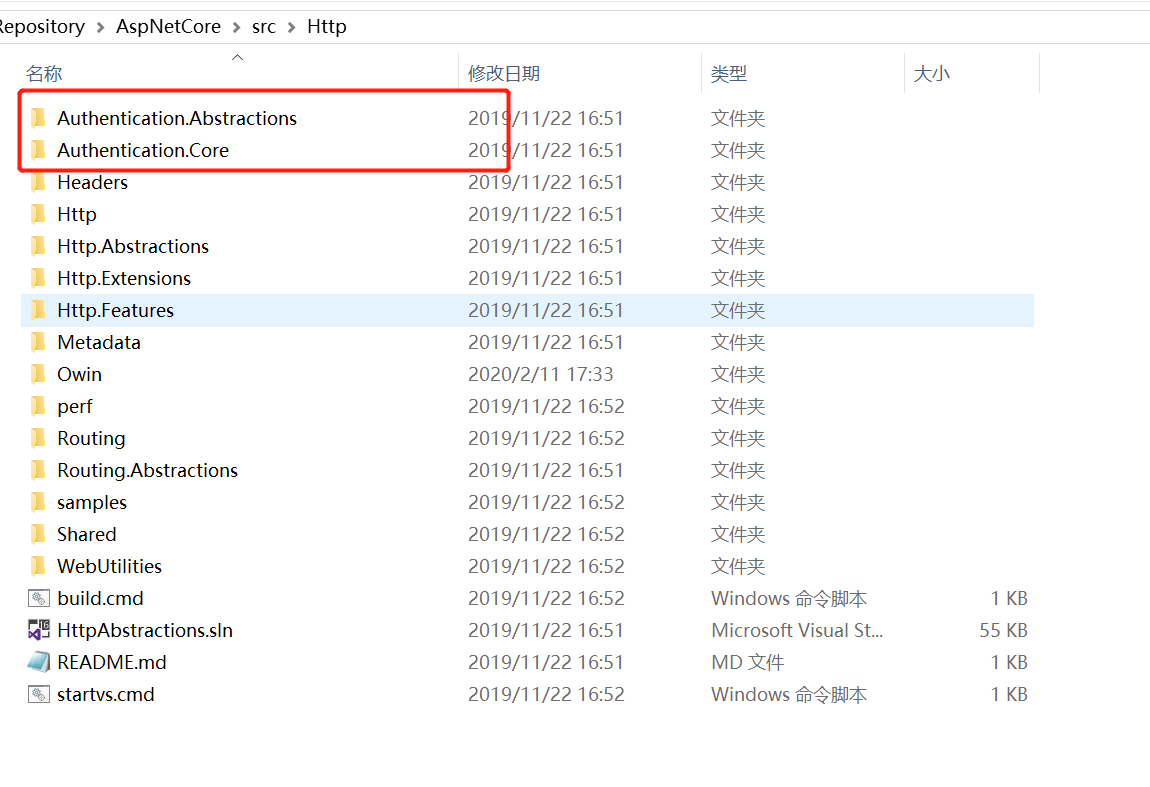
AddAuthenticationCore注入了认证服务的核心对象。这个方法在Authentication.Core项目,这个项目定义了认证服务的核心对象,在Authentication.Abstractions项目中定义了核心接口。
AddAuthenticationCore方法注入了IAuthenticationService,IClaimsTransformation,IAuthenticationHandlerProvider,IAuthenticationSchemeProvider
public static IServiceCollection AddAuthenticationCore(this IServiceCollection services)

{

    if (services == null)

    {

        throw new ArgumentNullException(nameof(services));

    }

    services.TryAddScoped<IAuthenticationService, AuthenticationService>();

    services.TryAddSingleton<IClaimsTransformation, NoopClaimsTransformation>(); // Can be replaced with scoped ones that use DbContext

    services.TryAddScoped<IAuthenticationHandlerProvider, AuthenticationHandlerProvider>();

    services.TryAddSingleton<IAuthenticationSchemeProvider, AuthenticationSchemeProvider>();

    return services;

}
IAuthenticationService
认证服务,定义了五个方法
- AuthenticateAsync: 认证
- ChallengeAsync:挑战,校验认证
- ForbidAsync:禁止认证
- SignInAsync:登入
- SignOutAsync:登出
class IAuthenticationService{
+AuthenticateAsync(HttpContext context, string scheme)
+ChallengeAsync(HttpContext context, string scheme, AuthenticationProperties properties)
+ForbidAsync(HttpContext context, string scheme, AuthenticationProperties properties)
+SignInAsync(HttpContext context, string scheme, ClaimsPrincipal principal, AuthenticationProperties properties)
+SignOutAsync(HttpContext context, string scheme, AuthenticationProperties properties)
}
通过AuthenticateAsync方法源代码可以看到,AuthenticateService只是做了控制器的角色,校验schema,根据schema获取handler,主要的认证逻辑是由handler处理。其他的方法基本也是这样的逻辑。
 public virtual async Task<AuthenticateResult> AuthenticateAsync(HttpContext context, string scheme)

{

    if (scheme == null)

    {

        var defaultScheme = await Schemes.GetDefaultAuthenticateSchemeAsync();

        scheme = defaultScheme?.Name;

        if (scheme == null)

        {

            throw new InvalidOperationException($"No authenticationScheme was specified, and there was no DefaultAuthenticateScheme found. The default schemes can be set using either AddAuthentication(string defaultScheme) or AddAuthentication(Action<AuthenticationOptions> configureOptions).");

        }

    }

    var handler = await Handlers.GetHandlerAsync(context, scheme);

    if (handler == null)

    {

        throw await CreateMissingHandlerException(scheme);

    }

    var result = await handler.AuthenticateAsync();

    if (result != null && result.Succeeded)

    {

        var transformed = await Transform.TransformAsync(result.Principal);

        return AuthenticateResult.Success(new AuthenticationTicket(transformed, result.Properties, result.Ticket.AuthenticationScheme));

    }

    return result;

}
IClaimsTransformation
class IClaimsTransformation{
+TransformAsync(ClaimsPrincipal principal)
}
该接口只有一个方法,用于转换Claims。默认注入的NoopClaimsTransformation,不会做任何操作。如果需要对Claims做一些处理,实现IClaimsTransformation并覆盖注入就可以了。
public class NoopClaimsTransformation : IClaimsTransformation

{

    /// <summary>

    /// Returns the principal unchanged.

    /// </summary>

    /// <param name="principal">The user.</param>

    /// <returns>The principal unchanged.</returns>

    public virtual Task<ClaimsPrincipal> TransformAsync(ClaimsPrincipal principal)

    {

        return Task.FromResult(principal);

    }

}
IAuthenticationHandlerProvider
class IAuthenticationHandlerProvider{
+GetHandlerAsync(HttpContext context, string authenticationScheme)
}
上面提到过handler处理了主要的认证业务逻辑,这个接口可以根据schema获取handler。
IAuthenticationSchemeProvider
class IAuthenticationSchemeProvider{
+GetAllSchemesAsync()
+GetSchemeAsync(string name)
+GetDefaultAuthenticateSchemeAsync()
+GetDefaultChallengeSchemeAsync()
+GetDefaultForbidSchemeAsync()
+GetDefaultSignInSchemeAsync()
+GetDefaultSignOutSchemeAsync()
+AddScheme(AuthenticationScheme scheme)
+RemoveScheme(string name)
+GetRequestHandlerSchemesAsync()
}
该接口主要定义了一些schema的操作方法。
AuthenticationScheme主要有三个属性,通过HandlerType与handler建立了关联。
class AuthenticationScheme{
Name
DisplayName
HandlerType
}
认证流程
A(AuthenticationOptions定义五个认证动作的Schema)
A --> B1(Authenticate)
A --> B2(Challenge)
A --> B3(Forbid)
A --> B4(SignIn)
A --> B5(SingOut)
C(IAuthenticationSchemeProvider获取Schema)
B1 --> C
B2 --> C
B3 --> C
B4 --> C
B5 --> C
C --> D(IAuthenticationHandlerProvider获取Schema对应的Handler)
D --> E(处理请求)
其他
除了核心对象,还注入了用于数据保护和解码的辅助对象
services.AddDataProtection();

services.AddWebEncoders();
Authentication中间件
中间件会优先在容器中找IAuthenticationRequestHandler的实现,如果handler不为空的话,则执行handler的HandleRequestAsync方法。IAuthenticationRequestHandler通常在远程认证(如:OAuth, OIDC等)中使用。
如果没有IAuthenticationRequestHandler的实现,则会找默认schema,执行默认schema对应handler的AuthenticationAsync方法,认证成功后,给HttpContext的User对象赋值。
public async Task Invoke(HttpContext context)

    {

        context.Features.Set<IAuthenticationFeature>(new AuthenticationFeature

        {

            OriginalPath = context.Request.Path,

            OriginalPathBase = context.Request.PathBase

        });

        // Give any IAuthenticationRequestHandler schemes a chance to handle the request

        var handlers = context.RequestServices.GetRequiredService<IAuthenticationHandlerProvider>();

        foreach (var scheme in await Schemes.GetRequestHandlerSchemesAsync())

        {

            var handler = await handlers.GetHandlerAsync(context, scheme.Name) as IAuthenticationRequestHandler;

            if (handler != null && await handler.HandleRequestAsync())

            {

                return;

            }

        }

        var defaultAuthenticate = await Schemes.GetDefaultAuthenticateSchemeAsync();

        if (defaultAuthenticate != null)

        {

            var result = await context.AuthenticateAsync(defaultAuthenticate.Name);

            if (result?.Principal != null)

            {

                context.User = result.Principal;

            }

        }

        await _next(context);

    }
AspNetCore3.1_Secutiry源码解析_2_Authentication_核心对象的更多相关文章
- AspNetCore3.1_Secutiry源码解析_3_Authentication_Cookies
系列文章目录 AspNetCore3.1_Secutiry源码解析_1_目录 AspNetCore3.1_Secutiry源码解析_2_Authentication_核心流程 AspNetCore3. ...
- AspNetCore3.1_Secutiry源码解析_6_Authentication_OpenIdConnect
title: "AspNetCore3.1_Secutiry源码解析_6_Authentication_OpenIdConnect" date: 2020-03-25T21:33: ...
- AspNetCore3.1_Secutiry源码解析_1_目录
文章目录 AspNetCore3.1_Secutiry源码解析_1_目录 AspNetCore3.1_Secutiry源码解析_2_Authentication_核心项目 AspNetCore3.1_ ...
- AspNetCore3.1_Secutiry源码解析_4_Authentication_JwtBear
title: "AspNetCore3.1_Secutiry源码解析_4_Authentication_JwtBear" date: 2020-03-22T16:29:29+08: ...
- AspNetCore3.1_Secutiry源码解析_5_Authentication_OAuth
title: "AspNetCore3.1_Secutiry源码解析_5_Authentication_OAuth" date: 2020-03-24T23:27:45+08:00 ...
- AspNetCore3.1_Secutiry源码解析_8_Authorization_授权框架
目录 AspNetCore3.1_Secutiry源码解析_1_目录 AspNetCore3.1_Secutiry源码解析_2_Authentication_核心流程 AspNetCore3.1_Se ...
- Mybatis源码解析3——核心类SqlSessionFactory,看完我悟了
这是昨晚的武汉,晚上九点钟拍的,疫情又一次来袭,曾经熙熙攘攘的夜市也变得冷冷清清,但比前几周要好很多了.希望大家都能保护好自己,保护好身边的人,生活不可能像你想象的那么好,但也不会像你想象的那么糟. ...
- AspNetCore3.1源码解析_2_Hsts中间件
title: "AspNetCore3.1源码解析_2_Hsts中间件" date: 2020-03-16T12:40:46+08:00 draft: false --- 概述 在 ...
- AspNetCore3.1_Middleware源码解析_3_HttpsRedirection
概述 上文提到3.1版本默认没有使用Hsts,但是使用了这个中间件.看名字就很好理解,https跳转,顾名思义,就是跳转到 https地址. 使用场景,当用户使用http访问网站时,自动跳转到http ...
随机推荐
- Linux查看后台任务,关闭后台任务
jobs查看后台任务, kill %num关闭相应的后台任务
- stack|session|fuss|anniversary
N-COUNT A stack of things is a pile of them. 摞; 堆 例: There were stacks of books on the bedside table ...
- revit卸载/完美解决安装失败/如何彻底卸载清除干净revit各种残留注册表和文件的方法
在卸载revit重装revit时发现安装失败,提示是已安装revit或安装失败.这是因为上一次卸载revit没有清理干净,系统会误认为已经安装revit了.有的同学是新装的系统也会出现revit安装失 ...
- 关于unicode汉字范围正则表达式的写法
\u2E80-\u2EFF:CJK部首补充: \u2F00-\u2FDF:康熙部首: \u3000-\u303F:CJK标点符号: \u31C0-\u31EF:CJK笔划: \u3200-\u32FF ...
- Welcome to Fan Ouyang’s website!
Welcome to Fan Ouyang's website! 欧阳璠,哲学博士,湖南娄底人. 目前为浙江大学教育学院课程与学习科学系教育技术专业百人计划研究员. 2013-2018年 明尼苏达大学 ...
- vm文件的优点
vm文件的优点 相较于内容写在jsp 文件: 1.在网页上上浏览和下载的内容用的是同一套,也就是说只需要维护一套内容,页面上看到的和下载得到的是一致的. 2.版本控制较为简便, 实现了页面内容和jsp ...
- js实现键盘数字输入
<html> <head> <meta charset="UTF-8"> </head> <script> functi ...
- Python---12函数式编程------12.1高阶函数
函数式编程 函数是Python内建支持的一种封装,我们通过把大段代码拆成函数,通过一层一层的函数调用,就可以把复杂任务分解成简单的任务,这种分解可以称之为面向过程的程序设计.函数就是面向过程的程序设计 ...
- flutter 白板工具Twitter IconFacebook Icon
flutter 白板工具 Categories: flutter 平常桌面上都放着一些草稿纸,因为经常要整理思路.画画草图啥的.这不是电子时代嘛,就觉得在手机.pad上也可以这样写写画画,我看了有很多 ...
- 修改android项目sdk版本
1.右键单击项目--->properties---->Resource----->Android在Project Bulid Target对话框中选择你需要的Android版本.2. ...