
Egret P2 ( 一) 掉落的小球
实际效果(蛋疼这个gif制作软件,帧率太低....):

一 Egret和P2的坐标系
首先了解下P2和Egret的坐标系。
某人链接:http://blog.csdn.net/qilei2010/article/details/51925754
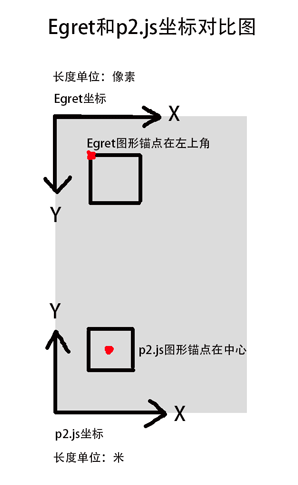
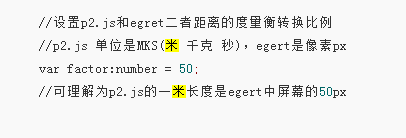
关于p2和Egret的单位换算,我看论坛拉登的demo没写这个factor,我也就没写了,不知后面会发生什么事情呢...= =!
二 创建物理世界
啥是物理世界? p2的刚体碰撞、重力、浮力等物理运算都在这个"世界"进行。
注意这里重力是10,如果是地球上,应该是朝地面,是-10才对。为啥这里是10,后面会讲。
this.world = new p2.World();

this.world.sleepMode = p2.World.BODY_SLEEPING;  //刚体睡眠,貌似是不动的时候,不用参与物理运算??

this.world.gravity = [,];
三 创建一个地板
Plane相当于地面,默认面向Y轴方向。
因为这个Y轴是P2的Y轴,而不是Egret的Y轴。P2和Egret的Y轴是相反的。所以将地面翻转180度。planeBody.angle = Math.PI
我们来看看不旋转会怎么样?
红色方块位置 = [100,100]
棕色地面位置 = [stage.stageWidth/2, stage.stageHeight - 100]
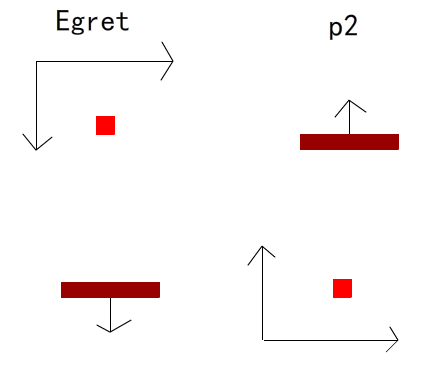
不旋转180度时的情况:
在Egret中视觉上是正常的,但是地面朝下。
在P2中,方块在地面下了,会运行不正常,方块像吃了药,飞速往下掉。
如果想P2中正常,得将地面和方块位置替换,那么在Egret中会显示地面在上,方块在下,这显然不是我们想要的。
旋转180度后:
Egret中视觉上和地面方向都正常了。
P2中地面朝下了,这时物理世界的重力得从-10改为10。
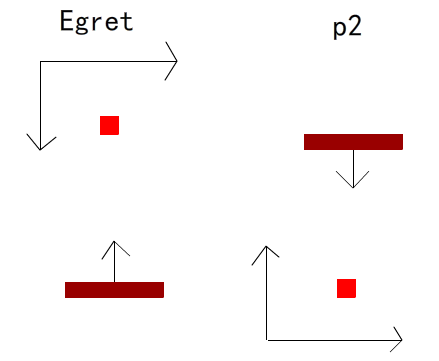
翻转后的结果就是,P2和Egret是反的,那么将地面反转,反反得正... (其实我也很晕...)
        var plane:p2.Plane = new p2.Plane();

        this.planeBody = new p2.Body({position:[GameConst.stage.stageWidth/, GameConst.stage.stageHeight - ]});

        this.planeBody.angle =  Math.PI;

        this.planeBody.addShape(plane);

        this.world.addBody(this.planeBody);

        this.plane = this.createPlane();

        this.planeBody.displays = [this.plane];
四 创建一个自由落体方块
        var box:p2.Box = new p2.Box({width:, height:});    //1. 创建一个Box

        this.boxBody = new p2.Body({mass:, angularVelocity:, position:[,]});   //2. 创建一个刚体,赋予Box物理特性

        this.boxBody.addShape(box);

        this.world.addBody(this.boxBody);

        this.ball = this.createBox();

        this.boxBody.displays = [this.ball];   //3. 给Box绑一个在Egret中的显示对象

        this.addChild(this.ball);
五 更新物理世界
物理世界step()不停的在进行物理运算, Egret对象就像是物理世界的影子,每帧将对象和物理世界对象同步。
    private onEnterFrame(){

        this.world.step(/);  //1. 60ms/1000 = 0.06秒更新一次

        var len:number = this.world.bodies.length;

        for(var i: number = ;i < len;i++) {                 //2. 同步物理世界对象和Egret显示对象的位置和角度

            var body: p2.Body = this.world.bodies[i];

            var display: egret.DisplayObject = body.displays[];

            display.x = body.position[];

                     display.y = body.position[];

            display.rotation = body.angle  *  / Math.PI;  //弧度和角度互换

        }

    }
六 所有代码
/**

 * 创建一个方块,自由落体

 *

 * 1. 世界,矩形,地板的使用

 *

 * @author chenkai

 * @since 2017/6/23

 */

class Box extends egret.Sprite{

    private world:p2.World;

    private boxBody:p2.Body;

    private planeBody:p2.Body;

    private ball:egret.Sprite;

    private plane:egret.Sprite;

    public constructor() {

        super();

        //创建world

        this.world = new p2.World();

        this.world.sleepMode = p2.World.BODY_SLEEPING;

        this.world.gravity = [,];

        //创建box

        var box:p2.Box = new p2.Box({width:, height:});

        this.boxBody = new p2.Body({mass:, angularVelocity:, position:[,]});

        this.boxBody.addShape(box);

        this.world.addBody(this.boxBody);

        this.ball = this.createBox();

        this.boxBody.displays = [this.ball];

        this.addChild(this.ball);

        //创建plane  Plane shape class. The plane is facing in the Y direction.

        var plane:p2.Plane = new p2.Plane();

        this.planeBody = new p2.Body({position:[GameConst.stage.stageWidth/, GameConst.stage.stageHeight - ]});  //GameConst.stage保存全局静态变量stage

        this.planeBody.angle =  Math.PI;

        this.planeBody.addShape(plane);

        this.world.addBody(this.planeBody);

        this.plane = this.createPlane();

        this.planeBody.displays = [this.plane];

        //每帧更新

        this.addEventListener(egret.Event.ENTER_FRAME, this.onEnterFrame, this);

    }

    private onEnterFrame(){

        //更新物理世界

        this.world.step(/);

        var len:number = this.world.bodies.length;

        for(var i: number = ;i < len;i++) {

            var body: p2.Body = this.world.bodies[i];

            var display: egret.DisplayObject = body.displays[];

            display.x = body.position[];                      //同步刚体和egret显示对象的位置和旋转角度

            display.y = body.position[];

            display.rotation = body.angle  *  / Math.PI;

        }

    }

    private createBox(){

        var sp:egret.Sprite = new egret.Sprite();

        sp.graphics.beginFill(0xff0000);

        sp.graphics.drawRect(,,,);

        sp.graphics.endFill();

        sp.anchorOffsetX = sp.width/;

        sp.anchorOffsetY = sp.height/;

        return sp;

    }

    private createPlane(){

        var sp:egret.Sprite = new egret.Sprite();

        sp.graphics.lineStyle(, 0x00ff00);

        sp.graphics.moveTo(, );

        sp.graphics.lineTo(GameConst.stage.stageWidth,);

        sp.anchorOffsetX = sp.width/;

        sp.anchorOffsetY = sp.height/;

        this.addChild(sp);

        return sp;

    }

}
Egret P2 ( 一) 掉落的小球的更多相关文章
- Egret P2 入门学习资料
1 p2库下载: https://github.com/egret-labs/egret-game-library/tree/rc/4.1.0 2 p2 作者demo:https://github.c ...
- egret p2物理引擎 遇到的坑(1)
直接将pythsic包丢到libs目录下并且修改egretPropertis.json文件 TypeError [ERR_INVALID_ARG_TYPE]: The "to" a ...
- 微信小游戏egret开发包括p2引擎小结
用egret + p2 做一个类似投球的小游戏,坑大致如下: 1.p2引擎与egret坐标不同注意转换,横坐标没什么,纵坐标egret.y = stageHeight - body.position[ ...
- hdu1547之BFS
Bubble Shooter Time Limit: 2000/1000 MS (Java/Others) Memory Limit: 65536/32768 K (Java/Others) T ...
- 【Holograms 101D】一步步用Unity 开发 Hologram
转载请注明出处: copperface:[Holograms 101D]一步步用Unity 开发 Hologram Holograms 101 该教程将带领你走完 Hologram 创建 的全过程.整 ...
- Javascript学习--时间
digit = [ [ [0,0,1,1,1,0,0], [0,1,1,0,1,1,0], [1,1,0,0,0,1,1], [1,1,0,0,0,1,1], [1,1,0,0,0,1,1], [1, ...
- ML-Agents(二)创建一个学习环境
ML-Agents(二)创建一个学习环境 一.前言 上一节我们讲了如何配置ML-Agents环境,这一节我们创建一个示例,主要利用Reinforcement Learning(强化学习). 如上图,本 ...
- 【h5游戏开发】egret引擎p2物理引擎 - 小球碰撞地面搞笑的物理现象
重力的方向和地面的问题 p2中默认的方向是从上到下,如果重力默认是正数的话,物体放到世界中是会从上面往下面飘的 p2中plane地面默认的方向是y轴的方向,而在p2中y轴的方向默认是从上往下 首先来看 ...
- Egret中使用P2物理引擎
游戏中的对象按照物理规律移动,体现重力.引力.反作用力.加速度等物体特性,实现自由落体.摇摆运动.抛物线运动,以及物理碰撞现象的模拟.用于模拟物理碰撞.物理运动的引擎称为物理引擎. 来自瑞典斯德哥尔摩 ...
随机推荐
- 06 Locking and Latching
本章提要---------------------------------------------------------------6,7,8,9,10,11 这 6 章要细看, 从本章开始how ...
- C++ c++与C语言的区别(struct类型的加强,函数-变量类型加强,bool类型)
//区别④:struct类型的加强(C++版本) #include<iostream> using namespace std; //C++中的struct是一个新类型的定义声明 //c+ ...
- Flume1.5.0入门:安装、部署、及flume的案例
转自:http://www.aboutyun.com/thread-8917-1-1.html 问题导读1.什么是flume2.flume的官方网站在哪里?3.flume有哪些术语?4.如何配置flu ...
- ConfigParser.NoSectionError: No section: 'MongoDB'
场景:手动执行bat文件正常,schtasks定时执行bat文件时报错. 原因:定时执行时,ini配置文件找不到.Windows 下用 schtasks 定时执行脚本的默认起始路径为:C:\Windo ...
- tarjan算法-解决有向图中求强连通分量的利器
小引 看到这个名词-tarjan,大家首先想到的肯定是又是一个以外国人名字命名的算法.说实话真的是很佩服那些算法大牛们,佩服得简直是五体投地啊.今天就遇到一道与求解有向图中强连通分量的问题,我的思路就 ...
- 如何强制关闭Tomcat
用Myeclipse打开后启动Tomcat提示信息为:Address already in use: JVM_Bind:80 ,表示该地址和端口已经被占用显示已经打开了.但是关不掉他...所以只能去关 ...
- jQuery-处理class属性
1.addClass方法 为每个匹配的元素添加指定的样式类名 参数类型说明: 1)class名称(字符串) 每个匹配元素添加的一个或多个用空格隔开的样式名 2)function(index, curr ...
- [Java并发包学习七]解密ThreadLocal
概述 相信读者在网上也看了非常多关于ThreadLocal的资料,非常多博客都这样说:ThreadLocal为解决多线程程序的并发问题提供了一种新的思路:ThreadLocal的目的是为了解决多线程訪 ...
- AOP技术应用和研究--AOP简单应用
为了更好的理解AOP实践和体现AOP的优势.我们始终将OOP和AOP的比較贯穿到下文中.并在终于总结出AOP与OOP相比所拥有的长处,AOP的缺点以及AOP一般的使用场景. 1.1 问题空间到解空间的 ...
- jQuery实现HTML表格单元格的合并功能
<!DOCTYPE html PUBLIC "-//W3C//DTD XHTML 1.0 Transitional//EN" "http://www.w3.org/ ...