
利用WCF创建简单的RESTFul Service
1):用VS2013创建一个WCF的工程,如下图所示:
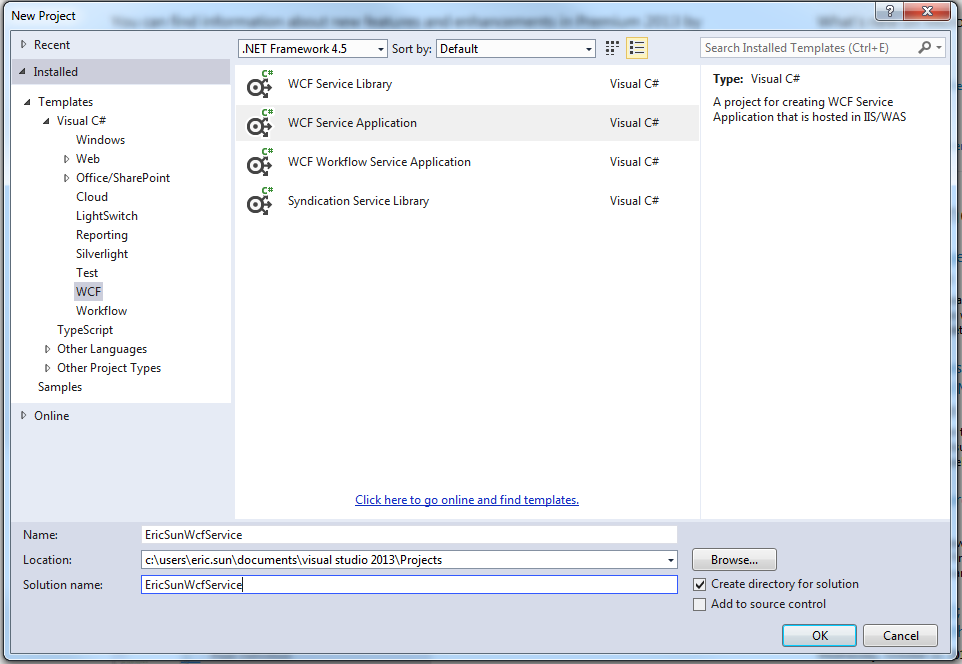
2):我们来看一下默认状态下的config文件内容,这里的内容我们会再后续的步骤中进行修改
<?xml version="1.0"?>

<configuration>

  <appSettings>

    <add key="aspnet:UseTaskFriendlySynchronizationContext" value="true" />

  </appSettings>

  <system.web>

    <compilation debug="true" targetFramework="4.5" />

    <httpRuntime targetFramework="4.5"/>

  </system.web>

  <system.serviceModel>

    <behaviors>

      <serviceBehaviors>

        <behavior>

          <!-- To avoid disclosing metadata information, set the values below to false before deployment -->

          <serviceMetadata httpGetEnabled="true" httpsGetEnabled="true"/>

          <!-- To receive exception details in faults for debugging purposes, set the value below to true.  Set to false before deployment to avoid disclosing exception information -->

          <serviceDebug includeExceptionDetailInFaults="false"/>

        </behavior>

      </serviceBehaviors>

    </behaviors>

    <protocolMapping>

        <add binding="basicHttpsBinding" scheme="https" />

    </protocolMapping>

    <serviceHostingEnvironment aspNetCompatibilityEnabled="true" multipleSiteBindingsEnabled="true" />

  </system.serviceModel>

  <system.webServer>

    <modules runAllManagedModulesForAllRequests="true"/>

    <!--

        To browse web app root directory during debugging, set the value below to true.

        Set to false before deployment to avoid disclosing web app folder information.

      -->

    <directoryBrowse enabled="true"/>

  </system.webServer>

</configuration>
3):我们对工程文件及其内容做一下修改,具体代码如下所示:
3.1):UserData class
using System;

using System.Collections.Generic;

using System.Linq;

using System.Runtime.Serialization;

using System.Web;

namespace EricSunWcfService

{

    [DataContract]

    public class UserData

    {

        [DataMember]

        public string Name { get; set; }

        [DataMember]

        public string Password { get; set; }

        [DataMember]

        public string Email { get; set; }

    }

}
3.2):IDataService,这个接口是从默认的IService1修改而来,并且这里提供了两种方法,一个是GET,另外是POST,都是简单的返回UserData对象的Json字符串
using System;

using System.Collections.Generic;

using System.Linq;

using System.Runtime.Serialization;

using System.ServiceModel;

using System.ServiceModel.Web;

using System.Text;

namespace EricSunWcfService

{

    // NOTE: You can use the "Rename" command on the "Refactor" menu to change the interface name "IService1" in both code and config file together.

    [ServiceContract]

    public interface IUserService

    {

        [OperationContract]

        [WebInvoke(Method = "GET", UriTemplate = "getuser/{name}", RequestFormat = WebMessageFormat.Json, ResponseFormat = WebMessageFormat.Json)]

        UserData GetUserData(string name);

        [OperationContract]

        [WebInvoke(Method = "POST", UriTemplate = "checkuser", RequestFormat = WebMessageFormat.Json, ResponseFormat = WebMessageFormat.Json)]

        UserData CheckUserData(UserData user);

    }

}
3.3):UserService,这个文件名是从默认的Service1修改过来的
using System;

using System.Collections.Generic;

using System.Linq;

using System.Runtime.Serialization;

using System.ServiceModel;

using System.ServiceModel.Web;

using System.Text;

namespace EricSunWcfService

{

    // NOTE: You can use the "Rename" command on the "Refactor" menu to change the class name "Service1" in code, svc and config file together.

    // NOTE: In order to launch WCF Test Client for testing this service, please select Service1.svc or Service1.svc.cs at the Solution Explorer and start debugging.

    public class UserService : IUserService

    {

        public UserData GetUserData(string name)

        {

            UserData user = new UserData();

            user.Name = name;

            user.Email = "test@123.com";

            return user;

        }

        public UserData CheckUserData(UserData user)

        {

            user.Name += "-test";

            return user;

        }

    }

}
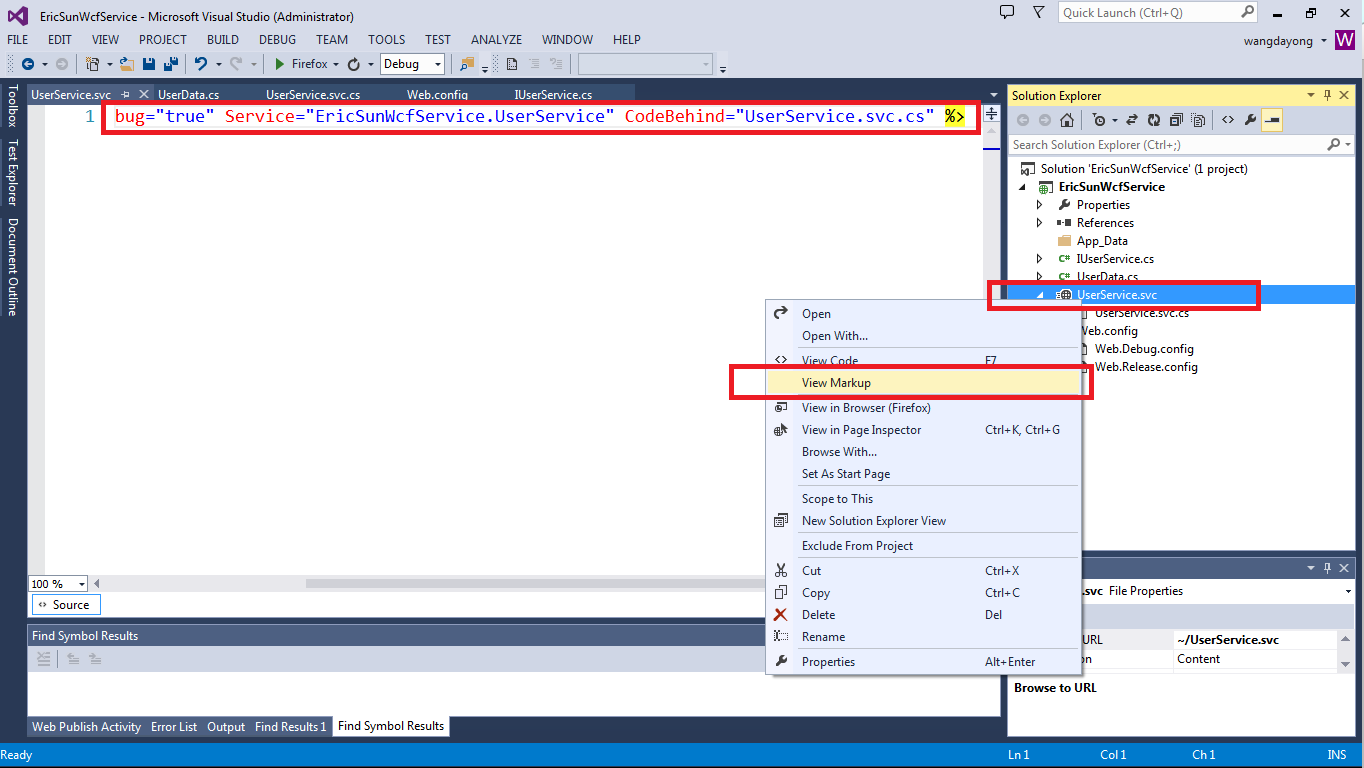
3.4):我们可以点击对应的Service的‘View Markup’来修改ServiceHost的信息,如下图所示
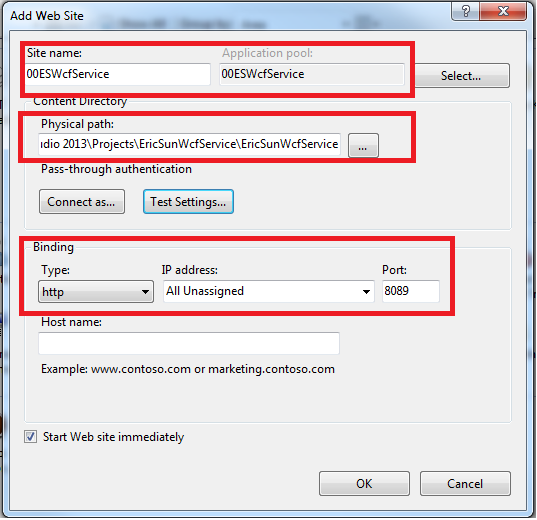
4):我们在IIS中创建一个Site来Host我们所提供的WCF Service,用http协议并且将端口绑定为8089,与此同时制定好Physical path,如下图所示
【注:请将创建的Application Pool的.Net Framework Version修改成为4.0】
5):在目前这种状态下还不能成功的访问对应的WCF Service的,我们需要对web.config进行修改
<?xml version="1.0"?>

<configuration>

  <appSettings>

    <add key="aspnet:UseTaskFriendlySynchronizationContext" value="true" />

  </appSettings>

  <system.web>

    <compilation debug="true" targetFramework="4.5" />

    <httpRuntime targetFramework="4.5"/>

  </system.web>

  <system.serviceModel>

    <services>

        <service name="EricSunWcfService.UserService" behaviorConfiguration="RESTBehaviour">

          <endpoint address=""

                    binding="webHttpBinding"

                    contract="EricSunWcfService.IUserService"

                    behaviorConfiguration="ESEndPointBehavior"/>

        </service>

      </services>

    <behaviors>

      <serviceBehaviors>

        <behavior name="RESTBehaviour">

          <serviceMetadata httpGetEnabled="true"/>

          <serviceDebug includeExceptionDetailInFaults="true"/>

        </behavior>

        <behavior>

          <!-- To avoid disclosing metadata information, set the values below to false before deployment -->

          <serviceMetadata httpGetEnabled="true" httpsGetEnabled="true"/>

          <!-- To receive exception details in faults for debugging purposes, set the value below to true.  Set to false before deployment to avoid disclosing exception information -->

          <serviceDebug includeExceptionDetailInFaults="false"/>

        </behavior>

      </serviceBehaviors>

      <endpointBehaviors>

        <behavior name="ESEndPointBehavior">

          <webHttp/>

        </behavior>

      </endpointBehaviors>

    </behaviors>

    <protocolMapping>

        <add binding="basicHttpsBinding" scheme="https" />

    </protocolMapping>

    <serviceHostingEnvironment aspNetCompatibilityEnabled="true" multipleSiteBindingsEnabled="true" />

  </system.serviceModel>

  <system.webServer>

    <!--

      To browse web app root directory during debugging, set the value below to true.

      Set to false before deployment to avoid disclosing web app folder information.

    -->

    <directoryBrowse enabled="true"/>

    <modules runAllManagedModulesForAllRequests="true"/>

  </system.webServer>

</configuration>
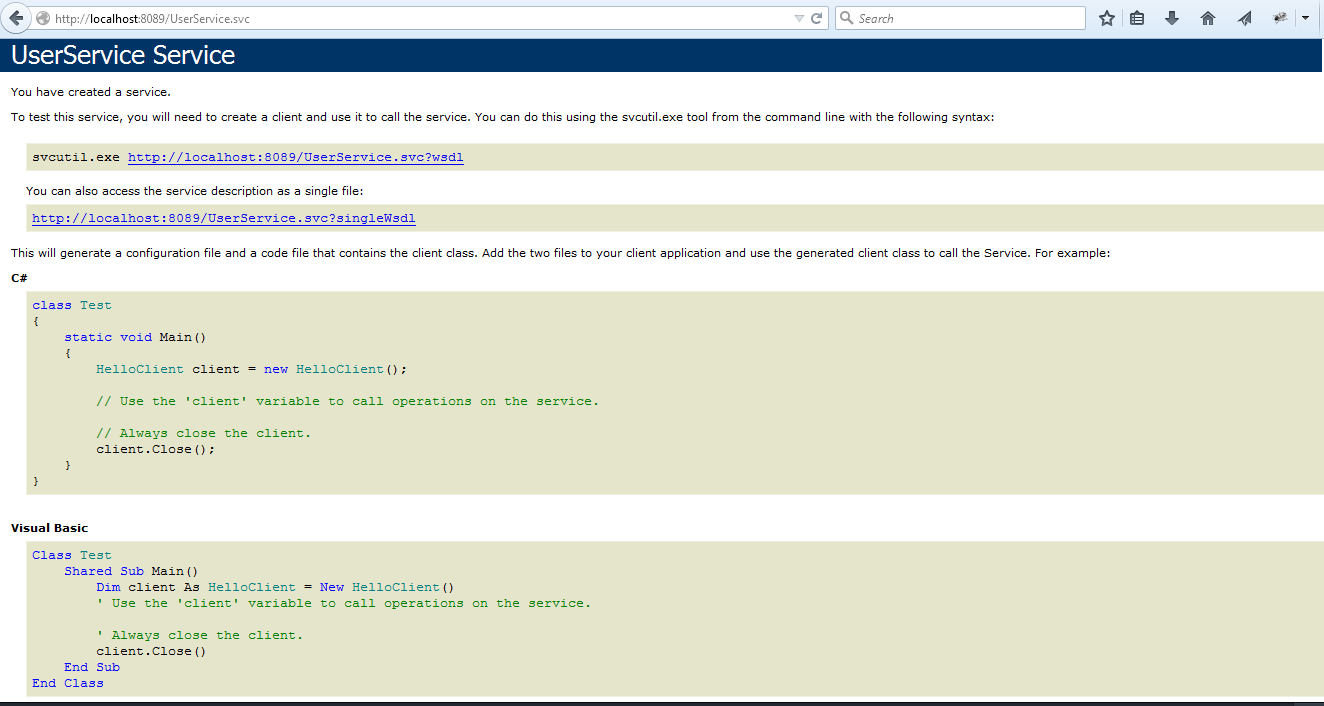
6):config文件配置完毕后,我们就可访问此URL:http://localhost:8089/UserService.svc 来判断我们Service提供的正确与否,若是看到下面的截图则表明Service无误
7):若在访问 http://localhost:8089/UserService.svc 的时候出现500.19【HTTP Error 500.19 - Internal Server Error】错误请参考如下链接解决
http://www.cnblogs.com/mingmingruyuedlut/archive/2011/11/04/2235630.html
8):访问GET方法我们可以直接在浏览器地址栏中输入对应的service地址即可访问
例如输入 http://localhost:8089/UserService.svc/getuser/eric
会给我们返回: {"Email":"test@123.com","Name":"eric","Password":null}
9):若是访问POST方法,单纯的在浏览器中输入地址则无法完成正确的调用,这里我们使用浏览器的插件poster (https://addons.mozilla.org/en-US/firefox/addon/poster/)
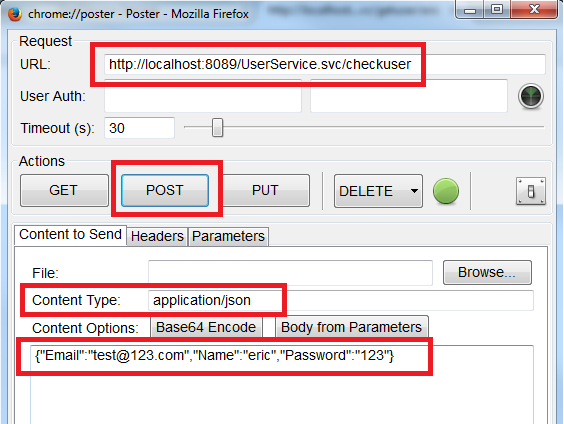
如上图所示,在poster中填入正确的配置信息,并且传入Json的参数值{"Email":"test@123.com","Name":"eric","Password":"123"}
点击POST按钮之后变回得到如下返回结果:
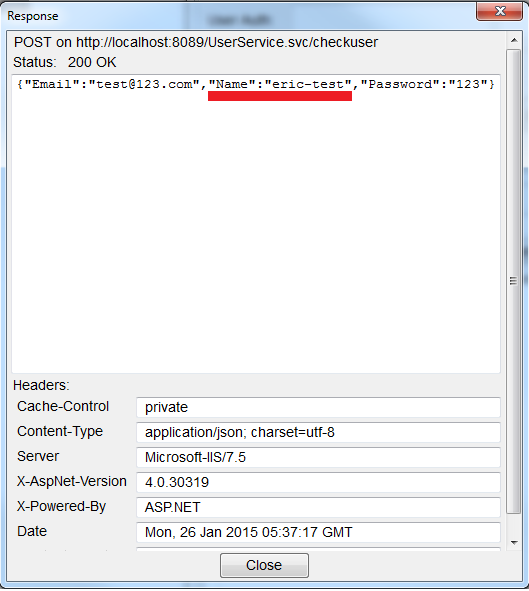
10):若是我们发现在调用PUT或者DELETE方法时出现Status:405 Method Not Allowed的问题,请在web.config文件中的system.webServer节点中添加如下配置
    <modules runAllManagedModulesForAllRequests="true">

      <remove name="WebDAVModule" />

    </modules>

    <handlers>

      <remove name="WebDAV" />

    </handlers>
至此我们就可以通过WCF向外提供REST的Service了~~
如何配置来完成HTTPS的访问请看如下链接:
http://www.cnblogs.com/mingmingruyuedlut/p/4236035.html
利用WCF创建简单的RESTFul Service的更多相关文章
- WCF创建简单程序
1. 新建立空白解决方案,并在解决方案中新建项目,项目类型为:WCF服务应用程序.建立完成后如下图所示: 2.删除系统生成的两个文件IService1.cs与Service1.svc,当然你也可以直接 ...
- Eclipse下利用Maven创建SpringBoot的Restful风格程序
参考文章:https://spring.io/guides/gs/rest-service/ 中文翻译:https://blog.dubby.cn/detail.html?id=9040 1.目标是什 ...
- SpringBoot IntelliJ创建简单的Restful接口
使用SpringBoot快速建服务,和NodeJS使用express几乎一模一样,主要分为以下: 1.添加和安装依赖 2.添加路由(即接口) 3.对路由事件进行处理 同样坑的地方就是,祖国的防火墙太 ...
- 利用HttpListener创建简单的HTTP服务
using System; using System.Collections.Generic; using System.IO; using System.IO.Compression; using ...
- WCF Restful Service
对 Web Services.WCF 和 Restful 的扫盲可参见:https://www.cnblogs.com/scy251147/p/3382436.html 关于之前对 WCF 的学习,可 ...
- 基于.Net FrameWork的 RestFul Service
关于本文 这篇文章的目的就是向大家阐述如何在.net framework 4.0中创建RestFul Service并且使用它. 什么是web Services,什么是WCF 首先讲到的是web Se ...
- [转]使用WCF 4.0 构建 REST Service
本文转自:http://www.cnblogs.com/lanvige/archive/2010/12/03/set_up_rest_service_with_wcf_4.html 用过一段时间的Ru ...
- 用 C# 实现一个简单的 Rest Service 供外部调用
用 C# 实现一个简单的 Restful Service 供外部调用,大体总结为4点: The service contract (the methods it offers). How do yo ...
- Wcf Restful Service服务搭建
目的 使用Wcf(C#)搭建一个Restful Service 背景 最近接到一个项目,客户要求使用Restful 方式接收到数据,并对数据提供对数据的统计显示功能,简单是简单,但必须要使用Restf ...
随机推荐
- 我的.NET自学之路
我第一门语言接触的并不是.net,而是php刚学php感觉还好,但是一学到后面就有一点头晕乎乎的,我感觉没有一个好的编写php代码的编辑器.而且php是弱类型语言,感觉起来没有像c,java,c#这些 ...
- Leetcode 254. Factor Combinations
Numbers can be regarded as product of its factors. For example, 8 = 2 x 2 x 2; = 2 x 4. Write a func ...
- BZOJ2242 [SDOI2011]计算器
本文版权归ljh2000和博客园共有,欢迎转载,但须保留此声明,并给出原文链接,谢谢合作. 本文作者:ljh2000 作者博客:http://www.cnblogs.com/ljh2000-jump/ ...
- Mysql 视图 游标 触发器 存储过程 事务
Mysql 视图 触发器 存储过程 游标 游标是从数据表中提取出来的数据,以临时表的形式存放在内存中,在游标中有一个数据指针,在初始状态下指向的是首记录,利用fetch语句可以移动该指针,从而对游标中 ...
- Java编程中的美好
java程序员如何写出"优美"代码,动力节点告诉你怎么办: 1.注释尽可能全面 对于方法的注释应该包含详细的入参和结果说明,有异常抛出的情况也要详细叙述:类的注释应该包含类的功能说 ...
- JavaScript中getBoundingClientRect()方法详解
获取浏览器滚动的高度: scrollTop=document.documentElement.scrollTop || document.body.scrollTop getBoundingClien ...
- [NHibernate]一对多关系(关联查询)
目录 写在前面 文档与系列文章 一对多查询 总结 写在前面 上篇文章介绍了nhibernate的一对多关系如何配置,以及级联删除,级联添加数据的内容.这篇文章我们将学习nhibernate中的一对多关 ...
- linux shell脚本查找重复行/查找非重复行/去除重复行/重复行统计
转自:http://blog.sina.com.cn/s/blog_6797a6700101pdm7.html 去除重复行 sort file |uniq 查找非重复行 sort file |uniq ...
- 【转载】使用Pandas进行数据提取
使用Pandas进行数据提取 本文转载自:蓝鲸的网站分析笔记 原文链接:使用python进行数据提取 目录 set_index() ix 按行提取信息 按列提取信息 按行与列提取信息 提取特定日期的信 ...
- [Operate System & Algorithm] 页面置换算法
页面置换算法是什么?我们看一下百度百科对页面置换算法给出的定义:在地址映射过程中,若在页面中发现所要访问的页面不在内存中,则产生缺页中断.当发生缺页中断时,如果操作系统内存中没有空闲页面,则操作系统必 ...