
springboot项目搭建及常用技术整合
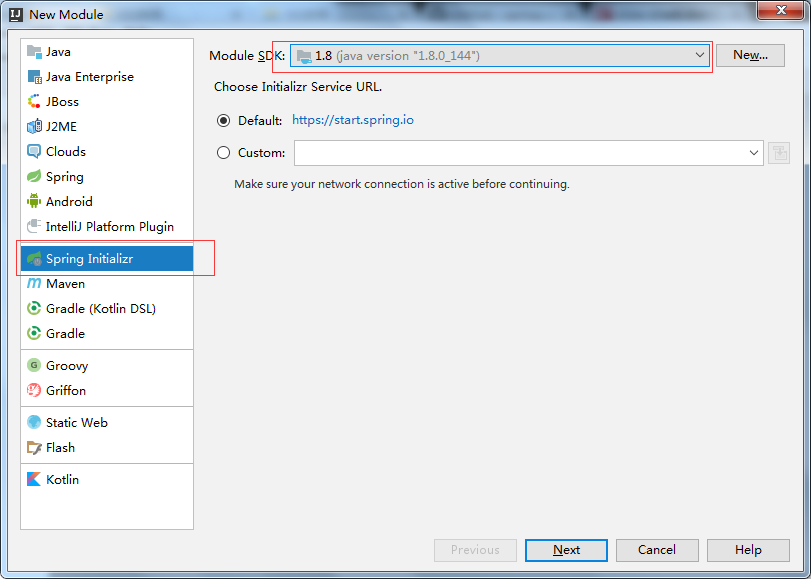
一.在你建立的工程下创建 Module 选择Spring initializr创建。
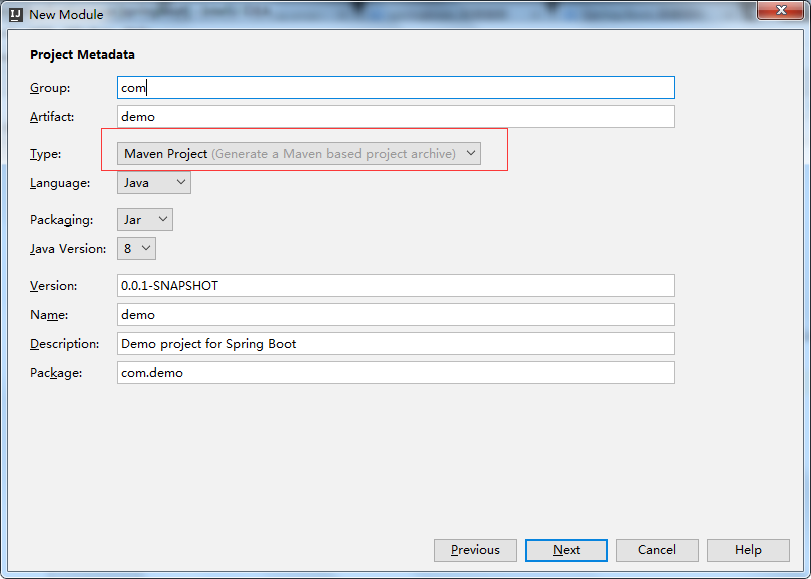
二.在Type处选择: Maven Project(项目的构建工具)
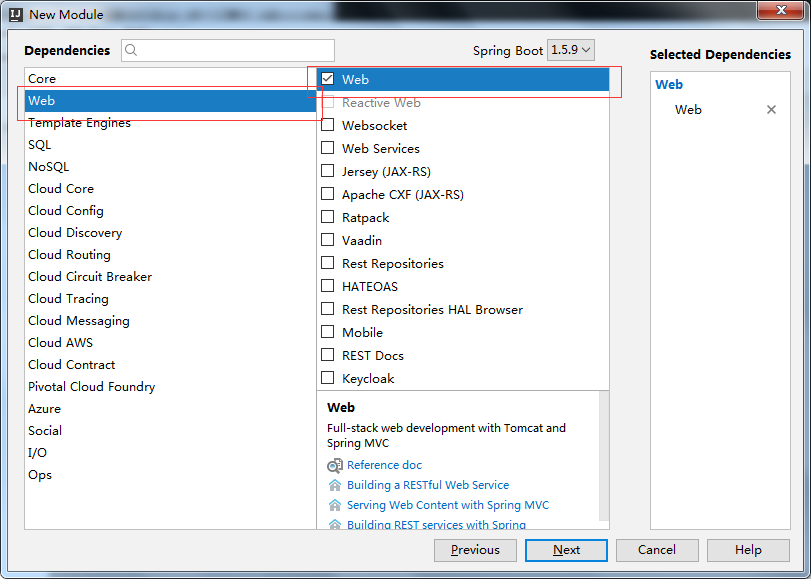
三.创建依赖时勾上web,mybatis,mysql(这个看你个人需要吧,可以自主选择)

建立好的项目结构如下:
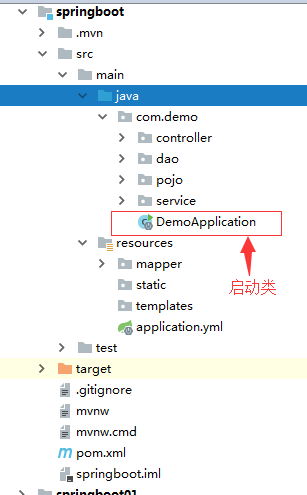
DemoApplication代码:
@ComponentScan(basePackages = {"com.example.demo.web", "com.example.demo.config"})

@SpringBootApplication(exclude = DataSourceAutoConfiguration.class)

@PropertySource(value = { "classpath:config/jdbc.properties"}, ignoreResourceNotFound = false)//未找到文件时报错

public class DemoApplication {

   public static void main(String[] args) {

      //方式一

//    SpringApplication.run(DemoApplication.class, args);

      //方式二

      SpringApplication SpringApplication = new SpringApplication(DemoApplication.class);

      SpringApplication.setBannerMode(Banner.Mode.OFF);//关闭banner图

      SpringApplication.run(args);

   }

}
注意要加exclude = DataSourceAutoConfiguration.class,否则没有配置数据源时会报错:
Failed to configure a DataSource: 'url' attribute is not specified and no embedded datasource could be configured.
Reason: Failed to determine a suitable driver class
启动方式:
1、启动类中右键执行main方法;
2、Terminal命令行中直接执行命令:mvn spring-boot:run (点击X号close session即关闭项目)
3、edit Configurations中添加maven命令,注意Command line中只有spring-boot:run,没有mvn
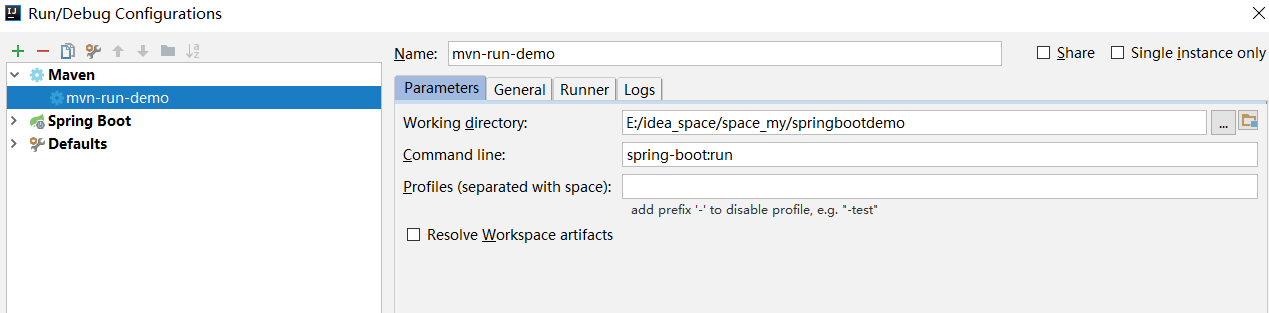
4、执行mvn install生成jar包,执行命令如:java -jar demo-0.0.1-SNAPSHOT.jar 启动
启动banner图设置:
打开地址生成banner文案:http://patorjk.com/software/taag/#p=display&h=3&v=3&f=4Max&t=springboot
复制生成的文本保存到banner.txt放到maven项目resouces目录下,启动即可看到效果。若要更改命名或者存放位置可通过配置更改:
banner.location= classpath:banner.txt
若要关闭可通过:
代码方式:SpringApplication.setBannerMode(Banner.Mode.OFF);
配置方式:spring.main.banner-mode= off(默认console)
自定义消息转化器
方式一:
在@Configuration的类中添加消息转化器的@bean加入到Spring容器,就会被Spring Boot自动加入到容器中。
@Bean

@ConditionalOnMissingBean//bean不存在情况下创建

public StringHttpMessageConverter stringHttpMessageConverter(){

   StringHttpMessageConverter converter  = new StringHttpMessageConverter(Charset.forName("UTF-8"));

   return converter;

}
效果相当于在xml文件中配置bean标签,此配置在spring容器中的名字即方法名,故一般方法名即是bean名
方式二:
自定义springmvc配置
有些时候我们需要自已配置SpringMVC而不是采用默认,比如说增加一个拦截器,这个时候就得通过实现WebMvcConfigurer然后重写父类中的configureMessageConverters方法进行扩展。
@Configuration

public class NewMvcConfig implements WebMvcConfigurer{

    @Override

    public void addInterceptors(InterceptorRegistry registry) {

        HandlerInterceptor handlerInterceptor = new HandlerInterceptor() {

            @Override

            public boolean preHandle(HttpServletRequest request, HttpServletResponse response, Object handler)

                    throws Exception {

                System.out.println("新 de 自定义拦截器............");

                return true;

            }

            @Override

            public void postHandle(HttpServletRequest request, HttpServletResponse response, Object handler,

                                   ModelAndView modelAndView) throws Exception {

            }

            @Override

            public void afterCompletion(HttpServletRequest request, HttpServletResponse response, Object handler,

                                        Exception ex) throws Exception {

            }

        };

        registry.addInterceptor(handlerInterceptor).addPathPatterns("/**");

    }

    // 自定义消息转化器的第二种方法

    @Override

    public void configureMessageConverters(List<HttpMessageConverter<?>> converters) {

        StringHttpMessageConverter converter  = new StringHttpMessageConverter(Charset.forName("UTF-8"));

        converters.add(converter);

    }

}
@PropertySource({"classpath:static/testpro.properties"})引入properties文件
可通过注解:@Value("${test.my.name}")在bean属性中直接获取properties属性值
@ImportResource({"classpath:config.xml","classpathsome.xml"})引入xml文件
整合mybatis
Mybatis和Spring Boot的整合有两种方式:
第一种:使用mybatis官方提供的Spring Boot整合包实现,地址:https://github.com/mybatis/spring-boot-starter
第二种:使用mybatis-spring整合的方式,也就是我们传统的方式
这里我们推荐使用第二种,因为这样我们可以很方便的控制Mybatis的各种配置。
1、springbootapplication类中配置数据源类
@Value("${jdbc.url}")

private String jdbcUrl;

@Value("${jdbc.driverClassName}")

private String jdbcDriverClassName;

@Value("${jdbc.username}")

private String jdbcUsername;

@Value("${jdbc.password}")

private String jdbcPassword;

@Bean(destroyMethod = "close")

public DataSource dataSource() {

   DruidDataSource dataSource = new DruidDataSource();

   dataSource.setDriverClassName(jdbcDriverClassName);

   dataSource.setUrl(jdbcUrl);

   dataSource.setUsername(jdbcUsername);

   dataSource.setPassword(jdbcPassword);

   return dataSource;

}
2、创建mybatis配置类
@Configuration

public class MyBatisConfig {

    @Autowired

    private DataSource dataSource;

    @Bean

    @ConditionalOnMissingBean //当容器里没有指定的Bean的情况下创建该对象

    public SqlSessionFactoryBean sqlSessionFactory() {

        SqlSessionFactoryBean sqlSessionFactoryBean = new SqlSessionFactoryBean();

        // 设置数据源

        sqlSessionFactoryBean.setDataSource(dataSource);

        // 设置mybatis的主配置文件

        ResourcePatternResolver resolver = new PathMatchingResourcePatternResolver();

        Resource mybatisConfigXml = resolver.getResource("classpath:config/mybatis-config.xml");

        sqlSessionFactoryBean.setConfigLocation(mybatisConfigXml);

        // 设置别名包

        sqlSessionFactoryBean.setTypeAliasesPackage("com.example.demo.model");

        //mapper文件路径匹配

        Resource[] mapperResourceList = null;

        try {

            mapperResourceList = new PathMatchingResourcePatternResolver().getResources("classpath*:mapper/**/*.xml");

        } catch (IOException e) {

            e.printStackTrace();

        }

        sqlSessionFactoryBean.setMapperLocations(mapperResourceList);

        return sqlSessionFactoryBean;

    }

}
3、创建mapper接口扫描类
@Configuration

@AutoConfigureAfter(MyBatisConfig.class) //保证在MyBatisConfig实例化之后再实例化该类

public class MapperScannerConfig {

    @Bean

    public MapperScannerConfigurer mapperScannerConfigurer() {

        MapperScannerConfigurer mapperScannerConfigurer = new MapperScannerConfigurer();

        mapperScannerConfigurer.setBasePackage("com.example.demo.dao");

        return mapperScannerConfigurer;

    }

}
4、设置事务管理
当引入jdbc依赖之后,Spring Boot会自动默认分别注入DataSourceTransactionManager或JpaTransactionManager,所以我们不需要任何额外配置就可以用@Transactional注解进行事务的使用。
<dependency>

   <groupId>org.springframework.boot</groupId>

   <artifactId>spring-boot-starter-jdbc</artifactId>

</dependency>
注意引入配置文件:
@PropertySource(value = { "classpath:config/jdbc.properties"}, ignoreResourceNotFound = false)//最好设置未找到文件时报错
mybatis-config.xml文件内容:
<?xml version="1.0" encoding="UTF-8"?>

<!DOCTYPE configuration PUBLIC "-//mybatis.org//DTD Config 3.0//EN" "http://mybatis.org/dtd/mybatis-3-config.dtd">

<configuration>

    <!-- 全局参数 -->

    <settings>

        <!-- 使全局的映射器启用或禁用缓存。 -->

        <setting name="cacheEnabled" value="true"/>

        <!-- 全局启用或禁用延迟加载。当禁用时,所有关联对象都会即时加载。 -->

        <setting name="lazyLoadingEnabled" value="true"/>

        <!-- 设置关联对象加载的形态,此处为按需加载字段(加载字段由SQL指 定),不会加载关联表的所有字段,以提高性能 -->

        <setting name="aggressiveLazyLoading" value="false"/>

        <!-- 是否允许单条sql 返回多个数据集  (取决于驱动的兼容性) default:true -->

        <setting name="multipleResultSetsEnabled" value="true"/>

        <!-- 是否可以使用列的别名 (取决于驱动的兼容性) default:true -->

        <setting name="useColumnLabel" value="true"/>

        <!-- 允许JDBC 生成主键。需要驱动器支持。如果设为了true,这个设置将强制使用被生成的主键,有一些驱动器不兼容不过仍然可以执行。  default:false  -->

        <setting name="useGeneratedKeys" value="false"/>

        <!-- 指定 MyBatis 如何自动映射 数据基表的列 NONE:不隐射 PARTIAL:部分  FULL:全部  -->

        <setting name="autoMappingBehavior" value="PARTIAL"/>

        <!-- 这是默认的执行类型  (SIMPLE: 简单; REUSE: 执行器可能重复使用prepared statements语句;BATCH: 执行器可以重复执行语句和批量更新)  -->

        <setting name="defaultExecutorType" value="SIMPLE"/>

        <!-- 使用驼峰命名法转换字段,自动映射数据库下划线 到驼峰字段。 -->

        <setting name="mapUnderscoreToCamelCase" value="true"/>

        <!-- 允许使用rowbounds嵌套语句 -->

        <setting name="safeRowBoundsEnabled" value="false"/>

        <!-- 设置本地缓存范围 session:就会有数据的共享  statement:语句范围 (这样就不会有数据的共享 ) defalut:session -->

        <setting name="localCacheScope" value="SESSION"/>

        <!-- 设置但JDBC类型为空时,某些驱动程序 要指定值,default:OTHER,插入空值时不需要指定类型 -->

        <!-- <setting name="jdbcTypeForNull" value="NULL"/> -->

        <!-- 指定对象的方法启用懒加载 -->

        <setting name="lazyLoadTriggerMethods" value="equals,clone,hashCode,toString"/>

    </settings>

      <plugins>

          <!-- 分页插件 -->

          <plugin interceptor="com.github.pagehelper.PageInterceptor">

            <!-- 数据库类型,可选值为oracle,mysql,mariadb,sqlite,hsqldb,postgresql -->

            <!-- <property name="dialect" value="mysql"/> -->

        </plugin>

      </plugins>

      <!-- <typeAliases>

        <package name="com.xiaomu.context.config.model"/>

    </typeAliases> -->

</configuration>
整合redis
1、引入springbootredis
<dependency>

   <groupId>org.springframework.boot</groupId>

   <artifactId>spring-boot-starter-data-redis</artifactId>

   <!-- 1.5的版本默认采用的连接池技术是jedis  2.0以上版本默认连接池是lettuce, 在这里采用jedis,所以需要排除lettuce的jar -->

   <exclusions>

      <exclusion>

         <groupId>redis.clients</groupId>

         <artifactId>jedis</artifactId>

      </exclusion>

      <exclusion>

         <groupId>io.lettuce</groupId>

         <artifactId>lettuce-core</artifactId>

      </exclusion>

   </exclusions>

</dependency>

<dependency>

   <groupId>com.alibaba</groupId>

   <artifactId>fastjson</artifactId>

   <version>1.2.29</version>

</dependency>

<!-- 添加jedis客户端 -->

<dependency>

   <groupId>redis.clients</groupId>

   <artifactId>jedis</artifactId>

</dependency>

<!--spring2.0集成redis所需common-pool2-->

<!-- 必须加上,jedis依赖此  -->

<!-- spring boot 2.0 的操作手册有标注 大家可以去看看 地址是:https://docs.spring.io/spring-boot/docs/2.0.3.RELEASE/reference/htmlsingle/-->

<dependency>

   <groupId>org.apache.commons</groupId>

   <artifactId>commons-pool2</artifactId>

   <version>2.4.2</version>

</dependency>
2、application.properties配置文件中配置redis
# 连接工厂使用的数据库索引(默认为0)

spring.redis.database= 0

# Redis服务器主机。

spring.redis.host= 127.0.0.1

# redis服务器端口

spring.redis.port= 6380

# 登录redis服务器的密码。

spring.redis.password=

# 给定时间池可以分配的最大连接数。 使用负值为无限制。

spring.redis.pool.max-active= 100

# 池中“空闲”连接的最大数量。 使用负值来表示无限数量的空闲连接。

spring.redis.pool.max-idle= 10

# 连接分配在池耗尽之前在抛出异常之前应阻止的最大时间量(以毫秒为单位)。 使用负值无限期地阻止。

spring.redis.pool.max-wait= -1

# 定义池中维护的最小空闲连接数。 此设置只有在正值时才有效果。

spring.redis.pool.min-idle= 0

# 连接超时(毫秒)。

spring.redis.timeout= 1000
3、配置redisconfig,配置的redisTemplate用于存取对象,普通字符串存取直接使用StringRedisTemplate即可
@Configuration

public class RedisConfig{

    @Bean

    public RedisTemplate<String, Object> redisTemplate(JedisConnectionFactory jedisConnectionFactory ) {

        //设置序列化

        Jackson2JsonRedisSerializer jackson2JsonRedisSerializer = new Jackson2JsonRedisSerializer(Object.class);

        ObjectMapper om = new ObjectMapper();

        om.setVisibility(PropertyAccessor.ALL, JsonAutoDetect.Visibility.ANY);

        om.enableDefaultTyping(ObjectMapper.DefaultTyping.NON_FINAL);

        jackson2JsonRedisSerializer.setObjectMapper(om);

        // 配置redisTemplate

        RedisTemplate<String, Object> redisTemplate = new RedisTemplate<String, Object>();

        redisTemplate.setConnectionFactory(jedisConnectionFactory);

        RedisSerializer stringSerializer = new StringRedisSerializer();

        redisTemplate.setKeySerializer(stringSerializer); // key序列化

        redisTemplate.setHashKeySerializer(stringSerializer); // Hash key序列化

        redisTemplate.setValueSerializer(jackson2JsonRedisSerializer); // value序列化

        redisTemplate.setHashValueSerializer(jackson2JsonRedisSerializer); // Hash value序列化

        redisTemplate.afterPropertiesSet();

        return redisTemplate;

    }

}
4、写redis工具方法
@Component

public class RedisClient {

    @Autowired

    private RedisTemplate<String, Object> redisTemplate;

    @Autowired

    private StringRedisTemplate stringRedisTemplate;

    /**

     * 删除缓存

     * @param key 可以传一个值 或多个

     */

    @SuppressWarnings("unchecked")

    public void del(String... key) {

        if (key != null && key.length > 0) {

            if (key.length == 1) {

                redisTemplate.delete(key[0]);

            } else {

                redisTemplate.delete(CollectionUtils.arrayToList(key));

            }

        }

    }

    /**

     * 普通缓存获取

     * @param key 键

     * @return 值

     */

    public String get(String key) {

        return key == null ? null : stringRedisTemplate.opsForValue().get(key);

    }

    public Object getObj(String key) {

        return key == null ? null : redisTemplate.opsForValue().get(key);

    }

    /**

     * 普通缓存放入

     * @param key 键

     * @param value 值

     * @return true成功 false失败

     */

    public boolean set(String key, String value) {

        try {

            stringRedisTemplate.opsForValue().set(key, value);

            return true;

        } catch (Exception e) {

            e.printStackTrace();

            return false;

        }

    }

    public boolean set(String key, Object value) {

        try {

            redisTemplate.opsForValue().set(key, value);

            return true;

        } catch (Exception e) {

            e.printStackTrace();

            return false;

        }

    }

}
配置freemarker
1、引入freemarker依赖
<dependency>

   <groupId>org.springframework.boot</groupId>

   <artifactId>spring-boot-starter-freemarker</artifactId>

</dependency>
2、配置freemarker
spring.freemarker.template-loader-path=classpath:/page/

spring.freemarker.charset=utf-8

spring.freemarker.cache=false

spring.freemarker.suffix=.ftl
3、写controller和页面(model类或者map放值都可以加入到页面)
@RequestMapping(value="testpage",method= RequestMethod.GET)

public String testPage(Map<String,Object> map, Model model){

    model.addAttribute("test1","test值放入");

    map.put("test","test值放入2");

    return "page";

}
配置拦截器
1、写拦截器实现
@Component

public class LoginInterceptor implements HandlerInterceptor {

    @Override

    public boolean preHandle(HttpServletRequest request, HttpServletResponse response, Object handler)

            throws Exception {

        System.out.println("拦截器先行方法。。。123 ");

        return true;

    }

    @Override

    public void postHandle(HttpServletRequest request, HttpServletResponse response, Object handler,

                           ModelAndView modelAndView) throws Exception {

    }

    @Override

    public void afterCompletion(HttpServletRequest request, HttpServletResponse response, Object handler,

                                Exception ex) throws Exception {

        System.out.println("拦截器后置方法。。。abc");

    }

}
2、继承WebMvcConfigurationSupport添加拦截器并设置拦截路径
@Configuration

public class SpringMVCConfig extends WebMvcConfigurationSupport {

    @Override

    public void addInterceptors(InterceptorRegistry registry) {

        // 添加拦截器并设置拦截路径

        registry.addInterceptor(new LoginInterceptor()).addPathPatterns("/test*/**");

    }

}
打包部署
1、更改包属性为war工程:<packaging>war</packaging>
2、添加tomcat依赖并设置为provider
<dependency>

   <groupId>org.springframework.boot</groupId>

   <artifactId>spring-boot-starter-tomcat</artifactId>

   <scope>provided</scope>

</dependency>
3、springboot入口类继承SpringBootServletInitializer并重写configure方法
@ComponentScan(basePackages = {"com.example.demo"})

@SpringBootApplication(exclude = DataSourceAutoConfiguration.class)

@PropertySource(value = { "classpath:config/jdbc.properties"}, ignoreResourceNotFound = false)

public class DemoApplication extends SpringBootServletInitializer{

   //。。。

   //重写方法用于部署到tomcat中运行

   @Override

   protected SpringApplicationBuilder configure(SpringApplicationBuilder builder) {

//    return super.configure(builder);

      return builder.sources(DemoApplication.class);

   }

}
4、执行maven命令package打包成war包部署即可。
说明:打包后的war包解压后WEB-INFO目录下没有web.xml文件,web入口由继承的SpringBootServletInitializer类在org目录下生成了很多关于项目入口的类
springboot整合缓存cache
第一步: 导入spring-boot-starter-cache模块
<dependency>

   <groupId>org.springframework.boot</groupId>

   <artifactId>spring-boot-starter-cache</artifactId>

</dependency>
注:配置文件中spring.cache.type=redis指定缓存类型
第二步: @EnableCaching开启缓存
@ComponentScan(basePackages = {"com.example.demo"})

@SpringBootApplication(exclude = DataSourceAutoConfiguration.class)

@PropertySource(value = { "classpath:config/jdbc.properties"}, ignoreResourceNotFound = false)

@EnableCaching

public class DemoApplication extends SpringBootServletInitializer{

    ...

}
第三步: 使用缓存注解
//@CachePut: 既调用方法,又更新缓存数据;同步更新缓存

//修改了数据库的某个数据,同时更新缓存

//运行:

// 1.先调用目标方法

// 2.将目标方法的结果缓存起来

@Override

@CachePut(value=CACHE_NAME,key = "#sysmenu.autoId")

public SysMenu updateMenu(SysMenu sysmenu) {

   sysMenuDao.update(sysmenu);

   return sysmenu;

}

//@CacheEvict:缓存清除

//key:指定要清除的数据

//allEntries = true : 指定清除这个缓存中的所有数据

//beforeInvocation=fales: 默认代表缓存清除操作是在方法执行之后执行;如果出现异常缓存就不会清除

//beforeInvocation=true  代表清除缓存操作是在方法运行之前执行,无论方法是否出现异常,缓存都清除

@Override

@CacheEvict(value=CACHE_NAME,key = "#menu_id", beforeInvocation = true)

public void delete(String menu_id) {

   sysMenuDao.delete(menu_id);

}

@Override

public int add(SysMenu sysMenu) {

   return sysMenuDao.add(sysMenu);

}

//查询时根据指定的参数查询缓存有无数据,有则直接返回,无则调用方法后将返回值放入缓存

//注意unless条件为真不缓存,记得指定结果为空不缓存,否则查询会缓存空结果导致若有此值新增将查询不到正确数据

@Override

@Cacheable(value=CACHE_NAME,key = "#autoId", unless = "#result==null")

public SysMenu getByAutoId(String autoId){

   return sysMenuDao.getByAutoId(autoId);

}
注解及参数说明:
@Cacheable
@Cacheable 的作用 主要针对方法配置,能够根据方法的请求参数对其结果进行缓存
|
参数 |
解释 |
example |
|
value |
缓存的名称,在 spring 配置文件中定义,必须指定至少一个 |
例如: @Cacheable(value=”mycache”) @Cacheable(value={”cache1”,”cache2”} |
|
key |
缓存的 key,可以为空,如果指定要按照 SpEL 表达式编写,如果不指定,则缺省按照方法的所有参数进行组合 |
@Cacheable(value=”testcache”,key=”#userName”) |
|
condition |
缓存的条件,可以为空,使用 SpEL 编写,返回 true 或者 false,只有为 true 才进行缓存 |
@Cacheable(value=”testcache”,condition=”#userName.length()>2”) |
@CachePut
@CachePut 的作用 主要针对方法配置,能够根据方法的请求参数对其结果进行缓存,和 @Cacheable 不同的是,它每次都会触发真实方法的调用
|
参数 |
解释 |
example |
|
value |
缓存的名称,在 spring 配置文件中定义,必须指定至少一个 |
@CachePut(value=”my cache”) |
|
key |
缓存的 key,可以为空,如果指定要按照 SpEL 表达式编写,如果不指定,则缺省按照方法的所有参数进行组合 |
@CachePut(value=”testcache”,key=”#userName”) |
|
condition |
缓存的条件,可以为空,使用 SpEL 编写,返回 true 或者 false,只有为 true 才进行缓存 |
@CachePut(value=”testcache”,condition=”#userName.length()>2”) |
@CacheEvict
@CachEvict 的作用 主要针对方法配置,能够根据一定的条件对缓存进行清空
|
参数 |
解释 |
example |
|
value |
缓存的名称,在 spring 配置文件中定义,必须指定至少一个 |
@CacheEvict(value=”my cache”) |
|
key |
缓存的 key,可以为空,如果指定要按照 SpEL 表达式编写,如果不指定,则缺省按照方法的所有参数进行组合 |
@CacheEvict(value=”testcache”,key=”#userName”) |
|
condition |
缓存的条件,可以为空,使用 SpEL 编写,返回 true 或者 false,只有为 true 才进行缓存 |
@CacheEvict(value=”testcache”,condition=”#userName.length()>2”) |
|
allEntries |
是否清空所有缓存内容,缺省为 false,如果指定为 true,则方法调用后将立即清空所有缓存 |
@CachEvict(value=”testcache”,allEntries=true) |
|
beforeInvocation |
是否在方法执行前就清空,缺省为 false,如果指定为 true,则在方法还没有执行的时候就清空缓存,缺省情况下,如果方法执行抛出异常,则不会清空缓存 |
@CachEvict(value=”testcache”,beforeInvocation=true) |
@CacheConfig
@Cacheable(value="xxx")注解在类上,统一声明方法中的value属性,如果你在你的方法写别的名字,那么依然以方法的名字为准。
参考:https://blog.csdn.net/u012240455/article/details/80844361
springboot项目搭建及常用技术整合的更多相关文章
- Springboot项目搭建(1)-创建,整合mysql/oracle,druid配置,简单的CRUD
源码地址:https://github.com/VioletSY/article-base 1:创建一个基本项目:https://blog.csdn.net/mousede/article/detai ...
- SpringBoot之入门教程-SpringBoot项目搭建
SpringBoot大大的简化了Spring的配置,把Spring从配置炼狱中解救出来了,以前天天配置Spring和Mybatis,Springmvc,Hibernate等整合在一起,感觉用起来还是挺 ...
- SpringBoot 项目搭建(详细介绍+案例源码)
SpringBoot 项目搭建 SpringBoot 项目整合源码 SpringBoot 项目整合 一.项目准备 1.1 快速创建 SpringBoot 项目 1.2 标准项目结构图如下 1.3 添加 ...
- SpringBoot项目搭建 + Jwt登录
临时接了一个小项目,有需要搭一个小项目,简单记录一下项目搭建过程以及整合登录功能. 1.首先拿到的是一个码云地址,里面是一个空的文件夹,只有一个 2. 拿到HTTPS码云项目地址链接,在IDEA中cl ...
- SpringBoot项目搭建与打包
一.环境准备 本地java环境jdk1.8 Maven版本3.5.2 IDE工具idea2017 二.SpringBoot微服务搭建 1.点击File >> New >> Pr ...
- springboot系列二、springboot项目搭建
一.官网快速构建 1.maven构建项目 1.访问http://start.spring.io/ 2.选择构建工具Maven Project.Spring Boot版本2.1.1以及一些工程基本信息, ...
- 从零开始的SpringBoot项目搭建
前言 今天是我加入博客园的第一天今天刚好学习到SpringBoot,就顺便记录一下吧 一.创建项目 1.创建工程 ① 通过File > New > Project,新建工程,选择Sprin ...
- Springboot项目搭建(2)-整合静态文件
1,引入依赖 <dependency> <groupId>org.springframework.boot</groupId> <artifactId> ...
- Android项目搭建最常用的架构解密
在完成android项目的时候第一步都是要搭建架构,下面我们来展示一下最常用的架构结构的: 源码下载地址: https://download.csdn.net/download/heishuai123 ...
随机推荐
- Office Online Server2016搭建与部署(在线编辑)
至少需要两台服务器,一台域控制器,一台部署Office Online Server https://docs.microsoft.com/zh-cn/officeonlineserver/office ...
- VS 2015main函数带参数的调试
最近学习pcl,学习C++,今天让main的参数接收数据,想起没用过这样的,不知道怎么在vs里面调试 因此找了下方法,并记录下来 代码 #include<iostream> int mai ...
- Linq调试实时输出信息扩展方法(摘抄)
原文在此 [译]如何在C#中调试LINQ查询 原linq语句: var res = employees .Where(e => e.Gender == "Male") .Ta ...
- KMP算法JS实现
参考阮一峰的<字符串匹配的KMP算法>,用JS实现一版,备忘~ // 主串 let str1 = 'BBC ABCDAB ABCDABCDABDEDC'; // 模式串 let str2 ...
- Influx Sql系列教程一:database 数据库
对于influxdb而言,database和我们更熟悉的mysql中的dababse没有什么特别的区别,可以将数据库简单理解为一堆表(measurement)的集合,接下来我们将看一下在influxd ...
- Java spi 和Spring spi
service provider framework是一个系统, 实现了SPI, 在系统里多个服务提供者模块可以提供一个服务的实现, 系统让客户端可以使用这些实现, 从而实现解耦. 一个service ...
- JAVAWEB实现增删查改(图书信息管理)之修改功能实现
首先通过点击index.jsp页面的修改按钮,获取该行的id:↓ 其次,跳转到updateBooks.jsp页面进行修改信息,页面代码如下:↓ <%@ page import="Boo ...
- Java反射桥接方法解析
在阅读mybaits源码的反射模块时,看到了如下的一段代码: /** * 添加 Method 数组到 uniqueMethods * @param uniqueMethods * @param met ...
- Python开发之规范化目录
13.规范化目录 规范目录优点: 可读性高 加载快 查询修改简 规范化目录结构 (1) start.py文件:首要配置启动文件,运行run()就可以执行项目 #start import sys imp ...
- flask框架(六)——闪现(get_flashed_message)、请求扩展、中间件(了解)
message -设置:flash('aaa') -取值:get_flashed_message() -假设在a页面操作出错,跳转到b页面,在b页面显示a页面的错误信息 1 如果要用flash就必须设 ...