
DSP using MATLAB 示例 Example3.10

用到的性质

上代码:
n = -5:10; x = rand(1,length(n)) + j * rand(1,length(n));

k = -100:100; w = (pi/100)*k;                 % freqency between -pi and +pi  ,   [0,pi] axis divided into 101 points.

X = x * (exp(-j*pi/100)) .^ (n'*k);           % DTFT of x

% conjugation property

y = conj(x);                                  % signal conjugation

Y = y * (exp(-j*pi/100)) .^ (n'*k);           % DTFT of y

magX = abs(X); angX = angle(X); realX = real(X); imagX = imag(X);

magY = abs(Y); angY = angle(Y); realY = real(Y); imagY = imag(Y);

%verification

Y_check = conj(fliplr(X));                    % conj(X(-w))    DTFT flip first, then conjugation

error = max(abs(Y-Y_check));                  % Difference

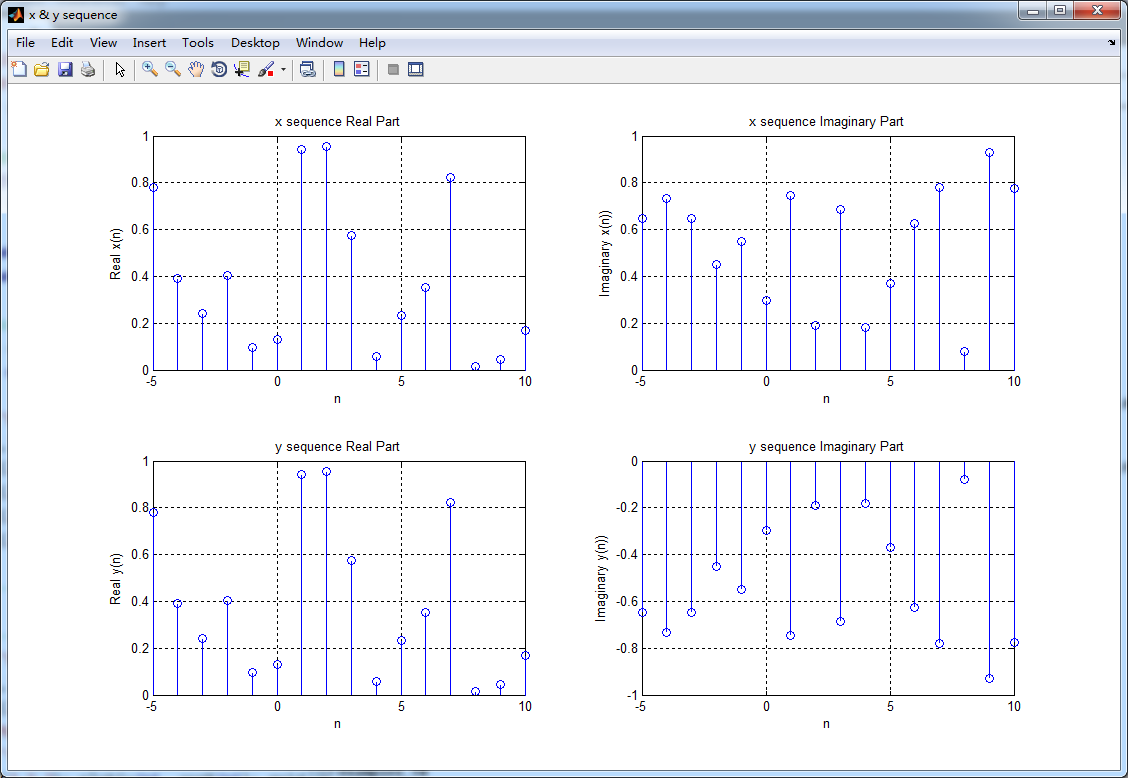
figure('NumberTitle', 'off', 'Name', 'x & y sequence')

set(gcf,'Color','white');

subplot(2,2,1); stem(n,real(x)); title('x sequence Real Part');         xlabel('n'); ylabel('Real x(n)'); grid on;

subplot(2,2,2); stem(n,imag(x)); title('x sequence Imaginary Part');    xlabel('n'); ylabel('Imaginary x(n))'); grid on;

subplot(2,2,3); stem(n,real(y)); title('y sequence Real Part');         xlabel('n'); ylabel('Real y(n)'); grid on;

subplot(2,2,4); stem(n,imag(y)); title('y sequence Imaginary Part');    xlabel('n'); ylabel('Imaginary y(n))'); grid on;

%% ----------------------------------------------------------------

%%        START Graphical verification

%% ----------------------------------------------------------------

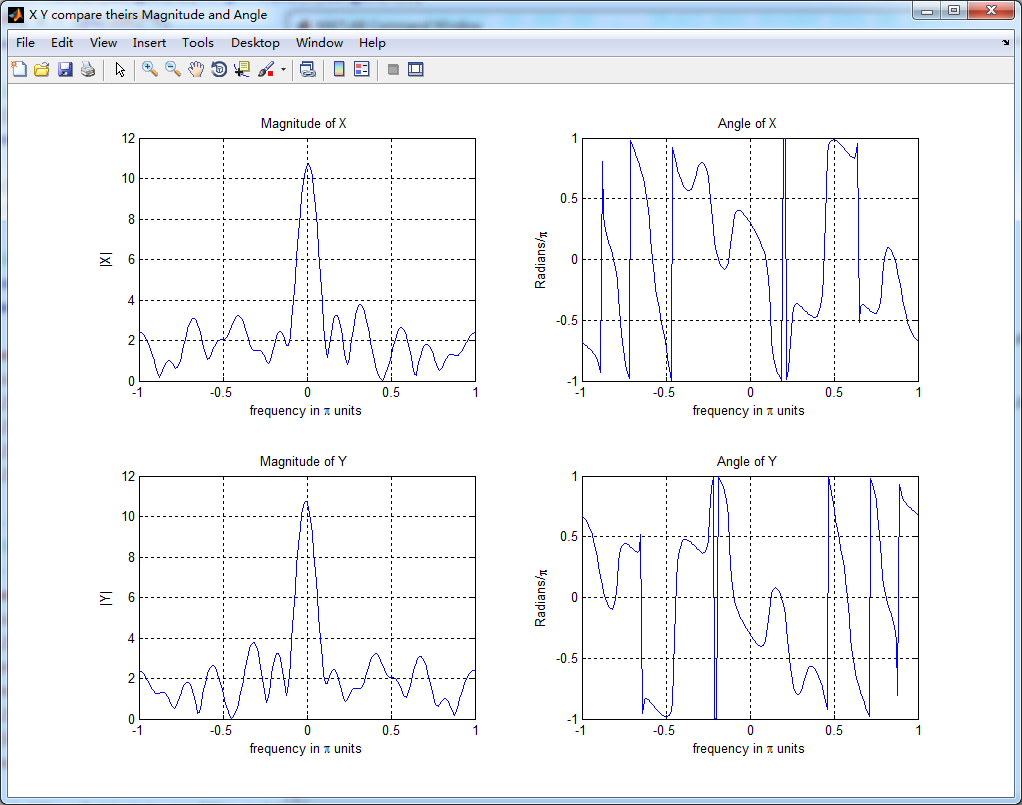
figure('NumberTitle', 'off', 'Name', 'X Y compare theirs Magnitude and Angle');

set(gcf,'Color','white');

subplot(2,2,1); plot(w/pi,magX); grid on; axis([-1,1,0,12]);

xlabel('frequency in \pi units'); ylabel('|X|'); title('Magnitude of X ');

subplot(2,2,2); plot(w/pi,angX/pi); grid on; axis([-1,1,-1,1]);

xlabel('frequency in \pi units'); ylabel('Radians/\pi'); title('Angle of X ');

subplot(2,2,3); plot(w/pi,magY); grid on; axis([-1,1,0,12]);

xlabel('frequency in \pi units'); ylabel('|Y|'); title('Magnitude of Y ');

subplot(2,2,4); plot(w/pi,angY/pi); grid on; axis([-1,1,-1,1]);

xlabel('frequency in \pi units'); ylabel('Radians/\pi'); title('Angle of Y ');

%% ----------------------------------------------------------------

%%        END Graphical verification

%% ----------------------------------------------------------------
运行结果:
DSP using MATLAB 示例 Example3.10的更多相关文章
- DSP using MATLAB 示例Example3.21
代码: % Discrete-time Signal x1(n) % Ts = 0.0002; n = -25:1:25; nTs = n*Ts; Fs = 1/Ts; x = exp(-1000*a ...
- DSP using MATLAB 示例 Example3.19
代码: % Analog Signal Dt = 0.00005; t = -0.005:Dt:0.005; xa = exp(-1000*abs(t)); % Discrete-time Signa ...
- DSP using MATLAB示例Example3.18
代码: % Analog Signal Dt = 0.00005; t = -0.005:Dt:0.005; xa = exp(-1000*abs(t)); % Continuous-time Fou ...
- DSP using MATLAB 示例Example3.23
代码: % Discrete-time Signal x1(n) : Ts = 0.0002 Ts = 0.0002; n = -25:1:25; nTs = n*Ts; x1 = exp(-1000 ...
- DSP using MATLAB示例Example3.16
代码: b = [0.0181, 0.0543, 0.0543, 0.0181]; % filter coefficient array b a = [1.0000, -1.7600, 1.1829, ...
- DSP using MATLAB 示例 Example3.13
上代码: w = [0:1:500]*pi/500; % freqency between 0 and +pi, [0,pi] axis divided into 501 points. H = ex ...
- DSP using MATLAB 示例 Example3.12
用到的性质 代码: n = -5:10; x = sin(pi*n/2); k = -100:100; w = (pi/100)*k; % freqency between -pi and +pi , ...
- DSP using MATLAB 示例 Example3.11
用到的性质 上代码: n = -5:10; x = rand(1,length(n)); k = -100:100; w = (pi/100)*k; % freqency between -pi an ...
- DSP using MATLAB 示例Example3.8
代码: x = rand(1,11); n = 0:10; k = 0:500; w = (pi/500)*k; % [0,pi] axis divided into 501 points. X = ...
随机推荐
- 为什么使用<!DOCTYPE HTML>
不管是刚接触前端,还是你已经"精通"web前端开发的内容,你应该知道在你写html的时候需要定义文档类型:你知道如果没有它,浏览器在渲染页面的时候会使用怪异模式:你知道各个浏览器在 ...
- 【python】类中的super().__init__()
来源:百度知道 python中的super( test, self).__init__()是什么意思? 首先找到test的父类(比如是类A),然后把类test的对象self转换为类A的对象,然后&qu ...
- php curl get post
post有3种. 1.post方式 privatefunction send_post($url,$post_data){ $ch = curl_init($url); curl_setopt($ch ...
- 《Thinking in Java》十四章类型信息_习题解
1~10 Page 318 练习1. 在ToyTest.java中,将Toy的默认构造器注释掉,并解释发生的现象. 书中代码如下(略有改动): package org.cc.foo_008; p ...
- Mac系统下使用VirtualBox虚拟机安装win7--第五步 共享文件夹设置
1.启动virtualbox--选中win7虚拟机--点击设置--点击共享文件夹--点击右侧按钮添加共享文件夹
- php 会话控制
会话控制 HTTP协议,在TCP协议基础上的HTTP协议称为无状态协议 SESSION COOKIE SESSION特点:1.存储在服务器.2.每个使用者都会生成一个SESSION.3.有默认的过期时 ...
- AJAX 汽车详细信息练习
<!DOCTYPE html PUBLIC "-//W3C//DTD XHTML 1.0 Transitional//EN" "http://www.w3.org/ ...
- VC++6.0使用OpenGL前的配置(必看)
要在VC++6.0中使用opengl,需要配置一下环境设置. 具体需要两步: 1.加入一个头文件,两个lib文件,两个dll文件,放在合适位置. 2.配置一下vc++6.0的Project Setti ...
- GMap.Net开发之地址解析与路径查找
上一篇介绍了如何在GMap地图上添加多边形,这篇介绍下如何使用在线的地图服务进行“地址解析”和“路径查找”. 先看地址解析,GMap中的地址解析主要用到GeocodingProvider中的如下方法: ...
- sqlplus 中spool命令的简单用法
spool基本格式: spool 路径+文件名 select col1||','||col2||','||col3||','||col4||'..' from tablename; spool off ...