
C#窗体自定义控件

 using System;

 using System.Collections.Generic;

 using System.ComponentModel;

 using System.Drawing;

 using System.Data;

 using System.Linq;

 using System.Text;

 using System.Threading.Tasks;

 using System.Windows.Forms;

 namespace WindowsFormsApplication1

 {

     public partial class TestControl : UserControl

     {

         private string UserName="";

         public TestControl()

         {

             InitializeComponent();

         }

         public TestControl(string uid)

         {

             InitializeComponent();

             UserName = uid;

         }

         private void TestControl_Load(object sender, EventArgs e)

         {

             YongHuDA da = new YongHuDA();

             YongHu data = da.Select(UserName);

             pictureBox1.BackgroundImage = Image.FromFile(data.Pic);

             pictureBox1.BackgroundImageLayout = ImageLayout.Zoom;

             label1.Text = data.Nick;

             label2.Text = data.Qian;

             button1.Tag = data.Uid;

         }

         private void pictureBox1_Click(object sender, EventArgs e)

         {

             //label1.Text;

             this.ParentForm.Controls["label1"].Text = label1.Text;

         }

         private void button1_Click(object sender, EventArgs e)

         {

         }

     }

 }
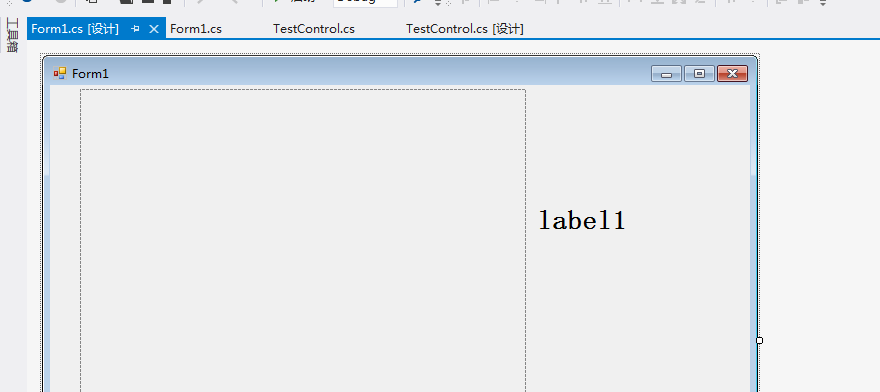
 using System;

 using System.Collections.Generic;

 using System.ComponentModel;

 using System.Data;

 using System.Drawing;

 using System.Linq;

 using System.Text;

 using System.Threading.Tasks;

 using System.Windows.Forms;

 namespace WindowsFormsApplication1

 {

     public partial class Form1 : Form

     {

         public Form1()

         {

             InitializeComponent();

         }

         private void Form1_Load(object sender, EventArgs e)

         {

             YongHuDA da = new YongHuDA();

             List<YongHu> list = da.Select();

             foreach (YongHu data in list)

             {

                 TestControl ctrl = new TestControl(data.Uid);

                 flowLayoutPanel1.Controls.Add(ctrl);

             }

         }

     }

 }
C#窗体自定义控件的更多相关文章
- C#窗体 自定义控件
1 using System; 2 using System.Collections.Generic; 3 using System.ComponentModel; 4 using System.Dr ...
- WPF自定义控件与样式(13)-自定义窗体Window & 自适应内容大小消息框MessageBox
一.前言 申明:WPF自定义控件与样式是一个系列文章,前后是有些关联的,但大多是按照由简到繁的顺序逐步发布的等,若有不明白的地方可以参考本系列前面的文章,文末附有部分文章链接. 本文主要内容: 自定义 ...
- 【转】WPF自定义控件与样式(13)-自定义窗体Window & 自适应内容大小消息框MessageBox
一.前言 申明:WPF自定义控件与样式是一个系列文章,前后是有些关联的,但大多是按照由简到繁的顺序逐步发布的等. 本文主要内容: 自定义Window窗体样式: 基于自定义窗体实现自定义MessageB ...
- c#自定义控件窗体Click无法点击Lable的处理解决方案
自定义控件做按钮,不继承Button,用Lable来做按钮文字时,点击空白处有效,但是点击lable不起作用的处理方案. 很简单,就是在Lable添加Click事件,事件中添加代码:OnClick(e ...
- (十七)c#Winform自定义控件-基类窗体
前提 入行已经7,8年了,一直想做一套漂亮点的自定义控件,于是就有了本系列文章. 开源地址:https://gitee.com/kwwwvagaa/net_winform_custom_control ...
- (十九)c#Winform自定义控件-停靠窗体
前提 入行已经7,8年了,一直想做一套漂亮点的自定义控件,于是就有了本系列文章. 开源地址:https://gitee.com/kwwwvagaa/net_winform_custom_control ...
- (二十)c#Winform自定义控件-有后退的窗体
前提 入行已经7,8年了,一直想做一套漂亮点的自定义控件,于是就有了本系列文章. 开源地址:https://gitee.com/kwwwvagaa/net_winform_custom_control ...
- (二十二)c#Winform自定义控件-半透明窗体
前提 入行已经7,8年了,一直想做一套漂亮点的自定义控件,于是就有了本系列文章. 开源地址:https://gitee.com/kwwwvagaa/net_winform_custom_control ...
- (二十三)c#Winform自定义控件-等待窗体
前提 入行已经7,8年了,一直想做一套漂亮点的自定义控件,于是就有了本系列文章. 开源地址:https://gitee.com/kwwwvagaa/net_winform_custom_control ...
随机推荐
- PL/SQL 存储函数和过程
--存储过程 .不带参: create or replace procedure 存储过程名 as|is --说明部分 begin --执行的语句: end: 调用存储过程 execute 存储过程名 ...
- 分享:一款前端布局工具(alloydesigner)
困扰 设计师给出静态的高保真图片, 需要前端工程师按照高保真图,进行html编码. 前端工程师, 一般工作方法为: 打开图片,一边看下图片, 一边编写相应的html代码. 这样有两个问题: 1. 前端 ...
- [Android Tips] 12. How to Create a Dash Line Shape
<?xml version="1.0" encoding="utf-8"?> <shape xmlns:android="http: ...
- Matlab的XTickLabel中数值带下标
%axis为'x'或'y',分别表示更改x或y刻度 %ticks是字符cell function settick(axis,ticks) n=length(ticks); tkx=get(gca,'X ...
- javascript序列化json 第二篇
这一节主要是记录父子关系的JSON生成,废话不多说,直接上代码. public partial class _default : System.Web.UI.Page { public static ...
- Python2.6.6执行selenium自动化
系统类型: [root@bogon home]# uname -aLinux bogon 2.6.32-431.el6.x86_64 #1 SMP Sun Nov 10 22:19:54 EST 20 ...
- AJAX-----14HTML5中新增的API---files
<!DOCTYPE html> <html lang="en"> <head> <meta charset="UTF-8&quo ...
- PL301 matrix内部模块
ASIB中的valid信号,有两部分,一部分add产生的地址映射,到main中的default addr.(vect) 一部分由Dmu和Cdas组成,到main中的build. Dmu:interco ...
- 基于webrtc的视频通话时webrtc的接口调用流程
场景: 1.A call B 2.B answer 3.A connected with B 共同的步骤: A 和 B 都需要初始化webrtc模块,创建peerconnectionfactory 步 ...
- Sublime Text怎么在切分两行视口内显示同一个文件
原文链接:http://devlog.en.alt-area.org/?p=1098 How to split one file into two views in Sublime Text2 You ...