
UITableView代理方知多少+执行顺序
一、前言
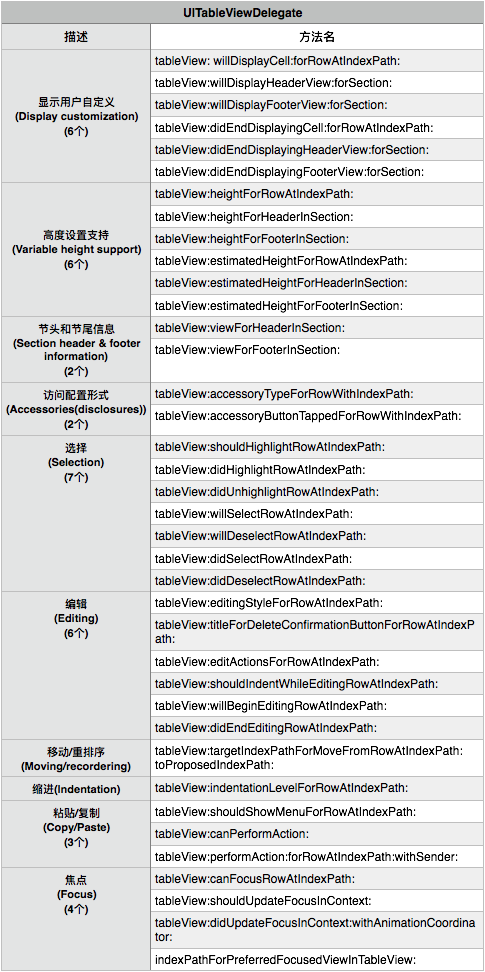
iOS中UITableView是最常用的一个控件。看了一下UITableView的代理:UITableViewDelegate 和 UITableViewDataSource。其中UITableViewDelegate的方法有38个,UITableViewDataSource的方法有11个。下面来简单介绍一下。(方法代码有点多)
二、UITableViewDelegate方法
UITableViewDelegate的38个方法所有的都是可选的。也就是你可以实现,也可以不实现。这里就不一一介绍了,简单的看一下这个图:
三、UITableViewDataSource方法
UITableViewDataSource的11个方法中有2个是必须实现的:
- (NSInteger)tableView:(UITableView *)tableView numberOfRowsInSection:(NSInteger)section;

- (UITableViewCell *)tableView:(UITableView *)tableView cellForRowAtIndexPath:(NSIndexPath *)indexPath;
简单看一下UITableViewDataSource代理方法:

五、方法执行顺序问题
这里面没有将所有的方法都考虑进去,这里只是对UITableView实例从创建到完全显示进行测试,而且都是常用的方法,实现其他方法其输出内容可能不一样,但整体结构不变。其中包括UITableViewDelegate的:
- (void)tableView:(UITableView *)tableView willDisplayCell:(UITableViewCell *)cell forRowAtIndexPath:(NSIndexPath *)indexPath {

    NSLog(@"%@",NSStringFromSelector(_cmd));

}

- (void)tableView:(UITableView *)tableView willDisplayHeaderView:(UIView *)view forSection:(NSInteger)section {

    NSLog(@"%@",NSStringFromSelector(_cmd));

}

- (void)tableView:(UITableView *)tableView willDisplayFooterView:(UIView *)view forSection:(NSInteger)section {

    NSLog(@"%@",NSStringFromSelector(_cmd));

}

- (void)tableView:(UITableView *)tableView didEndDisplayingCell:(UITableViewCell *)cell forRowAtIndexPath:(NSIndexPath*)indexPath {

    NSLog(@"%@",NSStringFromSelector(_cmd));

}

- (void)tableView:(UITableView *)tableView didEndDisplayingHeaderView:(UIView *)view forSection:(NSInteger)section {

    NSLog(@"%@",NSStringFromSelector(_cmd));

}

- (void)tableView:(UITableView *)tableView didEndDisplayingFooterView:(UIView *)view forSection:(NSInteger)section {

    NSLog(@"%@",NSStringFromSelector(_cmd));

}

// Variable height support

- (CGFloat)tableView:(UITableView *)tableView heightForRowAtIndexPath:(NSIndexPath *)indexPath {

    NSLog(@"%@",NSStringFromSelector(_cmd));

    return ;

}

- (CGFloat)tableView:(UITableView *)tableView heightForHeaderInSection:(NSInteger)section {

    NSLog(@"%@",NSStringFromSelector(_cmd));

    return ;

}

- (CGFloat)tableView:(UITableView *)tableView heightForFooterInSection:(NSInteger)section {

    NSLog(@"%@",NSStringFromSelector(_cmd));

    return ;

}

- (nullable UIView *)tableView:(UITableView *)tableView viewForHeaderInSection:(NSInteger)section {

    NSLog(@"%@",NSStringFromSelector(_cmd));

    UILabel *label = [[UILabel alloc] init];

    label.text = @"头标题";

    return label;

}

- (nullable UIView *)tableView:(UITableView *)tableView viewForFooterInSection:(NSInteger)section {

    NSLog(@"%@",NSStringFromSelector(_cmd));

    UILabel *label = [UILabel new];

    label.text = @"尾标题";

    return label;

}
以及UITableViewDataSource的:
- (NSInteger)tableView:(UITableView *)tableView numberOfRowsInSection:(NSInteger)section{

    NSLog(@"%@",NSStringFromSelector(_cmd));

    return 2;

}

- (UITableViewCell *)tableView:(UITableView *)tableView cellForRowAtIndexPath:(NSIndexPath *)indexPath{

    static NSString *CellIdentifier = @"Cell";

    UITableViewCell *cell = [tableView dequeueReusableCellWithIdentifier:CellIdentifier];

    if (!cell) {

        cell = [[UITableViewCell alloc] initWithStyle:UITableViewCellStyleDefault reuseIdentifier:CellIdentifier];

    }

    cell.textLabel.text = self.contentArray[indexPath.row];

    NSLog(@"%@",NSStringFromSelector(_cmd));

    return cell;

}

//设置section的个数

- (NSInteger)numberOfSectionsInTableView:(UITableView *)tableView {

   NSLog(@"----------------------------------------------------------------------%ld",++inde);

    NSLog(@"%@",NSStringFromSelector(_cmd));

    return 1;

}

- (nullable NSString *)tableView:(UITableView *)tableView titleForHeaderInSection:(NSInteger)section {

    NSLog(@"%@",NSStringFromSelector(_cmd));

    return @"headerTitle";

}

- (nullable NSString *)tableView:(UITableView *)tableView titleForFooterInSection:(NSInteger)section {

    NSLog(@"%@",NSStringFromSelector(_cmd));

    return @"footerTitle";

}
这里我是讲section得个数设置为1,每个section中的row为2。控制台输出结果如下:
-- ::19.042 UITableViewMethodsTest[:] ----------------------------------------------------------------------

-- ::19.042 UITableViewMethodsTest[:] numberOfSectionsInTableView:

-- ::19.042 UITableViewMethodsTest[:] tableView:heightForHeaderInSection:

-- ::19.043 UITableViewMethodsTest[:] tableView:heightForHeaderInSection:

-- ::19.043 UITableViewMethodsTest[:] tableView:heightForFooterInSection:

-- ::19.043 UITableViewMethodsTest[:] tableView:heightForFooterInSection:

-- ::19.043 UITableViewMethodsTest[:] tableView:numberOfRowsInSection:

-- ::19.043 UITableViewMethodsTest[:] tableView:heightForRowAtIndexPath:

-- ::19.043 UITableViewMethodsTest[:] tableView:heightForRowAtIndexPath:

-- ::19.048 UITableViewMethodsTest[:] ----------------------------------------------------------------------

-- ::19.049 UITableViewMethodsTest[:] numberOfSectionsInTableView:

-- ::19.049 UITableViewMethodsTest[:] tableView:heightForHeaderInSection:

-- ::19.049 UITableViewMethodsTest[:] tableView:heightForHeaderInSection:

-- ::19.049 UITableViewMethodsTest[:] tableView:heightForFooterInSection:

-- ::19.049 UITableViewMethodsTest[:] tableView:heightForFooterInSection:

-- ::19.049 UITableViewMethodsTest[:] tableView:numberOfRowsInSection:

-- ::19.049 UITableViewMethodsTest[:] tableView:heightForRowAtIndexPath:

-- ::19.049 UITableViewMethodsTest[:] tableView:heightForRowAtIndexPath:

-- ::19.067 UITableViewMethodsTest[:] ----------------------------------------------------------------------

-- ::19.067 UITableViewMethodsTest[:] numberOfSectionsInTableView:

-- ::19.067 UITableViewMethodsTest[:] tableView:heightForHeaderInSection:

-- ::19.067 UITableViewMethodsTest[:] tableView:heightForHeaderInSection:

-- ::19.067 UITableViewMethodsTest[:] tableView:heightForFooterInSection:

-- ::19.067 UITableViewMethodsTest[:] tableView:heightForFooterInSection:

-- ::19.067 UITableViewMethodsTest[:] tableView:numberOfRowsInSection:

-- ::19.067 UITableViewMethodsTest[:] tableView:heightForRowAtIndexPath:

-- ::19.067 UITableViewMethodsTest[:] tableView:heightForRowAtIndexPath:

-- ::19.070 UITableViewMethodsTest[:] ----------------------------------------------------------------------

-- ::19.070 UITableViewMethodsTest[:] numberOfSectionsInTableView:

-- ::19.070 UITableViewMethodsTest[:] tableView:heightForHeaderInSection:

-- ::19.070 UITableViewMethodsTest[:] tableView:heightForHeaderInSection:

-- ::19.070 UITableViewMethodsTest[:] tableView:heightForFooterInSection:

-- ::19.071 UITableViewMethodsTest[:] tableView:heightForFooterInSection:

-- ::19.071 UITableViewMethodsTest[:] tableView:numberOfRowsInSection:

-- ::19.071 UITableViewMethodsTest[:] tableView:heightForRowAtIndexPath:

-- ::19.071 UITableViewMethodsTest[:] tableView:heightForRowAtIndexPath:

-- ::19.072 UITableViewMethodsTest[:] tableView:cellForRowAtIndexPath:

-- ::19.073 UITableViewMethodsTest[:] tableView:heightForRowAtIndexPath:

-- ::19.073 UITableViewMethodsTest[:] tableView:willDisplayCell:forRowAtIndexPath:

-- ::19.073 UITableViewMethodsTest[:] tableView:cellForRowAtIndexPath:

-- ::19.074 UITableViewMethodsTest[:] tableView:heightForRowAtIndexPath:

-- ::19.074 UITableViewMethodsTest[:] tableView:willDisplayCell:forRowAtIndexPath:

-- ::19.074 UITableViewMethodsTest[:] tableView:viewForHeaderInSection:

-- ::19.074 UITableViewMethodsTest[:] tableView:willDisplayHeaderView:forSection:

-- ::19.074 UITableViewMethodsTest[:] tableView:viewForFooterInSection:

-- ::19.074 UITableViewMethodsTest[:] tableView:willDisplayFooterView:forSection:
从结果可知,当我们设置为1个section和一个每个section的row为2的时候,显示出来一个UITableView的实例需要4轮(我这里用numberOfSectionsInTableView:方法做了分割,所以是4轮):
第一轮~第三轮都是一样的:
1、先执行numberOfSectionsInTableView:一次
2、然后执行tableView:heightForHeaderInSection:两次
3、再执行tableView:heightForFooterInSection:两次
4、再执行tableView:numberOfRowsInSection:一次
5、最后执行tableView:heightForRowAtIndexPath:两次
第四轮是这样的:
1、执行numberOfSectionsInTableView:一次
2、执行tableView:heightForHeaderInSection:两次
3、执行tableView:heightForFooterInSection:两次
4、执行tableView:numberOfRowsInSection:一次
5、执行tableView:heightForRowAtIndexPath:两次
前5步和前三轮是一样的
6、执行tableView:cellForRowAtIndexPath:一次
7、执行tableView:heightForRowAtIndexPath:一次
8、执行tableView:willDisplayCell:forRowAtIndexPath:一次
9、10、11是重复6、7、8。(因为是两个row)
12、执行tableView:viewForHeaderInSection:一次
13、执行tableView:willDisplayHeaderView:forSection:一次
14、执行tableView:viewForFooterInSection:一次
15、执行tableView:willDisplayFooterView:forSection:一次
运行结果如下:(有点丑)

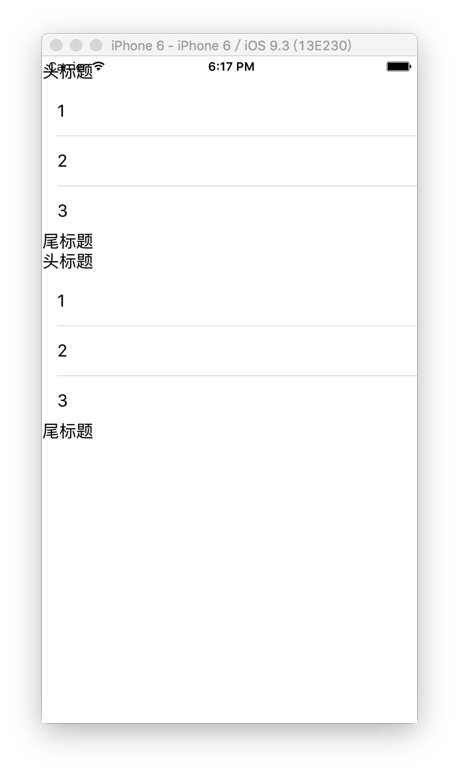
当我们把section设置为2,每个section中row行数为3的时候,控制台输出结果如下:
-- ::27.739 UITableViewMethodsTest[:] ----------------------------------------------------------------------

-- ::27.739 UITableViewMethodsTest[:] numberOfSectionsInTableView:

-- ::27.739 UITableViewMethodsTest[:] tableView:heightForHeaderInSection:

-- ::27.739 UITableViewMethodsTest[:] tableView:heightForHeaderInSection:

-- ::27.740 UITableViewMethodsTest[:] tableView:heightForFooterInSection:

-- ::27.740 UITableViewMethodsTest[:] tableView:heightForFooterInSection:

-- ::27.740 UITableViewMethodsTest[:] tableView:numberOfRowsInSection:

-- ::27.740 UITableViewMethodsTest[:] tableView:heightForRowAtIndexPath:

-- ::27.740 UITableViewMethodsTest[:] tableView:heightForRowAtIndexPath:

-- ::27.740 UITableViewMethodsTest[:] tableView:heightForRowAtIndexPath:

-- ::27.740 UITableViewMethodsTest[:] tableView:heightForHeaderInSection:

-- ::27.741 UITableViewMethodsTest[:] tableView:heightForHeaderInSection:

-- ::27.741 UITableViewMethodsTest[:] tableView:heightForFooterInSection:

-- ::27.741 UITableViewMethodsTest[:] tableView:heightForFooterInSection:

-- ::27.741 UITableViewMethodsTest[:] tableView:numberOfRowsInSection:

-- ::27.741 UITableViewMethodsTest[:] tableView:heightForRowAtIndexPath:

-- ::27.741 UITableViewMethodsTest[:] tableView:heightForRowAtIndexPath:

-- ::27.742 UITableViewMethodsTest[:] tableView:heightForRowAtIndexPath:

-- ::27.756 UITableViewMethodsTest[:] ----------------------------------------------------------------------

-- ::27.756 UITableViewMethodsTest[:] numberOfSectionsInTableView:

-- ::27.757 UITableViewMethodsTest[:] tableView:heightForHeaderInSection:

-- ::27.757 UITableViewMethodsTest[:] tableView:heightForHeaderInSection:

-- ::27.757 UITableViewMethodsTest[:] tableView:heightForFooterInSection:

-- ::27.758 UITableViewMethodsTest[:] tableView:heightForFooterInSection:

-- ::27.758 UITableViewMethodsTest[:] tableView:numberOfRowsInSection:

-- ::27.759 UITableViewMethodsTest[:] tableView:heightForRowAtIndexPath:

-- ::27.759 UITableViewMethodsTest[:] tableView:heightForRowAtIndexPath:

-- ::27.759 UITableViewMethodsTest[:] tableView:heightForRowAtIndexPath:

-- ::27.759 UITableViewMethodsTest[:] tableView:heightForHeaderInSection:

-- ::27.760 UITableViewMethodsTest[:] tableView:heightForHeaderInSection:

-- ::27.760 UITableViewMethodsTest[:] tableView:heightForFooterInSection:

-- ::27.760 UITableViewMethodsTest[:] tableView:heightForFooterInSection:

-- ::27.760 UITableViewMethodsTest[:] tableView:numberOfRowsInSection:

-- ::27.761 UITableViewMethodsTest[:] tableView:heightForRowAtIndexPath:

-- ::27.767 UITableViewMethodsTest[:] tableView:heightForRowAtIndexPath:

-- ::27.767 UITableViewMethodsTest[:] tableView:heightForRowAtIndexPath:

-- ::27.769 UITableViewMethodsTest[:] ----------------------------------------------------------------------

-- ::27.769 UITableViewMethodsTest[:] numberOfSectionsInTableView:

-- ::27.770 UITableViewMethodsTest[:] tableView:heightForHeaderInSection:

-- ::27.770 UITableViewMethodsTest[:] tableView:heightForHeaderInSection:

-- ::27.770 UITableViewMethodsTest[:] tableView:heightForFooterInSection:

-- ::27.770 UITableViewMethodsTest[:] tableView:heightForFooterInSection:

-- ::27.771 UITableViewMethodsTest[:] tableView:numberOfRowsInSection:

-- ::27.771 UITableViewMethodsTest[:] tableView:heightForRowAtIndexPath:

-- ::27.771 UITableViewMethodsTest[:] tableView:heightForRowAtIndexPath:

-- ::27.771 UITableViewMethodsTest[:] tableView:heightForRowAtIndexPath:

-- ::27.771 UITableViewMethodsTest[:] tableView:heightForHeaderInSection:

-- ::27.771 UITableViewMethodsTest[:] tableView:heightForHeaderInSection:

-- ::27.771 UITableViewMethodsTest[:] tableView:heightForFooterInSection:

-- ::27.771 UITableViewMethodsTest[:] tableView:heightForFooterInSection:

-- ::27.772 UITableViewMethodsTest[:] tableView:numberOfRowsInSection:

-- ::27.772 UITableViewMethodsTest[:] tableView:heightForRowAtIndexPath:

-- ::27.772 UITableViewMethodsTest[:] tableView:heightForRowAtIndexPath:

-- ::27.772 UITableViewMethodsTest[:] tableView:heightForRowAtIndexPath:

-- ::27.776 UITableViewMethodsTest[:] ----------------------------------------------------------------------

-- ::27.776 UITableViewMethodsTest[:] numberOfSectionsInTableView:

-- ::27.776 UITableViewMethodsTest[:] tableView:heightForHeaderInSection:

-- ::27.777 UITableViewMethodsTest[:] tableView:heightForHeaderInSection:

-- ::27.777 UITableViewMethodsTest[:] tableView:heightForFooterInSection:

-- ::27.777 UITableViewMethodsTest[:] tableView:heightForFooterInSection:

-- ::27.777 UITableViewMethodsTest[:] tableView:numberOfRowsInSection:

-- ::27.777 UITableViewMethodsTest[:] tableView:heightForRowAtIndexPath:

-- ::27.777 UITableViewMethodsTest[:] tableView:heightForRowAtIndexPath:

-- ::27.778 UITableViewMethodsTest[:] tableView:heightForRowAtIndexPath:

-- ::27.778 UITableViewMethodsTest[:] tableView:heightForHeaderInSection:

-- ::27.778 UITableViewMethodsTest[:] tableView:heightForHeaderInSection:

-- ::27.779 UITableViewMethodsTest[:] tableView:heightForFooterInSection:

-- ::27.779 UITableViewMethodsTest[:] tableView:heightForFooterInSection:

-- ::27.779 UITableViewMethodsTest[:] tableView:numberOfRowsInSection:

-- ::27.779 UITableViewMethodsTest[:] tableView:heightForRowAtIndexPath:

-- ::27.780 UITableViewMethodsTest[:] tableView:heightForRowAtIndexPath:

-- ::27.781 UITableViewMethodsTest[:] tableView:heightForRowAtIndexPath:

-- ::27.784 UITableViewMethodsTest[:] tableView:cellForRowAtIndexPath:

-- ::27.785 UITableViewMethodsTest[:] tableView:heightForRowAtIndexPath:

-- ::27.786 UITableViewMethodsTest[:] tableView:willDisplayCell:forRowAtIndexPath:

-- ::27.787 UITableViewMethodsTest[:] tableView:cellForRowAtIndexPath:

-- ::27.787 UITableViewMethodsTest[:] tableView:heightForRowAtIndexPath:

-- ::27.789 UITableViewMethodsTest[:] tableView:willDisplayCell:forRowAtIndexPath:

-- ::27.790 UITableViewMethodsTest[:] tableView:cellForRowAtIndexPath:

-- ::27.790 UITableViewMethodsTest[:] tableView:heightForRowAtIndexPath:

-- ::27.790 UITableViewMethodsTest[:] tableView:willDisplayCell:forRowAtIndexPath:

-- ::27.791 UITableViewMethodsTest[:] tableView:cellForRowAtIndexPath:

-- ::27.791 UITableViewMethodsTest[:] tableView:heightForRowAtIndexPath:

-- ::27.792 UITableViewMethodsTest[:] tableView:willDisplayCell:forRowAtIndexPath:

-- ::27.823 UITableViewMethodsTest[:] tableView:cellForRowAtIndexPath:

-- ::27.824 UITableViewMethodsTest[:] tableView:heightForRowAtIndexPath:

-- ::27.824 UITableViewMethodsTest[:] tableView:willDisplayCell:forRowAtIndexPath:

-- ::27.824 UITableViewMethodsTest[:] tableView:cellForRowAtIndexPath:

-- ::27.825 UITableViewMethodsTest[:] tableView:heightForRowAtIndexPath:

-- ::27.825 UITableViewMethodsTest[:] tableView:willDisplayCell:forRowAtIndexPath:

-- ::27.827 UITableViewMethodsTest[:] tableView:viewForHeaderInSection:

-- ::27.828 UITableViewMethodsTest[:] tableView:willDisplayHeaderView:forSection:

-- ::27.828 UITableViewMethodsTest[:] tableView:viewForFooterInSection:

-- ::27.829 UITableViewMethodsTest[:] tableView:willDisplayFooterView:forSection:

-- ::27.910 UITableViewMethodsTest[:] tableView:viewForHeaderInSection:

-- ::27.911 UITableViewMethodsTest[:] tableView:willDisplayHeaderView:forSection:

-- ::27.911 UITableViewMethodsTest[:] tableView:viewForFooterInSection:

-- ::27.911 UITableViewMethodsTest[:] tableView:willDisplayFooterView:forSection:
这里也是执行了4轮。前3轮一样。不过由于有两个section。
第一轮~第三轮都是一样的:
1、执行numberOfSectionsInTableView:一次
2、执行tableView:heightForHeaderInSection:两次
3、执行tableView:heightForFooterInSection:两次
4、执行tableView:numberOfRowsInSection:一次
5、执行tableView:heightForRowAtIndexPath:三次 (因为每个section中有3个row)
重复执行2~5
完毕。
第四轮:
前面的和前三轮是一致的。后面开始执行
续1、执行tableView:cellForRowAtIndexPath:一次
续2、执行tableView:heightForRowAtIndexPath:一次
续3、执行tableView:willDisplayCell:forRowAtIndexPath:一次
重复执行续1~续3 五次。然后继续执行:
续4、执行tableView:viewForHeaderInSection:一次
续5、执行tableView:willDisplayHeaderView:forSection:一次
续6、执行tableView:viewForFooterInSection:一次
续7、执行tableView:willDisplayFooterView:forSection:一次
重复执行续4~续5一次(因为有两个section,所以执行了两次设置header和footer)
完毕
运行结果:(有点丑)
四、注意点
1、如果在设置header和footer信息的时候,View的优先级高于titile。(Views are preferred over title should you decide to provide both)
2、如果想让header的title或者footer的title显示不一样的样式(颜色,字体大小),可以用自定义view(UILabel)来实现。
3、注意复用单元格。
4、设置headerTitle样式的时候如果这样写:
- (nullable UIView *)tableView:(UITableView *)tableView viewForHeaderInSection:(NSInteger)section {

    NSLog(@"%@",NSStringFromSelector(_cmd));

    static NSString *HEADTITLE = @"headerTitle";

    UITableViewHeaderFooterView *titleView = [tableView dequeueReusableHeaderFooterViewWithIdentifier:HEADTITLE];

    if (titleView == nil) {

        titleView = [[UITableViewHeaderFooterView alloc] initWithReuseIdentifier:HEADTITLE];

    }

    titleView.textLabel.textColor = [UIColor redColor];

   titleView.textLabel.text  =@"头部标题";

    return titleView;

}
其中的textColor设置无效。此时可以在这里设置:
- (void)tableView:(UITableView *)tableView willDisplayHeaderView:(UIView *)view forSection:(NSInteger)section {

    UITableViewHeaderFooterView *vi = (UITableViewHeaderFooterView *)view;

    vi.textLabel.textColor = [UIColor redColor];

    NSLog(@"%@",NSStringFromSelector(_cmd));

}
此方法是将要显示header的时候调用的。从执行顺序可以看出来tableView:viewForHeaderInsection:在tableView:willDisplayHeaderView:forSection:之前调用。但是我在tableView:willDisplayHeaderView:forSection:里面设置为什么设置无效呢?难道是因为他是自适应的原因么?有知道的可以告诉一下。
UITableView代理方知多少+执行顺序的更多相关文章
- UITableView的全部属性、方法以及代理方法执行顺序,看过之后肯定有收获---董鑫
UITableView-------表视图--继承UIScrollView并遵守NSCoding协议 属性 frame-------------设置控件的位置和大小 backgroundColor-- ...
- tableView代理方法执行顺序
tableView代理方法执行顺序,随着iOS系统版本的不断升级,执行顺序也有所变化 1.iOS7.1中先依次调一遍heightForRow方法再依次调一遍cellForRow方法,在调cellFor ...
- mysql优化必知(mysql的语句执行顺序)
MySQL的语句执行顺序 MySQL的语句一共分为11步,如下图所标注的那样,最先执行的总是FROM操作,最后执行的是LIMIT操作.其中每一个操作都会产生一张虚拟的表,这个虚拟的表作为一个处理的输入 ...
- UIViewController的生命周期及iOS程序执行顺序 和ios6 处理内存警告
当一个视图控制器被创建,并在屏幕上显示的时候. 代码的执行顺序1. alloc 创建对象,分配空间2.init (initWithN ...
- iOS程序执行顺序和UIViewController 的生命周期(整理)
说明:此文是自己的总结笔记,主要参考: iOS程序的启动执行顺序 AppDelegate 及 UIViewController 的生命周期 UIView的生命周期 言叶之庭.jpeg 一. iOS程序 ...
- 浅谈Spring AOP 面向切面编程 最通俗易懂的画图理解AOP、AOP通知执行顺序~
简介 我们都知道,Spring 框架作为后端主流框架之一,最有特点的三部分就是IOC控制反转.依赖注入.以及AOP切面.当然AOP作为一个Spring 的重要组成模块,当然IOC是不依赖于Spring ...
- java-mybaits-013-mybatis-Interceptor-拦截器执行顺序
一.概述 已知拦截器能够拦截四种类型:Executor.ParameterHandler.ResultSetHandler.StatementHandler. 1.1.不同类型拦截器的执行顺序 背景: ...
- MonoBehaviour Lifecycle(生命周期/脚本执行顺序)
脚本执行顺序 前言 搭建一个示例来验证Unity脚本的执行顺序,大概测试以下部分: 物理方面(Physics) 渲染(Scene rendering) 输入事件(InputEvent) 流程图 Uni ...
- Unity中脚本的执行顺序总结(@WhiteTaken)
(Editor)以上是Unity官方文档中的截图,脚本在被挂载到物体上,会启用Editor的方法Reset. (Initialization)当执行脚本开始,初始化的过程中,依次执行的是Awake-& ...
随机推荐
- [译]针对科学数据处理的统计学习教程(scikit-learn教程2)
翻译:Tacey Wong 统计学习: 随着科学实验数据的迅速增长,机器学习成了一种越来越重要的技术.问题从构建一个预测函数将不同的观察数据联系起来,到将观测数据分类,或者从未标记数据中学习到一些结构 ...
- C#密封类
密封类 密封类使用sealed修饰符声明. 密封类中不可能有抽象方法[因为:抽象方法必须在抽象类中,而抽象类不能是密封的或者是静态的,也就是说abstract 和sealed不能同时修饰一个类] ...
- C#协变和逆变
我们知道在C#中,是可以将派生类的实例赋值给基类对象的.
- 从客户端中检测到有潜在危险的 Request.Form 值 --MVC
可以在处理Post方法的Action添加一个特性: [ValidateInput(false)],这样处理就更加有针对性,提高页面的安全性. 如: [HttpPost][ValidateInput(f ...
- Entity Framework 实体框架的形成之旅--利用Unity对象依赖注入优化实体框架(2)
在本系列的第一篇随笔<Entity Framework 实体框架的形成之旅--基于泛型的仓储模式的实体框架(1)>中介绍了Entity Framework 实体框架的一些基础知识,以及构建 ...
- Unicode中文和特殊字符的编码范围
编程中有时候需要用到匹配中文的正则,一般用 [ \u4e00-\u9fa5]+ 即可搞定.不过这正则对一般的火星文鸟语就不太适用了,甚至全角的标点符号都不包含在内.例如游戏里面的玩家名,普通青年一般都 ...
- C#写爬虫,版本V1.0
之前看了Sql Server中的基本数据类型,发现image这个类型还是比较特殊的. 于是乎就做了一个将图片以二进制流形式存储的程序http://www.cnblogs.com/JsonZhangAA ...
- 【Java每日一题】20161110
package Nov2016; import java.util.HashSet; public class Ques1110 { public static void main(String[] ...
- border-style 属性
border-style 属性用于设置元素所有边框的样式,或者单独地为各边设置边框样式. 只有当这个值不是 none 时边框才可能出现. 例子 1 border-style:dotted solid ...
- mysql hang and srv_error_monitor_thread using 100% cpu
昨天晚上,运维过来说有台生产服务器的mysql cpu一直100%,新的客户端登录不了,但是已经在运行的应用都正常可用. 登录服务器后,top -H看了下,其中一个线程的cpu 一直100%,其他的几 ...